> ## Documentation Index
> Fetch the complete documentation index at: https://algolia.com/llms.txt
> Use this file to discover all available pages before exploring further.
# Algolia Search tool
> Query Algolia indices with natural language, filters, or keywords.
export const Index = () =>
index
;
This is a **beta feature** according to [Algolia's Terms of Service ("Beta Services")](https://www.algolia.com/policies/terms/).
Your agent can search across up to 10 indices in parallel or sequentially to answer questions with real-time data from your product catalog, content library, or any indexed data.
 * **Natural language queries** (when Algolia NeuralSearch is enabled): users ask questions in plain language, agent performs the search
* **Keyword search**: agent performs traditional keyword-based searches
* **Faceted filtering**: agent applies filters with AND/OR logic based on user requests
* **Multiple indices**: agent can query up to 10 indices per agent
* **Automatic enrichment**: index metadata (facets, searchable attributes) is automatically discovered
* **Analytics tracking**: all agent-performed queries tagged with the `alg#agent-studio` analytics tag
* **Full search API support**: supports all query-time Algolia Search parameters. For more information, see [Search API parameters](/doc/api-reference/search-api-parameters/)
* **Suggested refinements**: agent can suggest follow-up search refinements based on facet values, using a deterministic (facet-count heuristic) or agentic (LLM-driven) strategy
* **Configurable AI behavior**: control what the AI can change at query time — set bounds on results per page, restrict which attributes are returned, or lock facets to a fixed set
* **User-restricted access**: works with [secure API keys](/doc/guides/security/api-keys/how-to/user-restricted-access-to-data) for record-level access control
* **Simplest integration**: no external APIs required, uses existing Algolia Search configuration
Use a Search API key (never an Admin API key).
For more information, see [Algolia Search tool security](/doc/guides/algolia-ai/agent-studio/how-to/tools/security#algolia-search).
## Configure the Search tool
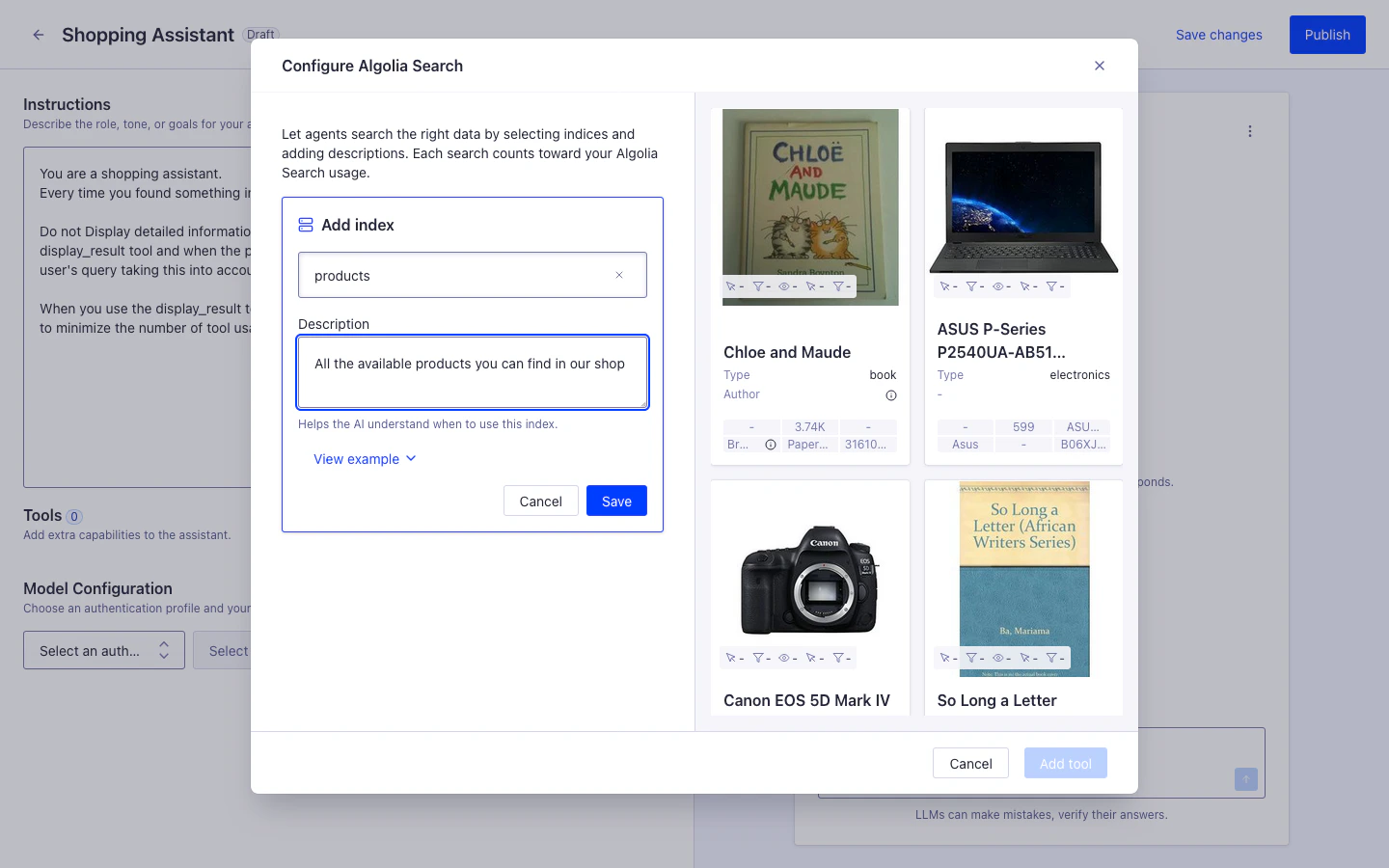
From the [Agent Studio agent edit view](https://dashboard.algolia.com/generativeAi/agent-studio/agents) in the Algolia dashboard:
1. Click **Add tool** > **Algolia Search**
2. Select your (for example, `products`)
3. Add a description: "Product catalog with titles, descriptions, prices, and availability"
4. Click **Add tool**
Use the **Other tools** option when you need to configure tools with settings not supported by the Algolia dashboard, or when a dedicated interface isn't available.
JSON tool definition:
```json JSON icon=braces theme={"system"}
{
"type": "algolia_search_index",
"name": "product_search",
"indices": [
{
"index": "products",
"description": "Ecommerce product catalog with electronics, clothing, and home goods",
"searchParameters": {
"filters": "inStock:true",
"hitsPerPage": 10
},
"searchControls": {
"hitsPerPage": { "exposed": true, "default": 7, "constraint": { "min": 1, "max": 10 } },
"attributesToRetrieve": { "exposed": true, "default": ["title", "price"], "constraint": { "values": ["title", "price", "brand"] } },
"facets": { "exposed": false, "default": ["brand", "category"] }
}
}
]
}
```
**Required fields**
* `type`: must be `"algolia_search_index"`
* `indices`: array of index configurations (minimum 1, maximum 10)
* `index`: Algolia index name
* `description`: describe what data is in the index, *not* how to use it. The tool automatically provides usage instructions to the LLM.
**Optional fields**
* `name`: custom name for this tool instance (defaults to `"algolia_search_index"`)
* `predefinedSearchParameters`: [Algolia Search API parameters](/doc/api-reference/search-api-parameters) applied to all indices in the tool.
```json JSON icon=braces theme={"system"}
{
"type": "algolia_search_index",
"predefinedSearchParameters": {
"filters": "status:active",
"analytics": true
},
"indices": [...]
}
```
* Per-index `searchParameters`: [Algolia Search API parameters](/doc/api-reference/search-api-parameters) applied to a specific index. Takes precedence over `predefinedSearchParameters`.
```json JSON icon=braces theme={"system"}
{
"type": "algolia_search_index",
"indices": [
{
"index": "products",
"description": "Ecommerce product catalog with electronics, clothing, and home goods",
"searchParameters": {
"filters": "isPublished:true AND inStock:true",
"attributesToRetrieve": ["title", "price", "image", "brand"],
"hitsPerPage": 20,
"analytics": true,
"clickAnalytics": true
}
}
]
}
```
* Per-index settings (`searchControls`): structured settings controlling how the AI uses the index (corresponds to **AI Search Settings** in the dashboard). Each field accepts:
* `exposed` (`boolean`): whether the AI can change the value at query time
* `default`: the default value
* `constraint` (optional): `{min, max}` for numeric fields, `{values}` for array fields
```json JSON icon=braces theme={"system"}
{
"searchControls": {
"hitsPerPage": { "exposed": true, "default": 7, "constraint": { "min": 1, "max": 10 } },
"page": { "exposed": true, "default": 0, "constraint": { "min": 0, "max": 10 } },
"attributesToRetrieve": { "exposed": true, "default": ["title", "price"], "constraint": { "values": ["title", "price", "brand"] } },
"responseFields": { "exposed": false, "default": null },
"facets": { "exposed": false, "default": ["brand", "category"] },
"custom": null
}
}
```
For more information,
see the [Agent Studio API reference](/doc/rest-api/agent-studio).
## Advanced usage
### AI Search Settings
Configure per-index settings that control how the AI uses the search tool.
Click **AI Search Settings** on an index entry in the [Agent Studio agent edit view](https://dashboard.algolia.com/generativeAi/agent-studio/agents).
| Parameter | Notes |
| ---------------------------------------------------------------- | ------------------------------------------------------------------------------------------------------------------------------------------------- |
| **Faceting** | |
| `facets` | Facets the AI can use to filter results.
* **Natural language queries** (when Algolia NeuralSearch is enabled): users ask questions in plain language, agent performs the search
* **Keyword search**: agent performs traditional keyword-based searches
* **Faceted filtering**: agent applies filters with AND/OR logic based on user requests
* **Multiple indices**: agent can query up to 10 indices per agent
* **Automatic enrichment**: index metadata (facets, searchable attributes) is automatically discovered
* **Analytics tracking**: all agent-performed queries tagged with the `alg#agent-studio` analytics tag
* **Full search API support**: supports all query-time Algolia Search parameters. For more information, see [Search API parameters](/doc/api-reference/search-api-parameters/)
* **Suggested refinements**: agent can suggest follow-up search refinements based on facet values, using a deterministic (facet-count heuristic) or agentic (LLM-driven) strategy
* **Configurable AI behavior**: control what the AI can change at query time — set bounds on results per page, restrict which attributes are returned, or lock facets to a fixed set
* **User-restricted access**: works with [secure API keys](/doc/guides/security/api-keys/how-to/user-restricted-access-to-data) for record-level access control
* **Simplest integration**: no external APIs required, uses existing Algolia Search configuration
Use a Search API key (never an Admin API key).
For more information, see [Algolia Search tool security](/doc/guides/algolia-ai/agent-studio/how-to/tools/security#algolia-search).
## Configure the Search tool
From the [Agent Studio agent edit view](https://dashboard.algolia.com/generativeAi/agent-studio/agents) in the Algolia dashboard:
1. Click **Add tool** > **Algolia Search**
2. Select your (for example, `products`)
3. Add a description: "Product catalog with titles, descriptions, prices, and availability"
4. Click **Add tool**
Use the **Other tools** option when you need to configure tools with settings not supported by the Algolia dashboard, or when a dedicated interface isn't available.
JSON tool definition:
```json JSON icon=braces theme={"system"}
{
"type": "algolia_search_index",
"name": "product_search",
"indices": [
{
"index": "products",
"description": "Ecommerce product catalog with electronics, clothing, and home goods",
"searchParameters": {
"filters": "inStock:true",
"hitsPerPage": 10
},
"searchControls": {
"hitsPerPage": { "exposed": true, "default": 7, "constraint": { "min": 1, "max": 10 } },
"attributesToRetrieve": { "exposed": true, "default": ["title", "price"], "constraint": { "values": ["title", "price", "brand"] } },
"facets": { "exposed": false, "default": ["brand", "category"] }
}
}
]
}
```
**Required fields**
* `type`: must be `"algolia_search_index"`
* `indices`: array of index configurations (minimum 1, maximum 10)
* `index`: Algolia index name
* `description`: describe what data is in the index, *not* how to use it. The tool automatically provides usage instructions to the LLM.
**Optional fields**
* `name`: custom name for this tool instance (defaults to `"algolia_search_index"`)
* `predefinedSearchParameters`: [Algolia Search API parameters](/doc/api-reference/search-api-parameters) applied to all indices in the tool.
```json JSON icon=braces theme={"system"}
{
"type": "algolia_search_index",
"predefinedSearchParameters": {
"filters": "status:active",
"analytics": true
},
"indices": [...]
}
```
* Per-index `searchParameters`: [Algolia Search API parameters](/doc/api-reference/search-api-parameters) applied to a specific index. Takes precedence over `predefinedSearchParameters`.
```json JSON icon=braces theme={"system"}
{
"type": "algolia_search_index",
"indices": [
{
"index": "products",
"description": "Ecommerce product catalog with electronics, clothing, and home goods",
"searchParameters": {
"filters": "isPublished:true AND inStock:true",
"attributesToRetrieve": ["title", "price", "image", "brand"],
"hitsPerPage": 20,
"analytics": true,
"clickAnalytics": true
}
}
]
}
```
* Per-index settings (`searchControls`): structured settings controlling how the AI uses the index (corresponds to **AI Search Settings** in the dashboard). Each field accepts:
* `exposed` (`boolean`): whether the AI can change the value at query time
* `default`: the default value
* `constraint` (optional): `{min, max}` for numeric fields, `{values}` for array fields
```json JSON icon=braces theme={"system"}
{
"searchControls": {
"hitsPerPage": { "exposed": true, "default": 7, "constraint": { "min": 1, "max": 10 } },
"page": { "exposed": true, "default": 0, "constraint": { "min": 0, "max": 10 } },
"attributesToRetrieve": { "exposed": true, "default": ["title", "price"], "constraint": { "values": ["title", "price", "brand"] } },
"responseFields": { "exposed": false, "default": null },
"facets": { "exposed": false, "default": ["brand", "category"] },
"custom": null
}
}
```
For more information,
see the [Agent Studio API reference](/doc/rest-api/agent-studio).
## Advanced usage
### AI Search Settings
Configure per-index settings that control how the AI uses the search tool.
Click **AI Search Settings** on an index entry in the [Agent Studio agent edit view](https://dashboard.algolia.com/generativeAi/agent-studio/agents).
| Parameter | Notes |
| ---------------------------------------------------------------- | ------------------------------------------------------------------------------------------------------------------------------------------------- |
| **Faceting** | |
| `facets` | Facets the AI can use to filter results.
Default: all available facets. |
| **Pagination** | |
| `hitsPerPage` | Enable **Allow AI to override** to let the AI choose a value within configurable min/max bounds.
Default: `7`. |
| `page` | Enable **Allow AI to override** to let the AI paginate through results.
Default: `0`. |
| **Retrieved Attributes** | |
| attributesToRetrieve | Enable **Allow AI to override** to let the AI choose from a restricted list of allowed attributes.
Default: all attributes. |
| `responseFields` | Add extra response fields on top of the default set.
Default: `hits`, `nbHits`, `page`, `nbPages`, `hitsPerPage`, `facets`. |
| **Custom Search Parameters** | |
| `custom` | Pass any other [Algolia Search API parameters](/doc/api-reference/search-api-parameters) in JSON format. |
Use `searchControls` in the index configuration. Each field accepts:
* `exposed` (`boolean`): whether the AI can change the value at query time
* `default`: the default value
* `constraint` (optional): `{min, max}` for numeric fields, `{values}` for array fields
```json JSON icon=braces theme={"system"}
{
"searchControls": {
"hitsPerPage": { "exposed": true, "default": 7, "constraint": { "min": 1, "max": 10 } },
"page": { "exposed": true, "default": 0, "constraint": { "min": 0, "max": 10 } },
"attributesToRetrieve": { "exposed": true, "default": ["title", "price"], "constraint": { "values": ["title", "price", "brand"] } },
"responseFields": { "exposed": false, "default": null },
"facets": { "exposed": false, "default": ["brand", "category"] },
"custom": null
}
}
```
### Full search parameters support
The Algolia Search tool supports all query-time parameters from the [Algolia Search API](/doc/api-reference/search-api-parameters).
Configure parameters in one of two ways:
```json JSON icon=braces theme={"system"}
{
"type": "algolia_search_index",
"indices": [
{
"index": "products",
"description": "Ecommerce product catalog with electronics, clothing, and home goods",
"searchParameters": {
"filters": "isPublished:true AND inStock:true",
"attributesToRetrieve": ["title", "price", "image", "brand"],
"hitsPerPage": 20,
"analytics": true,
"clickAnalytics": true
}
}
]
}
```
```json JSON icon=braces theme={"system"}
{
"type": "algolia_search_index",
"predefinedSearchParameters": {
"filters": "status:active",
"analytics": true
},
"indices": [...]
}
```
### Query-time search parameter overrides
You can override specific search parameters per request by passing `algolia.searchParameters` in the completions API request body.
Use this when some values vary by user or session, without changing the tool configuration.
You can only override indices that are already configured on the agent's Algolia Search tool.
Requests for other indices are rejected.
This is useful when you want to:
* Apply user-specific filters
* Limit which properties are returned
* Restrict which properties are searchable for a specific request
* Change `distinct` dynamically
* Pass personalization settings such as `userToken`
Pass overrides as an object with the index name as key:
```json JSON icon=braces theme={"system"}
{
"messages": [
{
"role": "user",
"content": "Show me something I might like"
}
],
"algolia": {
"searchParameters": {
"products": {
"userToken": "user-123",
"enablePersonalization": true,
"personalizationImpact": 75,
"filters": "inStock:true",
"attributesToRetrieve": ["name", "price", "url"],
"restrictSearchableAttributes": ["name", "description"],
"distinct": false
}
}
}
}
```
Allowed override fields:
| Field | Type | Description |
| ------------------------------ | ---------------------- | ----------------------------------------------- |
| `filters` | `string` | Filter expression |
| `attributesToRetrieve` | `string[]` | Properties returned in results |
| `restrictSearchableAttributes` | `string[]` | Properties searched in this request |
| `distinct` | `boolean` or `integer` | Deduplicate results |
| `userToken` | `string` | User token for personalization and analytics |
| `enablePersonalization` | `boolean` | Enable Algolia personalization |
| `personalizationImpact` | `integer` | Weight of personalization in ranking (0 to 100) |
For the request schema for `POST /agent-studio/1/agents/{agentId}/completions`, see the [Agent Studio API reference](/doc/rest-api/agent-studio).
If a parameter is already defined in the tool configuration, the tool configuration takes precedence over the query-time override.
Query-time overrides are most useful for per-user or per-session values, especially `userToken`, when these values aren't already fixed in the tool configuration.
For more information about Algolia personalization, see [Personalization](/doc/guides/personalization).
### Example filters for configuration
```json JSON icon=braces theme={"system"}
{
"searchParameters": {
"filters": "inStock:true"
}
}
```
```json JSON icon=braces theme={"system"}
{
"searchParameters": {
"filters": "isPublished:true AND (category:electronics OR category:computers)"
}
}
```
```json JSON icon=braces theme={"system"}
{
"searchParameters": {
"attributesToRetrieve": ["objectID", "title", "price", "image"],
"attributesToHighlight": []
}
}
```
```json JSON icon=braces theme={"system"}
{
"searchParameters": {
"facets": ["brand", "category", "price_range"],
"maxValuesPerFacet": 10
}
}
```
### Analytics tracking
All queries made by the Algolia Search tool are automatically tagged with:
```txt theme={"system"}
alg#agent-studio
```
You can:
* Track agent-generated queries separately in your Algolia analytics
* Identify popular search patterns from conversational interactions
* Optimize your index based on agent usage
Find the agent analytics data in the Algolia dashboard:
1. Go to [Algolia Analytics](https://dashboard.algolia.com/analytics)
2. Filter by tag: `alg#agent-studio`
3. Review top queries, click-through rates, and conversion metrics
For more information about user-restricted access with secured API keys,
see [Security and credentials](/doc/guides/algolia-ai/agent-studio/how-to/tools/security#user-restricted-access-with-secured-api-keys).
## See also
* [Tools overview](/doc/guides/algolia-ai/agent-studio/how-to/tools/overview)
* [Client-side tools](/doc/guides/algolia-ai/agent-studio/how-to/tools/client-side-tools)
* [Credentials](/doc/guides/algolia-ai/agent-studio/how-to/tools/security)
* [Search API parameters](/doc/api-reference/search-api-parameters)