> ## Documentation Index
> Fetch the complete documentation index at: https://algolia.com/llms.txt
> Use this file to discover all available pages before exploring further.
# Dynamic Facets
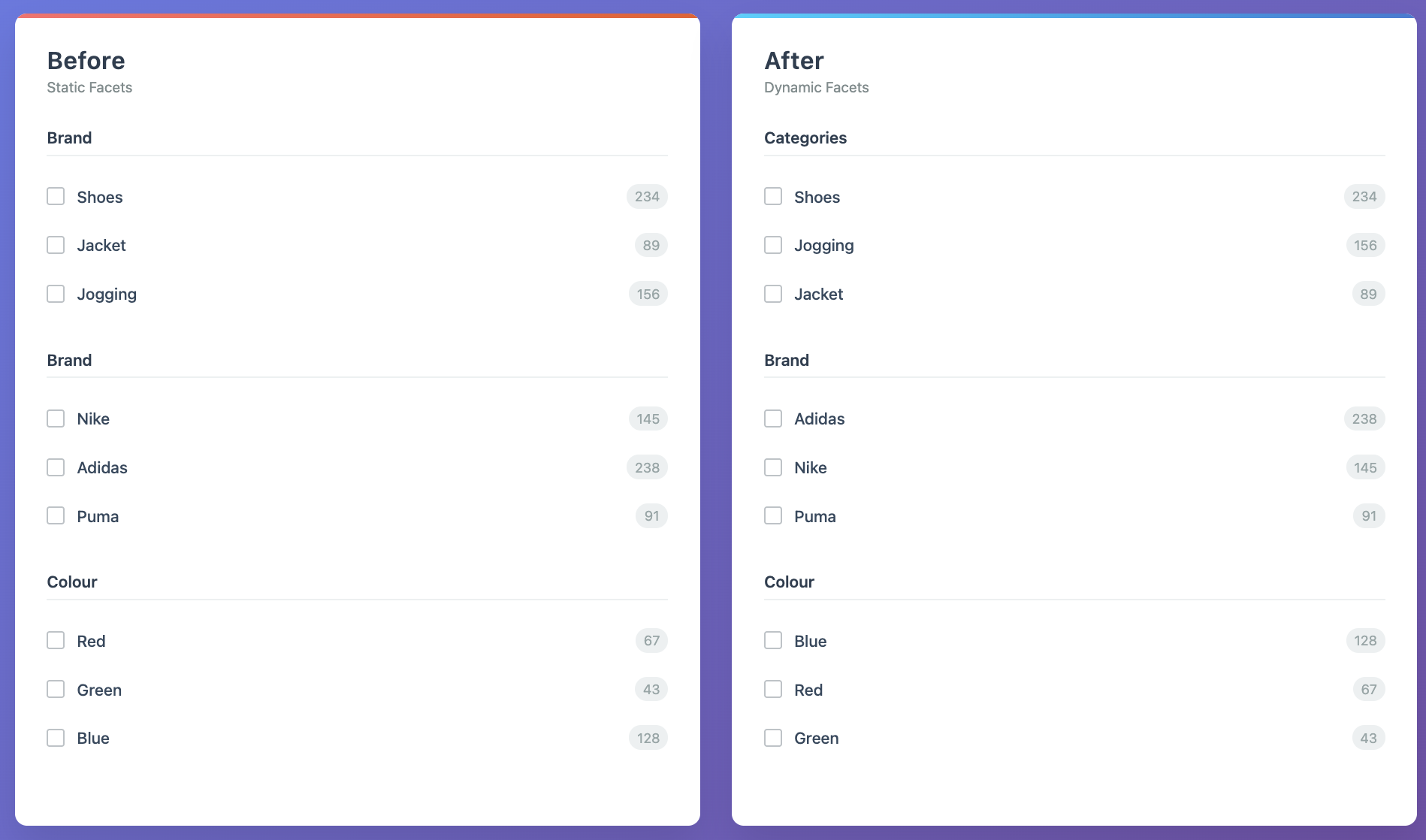
> Dynamic Facets helps users find relevant results by automatically reordering facets and facet values based on past filtering patterns.
Instead of a static list, users see the most relevant facets first for their query.
 ## How dynamic facets work
Dynamic Facets uses [query aggregation data](/doc/guides/search-analytics/concepts/query-aggregation) to reorder facets and facet values based on filtering patterns in past searches.
Dynamic Facets:
* Recomputes facet and facet value orderings daily and whenever you update the feature configuration.
* Uses the last 30 days of search data.
## Get started
To use Dynamic Facets in your UI, read facet and facet value ordering from the `renderingContent.facetOrdering` property in the search response.
You can use this ordering with InstantSearch or in a custom UI.
### With InstantSearch
Use the [`DynamicWidgets`](/doc/api-reference/widgets/dynamic-facets/js/) component to render refinement lists in the order returned by Dynamic Facets.
To apply facet value ordering automatically from the search response, you need **InstantSearch.js 4.72.0 or later** or **React InstantSearch v6 or later**.
### With a custom UI
To use Dynamic Facets without InstantSearch:
1. Read the facet ordering from the `renderingContent.facetOrdering` property in the search response.
2. Combine it with the `facets` property to build the final facet order in your UI.
3. Render only facets that are present in the response so you don't show outdated attributes.
For example:
```json JSON icon=braces expandable wrap theme={"system"}
{
"renderingContent": {
"facetOrdering": {
"facets": {
"order": ["brand", "categories", "color"]
},
"values": {
"brand": {
"order": ["Nike", "Adidas", "Puma"],
"sortRemainingBy": "count"
},
"categories": {
"order": ["Shoes", "Jacket", "Jogging"],
"sortRemainingBy": "count"
},
"color": {
"order": ["Red", "Green", "Blue"],
"sortRemainingBy": "count"
}
}
}
}
}
```
## Settings
Use these settings to configure how Dynamic Facets orders facets and facet values.
### Coverage
You can use another index as the source of events.
For example, if a replica doesn't receive events, you can reorder its facets and facet values based on events from its primary index.
### Browsing facets
If you [use Algolia for navigation](/doc/guides/solutions/ecommerce/filtering-and-navigation/), you can select a browsing facet for empty queries.
This means that instead of reordering facets based on a specific query, Dynamic Facets can reorder them for a single filter used for browsing, such as `categories:"Shoes"`.
### Where to apply
Choose where Dynamic Facets applies.
You can A/B test these options independently.
* **All**: apply to search queries and category pages.
* **Queries only**: apply only to search queries.
* **Categories only**: apply only to category browsing.
### Pinned facets
Pin up to 10 facets to keep them at the top of the list.
Dynamic Facets orders all other facets automatically.
Use pinned facets for globally relevant facets that should always stay visible, for example, for commercial or policy reasons.
* Only facets already present in your `Facet display` index setting can be pinned.
* Pinning applies to **all queries**. To override it for a specific query, use a [rule](/doc/guides/managing-results/rules/merchandising-and-promoting/how-to/merchandising-facets) that replaces the full `facetOrdering`.
* Only facets can be pinned, not individual facet values.
* If a pinned facet is also part of the dynamically reordered set, Dynamic Facets removes it from that set and places it in its pinned position.
### Preserve value order for selected facets
Use this option for facets such as `size` or `date`, where facet values follow a logical order.
The facet can still move within the list, but its values keep the order inherited from [`Facet display`](/doc/guides/building-search-ui/ui-and-ux-patterns/facet-display/js/).
## Interaction with `Facet display` index setting
If your index has facets listed in the `Facet display` index setting, Dynamic Facets merges its output with that setting at search time instead of replacing it.
### Facet ordering
`Facet display` acts as a list of allowed facets.
Dynamic Facets reorders only facets listed there.
If Dynamic Facets generates a facet that isn't in the index setting, that facet is removed.
Facets present in the index setting but not in the Dynamic Facets output are appended at the end in the same order as the index setting.
This guarantees that:
* No unwanted facets appear in the response.
* All configured facets are always present.
If no facets are listed in the `Facet display` index setting, the Dynamic Facets output is used as-is.
### Facet value ordering
For each facet in the final list:
* If the facet is in the **Preserve value order** list, Dynamic Facets ignores its own value reordering and uses the index setting values as-is, including any pinned values, hidden values, and the `sortRemainingBy` property.
* If the facet *isn't* in the **Preserve value order** list, Dynamic Facets uses its own value ordering (up to 20 values per facet) and sets `sortRemainingBy` to `count`.
* If a facet has no Dynamic Facets values and no index setting values, it's included without value ordering. The default frontend behavior applies.
## Interaction with other features
* **Rules and merchandising.** If a [rule](/doc/guides/managing-results/rules/rules-overview/) provides a `renderingContent` query parameter, it takes full precedence. Dynamic Facets is bypassed for that query.
* **Personalization.** Dynamic Facets and personalization don't work together. If personalization is enabled for a signed-in user, the personalized order overrides Dynamic Facets.
## Limitations
* Only the top **100,000 distinct queries** are considered.
* Only queries between **3 and 100 characters** with at least **100 searches** are considered for facet reordering.
* A maximum of **20 facets** and **20 facet values** per facet are reordered per query.
* Remaining items follow the `sortRemainingBy` behavior in `renderingContent`. `count` is the default.
* Deleted facets can still appear in Dynamic Facets output because the ordering is based on historical data. Check that a facet exists in the `facets` list before you display it.
## How dynamic facets work
Dynamic Facets uses [query aggregation data](/doc/guides/search-analytics/concepts/query-aggregation) to reorder facets and facet values based on filtering patterns in past searches.
Dynamic Facets:
* Recomputes facet and facet value orderings daily and whenever you update the feature configuration.
* Uses the last 30 days of search data.
## Get started
To use Dynamic Facets in your UI, read facet and facet value ordering from the `renderingContent.facetOrdering` property in the search response.
You can use this ordering with InstantSearch or in a custom UI.
### With InstantSearch
Use the [`DynamicWidgets`](/doc/api-reference/widgets/dynamic-facets/js/) component to render refinement lists in the order returned by Dynamic Facets.
To apply facet value ordering automatically from the search response, you need **InstantSearch.js 4.72.0 or later** or **React InstantSearch v6 or later**.
### With a custom UI
To use Dynamic Facets without InstantSearch:
1. Read the facet ordering from the `renderingContent.facetOrdering` property in the search response.
2. Combine it with the `facets` property to build the final facet order in your UI.
3. Render only facets that are present in the response so you don't show outdated attributes.
For example:
```json JSON icon=braces expandable wrap theme={"system"}
{
"renderingContent": {
"facetOrdering": {
"facets": {
"order": ["brand", "categories", "color"]
},
"values": {
"brand": {
"order": ["Nike", "Adidas", "Puma"],
"sortRemainingBy": "count"
},
"categories": {
"order": ["Shoes", "Jacket", "Jogging"],
"sortRemainingBy": "count"
},
"color": {
"order": ["Red", "Green", "Blue"],
"sortRemainingBy": "count"
}
}
}
}
}
```
## Settings
Use these settings to configure how Dynamic Facets orders facets and facet values.
### Coverage
You can use another index as the source of events.
For example, if a replica doesn't receive events, you can reorder its facets and facet values based on events from its primary index.
### Browsing facets
If you [use Algolia for navigation](/doc/guides/solutions/ecommerce/filtering-and-navigation/), you can select a browsing facet for empty queries.
This means that instead of reordering facets based on a specific query, Dynamic Facets can reorder them for a single filter used for browsing, such as `categories:"Shoes"`.
### Where to apply
Choose where Dynamic Facets applies.
You can A/B test these options independently.
* **All**: apply to search queries and category pages.
* **Queries only**: apply only to search queries.
* **Categories only**: apply only to category browsing.
### Pinned facets
Pin up to 10 facets to keep them at the top of the list.
Dynamic Facets orders all other facets automatically.
Use pinned facets for globally relevant facets that should always stay visible, for example, for commercial or policy reasons.
* Only facets already present in your `Facet display` index setting can be pinned.
* Pinning applies to **all queries**. To override it for a specific query, use a [rule](/doc/guides/managing-results/rules/merchandising-and-promoting/how-to/merchandising-facets) that replaces the full `facetOrdering`.
* Only facets can be pinned, not individual facet values.
* If a pinned facet is also part of the dynamically reordered set, Dynamic Facets removes it from that set and places it in its pinned position.
### Preserve value order for selected facets
Use this option for facets such as `size` or `date`, where facet values follow a logical order.
The facet can still move within the list, but its values keep the order inherited from [`Facet display`](/doc/guides/building-search-ui/ui-and-ux-patterns/facet-display/js/).
## Interaction with `Facet display` index setting
If your index has facets listed in the `Facet display` index setting, Dynamic Facets merges its output with that setting at search time instead of replacing it.
### Facet ordering
`Facet display` acts as a list of allowed facets.
Dynamic Facets reorders only facets listed there.
If Dynamic Facets generates a facet that isn't in the index setting, that facet is removed.
Facets present in the index setting but not in the Dynamic Facets output are appended at the end in the same order as the index setting.
This guarantees that:
* No unwanted facets appear in the response.
* All configured facets are always present.
If no facets are listed in the `Facet display` index setting, the Dynamic Facets output is used as-is.
### Facet value ordering
For each facet in the final list:
* If the facet is in the **Preserve value order** list, Dynamic Facets ignores its own value reordering and uses the index setting values as-is, including any pinned values, hidden values, and the `sortRemainingBy` property.
* If the facet *isn't* in the **Preserve value order** list, Dynamic Facets uses its own value ordering (up to 20 values per facet) and sets `sortRemainingBy` to `count`.
* If a facet has no Dynamic Facets values and no index setting values, it's included without value ordering. The default frontend behavior applies.
## Interaction with other features
* **Rules and merchandising.** If a [rule](/doc/guides/managing-results/rules/rules-overview/) provides a `renderingContent` query parameter, it takes full precedence. Dynamic Facets is bypassed for that query.
* **Personalization.** Dynamic Facets and personalization don't work together. If personalization is enabled for a signed-in user, the personalized order overrides Dynamic Facets.
## Limitations
* Only the top **100,000 distinct queries** are considered.
* Only queries between **3 and 100 characters** with at least **100 searches** are considered for facet reordering.
* A maximum of **20 facets** and **20 facet values** per facet are reordered per query.
* Remaining items follow the `sortRemainingBy` behavior in `renderingContent`. `count` is the default.
* Deleted facets can still appear in Dynamic Facets output because the ordering is based on historical data. Check that a facet exists in the `facets` list before you display it.