> ## Documentation Index
> Fetch the complete documentation index at: https://algolia.com/llms.txt
> Use this file to discover all available pages before exploring further.
# AI Synonyms
> Use AI to automate finding the best synonyms for your search.
export const Index = () =>
index
;
export const Application = () =>
application
;
export const AlgoliaSearch = () => ;
export const AcademyLink = ({href, title}) => {
return Learn more about: {title};
};
This feature isn't available on every plan.
Refer to your [pricing plan](https://www.algolia.com/pricing) to see if it's included.
Synonyms are words that share a similar meaning.
Adding synonyms to your search helps your users find relevant results
even if they use different words to express the same concept.
For example, by adding a synonym for trousers and pants,
a search for either term returns identical results.
## Get started
To activate AI Synonyms for one of your indices:
1. Go to the [Algolia dashboard](https://dashboard.algolia.com/explorer/browse) and select your Algolia .
2. On the left sidebar, select **Search**.
3. Select your Algolia .
4. Open the [**AI Synonyms**](https://dashboard.algolia.com/ai-synonyms) page and select **Activate for this index**.
## Send a user token with your searches
To find suggestions, Algolia determines [how often users rewrite](#user-query-rewrites) a search term.
To make that more accurate, send user tokens with your search requests.
For more information, see [Distinguish users for analytics](/doc/guides/search-analytics/guides/usertoken).
## Review synonyms
The **Suggested Synonyms** tab shows new suggestions.
To show all suggestions, turn off the **Show only new synonyms** option.
As you examine a suggested synonym, you'll see metrics to help you select the better option: the original term or the suggestion.
These metrics include:
* Conversion rate (CVR)
* Click-through rate (CTR)
* Result count
* Confidence score
If you're [sending click and conversion events](/doc/guides/sending-events),
you can compare click-through and conversion rates for both alternatives.
#### What the confidence score means
Each suggestion includes a **confidence score** between 0 and 100.
It helps you find the synonym suggestions with the highest probability of improving your search results.
Two machine learning models determine the score:
* **A semantic similarity model** which measures how closely related the terms are.
* **A confidence scoring model** that converts this semantic similarity into a probability that the suggested synonym will enhance search relevance.
For example:
* A score of **90** means there's a 90% chance the suggested synonym will improve your search results.
* A score of **10** means it's unlikely to help.
## Accept or decline suggestions
To accept a suggestion, click **Add to configuration** (`✓`).
If you don't want to add this suggestion to all replicas of this index, turn off the **Forward to replicas** option at the top.
You can edit accepted suggestions in the **Accepted suggestions** tab.
To decline a suggestion, click **Decline this suggestion** (`x`).
You can edit and accept declined suggestions in the **Declined suggestions** tab.
After accepting a suggestion, only edit it in the dashboard, not with the API.
## Change synonym types
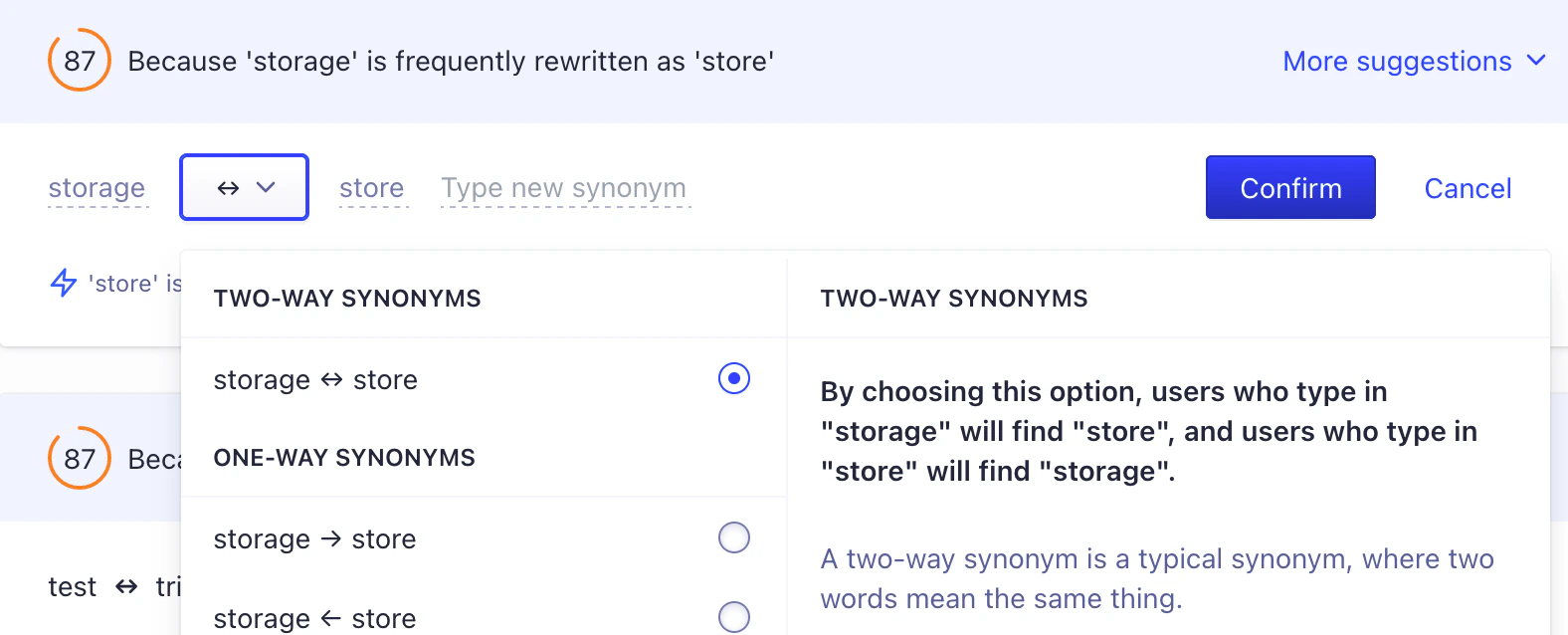
By default, the AI suggests adding regular two-way synonyms.
To change to another [synonym type](/doc/guides/managing-results/optimize-search-results/adding-synonyms),
hover over the suggestion and click the **Edit** button.
Then, click **Select Type** (`⇔`) and select a synonym type.
## Edit suggestions
To edit a suggestion, hover over it and click the **Edit** button.
Then, you can edit both synonyms or add more.
## Alternative suggestions
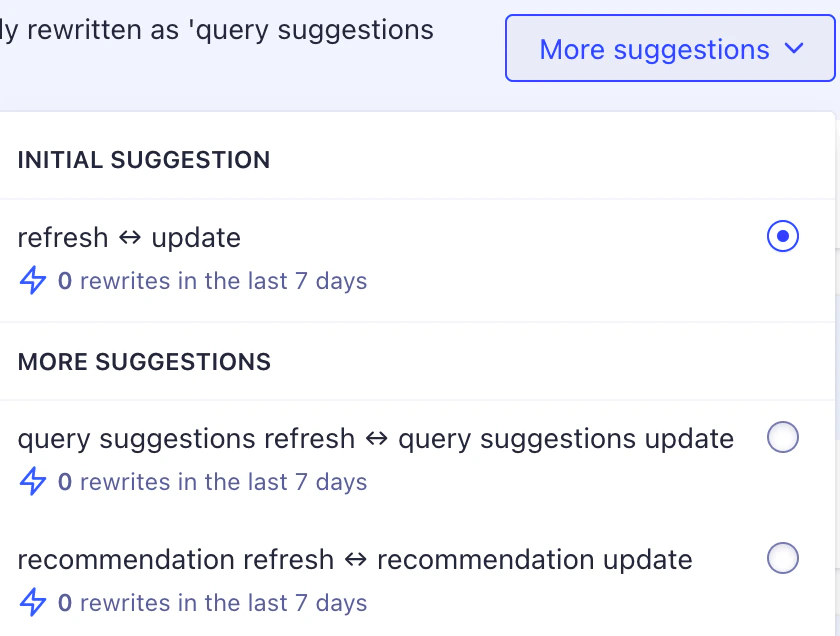
Sometimes, there are several suggestions for the same search query.
To see the alternative suggestions, click **More suggestions**.
## How AI Synonyms work
AI Synonyms provides a list of synonyms that may improve your search experience by considering how users rewrite their queries and the historical performance of different searches.
### User query rewrites
Algolia analyzes user sessions to detect when people change their search query.
If a user searches for a word and then changes the query to use a different word, that implies a potential synonym.
To qualify as a synonym suggestion:
* Users must search for one word and then change the query to another word (within about a minute).
* The two words must seldom appear together in the same query, suggesting they're potential synonyms rather than companions. For example, since **"sneakers"** and **"trainers"** are often synonyms, they're unlikely to appear in the same query. However, **"sneakers"** and **"laces"** may frequently co-occur and, hence, are companions.
For each index, the evaluation considers analytics data from the last 30 days.
For multi-word terms, Algolia examines the frequency of these terms across different search queries to confirm they're potential synonyms and not part of a set phrase.
#### Rewrite count
Each synonym suggestion includes a **rewrite count**, which reflects how often users switched from one word to another during the preceding week.
The more frequent this behavior is among your users, the higher the count.
### Search performance analysis
Algolia uses your analytics data to see how well each search term performs.
It only considers terms that users have typed into the search box.
Low-performing terms are terms that lead to low engagement (few clicks, low conversions) or poor result quality (few or zero results).
For each of these low-performing terms, Algolia suggests synonyms that are linguistically similar and likely to improve search outcomes.
For example, if users frequently search for "denim trousers" but that term leads to few clicks, "jeans" might be a synonym suggestion.
## See also
* [Synonyms](/doc/guides/managing-results/optimize-search-results/adding-synonyms)
* [Merchandising Playbook: AI Synonyms](https://www.algolia.com/ecommerce-merchandising-playbook/ai-synonyms)
 ## Edit suggestions
To edit a suggestion, hover over it and click the **Edit** button.
Then, you can edit both synonyms or add more.
## Edit suggestions
To edit a suggestion, hover over it and click the **Edit** button.
Then, you can edit both synonyms or add more.
 ## Alternative suggestions
Sometimes, there are several suggestions for the same search query.
To see the alternative suggestions, click **More suggestions**.
## Alternative suggestions
Sometimes, there are several suggestions for the same search query.
To see the alternative suggestions, click **More suggestions**.
 ## How AI Synonyms work
AI Synonyms provides a list of synonyms that may improve your search experience by considering how users rewrite their queries and the historical performance of different searches.
### User query rewrites
Algolia analyzes user sessions to detect when people change their search query.
If a user searches for a word and then changes the query to use a different word, that implies a potential synonym.
To qualify as a synonym suggestion:
* Users must search for one word and then change the query to another word (within about a minute).
* The two words must seldom appear together in the same query, suggesting they're potential synonyms rather than companions. For example, since **"sneakers"** and **"trainers"** are often synonyms, they're unlikely to appear in the same query. However, **"sneakers"** and **"laces"** may frequently co-occur and, hence, are companions.
For each index, the evaluation considers analytics data from the last 30 days.
## How AI Synonyms work
AI Synonyms provides a list of synonyms that may improve your search experience by considering how users rewrite their queries and the historical performance of different searches.
### User query rewrites
Algolia analyzes user sessions to detect when people change their search query.
If a user searches for a word and then changes the query to use a different word, that implies a potential synonym.
To qualify as a synonym suggestion:
* Users must search for one word and then change the query to another word (within about a minute).
* The two words must seldom appear together in the same query, suggesting they're potential synonyms rather than companions. For example, since **"sneakers"** and **"trainers"** are often synonyms, they're unlikely to appear in the same query. However, **"sneakers"** and **"laces"** may frequently co-occur and, hence, are companions.
For each index, the evaluation considers analytics data from the last 30 days.