> ## Documentation Index
> Fetch the complete documentation index at: https://algolia.com/llms.txt
> Use this file to discover all available pages before exploring further.
# Optimize search settings with AI Assist
> Use AI Assist in the Algolia dashboard to review an index's relevance settings and apply recommended configuration changes.
export const AlgoliaSearch = () => ;
This is a **beta feature** according to [Algolia's Terms of Service ("Beta Services")](https://www.algolia.com/policies/terms/).
AI Assist reviews index settings that affect [relevance](/doc/guides/managing-results/relevance-overview) and recommends changes.
Use AI Assist before you launch a search experience, after you change your record structure, or when search quality declines.
AI Assist tailors its recommendations to your [Algolia plan](https://www.algolia.com/pricing) and only suggests features included in your plan.
You can review each suggested change before you apply it.
## Before you begin
Make sure you have:
* An Algolia index with records.
* Permission to [update index settings](/doc/guides/security/api-keys#rights-and-restrictions) (the `editSettings` ACL).
### Plan how to test and apply changes
Before applying recommendations, consider how the index is used:
* If this is a production index, test changes on a test index or with [A/B testing](/doc/guides/ab-testing/what-is-ab-testing) before applying them broadly.
* If the index is part of an active A/B test, wait until the test ends before changing a setting that the test is evaluating.
* If the index has replicas, decide whether each change should apply to the primary index, its replicas, or both.
If you must change a setting during an active A/B test,
keep that setting consistent across all variants.
Otherwise, the change can affect the comparison.
## Review and apply index setting recommendations
1. Go to the [Algolia dashboard](https://dashboard.algolia.com/explorer/browse) and select your Algolia application.
2. On the left sidebar, select **Search**.
3. Select the index you want to review, then open the **Configuration** tab.
4. To review settings, select **Improve Search** for any setting or, on the **Configuration** tab, select **AI Assist**, then enter `Optimize search configuration`.
5. Answer the questions about your industry, search use case, and goals. AI Assist uses your answers to tailor its recommendations.
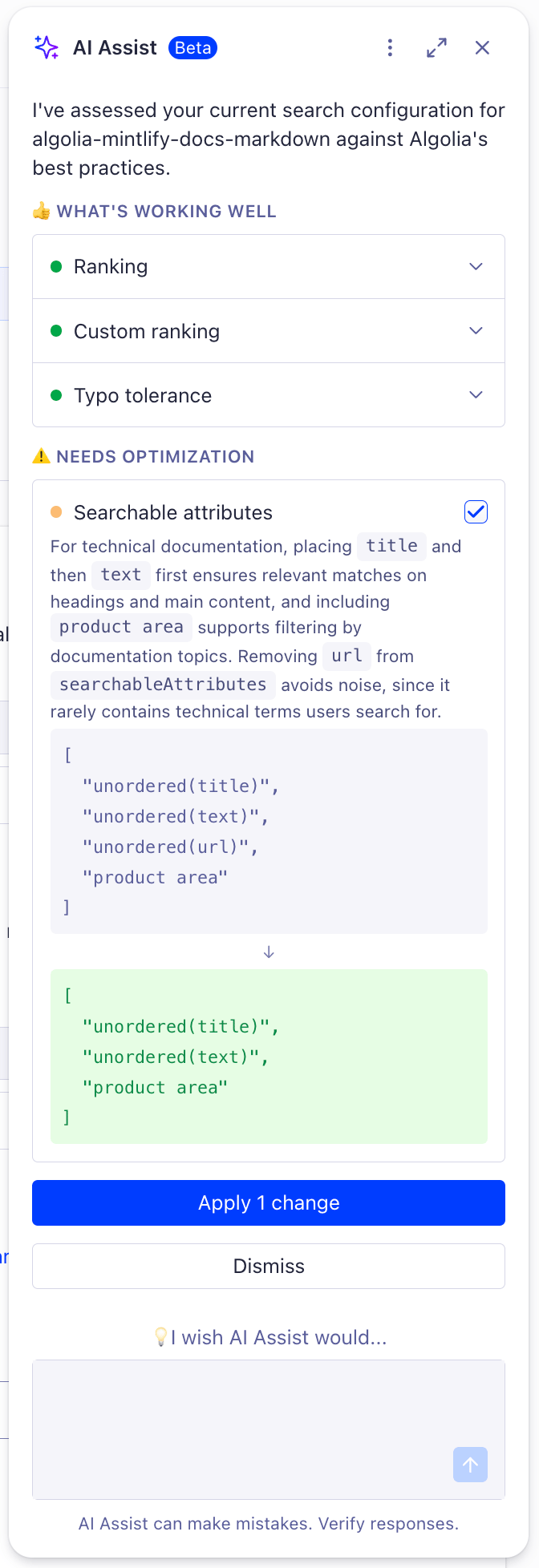
6. Review the **What's working well** and **Needs optimization** sections. For each proposed change, review the explanation.
7. Select the checkbox for each recommendation you want to use, then select **Apply**.
8. Wait for AI Assist to confirm that the changes are applied.
If your Algolia plan includes Activity Logs, review the applied changes in the [logs](https://dashboard.algolia.com/account/audit-logs).
## Supported settings
AI Assist can suggest changes for these index settings:
| Setting | What AI Assist reviews |
| ----------------------------------------------------------------------------------------------------------------------- | --------------------------------------------------------------------------------------- |
| [Searchable attributes](/doc/guides/managing-results/must-do/searchable-attributes) | Which record attributes Algolia searches and in what order. |
| [Custom ranking](/doc/guides/managing-results/must-do/custom-ranking) | The attributes Algolia uses to break ties between records that otherwise rank the same. |
| [Ranking](/doc/api-reference/api-parameters/ranking) and [sorting](/doc/guides/managing-results/refine-results/sorting) | How the index ranks records and supports sort orders. |
| [Typo tolerance](/doc/guides/managing-results/optimize-search-results/typo-tolerance) | How Algolia handles spelling mistakes. |
 7. Select the checkbox for each recommendation you want to use, then select **Apply**.
8. Wait for AI Assist to confirm that the changes are applied.
7. Select the checkbox for each recommendation you want to use, then select **Apply**.
8. Wait for AI Assist to confirm that the changes are applied.