> ## Documentation Index
> Fetch the complete documentation index at: https://algolia.com/llms.txt
> Use this file to discover all available pages before exploring further.
# Dynamic Re-Ranking
> Dynamic Re-Ranking adjusts ranking based on changing user behavior.
export const SearchQuery = () =>
search query
;
export const Records = () =>
records
;
export const Index = () =>
index
;
export const Filter = () =>
filter
;
export const ConversionRate = () =>
conversion rate (CVR)
;
export const AcademyLink = ({href, title}) => {
return Learn more about: {title};
};
This feature isn't available on every plan.
Refer to your [pricing plan](https://www.algolia.com/pricing) to see if it's included.
The relevance of your search results can change over time, sometimes quickly.
Consider a drugstore.
Before the COVID-19 pandemic, users who searched for "mask" could have been looking to buy facial masks for skincare.
During the pandemic, the same query could refer to surgical masks.
To respond to changing user expectations,
you might have to adjust your results with [Rules](/doc/guides/managing-results/rules/rules-overview) or [`optionalFilters`](/doc/api-reference/api-parameters/optionalFilters).
This can become time-consuming because trends come and go.
A better, more scalable approach is to use the Dynamic Re-Ranking feature.
## What is Dynamic Re-Ranking?
Dynamic Re-Ranking is an Algolia feature that uses AI to detect trends in user behavior.
It learns from click and conversion events for a given and can promote records that are becoming more popular.
Dynamic Re-Ranking only reorders records that pass textual relevance and your filters.
For example, if users increasingly choose surgical masks when searching for "mask", Dynamic Re-Ranking can move surgical masks higher in future results.
This can improve relevance and increase without requiring rules or manual changes.
For more information,
see [Merchandising Playbook: AI re-ranking](https://www.algolia.com/ecommerce-merchandising-playbook/ai-re-ranking/)
## How Dynamic Re-Ranking works
Learn when Dynamic Re-Ranking can reorder results, how ranking works, and how it interacts with Personalization.
### Effect on relevance
Dynamic Re-Ranking runs after Algolia has built the result set using textual relevance], filters, and
custom ranking.
However, there are some constraints on the feature:
* Dynamic Re-Ranking only reorders that are already eligible to appear in the results (it doesn't add new records).
* Most Rules consequences (such as boosting or burying categories) run *before* Dynamic Re-Ranking.
* Pin and hide consequences run *after* Dynamic Re-Ranking, so pinned records stay in place and hidden records don't appear.
Dynamic Re-Ranking may also change ordering when you use [geographical filtering or sorting](/doc/guides/managing-results/refine-results/geolocation#geographical-filtering-and-sorting),
depending on how you configure [geo ranking](/doc/guides/managing-results/refine-results/geolocation/how-to/geo-ranking-info).
In a typical search, Algolia applies these ranking steps in this order:
1. [Textual ranking criteria](/doc/guides/managing-results/relevance-overview/in-depth/ranking-criteria)
2. [Custom ranking](/doc/guides/managing-results/must-do/custom-ranking)
3. [Personalization](/doc/guides/personalization/classic-personalization/what-is-personalization) (if you've enabled it and Algolia has enough information to personalize results for a particular user)
4. Rules ([boosting](/doc/guides/managing-results/must-do/custom-ranking/how-to/boost-or-penalize-some-records) and [burying](https://support.algolia.com/hc/en-us/articles/4406981935761#bury-categories)) or [Automatic Boosting from Query Categorization](/doc/guides/algolia-ai/query-categorization#automatic-filtering-and-boosting)
5. Dynamic Re-Ranking
6. Rules ([pinning](https://support.algolia.com/hc/en-us/articles/4406981935761#pin-items) and [hiding](/doc/guides/managing-results/rules/merchandising-and-promoting/how-to/how-to-hide-hits) specific items).
By default,
Algolia doesn't apply Dynamic Re-Ranking to empty searches but you can
[enable re-ranking for empty searches filtered on a particular facet value](#enable-re-ranking-on-browsing-pages-browsing-facet).
### Allow Dynamic Re-Ranking when Personalization applies
By default, Dynamic Re-Ranking doesn't run if [Personalization](/doc/guides/personalization/classic-personalization/what-is-personalization) reorders results on the first page for that user.
To enable Dynamic Re-Ranking even when Personalization affects the first page of results,
set [`allowReRankingOnPersonalization`](/doc/api-reference/api-parameters/allowReRankingOnPersonalization) to `true` at query time.
```json JSON icon=braces theme={"system"}
{
"query": "mask",
"enablePersonalization": true,
"personalizationImpact": 80,
"enableReRanking": true,
"allowReRankingOnPersonalization": true,
"distinct": 0
}
```
Dynamic Re-Ranking doesn't apply when [`distinct`](/doc/api-reference/api-parameters/distinct) > 1,
even if `allowReRankingOnPersonalization` is `true`.
Set `distinct` to `0` or `1` to use Dynamic Re-Ranking with Personalization.
## Dynamic Re-Ranking preparation
Before you enable Dynamic Re-Ranking,
make sure you send the right events and meet the data requirements.
### Send the required click and conversion events
To use Dynamic Re-Ranking, you must send [click and conversion events](/doc/guides/sending-events).
Dynamic Re-Ranking uses this data to detect trends and adjust ranking accordingly.
Dynamic Re-Ranking may work with only click events (not conversion events)
but performs better if you send *both* click and conversion events.
Dynamic Re-Ranking refreshes the [ordering](#ordering-settings) for each query every 24 hours by default.
It uses a sliding 30-day window of recent analytics data.
To promote a record for a given query,
Dynamic Re-Ranking needs at least 20 clicks or two conversions for that record during the 30-day window.
Events must contain a [`queryID`](/doc/libraries/sdk/v1/methods/send-events#param-query-id) property that corresponds to a valid search.
For each query and record (`objectID`), Dynamic Re-Ranking counts at most one click and one conversion per [`userToken`](#security).
If the `userToken` in the event differs from the `userToken` in the search request, Dynamic Re-Ranking uses the search `userToken`.
Events must include an `objectID` property for a record in the specified index.
This `objectID` needs to belong to one of the returned records of the search with the specified `queryID`.
For example:
1. On the first day of the month, a search returns record `X`.
2. Your app sends an event for record `X` in the production index with the corresponding `queryID`.
3. Dynamic Re-Ranking uses record `X` in its next ordering computation.
4. On the fifth day of the month, your app deletes record `X` from the production index.
5. Dynamic Re-Ranking stops using record `X` in future ordering computations.
Dynamic Re-Ranking might not be suitable for indices with frequent record deletions,
such as those used by a second-hand car dealer where each car's record is deleted upon sale.
Instead, use [Automatic boosting from Query Categorization](/doc/guides/algolia-ai/query-categorization#automatic-filtering-and-boosting).
#### Security
To prevent malicious users from manipulating the ranking of your records,
Dynamic Re-Ranking counts at most one click and one conversion per [`userToken`](/doc/api-reference/api-parameters/userToken) for a given user, query, and record.
For a given [user-query-record combination](/doc/guides/sending-events/concepts/event-types#events-requirements-for-dynamic-re-ranking), Dynamic Re-Ranking counts at most one click and one conversion per `userToken`.
For example, if the same user (same `userToken`) clicks on the same record 100 times after the same query, it counts as one click.
If the same user clicks on the same record after different queries, they count as separate events.
To prevent users from crafting several user tokens,
use [secured API keys](/doc/libraries/sdk/v1/methods/generate-secured-api-key).
With secured API keys, you can include the `userToken` as an embedded parameter when you generate the key on your backend.
This gives each user a unique key, but they can't change its `userToken`.
### Validate with the simulator
Simulate re-ranking for any from the [**Dynamic Re-Ranking** page in the dashboard](https://dashboard.algolia.com/reranking/).
Once you've [sent enough click and conversion events](#send-the-required-click-and-conversion-events),
try out any query and see how Dynamic Re-Ranking affects the results (without activating re-ranking on your live index).
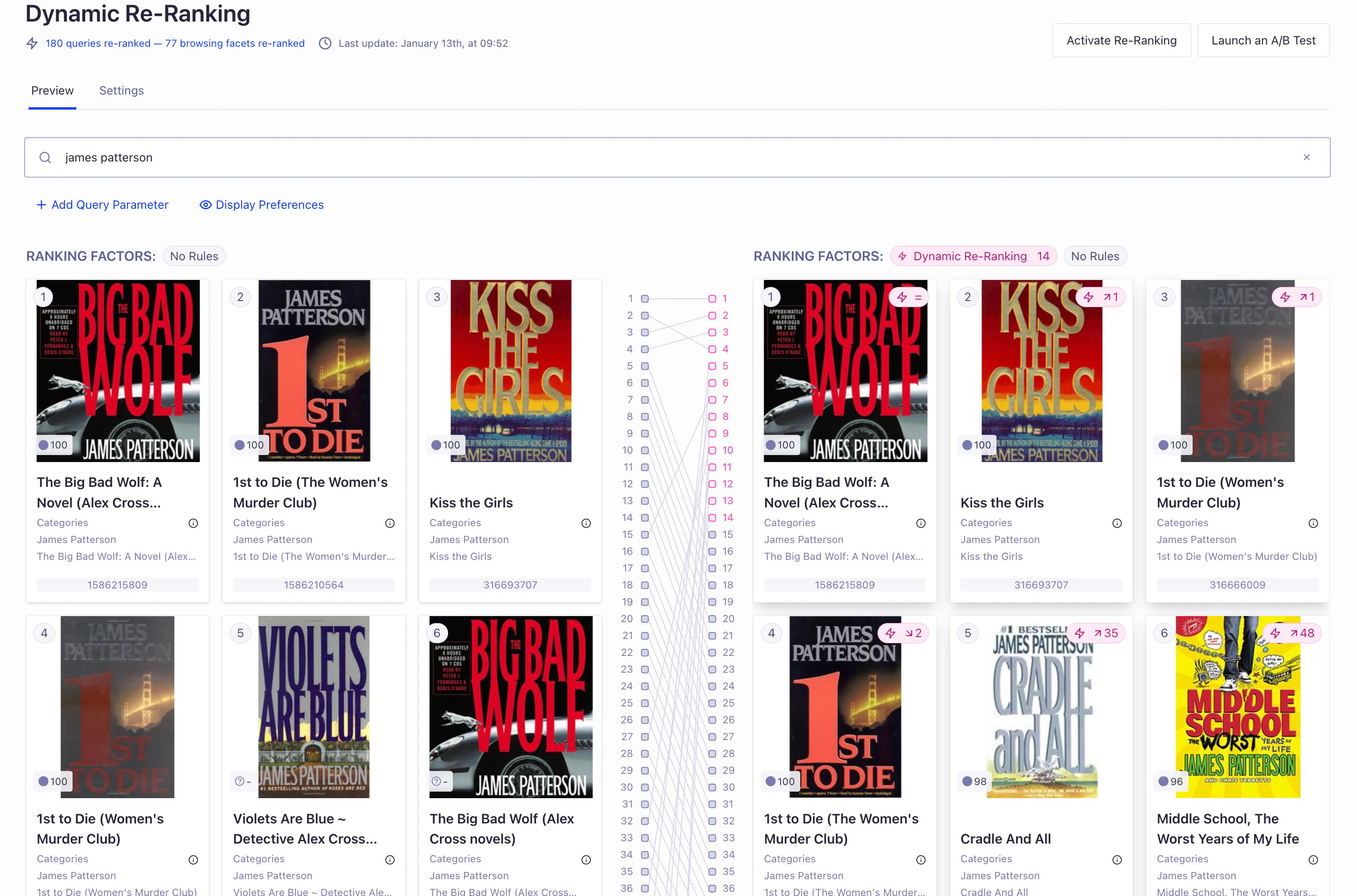 In the simulator, each record has an attractiveness score per query.
This score reflects the number of events the record received in the last 30 days compared with other records
and it explains why re-ranking boosts one record over another.
With time decay enabled, recent events matter more,
so a record with fewer recent events can outrank a record with more historical events.
Turn off the rules in the simulator with the **Rules** toggle to assess the benefits of Dynamic Re-Ranking.
Consider removing these rules if you're satisfied with the records that Dynamic Re-Ranking promotes.
If you use rules to [pin top records for popular queries](/doc/guides/managing-results/rules/merchandising-and-promoting/how-to/promote-hits),
Dynamic Re-Ranking has less impact because pinned records stay in place.
## Dynamic Re-Ranking settings
Configure the following settings from the [**Dynamic Re-Ranking** page in the dashboard](https://dashboard.algolia.com/reranking/).
### General settings
General settings control the goal, event source, and refresh frequency.
This feature isn't available on every plan.
Refer to your [pricing plan](https://www.algolia.com/pricing) to see if it's included.
The **Re-Ranking Revenue Goal** option is part of the Dynamic Re-Ranking for Revenue feature.
By default, Dynamic Re-Ranking reorders your search results to maximize the number of conversions on your index (CVR).
To optimize for total revenue instead,
send [Purchased object IDs after search events](/doc/libraries/sdk/v1/methods/purchased-object-ids-after-search) with `price`, `quantity`, and `currency` for each purchased item.
Dynamic Re-Ranking optimizes revenue for the currency that appears most often in an index's events and ignores events in other currencies.
By default, Dynamic Re-Ranking uses the [events](#send-the-required-click-and-conversion-events) sent to the re-ranked index.
You can use another index as the source of the events by changing the **Events source index** option.
The indices must be replicas of each other.
Use this parameter to experiment with your Dynamic Re-Ranking configuration without affecting production search results:
* Create a replica of your production index
* Enable Dynamic Re-Ranking on the replica
* Set the event source index to your production index to use its events to generate the replica's re-ranking, which would otherwise be empty because the replica has no events
* Test changes to your Dynamic Re-Ranking configuration in the simulator on the replica
* Start an A/B test by comparing your production index with the replica
This feature isn't available on every plan.
Refer to your [pricing plan](https://www.algolia.com/pricing) to see if it's included.
Refreshing every hour is an Advanced Dynamic Re-Ranking feature.
By default, Dynamic Re-Ranking refreshes every 24 hours.
When you enable this option, Dynamic Re-Ranking refreshes every hour instead.
**Refreshing every hour helps you respond to shorter-lived search trends.**
### Coverage settings
Coverage settings determine which queries Dynamic Re-Ranking can affect and the number of results it can reorder.
This feature isn't available on every plan.
Refer to your [pricing plan](https://www.algolia.com/pricing) to see if it's included.
By default, Dynamic Re-Ranking uses your events to re-rank top queries.
The Multi-Signal Ranking feature improves the ordering of less popular queries:
it doesn't affect the ordering of your top queries.
For less popular queries, Algolia trains an AI model on your events.
The model considers each record's textual relevance to the query and the record's content.
Algolia retrains the model every day, and training can take up to an hour.
After training finishes, Dynamic Re-Ranking applies the updated ordering to those queries in search results (as it does for any re-ranked query).
To train the model, choose up to 20 record attributes.
Choose attributes that influence the "attractiveness" of records for users.
Think about what influences user choices when they browse your site.
For example, `brand`, `price`, and `category.id` are good candidates but `SKU`, `imageURL`, or `margin` aren't.
The attributes must be booleans, numbers, strings, or lists.
Objects aren't supported.
You can mark each attribute as:
* `date` for numbers expressed as a [Unix timestamp](https://www.unixtimestamp.com/).
* `category` for string or number values shared across your records. Good examples are `brand` and `color`. Don't use `category` for unique fields like `productDescription` or `title`.
* `unclassified` for anything else.
To see which attributes affected ranking the most, download a CSV from the dashboard.
The closer the value is to 0, the less impact the attribute has on re-ranking.
Negative values show that the attribute lowers ranking.
For example, the attribute `isOutOfStock` can be negative because out of stock items aren't desirable.
Multi-Signal Ranking learns to demote attributes with a negative impact.
By default, Algolia doesn't dynamically re-rank empty queries.
Setting a **Browsing Facet** re-ranks empty queries that include facet filters
(either with the [`facetFilters`](/doc/api-reference/api-parameters/facetFilters) or [`filters`](/doc/api-reference/api-parameters/filters) parameter)
for that attribute.
For example, if you use Algolia to populate your website's category pages by performing an empty query with a `categoryPageID` facet, set `categoryPageID` as a browsing facet.
Re-ranking reorders records in each `categoryPageID` based on their popularity.
If you set the root of a nested faceting attribute as a browsing facet, Dynamic Re-Ranking reorders all its sub-attributes.
For example, if you have an attribute named `hierarchicalCategories` with several nested levels (like `hierarchicalCategories.level0` and `hierarchicalCategories.level1`), using only `hierarchicalCategories` as a browsing facet re-ranks empty queries filtered on `hierarchicalCategories.level0` and `hierarchicalCategories.level1` as well.
Set up to five browsing facets if your [plan](https://www.algolia.com/pricing) includes Advanced Dynamic Re-Ranking.
Otherwise, you can use only one browsing facet.
This feature isn't available on every plan.
Refer to your [pricing plan](https://www.algolia.com/pricing) to see if it's included.
This is an Advanced Dynamic Re-Ranking feature.
By default, Algolia doesn't dynamically re-rank empty queries.
When you enable this option, Dynamic Re-Ranking always re-ranks the empty query and promotes the most popular records.
Dynamic Re-Ranking uses events to sort re-ranked items only when the query is empty and no filters apply.
If you set up [browsing facets](/doc/guides/algolia-ai/re-ranking#enable-re-ranking-on-browsing-pages-browsing-facet),
Dynamic Re-Ranking uses the empty-query fallback only when the search request doesn't include any browsing facets.
You can increase the number of records at the top of search results from the default of 20 to 100.
Dynamic Re-Ranking may promote fewer results than this value if Dynamic Re-Ranking doesn't gather significant traffic on enough records for some queries, or if filters remove records that were about to be re-ranked.
### Ordering settings
Ordering settings control how Dynamic Re-Ranking weighs events and shares signals across similar queries.
To give more weight to recent events in the ranking computation, enable the **Event Freshness** option.
Otherwise, an event from four weeks ago affects re-ranking the same way as one from yesterday.”
**Enabling event freshness better handles seasonality and shorter search trends.**
By default, each query is re-ranked independently.
**Group Similar Queries** helps to re-rank less frequent query variations.
Dynamic Re-Ranking groups queries that contain the same words, in any order.
Setting a language for grouping allows Dynamic Re-Ranking to ignore plurals, conjugations, and stop words during the grouping phase.
Grouped queries share events and therefore use the same ordering.
If you set a re-ranking filter, Dynamic Re-Ranking only promotes records matching the configured filters.
For example, if you select `inStock = true`, Dynamic Re-Ranking only promotes items that are in stock.
## Enable Dynamic Re-Ranking for production
Enable Re-Ranking on the [**Dynamic Re-Ranking** page in the dashboard](https://dashboard.algolia.com/reranking/).
Choose the index you want to activate re-ranking for and select **Activate Re-Ranking**.
### A/B test Dynamic Re-Ranking
Use [A/B testing](/doc/guides/ab-testing/what-is-ab-testing) to measure how Dynamic Re-Ranking affects search performance on your index.
To create an A/B test from the [**Dynamic Re-Ranking** page in the dashboard](https://dashboard.algolia.com/reranking/), select **Launch an A/B test** in the top-right corner.
This lets you choose the traffic split and duration to compare search performance with and without Dynamic Re-Ranking.
### Turn off Dynamic Re-Ranking for specific queries
To turn Dynamic Re-Ranking off for a specific query,
create a [rule](/doc/guides/managing-results/rules/rules-overview) with `{"enableReRanking": false}` as a consequence.
In the simulator, each record has an attractiveness score per query.
This score reflects the number of events the record received in the last 30 days compared with other records
and it explains why re-ranking boosts one record over another.
With time decay enabled, recent events matter more,
so a record with fewer recent events can outrank a record with more historical events.
Turn off the rules in the simulator with the **Rules** toggle to assess the benefits of Dynamic Re-Ranking.
Consider removing these rules if you're satisfied with the records that Dynamic Re-Ranking promotes.
If you use rules to [pin top records for popular queries](/doc/guides/managing-results/rules/merchandising-and-promoting/how-to/promote-hits),
Dynamic Re-Ranking has less impact because pinned records stay in place.
## Dynamic Re-Ranking settings
Configure the following settings from the [**Dynamic Re-Ranking** page in the dashboard](https://dashboard.algolia.com/reranking/).
### General settings
General settings control the goal, event source, and refresh frequency.
This feature isn't available on every plan.
Refer to your [pricing plan](https://www.algolia.com/pricing) to see if it's included.
The **Re-Ranking Revenue Goal** option is part of the Dynamic Re-Ranking for Revenue feature.
By default, Dynamic Re-Ranking reorders your search results to maximize the number of conversions on your index (CVR).
To optimize for total revenue instead,
send [Purchased object IDs after search events](/doc/libraries/sdk/v1/methods/purchased-object-ids-after-search) with `price`, `quantity`, and `currency` for each purchased item.
Dynamic Re-Ranking optimizes revenue for the currency that appears most often in an index's events and ignores events in other currencies.
By default, Dynamic Re-Ranking uses the [events](#send-the-required-click-and-conversion-events) sent to the re-ranked index.
You can use another index as the source of the events by changing the **Events source index** option.
The indices must be replicas of each other.
Use this parameter to experiment with your Dynamic Re-Ranking configuration without affecting production search results:
* Create a replica of your production index
* Enable Dynamic Re-Ranking on the replica
* Set the event source index to your production index to use its events to generate the replica's re-ranking, which would otherwise be empty because the replica has no events
* Test changes to your Dynamic Re-Ranking configuration in the simulator on the replica
* Start an A/B test by comparing your production index with the replica
This feature isn't available on every plan.
Refer to your [pricing plan](https://www.algolia.com/pricing) to see if it's included.
Refreshing every hour is an Advanced Dynamic Re-Ranking feature.
By default, Dynamic Re-Ranking refreshes every 24 hours.
When you enable this option, Dynamic Re-Ranking refreshes every hour instead.
**Refreshing every hour helps you respond to shorter-lived search trends.**
### Coverage settings
Coverage settings determine which queries Dynamic Re-Ranking can affect and the number of results it can reorder.
This feature isn't available on every plan.
Refer to your [pricing plan](https://www.algolia.com/pricing) to see if it's included.
By default, Dynamic Re-Ranking uses your events to re-rank top queries.
The Multi-Signal Ranking feature improves the ordering of less popular queries:
it doesn't affect the ordering of your top queries.
For less popular queries, Algolia trains an AI model on your events.
The model considers each record's textual relevance to the query and the record's content.
Algolia retrains the model every day, and training can take up to an hour.
After training finishes, Dynamic Re-Ranking applies the updated ordering to those queries in search results (as it does for any re-ranked query).
To train the model, choose up to 20 record attributes.
Choose attributes that influence the "attractiveness" of records for users.
Think about what influences user choices when they browse your site.
For example, `brand`, `price`, and `category.id` are good candidates but `SKU`, `imageURL`, or `margin` aren't.
The attributes must be booleans, numbers, strings, or lists.
Objects aren't supported.
You can mark each attribute as:
* `date` for numbers expressed as a [Unix timestamp](https://www.unixtimestamp.com/).
* `category` for string or number values shared across your records. Good examples are `brand` and `color`. Don't use `category` for unique fields like `productDescription` or `title`.
* `unclassified` for anything else.
To see which attributes affected ranking the most, download a CSV from the dashboard.
The closer the value is to 0, the less impact the attribute has on re-ranking.
Negative values show that the attribute lowers ranking.
For example, the attribute `isOutOfStock` can be negative because out of stock items aren't desirable.
Multi-Signal Ranking learns to demote attributes with a negative impact.
By default, Algolia doesn't dynamically re-rank empty queries.
Setting a **Browsing Facet** re-ranks empty queries that include facet filters
(either with the [`facetFilters`](/doc/api-reference/api-parameters/facetFilters) or [`filters`](/doc/api-reference/api-parameters/filters) parameter)
for that attribute.
For example, if you use Algolia to populate your website's category pages by performing an empty query with a `categoryPageID` facet, set `categoryPageID` as a browsing facet.
Re-ranking reorders records in each `categoryPageID` based on their popularity.
If you set the root of a nested faceting attribute as a browsing facet, Dynamic Re-Ranking reorders all its sub-attributes.
For example, if you have an attribute named `hierarchicalCategories` with several nested levels (like `hierarchicalCategories.level0` and `hierarchicalCategories.level1`), using only `hierarchicalCategories` as a browsing facet re-ranks empty queries filtered on `hierarchicalCategories.level0` and `hierarchicalCategories.level1` as well.
Set up to five browsing facets if your [plan](https://www.algolia.com/pricing) includes Advanced Dynamic Re-Ranking.
Otherwise, you can use only one browsing facet.
This feature isn't available on every plan.
Refer to your [pricing plan](https://www.algolia.com/pricing) to see if it's included.
This is an Advanced Dynamic Re-Ranking feature.
By default, Algolia doesn't dynamically re-rank empty queries.
When you enable this option, Dynamic Re-Ranking always re-ranks the empty query and promotes the most popular records.
Dynamic Re-Ranking uses events to sort re-ranked items only when the query is empty and no filters apply.
If you set up [browsing facets](/doc/guides/algolia-ai/re-ranking#enable-re-ranking-on-browsing-pages-browsing-facet),
Dynamic Re-Ranking uses the empty-query fallback only when the search request doesn't include any browsing facets.
You can increase the number of records at the top of search results from the default of 20 to 100.
Dynamic Re-Ranking may promote fewer results than this value if Dynamic Re-Ranking doesn't gather significant traffic on enough records for some queries, or if filters remove records that were about to be re-ranked.
### Ordering settings
Ordering settings control how Dynamic Re-Ranking weighs events and shares signals across similar queries.
To give more weight to recent events in the ranking computation, enable the **Event Freshness** option.
Otherwise, an event from four weeks ago affects re-ranking the same way as one from yesterday.”
**Enabling event freshness better handles seasonality and shorter search trends.**
By default, each query is re-ranked independently.
**Group Similar Queries** helps to re-rank less frequent query variations.
Dynamic Re-Ranking groups queries that contain the same words, in any order.
Setting a language for grouping allows Dynamic Re-Ranking to ignore plurals, conjugations, and stop words during the grouping phase.
Grouped queries share events and therefore use the same ordering.
If you set a re-ranking filter, Dynamic Re-Ranking only promotes records matching the configured filters.
For example, if you select `inStock = true`, Dynamic Re-Ranking only promotes items that are in stock.
## Enable Dynamic Re-Ranking for production
Enable Re-Ranking on the [**Dynamic Re-Ranking** page in the dashboard](https://dashboard.algolia.com/reranking/).
Choose the index you want to activate re-ranking for and select **Activate Re-Ranking**.
### A/B test Dynamic Re-Ranking
Use [A/B testing](/doc/guides/ab-testing/what-is-ab-testing) to measure how Dynamic Re-Ranking affects search performance on your index.
To create an A/B test from the [**Dynamic Re-Ranking** page in the dashboard](https://dashboard.algolia.com/reranking/), select **Launch an A/B test** in the top-right corner.
This lets you choose the traffic split and duration to compare search performance with and without Dynamic Re-Ranking.
### Turn off Dynamic Re-Ranking for specific queries
To turn Dynamic Re-Ranking off for a specific query,
create a [rule](/doc/guides/managing-results/rules/rules-overview) with `{"enableReRanking": false}` as a consequence.