> ## Documentation Index
> Fetch the complete documentation index at: https://algolia.com/llms.txt
> Use this file to discover all available pages before exploring further.
# Enable Dynamic Re-Ranking on category pages
> Use Dynamic Re-Ranking to re-rank and promote popular products on category pages.
export const SearchQuery = () =>
search query
;
export const Records = () =>
records
;
export const Index = () =>
index
;
export const Filter = () =>
filter
;
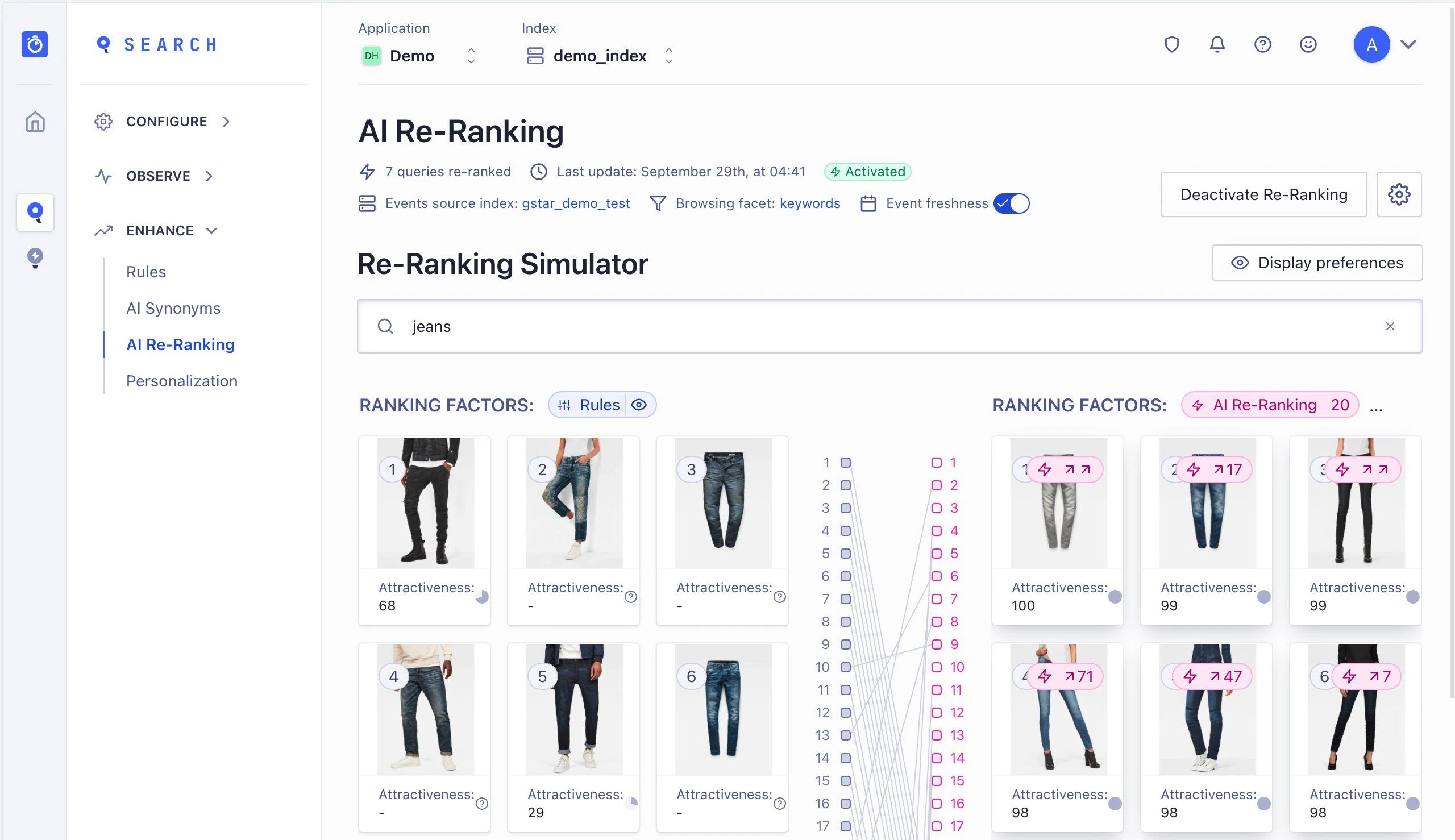
You can use [Dynamic Re-Ranking](/doc/guides/algolia-ai/re-ranking) to detect trends in your users' behavior.
Based on their search and browse interactions,
Dynamic Re-Ranking boosts trending or popular results to improve relevance on category pages.
Once you've configured your category pages and sent [click and conversion events](/doc/guides/sending-events/getting-started) to Algolia,
Dynamic Re-Ranking uses this data to identify trends.
You don't need to write any code to enable Dynamic Re-Ranking on category pages.
 This feature isn't available on every plan.
Refer to your [pricing plan](https://www.algolia.com/pricing) to see if it's included.
## Before you begin
Create [category pages](/doc/guides/solutions/ecommerce/browse/tutorials/category-pages) before enabling Dynamic Re-Ranking.
## Enable Dynamic Re-Ranking on category pages
Set the following options in the [Dynamic Re-Ranking page in the dashboard](https://dashboard.algolia.com/reranking/):
* **Events source index.** Select the that receives your click and conversion events.
You can also select an alternative source index.
This is helpful if you have a staging index that replaces the production index every day for atomic reindexing.
In this case, enable re-ranking on both the staging and production indices as source events, given that the production index already receives events.
* **Browsing facets.** Set this to the category page identifier in your index, such as `collections`, `categories`, or `categoryPageId`.
Check with your team to make sure the browsing is referencing the correct filter used in the to generate the category page in the frontend UI.
* **(Optional) Event freshness.** [Event freshness](/doc/guides/algolia-ai/re-ranking#give-more-weight-to-recent-events-event-freshness) gives more weight to recent events to account for seasonality and short-term trends. This setting is on by default, and in most cases, you should keep it enabled.
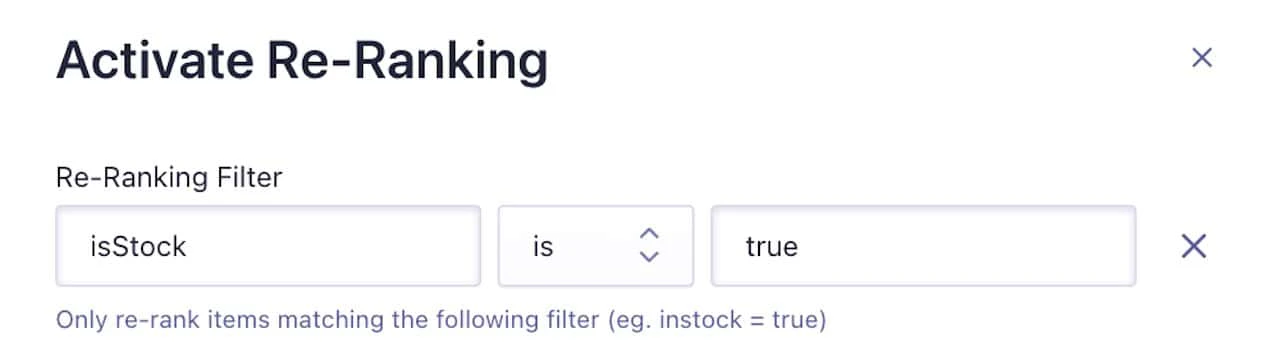
* **(Optional) Re-Ranking filter.** You can turn off re-ranking for specific to prevent promoting popular items that are out of stock or no longer listed. To do this, select a filter value, for example `instock=true`.
This feature isn't available on every plan.
Refer to your [pricing plan](https://www.algolia.com/pricing) to see if it's included.
## Before you begin
Create [category pages](/doc/guides/solutions/ecommerce/browse/tutorials/category-pages) before enabling Dynamic Re-Ranking.
## Enable Dynamic Re-Ranking on category pages
Set the following options in the [Dynamic Re-Ranking page in the dashboard](https://dashboard.algolia.com/reranking/):
* **Events source index.** Select the that receives your click and conversion events.
You can also select an alternative source index.
This is helpful if you have a staging index that replaces the production index every day for atomic reindexing.
In this case, enable re-ranking on both the staging and production indices as source events, given that the production index already receives events.
* **Browsing facets.** Set this to the category page identifier in your index, such as `collections`, `categories`, or `categoryPageId`.
Check with your team to make sure the browsing is referencing the correct filter used in the to generate the category page in the frontend UI.
* **(Optional) Event freshness.** [Event freshness](/doc/guides/algolia-ai/re-ranking#give-more-weight-to-recent-events-event-freshness) gives more weight to recent events to account for seasonality and short-term trends. This setting is on by default, and in most cases, you should keep it enabled.
* **(Optional) Re-Ranking filter.** You can turn off re-ranking for specific to prevent promoting popular items that are out of stock or no longer listed. To do this, select a filter value, for example `instock=true`.
 ## Turn on Dynamic Re-Ranking
To turn the feature on,
click **Activate Re-Ranking** from the [Dynamic Re-Ranking page in the dashboard](https://dashboard.algolia.com/reranking/).
## Turn on Dynamic Re-Ranking
To turn the feature on,
click **Activate Re-Ranking** from the [Dynamic Re-Ranking page in the dashboard](https://dashboard.algolia.com/reranking/).
 Dynamic Re-Ranking refreshes each query's ranking every 24 hours.
It always takes the last 30 days into account,
meaning it's based on a sliding window of the most recent analytics data.
You can see re-ranked results only after Algolia has received enough search traffic and click and conversion events.
To be promoted for a given query, a record must receive **at least 20 clicks or two conversions within the 30-day window.**
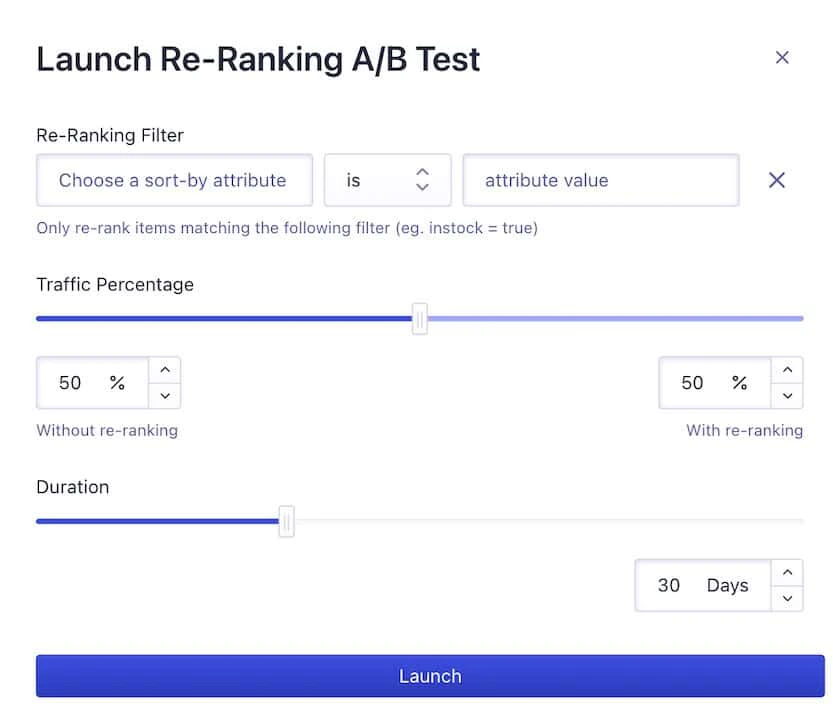
## A/B test Dynamic Re-Ranking on category pages
To ensure accurate measurement,
launch your A/B test from the Dynamic Re-Ranking page in the dashboard:
not from the dashboard's A/B test page.
This applies the configuration as intended and limits results to category pages with enough traffic.
Dynamic Re-Ranking refreshes each query's ranking every 24 hours.
It always takes the last 30 days into account,
meaning it's based on a sliding window of the most recent analytics data.
You can see re-ranked results only after Algolia has received enough search traffic and click and conversion events.
To be promoted for a given query, a record must receive **at least 20 clicks or two conversions within the 30-day window.**
## A/B test Dynamic Re-Ranking on category pages
To ensure accurate measurement,
launch your A/B test from the Dynamic Re-Ranking page in the dashboard:
not from the dashboard's A/B test page.
This applies the configuration as intended and limits results to category pages with enough traffic.
 ## See also
* [Dynamic Re-Ranking's effect on relevance](/doc/guides/algolia-ai/re-ranking#effect-on-relevance).
* [Send click and conversion events with InstantSearch.js](/doc/guides/building-search-ui/events/js).
* [Choose how to send events](/doc/guides/sending-events/getting-started).
* [Security best practice on sending click and conversion events](/doc/guides/algolia-ai/re-ranking#security).
## See also
* [Dynamic Re-Ranking's effect on relevance](/doc/guides/algolia-ai/re-ranking#effect-on-relevance).
* [Send click and conversion events with InstantSearch.js](/doc/guides/building-search-ui/events/js).
* [Choose how to send events](/doc/guides/sending-events/getting-started).
* [Security best practice on sending click and conversion events](/doc/guides/algolia-ai/re-ranking#security).