> ## Documentation Index
> Fetch the complete documentation index at: https://www.algolia.com/llms.txt
> Use this file to discover all available pages before exploring further.

# Personalized recommendations

> Personalize recommendations for your users.

export const Application = () => <Tooltip tip="An Algolia application is a self-contained environment with its own indices, configuration, and API keys. Applications don't share data or settings with each other.">
    application
  </Tooltip>;

export const AlgoliaRecommend = () => <svg xmlns="http://www.w3.org/2000/svg" className="inline" viewBox="0 0 80 80" width="20" height="20" fill="none" role="presentation" ariaLabel="Algolia Recommend">
    <path d="m50 65-4 12H34l-4-12h20Z" fill="#36395A"></path>
    <path d="M68 32c0 15.464-12.536 28-28 28S12 47.464 12 32 24.536 4 40 4s28 12.536 28 28Z" fill="#FF2A6A"></path>
    <path d="M43 34V17L26 34h17Z" fill="#fff"></path>
    <path d="M37 30v17l17-17H37Z" fill="#fff"></path>
  </svg>;

<Callout icon="flask-conical" color="#14b8a6">
  This is a **beta feature** according to [Algolia's Terms of Service ("Beta Services")](https://www.algolia.com/policies/terms/).
</Callout>

Personalized recommendations re-rank a model's results using each user's affinities.
Two users who view the same product see the same model, but a different order of recommended items.

Personalized recommendations are compatible with both [Classic](/doc/guides/personalization/classic-personalization/what-is-personalization) and [Advanced](/doc/guides/personalization/advanced-personalization/what-is-advanced-personalization) Personalization.

Personalized recommendations are available for the following models:

* [Frequently bought together](/doc/guides/algolia-recommend/overview#frequently-bought-together)
* [Related items](/doc/guides/algolia-recommend/overview#related-items)
* [Trending items](/doc/guides/algolia-recommend/overview#trending-items-and-trending-facets-value)
* [Looking similar](/doc/guides/algolia-recommend/overview#looking-similar)

## How personalized recommendations work

Personalized recommendations use the same Recommend models, but they incorporate user affinities to tailor the recommendations to individual users.

The recommendations are re-ranked based on users' [affinities](/doc/guides/personalization/classic-personalization/what-is-personalization/in-depth/how-personalization-works#translate-user-behavior-into-affinities-through-events),
which are derived from their interactions and preferences.

Each Recommend request must include the [`userToken`](/doc/api-reference/api-parameters/userToken).
Without it, Recommend doesn't have any affinities to re-rank with and returns the model's default results.

## Before you begin

<Callout icon="credit-card" color="#c084fc">
  This feature isn't available on every plan.
  Refer to your [pricing plan](https://www.algolia.com/pricing) to see if it's included.
</Callout>

Before you enable personalized recommendations:

* Set up your [Personalization configuration](/doc/guides/personalization/classic-personalization/personalizing-results/in-depth/configuring-personalization) and confirm that user affinities are being computed.
* Check that you [send a `userToken`](/doc/guides/sending-events/concepts/usertoken) with your events, and that each user has their own token.

## Enable personalized recommendations

1. Go to the [Algolia dashboard](https://dashboard.algolia.com/explorer/browse) and select your Algolia <Application />.
2. On the left sidebar, select <AlgoliaRecommend /> **Recommend**.
3. Select one of the supported models and click **Start using**.
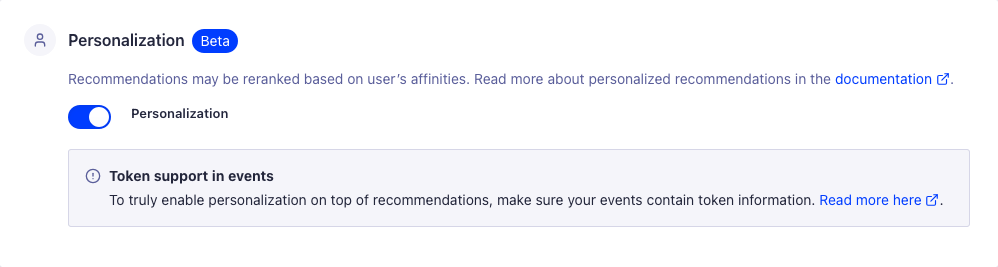
4. On the model's configuration page, turn on **Personalization**.

   <img src="https://mintcdn.com/algolia/QUuhkPGiow1bP-ae/images/guides/recommend/personalization-toggle.png?fit=max&auto=format&n=QUuhkPGiow1bP-ae&q=85&s=11bb36bb7c832cb86df77713aac1e24c" alt="Screenshot of a &#x22;Personalization&#x22; settings page with an enabled toggle and a note about &#x22;Token support in events&#x22;." width="998" height="267" data-path="images/guides/recommend/personalization-toggle.png" />

## Send a user token with your requests

Recommend inherits [`enablePersonalization`](/doc/api-reference/api-parameters/enablePersonalization) from the **Personalization** toggle you turned on for this model in [Enable personalized recommendations](#enable-personalized-recommendations), so you only need to send it to override that setting for a single request.

If you use InstantSearch with the [`insights` middleware](/doc/api-reference/widgets/insights/js), the Recommend widgets send the user token for you.

You can also set `userToken` in the widget's `queryParameters`:

```js JavaScript icon=code theme={"system"}
relatedProducts({
  container: "#relatedProducts",
  objectIDs: ["OBJECT_ID"],
  queryParameters: {
    userToken: "user-1234",
    enablePersonalization: true, // Optional: overrides the configuration
  },
});
```

If you use the [Recommend API client](/doc/libraries/sdk/methods/recommend/get-recommendations), add `userToken` to the `queryParameters` of each request:

```js JavaScript icon=code theme={"system"}
const response = await client.getRecommendations({
  requests: [
    {
      model: "related-products",
      indexName: "INDEX_NAME",
      objectID: "OBJECT_ID",
      threshold: 0,
      queryParameters: {
        userToken: "user-1234",
        enablePersonalization: true, // Optional: overrides the configuration
      },
    },
  ],
});
```

Send the same token you send with your click and conversion events.

If you use the Search Insights library, call [`getUserToken`](/doc/guides/sending-events/concepts/usertoken#get-the-user-token-from-search-insights) to get the anonymous user token, instead of generating your own.

## Personalize fallback results

When using a [fallback query](/doc/guides/algolia-recommend/how-to/set-up#show-fallback-recommendations), the results aren't personalized by default.

To personalize fallback results, set `enablePersonalization: true` in `fallbackParameters`:

```js JavaScript icon=code theme={"system"}
relatedProducts({
  // ...
  fallbackParameters: {
    // ...
    enablePersonalization: true,
  },
});
```

InstantSearch forwards `userToken` into `fallbackParameters` for you.
`enablePersonalization` needs to be set explicitly in `fallbackParameters`.

If you use the Recommend API client or an older version of InstantSearch, set both `userToken` and `enablePersonalization` in `fallbackParameters`.

## See also

* [Recommended for you](/doc/guides/algolia-recommend/how-to/recommended-for-you), a model that's personalized by design
* [Set up Recommend](/doc/guides/algolia-recommend/how-to/set-up)