> ## Documentation Index
> Fetch the complete documentation index at: https://algolia.com/llms.txt
> Use this file to discover all available pages before exploring further.
# No results handler
> The "NoResultsView" component displays different options to users when there are no results for a specific search.
export const SearchQuery = () =>
search query
;
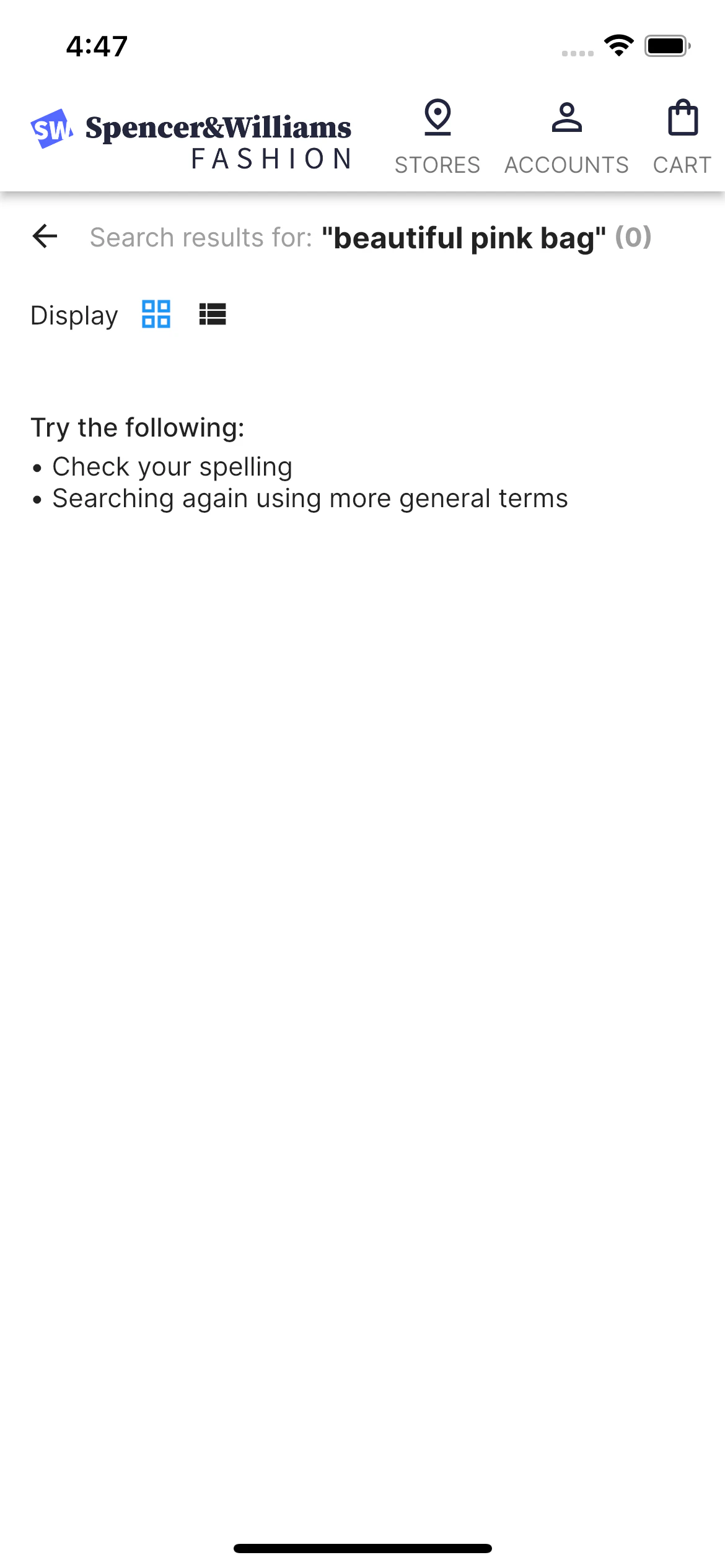
The `NoResultsView` component guides users when there are no results for a specific search by providing them with different ways to continue.
In the following example, the "beautiful black bag" doesn't match any result.
The `NoResultsView` component hides all other components and lists two options to help users find relevant results:
* Check the query spelling.
* Searching again using more general terms.
 ## Code summary
You can customize `NoResultsView` in:
* [The search results screen](https://github.com/algolia/flutter-ecom-ui-template/blob/0.1.0/lib/ui/screens/products/search_results_screen.dart#L104-L106)
* [The `NoResultsView` file](https://github.com/algolia/flutter-ecom-ui-template/blob/0.1.0/lib/ui/screens/products/components/no_results_view.dart)
### Usage
```dart Usage icon=code theme={"system"}
class NoResultsView extends StatelessWidget {
const NoResultsView({Key? key}) : super(key: key);
@override
Widget build(BuildContext context) {
return Padding(
padding: const EdgeInsets.symmetric(horizontal: 8.0, vertical: 24.0),
child: Column(
crossAxisAlignment: CrossAxisAlignment.start,
children: [
Text("Try the following:",
style: Theme.of(context).textTheme.bodyText1),
const SizedBox(height: 4),
Text("• Check your spelling",
style: Theme.of(context).textTheme.bodyText2),
Text("• Searching again using more general terms",
style: Theme.of(context).textTheme.bodyText2),
],
),
);
}
}
```
## External packages used
The `NoResultsView` widget is used with paging hits widgets which depend on the following Flutter packages:
| Package | Description | Used by |
| ----------------------------------------------------------------------------------- | ---------------------------------------------------------------------- | ---------------------------------------- |
| [`infinite_scroll_pagination`](https://pub.dev/packages/infinite_scroll_pagination) | Lazily load and display pages of items as users scroll down the screen | `PagedHitsListView`, `PagedHitsGridView` |
## Code summary
You can customize `NoResultsView` in:
* [The search results screen](https://github.com/algolia/flutter-ecom-ui-template/blob/0.1.0/lib/ui/screens/products/search_results_screen.dart#L104-L106)
* [The `NoResultsView` file](https://github.com/algolia/flutter-ecom-ui-template/blob/0.1.0/lib/ui/screens/products/components/no_results_view.dart)
### Usage
```dart Usage icon=code theme={"system"}
class NoResultsView extends StatelessWidget {
const NoResultsView({Key? key}) : super(key: key);
@override
Widget build(BuildContext context) {
return Padding(
padding: const EdgeInsets.symmetric(horizontal: 8.0, vertical: 24.0),
child: Column(
crossAxisAlignment: CrossAxisAlignment.start,
children: [
Text("Try the following:",
style: Theme.of(context).textTheme.bodyText1),
const SizedBox(height: 4),
Text("• Check your spelling",
style: Theme.of(context).textTheme.bodyText2),
Text("• Searching again using more general terms",
style: Theme.of(context).textTheme.bodyText2),
],
),
);
}
}
```
## External packages used
The `NoResultsView` widget is used with paging hits widgets which depend on the following Flutter packages:
| Package | Description | Used by |
| ----------------------------------------------------------------------------------- | ---------------------------------------------------------------------- | ---------------------------------------- |
| [`infinite_scroll_pagination`](https://pub.dev/packages/infinite_scroll_pagination) | Lazily load and display pages of items as users scroll down the screen | `PagedHitsListView`, `PagedHitsGridView` |