> ## Documentation Index
> Fetch the complete documentation index at: https://algolia.com/llms.txt
> Use this file to discover all available pages before exploring further.
# Product card
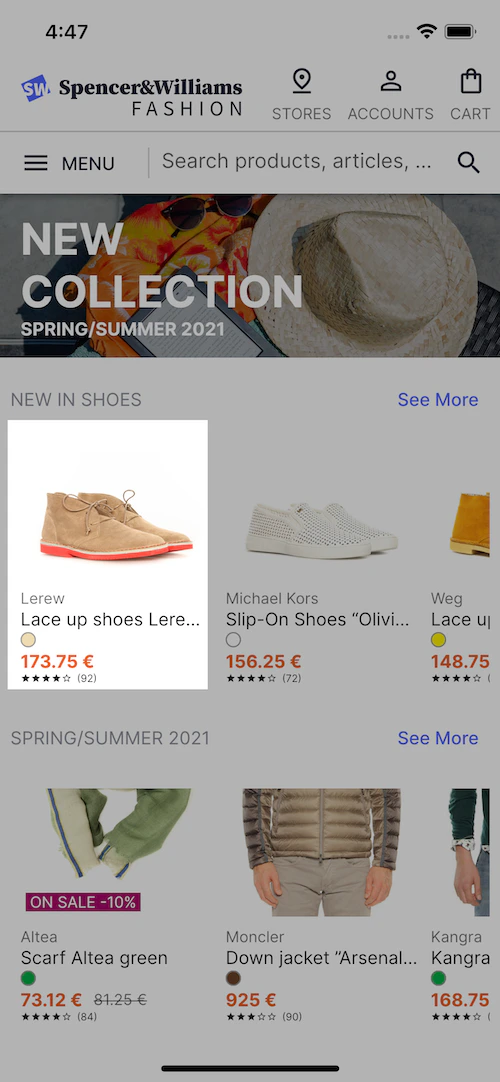
> The "Product card" components show your product data from an Algolia index as a product card.
Use:
* The [`ProductCardView` widget](#product-card) to display product information in a list or grid.
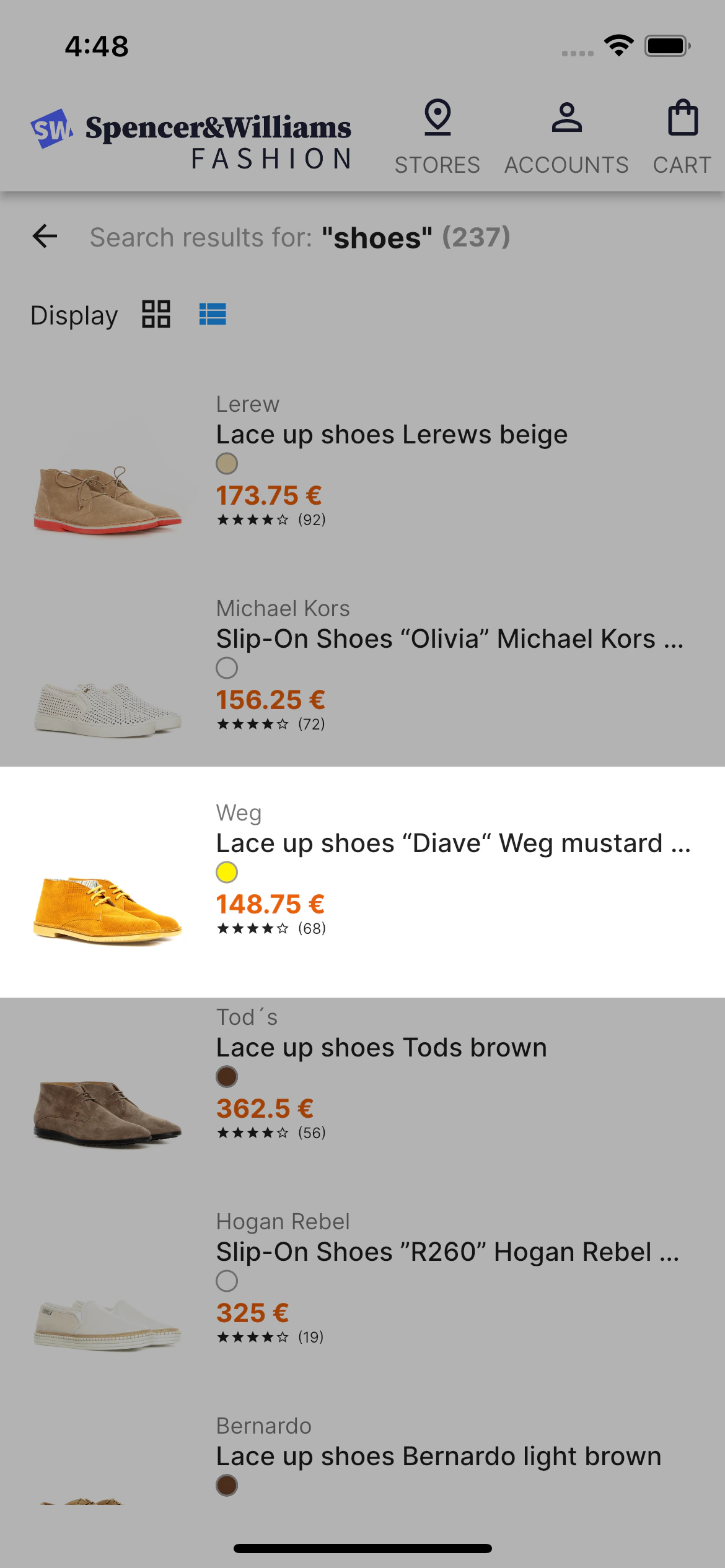
* The [`ProductItemView` widget](#product-item) to display product information with details in a list.
## Product card
The `ProductCardView` component lets you display product information. For example, you can show product cards in a list or grid view.
 ### Code summary
You can customize `ProductCardView` in:
* [The `ProductCardView` file](https://github.com/algolia/flutter-ecom-ui-template/blob/0.1.0/lib/ui/widgets/product_card_view.dart)
* [The `PagedHitsGridView` file](https://github.com/algolia/flutter-ecom-ui-template/blob/0.1.0/lib/ui/screens/products/components/paged_hits_grid_view.dart#L31-L35)
* [The home screen](https://github.com/algolia/flutter-ecom-ui-template/blob/0.1.0/lib/ui/screens/home/home_screen.dart#L73-L79)
* Its props.
#### Usage and props
```dart Usage theme={"system"}
class ProductCardView extends StatelessWidget {
const ProductCardView(
{Key? key,
required this.product,
this.imageAlignment = Alignment.bottomCenter,
this.onTap})
: super(key: key);
final Product product;
final Alignment imageAlignment;
final Function(String)? onTap;
@override
Widget build(BuildContext context) {
final priceValue = (product.price?.onSales ?? false)
? product.price?.discountedValue
: product.price?.value;
final crossedValue =
(product.price?.onSales ?? false) ? product.price?.value : null;
return GestureDetector(
onTap: () => onTap?.call(product.objectID!),
child: SizedBox(
width: 150,
child: Column(crossAxisAlignment: CrossAxisAlignment.start, children: [
Stack(
alignment: AlignmentDirectional.bottomStart,
children: [
SizedBox(
height: 100,
width: MediaQuery.of(context).size.width,
child: Image.network('${product.image}',
alignment: imageAlignment, fit: BoxFit.cover)),
if (product.price?.onSales == true)
Padding(
padding: const EdgeInsets.all(4.0),
child: Text(" ON SALE ${product.price?.discountLevel}% ",
style: Theme.of(context).textTheme.caption?.copyWith(
color: Colors.white,
backgroundColor: AppTheme.darkPink)),
)
],
),
const SizedBox(height: 8),
SizedBox(
child: Text('${product.brand}',
maxLines: 1,
overflow: TextOverflow.ellipsis,
softWrap: false,
style: Theme.of(context).textTheme.caption)),
SizedBox(
child: Text('${product.name}',
maxLines: 1,
overflow: TextOverflow.ellipsis,
softWrap: false,
style: Theme.of(context).textTheme.bodyText2)),
Padding(
padding: const EdgeInsets.symmetric(vertical: 2.0),
child: ColorIndicatorView(product: product),
),
Row(
children: [
Text('$priceValue €',
maxLines: 1,
overflow: TextOverflow.clip,
softWrap: false,
style: Theme.of(context).textTheme.bodyText2?.copyWith(
fontWeight: FontWeight.bold,
color: AppTheme.vividOrange)),
if (crossedValue != null)
Padding(
padding: const EdgeInsets.only(left: 8.0),
child: Text('$crossedValue €',
maxLines: 1,
overflow: TextOverflow.clip,
softWrap: false,
style: Theme.of(context)
.textTheme
.caption
?.copyWith(decoration: TextDecoration.lineThrough)),
),
],
),
RatingView(
value: product.reviews?.rating?.toInt() ?? 0,
reviewsCount: product.reviews?.count?.toInt() ?? 0),
]),
),
);
}
}
```
```dart Props theme={"system"}
final Product product; // Product item to display
final Alignment imageAlignment; // How to align the image within its bounds
final Function(String)? onTap; // Callback in item click
```
## Product item
The `ProductItemView` component lets you display product information.
For example, you can show product item with details in a list.
### Code summary
You can customize `ProductCardView` in:
* [The `ProductCardView` file](https://github.com/algolia/flutter-ecom-ui-template/blob/0.1.0/lib/ui/widgets/product_card_view.dart)
* [The `PagedHitsGridView` file](https://github.com/algolia/flutter-ecom-ui-template/blob/0.1.0/lib/ui/screens/products/components/paged_hits_grid_view.dart#L31-L35)
* [The home screen](https://github.com/algolia/flutter-ecom-ui-template/blob/0.1.0/lib/ui/screens/home/home_screen.dart#L73-L79)
* Its props.
#### Usage and props
```dart Usage theme={"system"}
class ProductCardView extends StatelessWidget {
const ProductCardView(
{Key? key,
required this.product,
this.imageAlignment = Alignment.bottomCenter,
this.onTap})
: super(key: key);
final Product product;
final Alignment imageAlignment;
final Function(String)? onTap;
@override
Widget build(BuildContext context) {
final priceValue = (product.price?.onSales ?? false)
? product.price?.discountedValue
: product.price?.value;
final crossedValue =
(product.price?.onSales ?? false) ? product.price?.value : null;
return GestureDetector(
onTap: () => onTap?.call(product.objectID!),
child: SizedBox(
width: 150,
child: Column(crossAxisAlignment: CrossAxisAlignment.start, children: [
Stack(
alignment: AlignmentDirectional.bottomStart,
children: [
SizedBox(
height: 100,
width: MediaQuery.of(context).size.width,
child: Image.network('${product.image}',
alignment: imageAlignment, fit: BoxFit.cover)),
if (product.price?.onSales == true)
Padding(
padding: const EdgeInsets.all(4.0),
child: Text(" ON SALE ${product.price?.discountLevel}% ",
style: Theme.of(context).textTheme.caption?.copyWith(
color: Colors.white,
backgroundColor: AppTheme.darkPink)),
)
],
),
const SizedBox(height: 8),
SizedBox(
child: Text('${product.brand}',
maxLines: 1,
overflow: TextOverflow.ellipsis,
softWrap: false,
style: Theme.of(context).textTheme.caption)),
SizedBox(
child: Text('${product.name}',
maxLines: 1,
overflow: TextOverflow.ellipsis,
softWrap: false,
style: Theme.of(context).textTheme.bodyText2)),
Padding(
padding: const EdgeInsets.symmetric(vertical: 2.0),
child: ColorIndicatorView(product: product),
),
Row(
children: [
Text('$priceValue €',
maxLines: 1,
overflow: TextOverflow.clip,
softWrap: false,
style: Theme.of(context).textTheme.bodyText2?.copyWith(
fontWeight: FontWeight.bold,
color: AppTheme.vividOrange)),
if (crossedValue != null)
Padding(
padding: const EdgeInsets.only(left: 8.0),
child: Text('$crossedValue €',
maxLines: 1,
overflow: TextOverflow.clip,
softWrap: false,
style: Theme.of(context)
.textTheme
.caption
?.copyWith(decoration: TextDecoration.lineThrough)),
),
],
),
RatingView(
value: product.reviews?.rating?.toInt() ?? 0,
reviewsCount: product.reviews?.count?.toInt() ?? 0),
]),
),
);
}
}
```
```dart Props theme={"system"}
final Product product; // Product item to display
final Alignment imageAlignment; // How to align the image within its bounds
final Function(String)? onTap; // Callback in item click
```
## Product item
The `ProductItemView` component lets you display product information.
For example, you can show product item with details in a list.
 ### Code summary
You can customize `ProductItemView` in:
* [The `ProductItemView` file](https://github.com/algolia/flutter-ecom-ui-template/blob/0.1.0/lib/ui/widgets/product_item_view.dart)
* [The `PagedHitsListView` file](https://github.com/algolia/flutter-ecom-ui-template/blob/0.1.0/lib/ui/screens/products/components/paged_hits_list_view.dart#L26-L30)
* Its props.
#### Usage and props
```dart Usage theme={"system"}
class ProductItemView extends StatelessWidget {
const ProductItemView(
{Key? key,
required this.product,
this.imageAlignment = Alignment.center,
this.onProductPressed})
: super(key: key);
final Product product;
final Alignment imageAlignment;
final Function(String)? onProductPressed;
@override
Widget build(BuildContext context) {
final priceValue = (product.price?.onSales ?? false)
? product.price?.discountedValue
: product.price?.value;
final crossedValue =
(product.price?.onSales ?? false) ? product.price?.value : null;
return GestureDetector(
onTap: () {
onProductPressed?.call(product.objectID!);
},
child: SizedBox(
child: Row(mainAxisSize: MainAxisSize.min, children: [
Stack(
alignment: AlignmentDirectional.bottomStart,
children: [
SizedBox(
height: 100,
width: 100,
child: Image.network('${product.image}',
alignment: imageAlignment, fit: BoxFit.cover)),
if (product.price?.onSales == true)
Padding(
padding: const EdgeInsets.all(4.0),
child: Text(
" ON SALE ${product.price?.discountLevel}% ",
style: Theme.of(context).textTheme.caption?.copyWith(
color: Colors.white,
backgroundColor: AppTheme.darkPink),
))
],
),
const SizedBox(width: 8),
Expanded(
child: Column(
crossAxisAlignment: CrossAxisAlignment.start,
children: [
Text('${product.brand}',
maxLines: 1,
overflow: TextOverflow.ellipsis,
softWrap: false,
style: Theme.of(context).textTheme.caption),
Text('${product.name}',
maxLines: 1,
overflow: TextOverflow.ellipsis,
softWrap: false,
style: Theme.of(context).textTheme.bodyText1),
if (product.description?.isNotEmpty == true)
Text('${product.description}',
maxLines: 2,
overflow: TextOverflow.ellipsis,
softWrap: false,
style: Theme.of(context)
.textTheme
.bodyText2
?.copyWith(fontSize: 12, color: Colors.grey)),
Padding(
padding: const EdgeInsets.symmetric(vertical: 2.0),
child: ColorIndicatorView(product: product),
),
Row(
children: [
Text('$priceValue €',
maxLines: 1,
overflow: TextOverflow.clip,
softWrap: false,
style: Theme.of(context).textTheme.bodyText2?.copyWith(
fontWeight: FontWeight.bold,
color: AppTheme.vividOrange)),
if (crossedValue != null)
Padding(
padding: const EdgeInsets.only(left: 8.0),
child: Text('$crossedValue €',
maxLines: 1,
overflow: TextOverflow.clip,
softWrap: false,
style: Theme.of(context)
.textTheme
.caption
?.copyWith(
decoration: TextDecoration.lineThrough)),
),
],
),
RatingView(
value: product.reviews?.rating?.toInt() ?? 0,
reviewsCount: product.reviews?.count?.toInt() ?? 0),
],
),
),
]),
),
);
}
}
```
```dart Props theme={"system"}
final Product product; // Product item to display
final Alignment imageAlignment; // How to align the image within its bounds
final Function(String)? onProductPressed; // Callback in item click
```
### Code summary
You can customize `ProductItemView` in:
* [The `ProductItemView` file](https://github.com/algolia/flutter-ecom-ui-template/blob/0.1.0/lib/ui/widgets/product_item_view.dart)
* [The `PagedHitsListView` file](https://github.com/algolia/flutter-ecom-ui-template/blob/0.1.0/lib/ui/screens/products/components/paged_hits_list_view.dart#L26-L30)
* Its props.
#### Usage and props
```dart Usage theme={"system"}
class ProductItemView extends StatelessWidget {
const ProductItemView(
{Key? key,
required this.product,
this.imageAlignment = Alignment.center,
this.onProductPressed})
: super(key: key);
final Product product;
final Alignment imageAlignment;
final Function(String)? onProductPressed;
@override
Widget build(BuildContext context) {
final priceValue = (product.price?.onSales ?? false)
? product.price?.discountedValue
: product.price?.value;
final crossedValue =
(product.price?.onSales ?? false) ? product.price?.value : null;
return GestureDetector(
onTap: () {
onProductPressed?.call(product.objectID!);
},
child: SizedBox(
child: Row(mainAxisSize: MainAxisSize.min, children: [
Stack(
alignment: AlignmentDirectional.bottomStart,
children: [
SizedBox(
height: 100,
width: 100,
child: Image.network('${product.image}',
alignment: imageAlignment, fit: BoxFit.cover)),
if (product.price?.onSales == true)
Padding(
padding: const EdgeInsets.all(4.0),
child: Text(
" ON SALE ${product.price?.discountLevel}% ",
style: Theme.of(context).textTheme.caption?.copyWith(
color: Colors.white,
backgroundColor: AppTheme.darkPink),
))
],
),
const SizedBox(width: 8),
Expanded(
child: Column(
crossAxisAlignment: CrossAxisAlignment.start,
children: [
Text('${product.brand}',
maxLines: 1,
overflow: TextOverflow.ellipsis,
softWrap: false,
style: Theme.of(context).textTheme.caption),
Text('${product.name}',
maxLines: 1,
overflow: TextOverflow.ellipsis,
softWrap: false,
style: Theme.of(context).textTheme.bodyText1),
if (product.description?.isNotEmpty == true)
Text('${product.description}',
maxLines: 2,
overflow: TextOverflow.ellipsis,
softWrap: false,
style: Theme.of(context)
.textTheme
.bodyText2
?.copyWith(fontSize: 12, color: Colors.grey)),
Padding(
padding: const EdgeInsets.symmetric(vertical: 2.0),
child: ColorIndicatorView(product: product),
),
Row(
children: [
Text('$priceValue €',
maxLines: 1,
overflow: TextOverflow.clip,
softWrap: false,
style: Theme.of(context).textTheme.bodyText2?.copyWith(
fontWeight: FontWeight.bold,
color: AppTheme.vividOrange)),
if (crossedValue != null)
Padding(
padding: const EdgeInsets.only(left: 8.0),
child: Text('$crossedValue €',
maxLines: 1,
overflow: TextOverflow.clip,
softWrap: false,
style: Theme.of(context)
.textTheme
.caption
?.copyWith(
decoration: TextDecoration.lineThrough)),
),
],
),
RatingView(
value: product.reviews?.rating?.toInt() ?? 0,
reviewsCount: product.reviews?.count?.toInt() ?? 0),
],
),
),
]),
),
);
}
}
```
```dart Props theme={"system"}
final Product product; // Product item to display
final Alignment imageAlignment; // How to align the image within its bounds
final Function(String)? onProductPressed; // Callback in item click
```