> ## Documentation Index
> Fetch the complete documentation index at: https://algolia.com/llms.txt
> Use this file to discover all available pages before exploring further.

# SEO checklist

> Every step you can take to make your React InstantSearch search experience SEO-friendly.

export const Records = () => <Tooltip tip="A record is a searchable object in an Algolia index. Each record consists of named attributes." cta="Algolia records" href="/doc/guides/sending-and-managing-data/prepare-your-data#algolia-records">
    records
  </Tooltip>;

<Note>
  This is the **React InstantSearch v7** documentation.
  If you're upgrading from v6, see the [upgrade guide](/doc/guides/building-search-ui/upgrade-guides/react/#migrate-from-react-instantsearch-v6-to-react-instantsearch-v7).
  If you were using React InstantSearch Hooks,
  this v7 documentation applies—just check for [necessary changes](/doc/guides/building-search-ui/upgrade-guides/react/#migrate-from-react-instantsearch-hooks-to-react-instantsearch-v7).
  To continue using v6, you can find the [archived documentation](https://algolia.com/old-docs/deprecated/instantsearch/react/v6/api-reference/instantsearch/).
</Note>

For your website to appear in a search engine's results,
the search engine needs to be able to **discover, crawl, parse, and render the key pages of your site**.

When building your search experience with client-side JavaScript,
you may worry that search engines can't crawl or render your URLs and that this may hurt your ranking.
While some search engines are getting better at processing sites with client-side JavaScript search,
you can also do a lot to optimize your website for search engines without sacrificing the user experience.

## Your search result pages are directly accessible through a URL

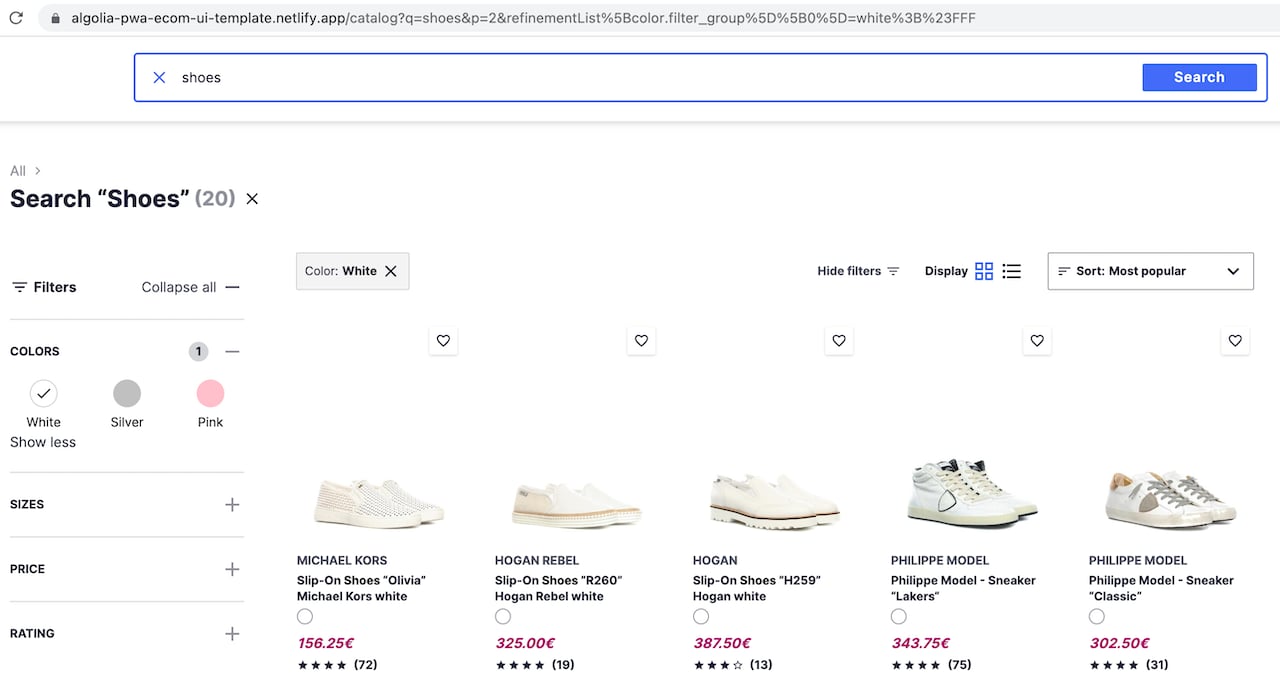
As users interact with your search interface, the URL should dynamically update and reflect the options they've selected and their actions.

This allows them to share links to your website,
enhancing the overall usability of your search and encouraging [backlinking](https://wikipedia.org/wiki/Backlink).

<img src="https://mintcdn.com/algolia/u8QjGPGZbKOqOFEr/images/guides/seo/demo-url-sync.png?fit=max&auto=format&n=u8QjGPGZbKOqOFEr&q=85&s=687a68ad818b846c9d445045638bb2b0" alt="Reflect the search query and selected refinements in your URL" width="1280" height="683" data-path="images/guides/seo/demo-url-sync.png" />

<Columns>
  <Card title="Open CodeSandbox" icon="codesandbox" href="https://codesandbox.io/s/github/algolia/instantsearch-seo-demo-apps/tree/master/server-side-rendering/react-instantsearch">
    Run and edit the SEO-friendly routing example in CodeSandbox.
  </Card>

  <Card title="Explore source code" icon="github" href="https://github.com/algolia/instantsearch-seo-demo-apps/tree/master/server-side-rendering/react-instantsearch">
    Browse the SEO-friendly routing example on GitHub.
  </Card>
</Columns>

This approach has clear benefits for the user experience,
but you might be concerned about content duplication.
Isn't this creating too many pages returning the same content? Aren't dynamic URLs bad for SEO?

Many websites use dynamic URLs. Even though they're harder to index than static URLs,
most search engines can remove query parameters and trace back to the primary page.

Dynamic URLs can be SEO-friendly if well-structured and supported with [canonical tags](#you-use-canonical-urls-to-indicate-primary-content).

For more information, see:

* [Dynamic versus static URLs](https://developers.google.com/search/blog/2008/09/dynamic-urls-vs-static-urls)
* [Specify canonical URLs](https://developers.google.com/search/docs/crawling-indexing/consolidate-duplicate-urls)

## Your widgets use `a `tags with `href` attributes

This section is only relevant if you have customized the markup of at least one of your widgets.
The default markup implements anchor tags with plain URLs.

Search engines follow the links they find on a page.
**They should be able to crawl every page of your website by going from link to link.**

For example, if you customized the pagination widget then **make sure each page button is an `<a>` tag with an `href` attribute**.
It shouldn't be a button with an event listener.
This especially applies to discovery-related widgets, such as:

<Tabs>
  <Tab title="JavaScript and Vue">
    * [`breadcrumb`](/doc/api-reference/widgets/breadcrumb/js)
    * [`hierarchicalMenu`](/doc/api-reference/widgets/hierarchical-menu/js)
    * [`hits`](/doc/api-reference/widgets/hits/js)
    * [`infiniteHits`](/doc/api-reference/widgets/infinite-hits/js)
    * [`menu`](/doc/api-reference/widgets/menu/js)
    * [`pagination`](/doc/api-reference/widgets/pagination/js)
  </Tab>

  <Tab title="React">
    * [`Breadcrumb`](/doc/api-reference/widgets/breadcrumb/react)
    * [`HierarchicalMenu`](/doc/api-reference/widgets/hierarchical-menu/react)
    * [`Hits`](/doc/api-reference/widgets/hits/react)
    * [`InfiniteHits`](/doc/api-reference/widgets/infinite-hits/react)
    * [`Menu`](/doc/api-reference/widgets/menu/react)
    * [`Pagination`](/doc/api-reference/widgets/pagination/react)
  </Tab>
</Tabs>

### Dos and don'ts

Do this:

```html HTML theme={"system"}
<a href="https://example.com">
<a href="/relative/path/file">
```

Not this:

```html HTML theme={"system"}
<a routerLink="some/path">
<span href="https://example.com">
<a onclick="goto('https://example.com')">
```

## Your URLs are readable

Your URLs must be logical and readable.
It's better to use full words than identifiers or abbreviations.

For every InstantSearch flavor, the basic routing configuration injects every search refinement into the URL as a [query string](https://wikipedia.org/wiki/Query_string) parameter.
These parameters are inferred from [`uiState`](/doc/api-reference/widgets/ui-state/js).

```txt theme={"system"}
https://mywebsite.com/?menu[categories]=Cell Phone Accessories&refinementList[brand][0]=Apple&query=case
```

The default InstantSearch routing adds unnecessary URL information.
You should configure the routing to only preserve important and readable keywords.

```txt theme={"system"}
https://mywebsite.com/Cell-Phone-Accessories/?brands=Apple&query=case
```

For example, if someone searches for "red dresses" in a search engine,
your website should show up on the results page as `https://mywebsite.com/red-dresses/` rather than
`https://mywebsite.com/?c=red%20dresses`.

### Dos and don'ts

Do this:

* `https://mywebsite.com/Car-Equipment/`
* `https://mywebsite.com/Car-Equipment/?page=3`
* `https://mywebsite.com/Computers+%26+Tablets/?page=2&brands=Apple`

Not this:

* `https://mywebsite.com/98907/?q=879065`
* `https://mywebsite.com/search/?c=Car%20Equipement&s=asc&p=3`

For more information, see [Keep a simple URL structure](https://developers.google.com/search/docs/crawling-indexing/url-structure).

## Your URLs reflect the structure of your website

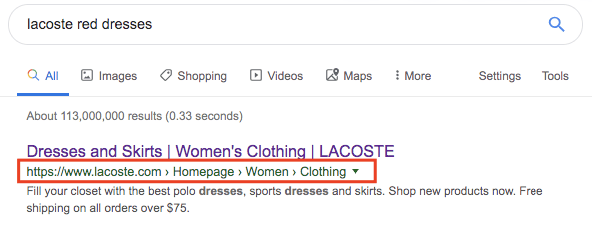
Search engines can use your URL structure to infer the architecture of your website,
understand the context of a page, and enhance its relevance for a particular search query.

<img src="https://mintcdn.com/algolia/u8QjGPGZbKOqOFEr/images/guides/seo/lacoste-url-structure.png?fit=max&auto=format&n=u8QjGPGZbKOqOFEr&q=85&s=b3b895ce37d1f224454bee80bcbd4258" alt="Use well-structured URLs for better search results" width="592" height="233" data-path="images/guides/seo/lacoste-url-structure.png" />

Well-structured URLs give your users immediate insight into a page's topic and its location within the website.

For example, if a website has categories and sub-categories,
each category should be reachable through `https://mywebsite.com/<category>/` and each sub-category through `https://mywebsite.com/<category>/<sub-category>`.

### Dos and don'ts

Do this:

* `https://mywebsite.com/Car-Equipment/`
* `https://mywebsite.com/Women-Clothing/T-Shirts/`

Not this:

* `https://mywebsite.com/search?category=Cars-Equipement`
* `https://mywebsite.com/search?categorylvl1=Clothing&categoryLvl2=T-shirts`

For more information, see [Better presentation of URLs in search results](https://developers.google.com/search/blog/2015/04/better-presentation-of-urls-in-search)

## Your `robots.txt` file

If you use [canonical URLs](#you-use-canonical-urls-to-indicate-primary-content) and a [sitemap](#your-category-urls-are-referenced-in-a-sitemap),
you don't have to change your [`robots.txt`](https://www.robotstxt.org/) file.

## You use canonical URLs to indicate primary content

A canonical URL is [the most representative page from a set of duplicate pages](https://developers.google.com/search/docs/crawling-indexing/consolidate-duplicate-urls) on your site.

When users search for "women t-shirts" in a search engine, you want them to find `https://mywebsite.com/Women-Clothing/T-Shirts/` rather than:

```txt theme={"system"}
https://mywebsite.com/Women-Clothing/T-Shirts/?query=tshirts&free-shipping=true&page=4
```

Here, all three pages have similar content.
As a result, you need to tell search engine bots which URL to reference as the primary page (canonical URL).

To do this, add a `rel="canonical"` link that points to the canonical URL on all possible duplicate pages.
In the following example, all links need to have a `link` element pointing to the primary page.

* `https://mywebsite.com/Women-Clothing/T-Shirts/?page=42`
* `https://mywebsite.com/Women-Clothing/T-Shirts/?brand=lacoste`
* `https://mywebsite.com/Women-Clothing/T-Shirts/?query=round%20Collar`

```html HTML icon="code-xml" theme={"system"}
<head>
  <!-- ... -->
  <link rel="canonical" href="https://mywebsite.com/Women-Clothing/T-Shirts/" />
</head>
```

### Are mobile pages duplicates?

Yes, the mobile version of a page counts as duplicate content.
Make sure your mobile pages have a canonical link in their `head`,
indicating the desktop page as the primary page.

You can also reference the mobile page from the primary page with the following tag:

```html HTML icon="code-xml" theme={"system"}
<head>
  <!-- ... -->
  <link rel="alternate" media="only screen and (max-width: 640px)">
</head>
```

### Paginated content

If you're using the pagination widget or the "show more" button of the infinite hits widget,
make sure that:

1. Your widget uses `<a>` tags with an `href` attribute:

   ```html HTML theme={"system"}
   <!-- Pagination -->
   <ul>
     <li><a href="https://mywebsite.com/Women-Clothing/T-Shirts/?page=1">1</a></li>
     <li><a href="https://mywebsite.com/Women-Clothing/T-Shirts/?page=2">2</a></li>
     <!-- ... -->
   </ul>

   <!-- "Show more" button -->
   <a href="https://mywebsite.com/Women-Clothing/T-Shirts/?page=2">Show more</a>
   ```

2. Each page can be accessed directly through a URL.

3. Each page URL has a canonical link to its primary page.

If your pagination occurs on scroll (as is the case with the infinite hits widget),
make sure you still provide a "show more" link that uses plain URLs.

Some search engines use the HTML `link` elements with attributes `rel="next"` and `rel="prev"` in the `<head>` of your page to infer the relationship between component URLs in a paginated series.
These elements help but not all search engines use them for indexing.

For more information, see:

* [Pagination with rel="next" and rel="prev"](https://developers.google.com/search/blog/2011/09/pagination-with-relnext-and-relprev)
* [Infinite scroll search-friendly recommendations](https://developers.google.com/search/blog/2014/02/infinite-scroll-search-friendly)

## Your category URLs are referenced in a sitemap

A sitemap is an XML file that tells search engine crawlers which pages are central to your site.
Having a sitemap is particularly recommended for large websites with many unrelated pages.

When deciding which pages to put in your sitemap,
a good rule is to include only your canonical pages.

If you're not using a content management system (CMS) that automatically generates a sitemap for you,
you can generate one based on your Algolia indices.

For more information, see:

* [Generate a sitemap from an Algolia index](/doc/guides/sending-and-managing-data/manage-indices-and-apps/manage-indices/tutorial/generate-sitemap-from-index)
* [Learn about sitemaps](https://developers.google.com/search/docs/crawling-indexing/sitemaps/overview)

## Your canonical pages have unique titles and descriptions

The `title` and `description` meta tags give search engine users important insight into the content of a search result and its relevance.
This information often determines which search engine result a person clicks on,
so it's crucial to use [high-quality titles and descriptions](https://developers.google.com/search/docs/appearance/title-link) when you build your web pages.

<Note>
  Algolia doesn't add meta tags to your pages.
  You have to do that yourself using the tools you use to build your website.
</Note>

## Your widget's markup is semantic

InstantSearch widgets provide a default semantic markup that should cover most cases,
but if you're using connectors to customize your UI,
make sure to properly use markup according to its meaning and purpose.

For example, use heading elements (`h1` to `h6`) for headings,
paragraph elements (`p`) for paragraphs,
list elements (`ul`, `ol`, or `dl`) for lists, and tables (`table`) for data tables.
Semantic markup helps search engines identify and categorize your content with minimal effort.

### Dos and don'ts

Do this:

```html HTML icon="code-xml" theme={"system"}
<h1>Heading</h1>
<p>Body text.</p>
<p>More body text.</p>
```

Not this:

```html HTML icon="code-xml" theme={"system"}
<p class="heading">Heading</p>
Body text.<br><br>
More body text.
```

Because your site's <Records /> are unique,
you need to customize the markup template for the hits or infinite hits widgets.

Here's a possible template for a product search result on an ecommerce website:

```html HTML icon="code-xml" theme={"system"}
<article>
  <header>
    <h2>Google Chromecast Ultra</h2>
    <p>TV and home theater</p>
  </header>
  <div>
    <img src="https://cdn-demo.algolia.com/bestbuy-0118/4397400_sb.jpg" width="220" height="146" alt="Google Chromecast Ultra" />
    <p>Enjoy all your favorite movies, shows, games, and music plus the latest 4K content with Chromecast Ultra, a streaming device that…</p>
  </div>
  <footer>
    <p>
      <span>$</span> <strong>69</strong>
      <span>Rating: 4/5</span>
    </p>
  </footer>
</article>
```

While Algolia uses semantic markup (the content is isolated in an `article` element, a `header` section with the product name in an `h2` element, a product image with an `alt` attribute, and the main description in a `p` element),
you're missing some information details that could be useful for a search engine ("TV and home theater" is the product category, "69" is its price).
You can solve this by using structured data.

### Structured data

Structured data is a standardized format for providing information about a page and classifying its content. With structured data, you can give search engines insight into the meaning of your pages.

Here's how to add structured data to the previous example:

```html HTML icon="code-xml" theme={"system"}
<article itemscope itemtype="http://schema.org/Product">
  <header>
    <h2 itemprop="name">Google Chromecast Ultra</h2>
    <p itemprop="category">TV and home theater</p>
    <meta itemprop="brand" content="Google" />
    <meta itemprop="gtin12" content="GA3A00403A14" />
  </header>
  <div>
    <img itemprop="image" src="https://cdn-demo.algolia.com/bestbuy-0118/4397400_sb.jpg" width="220" height="146" alt="Google Chromecast Ultra" />
    <p itemprop="description">Enjoy all your favorite movies, shows, games, and music plus the latest 4K content with Chromecast Ultra, a streaming device that…</p>
  </div>
  <footer>
    <p>
      <span itemprop="offers" itemscope itemtype="http://schema.org/Offer">
        <span itemprop="priceCurrency" content="USD">$</span> <strong itemprop="price" content="69.00">69</strong>
        <link itemprop="url" href="https://www.amazon.com/Google-Chromecast-Ultra/dp/B0157OY5EA/" />
        <meta itemprop="availability" content="https://schema.org/InStock" />
        <meta itemprop="priceValidUntil" content="2021-11-05" />
      </span>
      <span itemprop="aggregateRating" itemscope itemtype="http://schema.org/AggregateRating">
        Rating: <span itemprop="ratingValue">4</span>/<span itemprop="bestRating">5</span>
        <meta itemprop="reviewCount" content="89" />
      </span>
    </p>
    <meta itemprop="sku" content="0446310786" />
  </footer>
</article>
```

This markup is now much more complete: it explicitly references what the content represents (product name, category, price, rating). You have also added content for search engines using `link` and `meta` tags.

Here are some examples of templates with structured data for InstantSearch widgets:

<CodeGroup>
  ```html Breadcrumb theme={"system"}
  <ol itemscope itemtype="https://schema.org/BreadcrumbList">
    <li itemprop="itemListElement" itemscope itemtype="https://schema.org/ListItem">
      <a itemtype="https://schema.org/Thing" itemprop="item" href="https://example.com/">
        <span itemprop="name">Home</span>
      </a>
      <meta itemprop="position" content="1">
    </li>

    <li itemprop="itemListElement" itemscope itemtype="https://schema.org/ListItem">
      <a itemprop="item" itemtype="https://schema.org/Thing" href="https://example.com/cameras-and-camcorders">
        <span itemprop="name">Cameras &amp; Camcorders</span>
      </a>
      <meta itemprop="position" content="2">
    </li>
    <li itemprop="itemListElement" itemscope itemtype="https://schema.org/ListItem">
      <span itemprop="name">Digital Cameras</span>
      <meta itemprop="item" itemtype="https://schema.org/Thing"
            content="https://example.com/cameras-and-camcorders/digital-cameras">
      <meta itemprop="position" content="3">
    </li>
  </ol>
  ```

  ```html Menu theme={"system"}
  <ul itemscope itemtype="https://schema.org/SiteNavigationElement">
    <li>
      <a itemprop="url" href="https://example.com/Appliances">
        <span itemprop="name">Appliances</span> (4306)
      </a>
    </li>
    <li>
      <a itemprop="url" href="https://example.com/Audio">
        <span itemprop="name">Audio</span> (1570)
      </a>
    </li>
    <li>
      <a itemprop="url" href="https://example.com/Cameras-and-Camcorders">
        <span itemprop="name">Cameras &amp; Camcorders</span> (1369)
      </a>
    </li>
    <li>
      <a itemprop="url" href="https://example.com/Car-Electronics-and-GPS">
        <span itemprop="name">Car Electronics &amp; GPS</span> (1208)
      </a>
    </li>
    <li>
      <a itemprop="url" href="https://example.com/Cell-Phones">
        <span itemprop="name">Cell Phones</span> (3291)
      </a>
    </li>
  </ul>
  ```

  ```html HierarchicalMenu theme={"system"}
  <ul itemscope itemtype="https://schema.org/SiteNavigationElement">
    <li>
      <a itemprop="url" href="https://example.com/Appliances">
        <span itemprop="name">Appliances</span> (4306)
      </a>
    </li>
    <li>
      <a itemprop="url" href="https://example.com/Audio">
        <span itemprop="name">Audio</span> (1570)
      </a>
    </li>
    <li>
      <a itemprop="url" href="https://example.com/Cameras-and-Camcorders">
        <span itemprop="name">Cameras &amp; Camcorders</span> (1369)
      </a>
      <ul>
        <li>
          <a itemprop="url" href="https://example.com/Cameras-and-Camcorders/Binoculars">
            <span itemprop="name">Binoculars</span> (20)
          </a>
        </li>
        <li>
          <a itemprop="url" href="https://example.com/Cameras-and-Camcorders/Camcorder-Accessories">
            <span itemprop="name">Camcorder Accessories</span> (173)
          </a>
        </li>
        <li>
          <a itemprop="url" href="https://example.com/Cameras-and-Camcorders/Camcorders">
            <span itemprop="name">Camcorders</span> (50)
          </a>
        </li>
        <li>
          <a itemprop="url" href="https://example.com/Cameras-and-Camcorders/Digital-Camera-Accessories">
            <span itemprop="name">Digital Camera Accessories</span> (804)
          </a>
        </li>
        <li>
          <a itemprop="url" href="https://example.com/Cameras-and-Camcorders/Digital-Cameras">
            <span itemprop="name">Digital Cameras</span> (170)
          </a>
          <ul>
            <li>
              <a itemprop="url" href="https://example.com/Cameras-and-Camcorders/Digital-Cameras/Digital-SLR-Cameras">
                <span itemprop="name">Digital SLR Cameras</span> (44)
              </a>
            </li>
            <li>
              <a itemprop="url" href="https://example.com/Cameras-and-Camcorders/Digital-Cameras/Mirrorless-Cameras">
                <span itemprop="name">Mirrorless Cameras</span> (29)
              </a>
            </li>
            <li>
              <a itemprop="url" href="https://example.com/Cameras-and-Camcorders/Digital-Cameras/Point-and-Shoot-Cameras">
                <span itemprop="name">Point &amp; Shoot Cameras</span> (84)
              </a>
            </li>
          </ul>
        </li>
      </ul>
    </li>
    <li>
      <a itemprop="url" href="https://example.com/Car-Electronics-and-GPS">
        <span itemprop="name">Car Electronics &amp; GPS</span> (1208)
      </a>
    </li>
    <li>
      <a itemprop="url" href="https://example.com/Cell-Phones">
        <span itemprop="name">Cell Phones</span> (3291)
      </a>
    </li>
  </ul>
  ```
</CodeGroup>

Search engines support a variety of structured data, and you're encouraged to mark up your content with it.

For more information, see:

* [Web semantics](https://developers.google.com/search/blog/2012/07/on-web-semantics)
* [HTML elements reference](https://developer.mozilla.org/en-US/docs/Web/HTML/Element)
* [HTML standard](https://html.spec.whatwg.org)
* [Google-supported structured data](https://developers.google.com/search/docs/appearance/structured-data/search-gallery)
* [Introduction to structured data](https://developers.google.com/search/docs/appearance/structured-data/intro-structured-data)
* [Schema.org](https://schema.org)
* [Structured data testing tool](https://developers.google.com/search/docs/appearance/structured-data)

## Your website is mobile-friendly

Due to the large number of users who browse the web on mobile,
search engines value [mobile-friendly websites](https://developers.google.com/search/docs/crawling-indexing/mobile/mobile-sites-mobile-first-indexing) and only index content visible on a mobile device.

Therefore, your mobile and desktop sites must share the same content, structured data, title, and description meta tags.

## Your site is using a pre-rendering technique

Algolia can power a wide array of search experiences, but the most potent implementations often rely on client-side JavaScript.
That's why InstantSearch was built: it's a suite of search widgets compatible with the most popular frontend frameworks.

Not all search engine crawlers can [process JavaScript successfully or immediately](https://developers.google.com/search/docs/crawling-indexing/javascript/javascript-seo-basics).
Fortunately, there are many ways around it.

### Server-side rendering (SSR)

This technique fetches your data and renders a JavaScript website on the server before sending it to the browser.
React InstantSearch and Vue InstantSearch support dynamic rendering.
For more information, see:

* [Server-side Rendering with Vue InstantSearch](/doc/guides/building-search-ui/going-further/server-side-rendering/vue)
* [Server-side Rendering with React InstantSearch](/doc/guides/building-search-ui/going-further/server-side-rendering/react).