> ## Documentation Index
> Fetch the complete documentation index at: https://algolia.com/llms.txt
> Use this file to discover all available pages before exploring further.
# Build a Query Suggestions UI with InstantSearch iOS and UIKit
> Build a user interface to show Query Suggestions in your InstantSearch iOS app.
export const Index = () =>
index
;
When your user interacts with a search box,
you can help them discover what they could search for by providing **Query suggestions**.
Query suggestions are a specific kind of multi-index interface:
* The main search interface will use a regular .
* As users type a phrase, suggestions from your [Query Suggestions index](/doc/guides/building-search-ui/ui-and-ux-patterns/query-suggestions/js) are displayed.
To display the suggestions in your iOS app, use Algolia's `MultiHitsViewModel` component. Read on for an example of how to display a search bar with instant results and query suggestions "as you type".
## Usage
To display the suggestions:
* Create a [Query Suggestions index](/doc/guides/building-search-ui/ui-and-ux-patterns/query-suggestions/js) from your main index.
* Implement a [Multi-Index search experience](/doc/guides/building-search-ui/ui-and-ux-patterns/multi-index-search/ios) using both indices.
* When clicking on a suggestion, set the query to the chosen suggestion.
## Before you begin
To use InstantSearch iOS, you need an Algolia account.
Either [create a new account](https://dashboard.algolia.com/users/sign_up) or use the following credentials:
* Application ID: `latency`
* Search API key: `927c3fe76d4b52c5a2912973f35a3077`
* Results index name: `STAGING_native_ecom_demo_products`
* Suggestions index name: `STAGING_native_ecom_demo_products_query_suggestions`
These credentials give you access to pre-existing datasets of products and Query Suggestions appropriate for this guide.
## Expected behavior
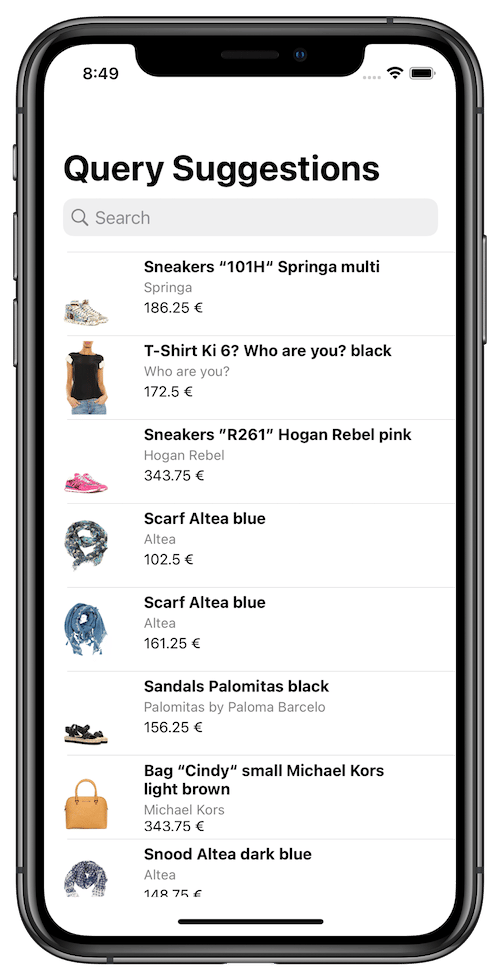
The initial screen shows the search box and results for an empty query:
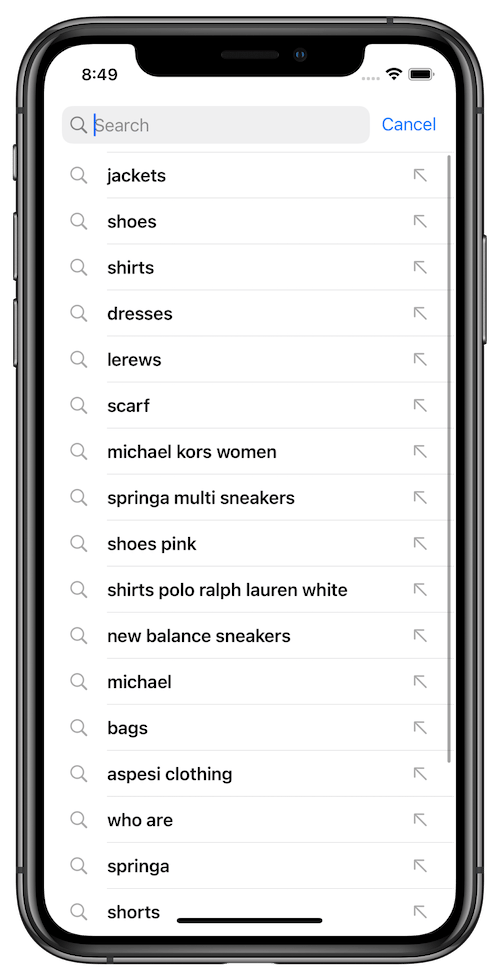
 When users tap the search box, a list of query suggestions are shown (the most popular for an empty query):
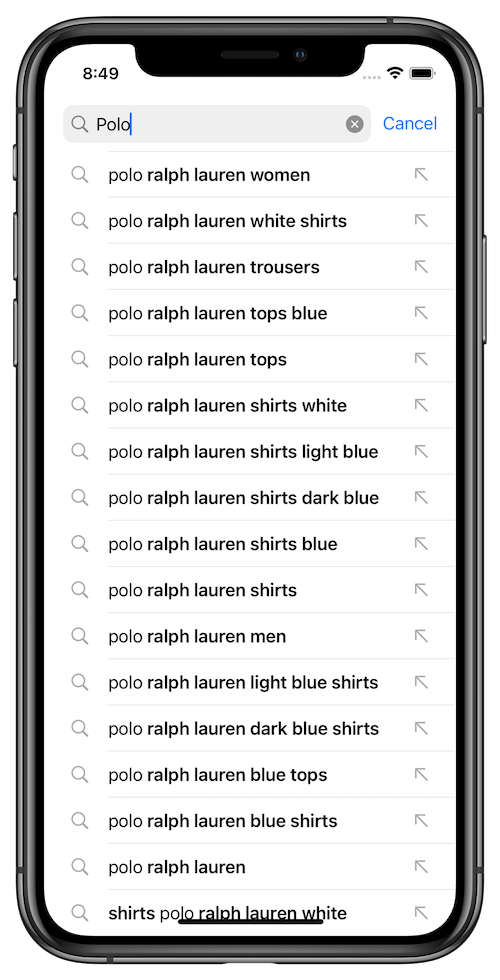
 On each keystroke, the list of suggestions is updated:
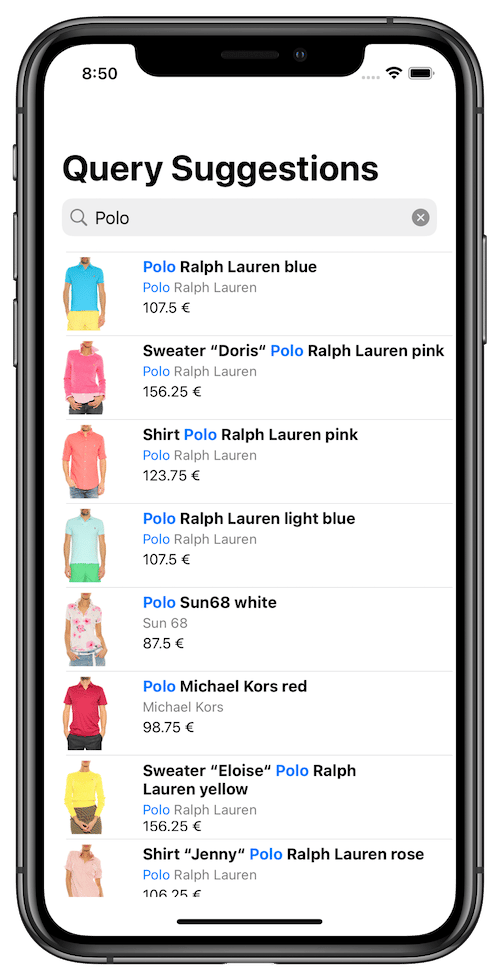
 When users select a suggestion from the list, it replaces the query in the search box, and the suggestions view controller disappears.
The results view controller presents search results for the selected suggestion:
When users select a suggestion from the list, it replaces the query in the search box, and the suggestions view controller disappears.
The results view controller presents search results for the selected suggestion:
 * A basic query suggestions view controller is provided out-of-box with the [InstantSearch](https://github.com/algolia/instantsearch-ios) library.
* The query suggestions view controller is a hits view controller that uses the `QuerySuggestion` object provided by the [InstantSearch Core](https://github.com/algolia/instantsearch-core-swift) library as a search record.
## Project structure
Algolia's query suggestions uses three view controllers:
* `QuerySuggestionsDemoViewController`: main view controller presenting the search experience,
* `SuggestionsTableViewController`: child view controller presenting the Query Suggestions,
* `StoreItemsTableViewController`: child view controller presenting the search results.
### Model object
Start with declaration of the `StoreItem` model object which represents the items in the index.
```swift Swift icon=code theme={"system"}
struct StoreItem: Codable {
let name: String
let brand: String?
let description: String?
let images: [URL]
let price: Double?
enum CodingKeys: String, CodingKey {
case name
case brand
case description
case images = "image_urls"
case price
}
enum PriceCodingKeys: String, CodingKey {
case value
}
init(from decoder: Decoder) throws {
let container = try decoder.container(keyedBy: CodingKeys.self)
self.name = try container.decode(String.self, forKey: .name)
self.brand = try? container.decode(String.self, forKey: .brand)
self.description = try? container.decode(String.self, forKey: .description)
if let rawImages = try? container.decode([String].self, forKey: .images) {
self.images = rawImages.compactMap(URL.init)
} else {
self.images = []
}
if
let priceContainer = try? container.nestedContainer(keyedBy: PriceCodingKeys.self, forKey: .price),
let price = try? priceContainer.decode(Double.self, forKey: .value) {
self.price = price
} else {
self.price = .none
}
}
func encode(to encoder: Encoder) throws {
var container = encoder.container(keyedBy: CodingKeys.self)
try container.encode(name, forKey: .name)
try container.encode(brand, forKey: .brand)
try container.encode(description, forKey: .description)
try container.encode(images, forKey: .images)
try container.encode(price, forKey: .price)
}
}
```
### Result views
`ProductTableViewCell` is a subclass of `UITableViewCell` for visually displaying store items in the list of results.
This view uses the [SDWebImage](https://github.com/SDWebImage/SDWebImage) library for asynchronous image loading. To use `ProductTableViewCell`, you need to add the `SDWebImage` library to your project.
```swift Swift icon=code theme={"system"}
import Foundation
import UIKit
import SDWebImage
class ProductTableViewCell: UITableViewCell {
let itemImageView: UIImageView
let titleLabel: UILabel
let subtitleLabel: UILabel
let priceLabel: UILabel
let mainStackView: UIStackView
let labelsStackView: UIStackView
override init(style: UITableViewCell.CellStyle, reuseIdentifier: String?) {
itemImageView = .init()
titleLabel = .init()
subtitleLabel = .init()
mainStackView = .init()
labelsStackView = .init()
priceLabel = .init()
super.init(style: style, reuseIdentifier: reuseIdentifier)
layout()
backgroundColor = .white
}
required init?(coder: NSCoder) {
fatalError("init(coder:) has not been implemented")
}
private func layout() {
itemImageView.sd_imageIndicator = SDWebImageActivityIndicator.gray
itemImageView.translatesAutoresizingMaskIntoConstraints = false
itemImageView.clipsToBounds = true
itemImageView.contentMode = .scaleAspectFit
itemImageView.layer.masksToBounds = true
titleLabel.translatesAutoresizingMaskIntoConstraints = false
titleLabel.font = .systemFont(ofSize: 15, weight: .bold)
titleLabel.numberOfLines = 1
subtitleLabel.translatesAutoresizingMaskIntoConstraints = false
subtitleLabel.font = .systemFont(ofSize: 13, weight: .regular)
subtitleLabel.textColor = .gray
subtitleLabel.numberOfLines = 1
priceLabel.translatesAutoresizingMaskIntoConstraints = false
priceLabel.font = .systemFont(ofSize: 14)
labelsStackView.axis = .vertical
labelsStackView.translatesAutoresizingMaskIntoConstraints = false
labelsStackView.spacing = 3
labelsStackView.addArrangedSubview(titleLabel)
labelsStackView.addArrangedSubview(subtitleLabel)
labelsStackView.addArrangedSubview(priceLabel)
labelsStackView.addArrangedSubview(UIView())
mainStackView.axis = .horizontal
mainStackView.translatesAutoresizingMaskIntoConstraints = false
mainStackView.spacing = 20
mainStackView.addArrangedSubview(itemImageView)
mainStackView.addArrangedSubview(labelsStackView)
contentView.addSubview(mainStackView)
contentView.layoutMargins = .init(top: 5, left: 3, bottom: 5, right: 3)
mainStackView.pin(to: contentView.layoutMarginsGuide)
itemImageView.widthAnchor.constraint(equalTo: itemImageView.heightAnchor).isActive = true
}
}
```
Define a `ProductTableViewCell` extension. Its `setup` method configures a cell with a `StoreItem` instance:
```swift Swift icon=code theme={"system"}
extension ProductTableViewCell {
func setup(with productHit: Hit) {
let product = productHit.object
itemImageView.sd_setImage(with: product.images.first)
if let highlightedName = productHit.hightlightedString(forKey: "name") {
titleLabel.attributedText = NSAttributedString(highlightedString: highlightedName,
attributes: [
.foregroundColor: UIColor.tintColor])
} else {
titleLabel.text = product.name
}
if let highlightedDescription = productHit.hightlightedString(forKey: "brand") {
subtitleLabel.attributedText = NSAttributedString(highlightedString: highlightedDescription,
attributes: [
.foregroundColor: UIColor.tintColor
])
} else {
subtitleLabel.text = product.brand
}
if let price = product.price {
priceLabel.text = "\(price) €"
}
}
}
```
### Results view controller
Algolia doesn't provide a ready-to-use results view controller, but you can create one with the tools in the [InstantSearch](https://github.com/algolia/instantsearch-ios) library by copying and pasting the following code to your project.
Read more about `Hits` in the [API reference](/doc/api-reference/widgets/hits/ios).
Add `StoreItemsTableViewController`, a subclass of `UITableViewController`, which implements the `HitsController` protocol. This view controller presents the search results using the previously declared `ProductTableViewCell`.
```swift Swift icon=code theme={"system"}
import Foundation
import UIKit
import InstantSearch
class StoreItemsTableViewController: UITableViewController, HitsController {
var hitsSource: HitsInteractor>?
var didSelect: ((Hit) -> Void)?
let cellIdentifier = "cellID"
override func viewDidLoad() {
super.viewDidLoad()
tableView.register(ProductTableViewCell.self, forCellReuseIdentifier: cellIdentifier)
}
override func tableView(_ tableView: UITableView, numberOfRowsInSection section: Int) -> Int {
return hitsSource?.numberOfHits() ?? 0
}
override func tableView(_ tableView: UITableView, cellForRowAt indexPath: IndexPath) -> UITableViewCell {
guard let cell = tableView.dequeueReusableCell(withIdentifier: cellIdentifier, for: indexPath) as? ProductTableViewCell else {
return UITableViewCell()
}
guard let hit = hitsSource?.hit(atIndex: indexPath.row) else {
return cell
}
cell.setup(with: hit)
return cell
}
override func tableView(_ tableView: UITableView, heightForRowAt indexPath: IndexPath) -> CGFloat {
return 80
}
override func tableView(_ tableView: UITableView, didSelectRowAt indexPath: IndexPath) {
if let hit = hitsSource?.hit(atIndex: indexPath.row) {
didSelect?(hit)
}
}
}
```
### Suggestions
The suggestion model is provided by InstantSearch iOS and called `QuerySuggestion`.
Define the `SearchSuggestionTableViewCell` displaying a search suggestion.
```swift Swift icon=code theme={"system"}
class SearchSuggestionTableViewCell: UITableViewCell {
var didTapTypeAheadButton: (() -> Void)?
private func typeAheadButton() -> UIButton {
let typeAheadButton = UIButton()
typeAheadButton.setImage(UIImage(systemName: "arrow.up.left"), for: .normal)
typeAheadButton.sizeToFit()
typeAheadButton.addTarget(self, action: #selector(typeAheadButtonTap), for: .touchUpInside)
return typeAheadButton
}
override init(style: UITableViewCell.CellStyle, reuseIdentifier: String?) {
super.init(style: style, reuseIdentifier: reuseIdentifier)
accessoryView = typeAheadButton()
imageView?.image = UIImage(systemName: "magnifyingglass")
tintColor = .lightGray
}
required init?(coder: NSCoder) {
fatalError("init(coder:) has not been implemented")
}
@objc func typeAheadButtonTap(_ sender: UIButton) {
didTapTypeAheadButton?()
}
}
```
Define an extension of `SearchSuggestionsTableViewCell` to setup the cell with a `QuerySuggestion` instance.
```swift Swift icon=code theme={"system"}
extension SearchSuggestionTableViewCell {
func setup(with querySuggestion: QuerySuggestion) {
guard let textLabel = textLabel else { return }
textLabel.attributedText = querySuggestion
.highlighted
.flatMap(HighlightedString.init)
.flatMap { NSAttributedString(highlightedString: $0,
inverted: true,
attributes: [.font: UIFont.boldSystemFont(ofSize: textLabel.font.pointSize)])
}
}
}
```
Define the `SuggestionsTableViewController`, a subclass of `UITableViewController` implementing `HitsController` protocol which displays the list of suggestions.
As a selection of a suggestion or type ahead button click might trigger the textual query change, this view controller also conform to `SearchBoxController` protocol, so it can be easily connected to `SearchBoxInteractor` or `SearchBoxConnector`.
```swift Swift icon=code theme={"system"}
class SuggestionsTableViewController: UITableViewController, HitsController, SearchBoxController {
var onQueryChanged: ((String?) -> Void)?
var onQuerySubmitted: ((String?) -> Void)?
public var hitsSource: HitsInteractor?
let cellID = "сellID"
public override init(style: UITableView.Style) {
super.init(style: style)
tableView.register(SearchSuggestionTableViewCell.self, forCellReuseIdentifier: cellID)
}
required init?(coder: NSCoder) {
fatalError("init(coder:) has not been implemented")
}
func setQuery(_ query: String?) {
// not applicable
}
public override func tableView(_ tableView: UITableView, numberOfRowsInSection section: Int) -> Int {
return hitsSource?.numberOfHits() ?? 0
}
public override func tableView(_ tableView: UITableView, cellForRowAt indexPath: IndexPath) -> UITableViewCell {
guard let cell = tableView.dequeueReusableCell(withIdentifier: cellID) as? SearchSuggestionTableViewCell else { return .init() }
if let suggestion = hitsSource?.hit(atIndex: indexPath.row) {
cell.setup(with: suggestion)
cell.didTapTypeAheadButton = {
self.onQueryChanged?(suggestion.query)
}
}
return cell
}
public override func tableView(_ tableView: UITableView, didSelectRowAt indexPath: IndexPath) {
guard let suggestion = hitsSource?.hit(atIndex: indexPath.row) else { return }
onQuerySubmitted?(suggestion.query)
}
}
```
## Building the main view controller
The last step is the declaration of the `QuerySuggestionsDemoViewController`. It includes the business logic performing the multi-index search in the products and suggestions indices simultaneously.
First, declare, and initialize all the necessary components:
```swift Swift icon=code theme={"system"}
import Foundation
import UIKit
import InstantSearch
public class QuerySuggestionsDemoViewController: UIViewController {
let searchController: UISearchController
let searcher: MultiSearcher
let searchBoxConnector: SearchBoxConnector
let textFieldController: TextFieldController
let suggestionsHitsConnector: HitsConnector
let suggestionsViewController: SuggestionsTableViewController
let resultsHitsConnector: HitsConnector>
let resultsViewController: StoreItemsTableViewController
override init(nibName nibNameOrNil: String?, bundle nibBundleOrNil: Bundle?) {
searcher = .init(appID: "latency",
apiKey: "927c3fe76d4b52c5a2912973f35a3077")
let suggestionsSearcher = searcher.addHitsSearcher(indexName: "STAGING_native_ecom_demo_products_query_suggestions")
suggestionsViewController = .init(style: .plain)
suggestionsHitsConnector = HitsConnector(searcher: suggestionsSearcher,
interactor: .init(infiniteScrolling: .off),
controller: suggestionsViewController)
let resultsSearcher = searcher.addHitsSearcher(indexName: "STAGING_native_ecom_demo_products")
resultsViewController = .init(style: .plain)
resultsHitsConnector = HitsConnector(searcher: resultsSearcher,
interactor: .init(),
controller: resultsViewController)
searchController = .init(searchResultsController: suggestionsViewController)
textFieldController = .init(searchBar: searchController.searchBar)
searchBoxConnector = .init(searcher: searcher,
controller: textFieldController)
super.init(nibName: nibNameOrNil, bundle: nibBundleOrNil)
}
required init?(coder: NSCoder) {
fatalError("init(coder:) has not been implemented")
}
}
```
### Business logic
Now add a `setup` function to create the necessary connections between the components and set them up, establishing the business logic of your view controller. It must be called after the initialization of these components.
```swift Swift icon=code theme={"system"}
import Foundation
import UIKit
import InstantSearch
public class QuerySuggestionsDemoViewController: UIViewController {
let searchController: UISearchController
let searcher: MultiSearcher
let searchBoxConnector: SearchBoxConnector
let textFieldController: TextFieldController
let suggestionsHitsConnector: HitsConnector
let suggestionsViewController: SuggestionsTableViewController
let resultsHitsConnector: HitsConnector>
let resultsViewController: StoreItemsTableViewController
override init(nibName nibNameOrNil: String?, bundle nibBundleOrNil: Bundle?) {
searcher = .init(appID: "latency",
apiKey: "927c3fe76d4b52c5a2912973f35a3077")
let suggestionsSearcher = searcher.addHitsSearcher(indexName: "STAGING_native_ecom_demo_products_query_suggestions")
suggestionsViewController = .init(style: .plain)
suggestionsHitsConnector = HitsConnector(searcher: suggestionsSearcher,
interactor: .init(infiniteScrolling: .off),
controller: suggestionsViewController)
let resultsSearcher = searcher.addHitsSearcher(indexName: "STAGING_native_ecom_demo_products")
resultsViewController = .init(style: .plain)
resultsHitsConnector = HitsConnector(searcher: resultsSearcher,
interactor: .init(),
controller: resultsViewController)
searchController = .init(searchResultsController: suggestionsViewController)
textFieldController = .init(searchBar: searchController.searchBar)
searchBoxConnector = .init(searcher: searcher,
controller: textFieldController)
super.init(nibName: nibNameOrNil, bundle: nibBundleOrNil)
setup()
}
required init?(coder: NSCoder) {
fatalError("init(coder:) has not been implemented")
}
private func setup() {
navigationItem.searchController = searchController
navigationItem.hidesSearchBarWhenScrolling = false
searchController.showsSearchResultsController = true
addChild(resultsViewController)
resultsViewController.didMove(toParent: self)
searchBoxConnector.connectController(suggestionsViewController)
searchBoxConnector.interactor.onQuerySubmitted.subscribe(with: searchController) { (searchController, _) in
searchController.dismiss(animated: true, completion: .none)
}
searcher.search()
}
}
```
### Setup layout
Finally, add sub-views to the view controller, and specify the Auto Layout constraints so that the display looks good on any device.
Add the `configureUI()` function to your file and call it from `viewDidLoad`:
```swift Swift icon=code theme={"system"}
import Foundation
import UIKit
import InstantSearch
public class QuerySuggestionsDemoViewController: UIViewController {
let searchController: UISearchController
let searcher: MultiSearcher
let searchBoxConnector: SearchBoxConnector
let textFieldController: TextFieldController
let suggestionsHitsConnector: HitsConnector
let suggestionsViewController: SuggestionsTableViewController
let resultsHitsConnector: HitsConnector>
let resultsViewController: StoreItemsTableViewController
override init(nibName nibNameOrNil: String?, bundle nibBundleOrNil: Bundle?) {
searcher = .init(appID: "latency",
apiKey: "927c3fe76d4b52c5a2912973f35a3077")
let suggestionsSearcher = searcher.addHitsSearcher(indexName: "STAGING_native_ecom_demo_products")
suggestionsViewController = .init(style: .plain)
suggestionsHitsConnector = HitsConnector(searcher: suggestionsSearcher,
interactor: .init(infiniteScrolling: .off),
controller: suggestionsViewController)
let resultsSearcher = searcher.addHitsSearcher(indexName: "STAGING_native_ecom_demo_products_query_suggestions")
resultsViewController = .init(style: .plain)
resultsHitsConnector = HitsConnector(searcher: resultsSearcher,
interactor: .init(),
controller: resultsViewController)
searchController = .init(searchResultsController: suggestionsViewController)
textFieldController = .init(searchBar: searchController.searchBar)
searchBoxConnector = .init(searcher: searcher,
controller: textFieldController)
super.init(nibName: nibNameOrNil, bundle: nibBundleOrNil)
setup()
}
required init?(coder: NSCoder) {
fatalError("init(coder:) has not been implemented")
}
override public func viewDidLoad() {
super.viewDidLoad()
configureUI()
}
private func setup() {
navigationItem.searchController = searchController
navigationItem.hidesSearchBarWhenScrolling = false
searchController.showsSearchResultsController = true
addChild(resultsViewController)
resultsViewController.didMove(toParent: self)
searchBoxConnector.connectController(suggestionsViewController)
searchBoxConnector.interactor.onQuerySubmitted.subscribe(with: searchController) { (searchController, _) in
searchController.dismiss(animated: true, completion: .none)
}
searcher.search()
}
private func configureUI() {
title = "Query Suggestions"
view.backgroundColor = .white
let resultsView = resultsViewController.view!
resultsView.translatesAutoresizingMaskIntoConstraints = false
view.addSubview(resultsView)
NSLayoutConstraint.activate([
resultsView.topAnchor.constraint(equalTo: view.safeAreaLayoutGuide.topAnchor),
resultsView.leadingAnchor.constraint(equalTo: view.safeAreaLayoutGuide.leadingAnchor),
resultsView.trailingAnchor.constraint(equalTo: view.safeAreaLayoutGuide.trailingAnchor),
resultsView.bottomAnchor.constraint(equalTo: view.bottomAnchor),
])
}
}
```
## Presentation
Your query suggestions search experience is now ready to use. Initialize your `QuerySuggestionsDemoViewController` and push it in your navigation controller hierarchy.
```swift Swift icon=code theme={"system"}
let searchViewController = QuerySuggestionsDemoViewController()
navigationController?.pushViewController(searchViewController, animated: true)
```
You can find a complete project in the [iOS examples repository](https://github.com/algolia/instantsearch-ios/tree/demos-v1/Examples/QuerySuggestions).
## Going further
Checkout advanced query suggestions experiences:
### Query Suggestions with hits
Find the [source code](https://github.com/algolia/instantsearch-ios/tree/demos-v1/Examples/QuerySuggestionsHits) of this example on GitHub.
### Query Suggestions with categories
Find the [source code](https://github.com/algolia/instantsearch-ios/tree/demos-v1/Examples/QuerySuggestionsCategories) of this example on GitHub.
### Query Suggestions with recent searches
Find the [source code](https://github.com/algolia/instantsearch-ios/tree/demos-v1/Examples/QuerySuggestionsRecentSearches) of this example on GitHub.
* A basic query suggestions view controller is provided out-of-box with the [InstantSearch](https://github.com/algolia/instantsearch-ios) library.
* The query suggestions view controller is a hits view controller that uses the `QuerySuggestion` object provided by the [InstantSearch Core](https://github.com/algolia/instantsearch-core-swift) library as a search record.
## Project structure
Algolia's query suggestions uses three view controllers:
* `QuerySuggestionsDemoViewController`: main view controller presenting the search experience,
* `SuggestionsTableViewController`: child view controller presenting the Query Suggestions,
* `StoreItemsTableViewController`: child view controller presenting the search results.
### Model object
Start with declaration of the `StoreItem` model object which represents the items in the index.
```swift Swift icon=code theme={"system"}
struct StoreItem: Codable {
let name: String
let brand: String?
let description: String?
let images: [URL]
let price: Double?
enum CodingKeys: String, CodingKey {
case name
case brand
case description
case images = "image_urls"
case price
}
enum PriceCodingKeys: String, CodingKey {
case value
}
init(from decoder: Decoder) throws {
let container = try decoder.container(keyedBy: CodingKeys.self)
self.name = try container.decode(String.self, forKey: .name)
self.brand = try? container.decode(String.self, forKey: .brand)
self.description = try? container.decode(String.self, forKey: .description)
if let rawImages = try? container.decode([String].self, forKey: .images) {
self.images = rawImages.compactMap(URL.init)
} else {
self.images = []
}
if
let priceContainer = try? container.nestedContainer(keyedBy: PriceCodingKeys.self, forKey: .price),
let price = try? priceContainer.decode(Double.self, forKey: .value) {
self.price = price
} else {
self.price = .none
}
}
func encode(to encoder: Encoder) throws {
var container = encoder.container(keyedBy: CodingKeys.self)
try container.encode(name, forKey: .name)
try container.encode(brand, forKey: .brand)
try container.encode(description, forKey: .description)
try container.encode(images, forKey: .images)
try container.encode(price, forKey: .price)
}
}
```
### Result views
`ProductTableViewCell` is a subclass of `UITableViewCell` for visually displaying store items in the list of results.
This view uses the [SDWebImage](https://github.com/SDWebImage/SDWebImage) library for asynchronous image loading. To use `ProductTableViewCell`, you need to add the `SDWebImage` library to your project.
```swift Swift icon=code theme={"system"}
import Foundation
import UIKit
import SDWebImage
class ProductTableViewCell: UITableViewCell {
let itemImageView: UIImageView
let titleLabel: UILabel
let subtitleLabel: UILabel
let priceLabel: UILabel
let mainStackView: UIStackView
let labelsStackView: UIStackView
override init(style: UITableViewCell.CellStyle, reuseIdentifier: String?) {
itemImageView = .init()
titleLabel = .init()
subtitleLabel = .init()
mainStackView = .init()
labelsStackView = .init()
priceLabel = .init()
super.init(style: style, reuseIdentifier: reuseIdentifier)
layout()
backgroundColor = .white
}
required init?(coder: NSCoder) {
fatalError("init(coder:) has not been implemented")
}
private func layout() {
itemImageView.sd_imageIndicator = SDWebImageActivityIndicator.gray
itemImageView.translatesAutoresizingMaskIntoConstraints = false
itemImageView.clipsToBounds = true
itemImageView.contentMode = .scaleAspectFit
itemImageView.layer.masksToBounds = true
titleLabel.translatesAutoresizingMaskIntoConstraints = false
titleLabel.font = .systemFont(ofSize: 15, weight: .bold)
titleLabel.numberOfLines = 1
subtitleLabel.translatesAutoresizingMaskIntoConstraints = false
subtitleLabel.font = .systemFont(ofSize: 13, weight: .regular)
subtitleLabel.textColor = .gray
subtitleLabel.numberOfLines = 1
priceLabel.translatesAutoresizingMaskIntoConstraints = false
priceLabel.font = .systemFont(ofSize: 14)
labelsStackView.axis = .vertical
labelsStackView.translatesAutoresizingMaskIntoConstraints = false
labelsStackView.spacing = 3
labelsStackView.addArrangedSubview(titleLabel)
labelsStackView.addArrangedSubview(subtitleLabel)
labelsStackView.addArrangedSubview(priceLabel)
labelsStackView.addArrangedSubview(UIView())
mainStackView.axis = .horizontal
mainStackView.translatesAutoresizingMaskIntoConstraints = false
mainStackView.spacing = 20
mainStackView.addArrangedSubview(itemImageView)
mainStackView.addArrangedSubview(labelsStackView)
contentView.addSubview(mainStackView)
contentView.layoutMargins = .init(top: 5, left: 3, bottom: 5, right: 3)
mainStackView.pin(to: contentView.layoutMarginsGuide)
itemImageView.widthAnchor.constraint(equalTo: itemImageView.heightAnchor).isActive = true
}
}
```
Define a `ProductTableViewCell` extension. Its `setup` method configures a cell with a `StoreItem` instance:
```swift Swift icon=code theme={"system"}
extension ProductTableViewCell {
func setup(with productHit: Hit) {
let product = productHit.object
itemImageView.sd_setImage(with: product.images.first)
if let highlightedName = productHit.hightlightedString(forKey: "name") {
titleLabel.attributedText = NSAttributedString(highlightedString: highlightedName,
attributes: [
.foregroundColor: UIColor.tintColor])
} else {
titleLabel.text = product.name
}
if let highlightedDescription = productHit.hightlightedString(forKey: "brand") {
subtitleLabel.attributedText = NSAttributedString(highlightedString: highlightedDescription,
attributes: [
.foregroundColor: UIColor.tintColor
])
} else {
subtitleLabel.text = product.brand
}
if let price = product.price {
priceLabel.text = "\(price) €"
}
}
}
```
### Results view controller
Algolia doesn't provide a ready-to-use results view controller, but you can create one with the tools in the [InstantSearch](https://github.com/algolia/instantsearch-ios) library by copying and pasting the following code to your project.
Read more about `Hits` in the [API reference](/doc/api-reference/widgets/hits/ios).
Add `StoreItemsTableViewController`, a subclass of `UITableViewController`, which implements the `HitsController` protocol. This view controller presents the search results using the previously declared `ProductTableViewCell`.
```swift Swift icon=code theme={"system"}
import Foundation
import UIKit
import InstantSearch
class StoreItemsTableViewController: UITableViewController, HitsController {
var hitsSource: HitsInteractor>?
var didSelect: ((Hit) -> Void)?
let cellIdentifier = "cellID"
override func viewDidLoad() {
super.viewDidLoad()
tableView.register(ProductTableViewCell.self, forCellReuseIdentifier: cellIdentifier)
}
override func tableView(_ tableView: UITableView, numberOfRowsInSection section: Int) -> Int {
return hitsSource?.numberOfHits() ?? 0
}
override func tableView(_ tableView: UITableView, cellForRowAt indexPath: IndexPath) -> UITableViewCell {
guard let cell = tableView.dequeueReusableCell(withIdentifier: cellIdentifier, for: indexPath) as? ProductTableViewCell else {
return UITableViewCell()
}
guard let hit = hitsSource?.hit(atIndex: indexPath.row) else {
return cell
}
cell.setup(with: hit)
return cell
}
override func tableView(_ tableView: UITableView, heightForRowAt indexPath: IndexPath) -> CGFloat {
return 80
}
override func tableView(_ tableView: UITableView, didSelectRowAt indexPath: IndexPath) {
if let hit = hitsSource?.hit(atIndex: indexPath.row) {
didSelect?(hit)
}
}
}
```
### Suggestions
The suggestion model is provided by InstantSearch iOS and called `QuerySuggestion`.
Define the `SearchSuggestionTableViewCell` displaying a search suggestion.
```swift Swift icon=code theme={"system"}
class SearchSuggestionTableViewCell: UITableViewCell {
var didTapTypeAheadButton: (() -> Void)?
private func typeAheadButton() -> UIButton {
let typeAheadButton = UIButton()
typeAheadButton.setImage(UIImage(systemName: "arrow.up.left"), for: .normal)
typeAheadButton.sizeToFit()
typeAheadButton.addTarget(self, action: #selector(typeAheadButtonTap), for: .touchUpInside)
return typeAheadButton
}
override init(style: UITableViewCell.CellStyle, reuseIdentifier: String?) {
super.init(style: style, reuseIdentifier: reuseIdentifier)
accessoryView = typeAheadButton()
imageView?.image = UIImage(systemName: "magnifyingglass")
tintColor = .lightGray
}
required init?(coder: NSCoder) {
fatalError("init(coder:) has not been implemented")
}
@objc func typeAheadButtonTap(_ sender: UIButton) {
didTapTypeAheadButton?()
}
}
```
Define an extension of `SearchSuggestionsTableViewCell` to setup the cell with a `QuerySuggestion` instance.
```swift Swift icon=code theme={"system"}
extension SearchSuggestionTableViewCell {
func setup(with querySuggestion: QuerySuggestion) {
guard let textLabel = textLabel else { return }
textLabel.attributedText = querySuggestion
.highlighted
.flatMap(HighlightedString.init)
.flatMap { NSAttributedString(highlightedString: $0,
inverted: true,
attributes: [.font: UIFont.boldSystemFont(ofSize: textLabel.font.pointSize)])
}
}
}
```
Define the `SuggestionsTableViewController`, a subclass of `UITableViewController` implementing `HitsController` protocol which displays the list of suggestions.
As a selection of a suggestion or type ahead button click might trigger the textual query change, this view controller also conform to `SearchBoxController` protocol, so it can be easily connected to `SearchBoxInteractor` or `SearchBoxConnector`.
```swift Swift icon=code theme={"system"}
class SuggestionsTableViewController: UITableViewController, HitsController, SearchBoxController {
var onQueryChanged: ((String?) -> Void)?
var onQuerySubmitted: ((String?) -> Void)?
public var hitsSource: HitsInteractor?
let cellID = "сellID"
public override init(style: UITableView.Style) {
super.init(style: style)
tableView.register(SearchSuggestionTableViewCell.self, forCellReuseIdentifier: cellID)
}
required init?(coder: NSCoder) {
fatalError("init(coder:) has not been implemented")
}
func setQuery(_ query: String?) {
// not applicable
}
public override func tableView(_ tableView: UITableView, numberOfRowsInSection section: Int) -> Int {
return hitsSource?.numberOfHits() ?? 0
}
public override func tableView(_ tableView: UITableView, cellForRowAt indexPath: IndexPath) -> UITableViewCell {
guard let cell = tableView.dequeueReusableCell(withIdentifier: cellID) as? SearchSuggestionTableViewCell else { return .init() }
if let suggestion = hitsSource?.hit(atIndex: indexPath.row) {
cell.setup(with: suggestion)
cell.didTapTypeAheadButton = {
self.onQueryChanged?(suggestion.query)
}
}
return cell
}
public override func tableView(_ tableView: UITableView, didSelectRowAt indexPath: IndexPath) {
guard let suggestion = hitsSource?.hit(atIndex: indexPath.row) else { return }
onQuerySubmitted?(suggestion.query)
}
}
```
## Building the main view controller
The last step is the declaration of the `QuerySuggestionsDemoViewController`. It includes the business logic performing the multi-index search in the products and suggestions indices simultaneously.
First, declare, and initialize all the necessary components:
```swift Swift icon=code theme={"system"}
import Foundation
import UIKit
import InstantSearch
public class QuerySuggestionsDemoViewController: UIViewController {
let searchController: UISearchController
let searcher: MultiSearcher
let searchBoxConnector: SearchBoxConnector
let textFieldController: TextFieldController
let suggestionsHitsConnector: HitsConnector
let suggestionsViewController: SuggestionsTableViewController
let resultsHitsConnector: HitsConnector>
let resultsViewController: StoreItemsTableViewController
override init(nibName nibNameOrNil: String?, bundle nibBundleOrNil: Bundle?) {
searcher = .init(appID: "latency",
apiKey: "927c3fe76d4b52c5a2912973f35a3077")
let suggestionsSearcher = searcher.addHitsSearcher(indexName: "STAGING_native_ecom_demo_products_query_suggestions")
suggestionsViewController = .init(style: .plain)
suggestionsHitsConnector = HitsConnector(searcher: suggestionsSearcher,
interactor: .init(infiniteScrolling: .off),
controller: suggestionsViewController)
let resultsSearcher = searcher.addHitsSearcher(indexName: "STAGING_native_ecom_demo_products")
resultsViewController = .init(style: .plain)
resultsHitsConnector = HitsConnector(searcher: resultsSearcher,
interactor: .init(),
controller: resultsViewController)
searchController = .init(searchResultsController: suggestionsViewController)
textFieldController = .init(searchBar: searchController.searchBar)
searchBoxConnector = .init(searcher: searcher,
controller: textFieldController)
super.init(nibName: nibNameOrNil, bundle: nibBundleOrNil)
}
required init?(coder: NSCoder) {
fatalError("init(coder:) has not been implemented")
}
}
```
### Business logic
Now add a `setup` function to create the necessary connections between the components and set them up, establishing the business logic of your view controller. It must be called after the initialization of these components.
```swift Swift icon=code theme={"system"}
import Foundation
import UIKit
import InstantSearch
public class QuerySuggestionsDemoViewController: UIViewController {
let searchController: UISearchController
let searcher: MultiSearcher
let searchBoxConnector: SearchBoxConnector
let textFieldController: TextFieldController
let suggestionsHitsConnector: HitsConnector
let suggestionsViewController: SuggestionsTableViewController
let resultsHitsConnector: HitsConnector>
let resultsViewController: StoreItemsTableViewController
override init(nibName nibNameOrNil: String?, bundle nibBundleOrNil: Bundle?) {
searcher = .init(appID: "latency",
apiKey: "927c3fe76d4b52c5a2912973f35a3077")
let suggestionsSearcher = searcher.addHitsSearcher(indexName: "STAGING_native_ecom_demo_products_query_suggestions")
suggestionsViewController = .init(style: .plain)
suggestionsHitsConnector = HitsConnector(searcher: suggestionsSearcher,
interactor: .init(infiniteScrolling: .off),
controller: suggestionsViewController)
let resultsSearcher = searcher.addHitsSearcher(indexName: "STAGING_native_ecom_demo_products")
resultsViewController = .init(style: .plain)
resultsHitsConnector = HitsConnector(searcher: resultsSearcher,
interactor: .init(),
controller: resultsViewController)
searchController = .init(searchResultsController: suggestionsViewController)
textFieldController = .init(searchBar: searchController.searchBar)
searchBoxConnector = .init(searcher: searcher,
controller: textFieldController)
super.init(nibName: nibNameOrNil, bundle: nibBundleOrNil)
setup()
}
required init?(coder: NSCoder) {
fatalError("init(coder:) has not been implemented")
}
private func setup() {
navigationItem.searchController = searchController
navigationItem.hidesSearchBarWhenScrolling = false
searchController.showsSearchResultsController = true
addChild(resultsViewController)
resultsViewController.didMove(toParent: self)
searchBoxConnector.connectController(suggestionsViewController)
searchBoxConnector.interactor.onQuerySubmitted.subscribe(with: searchController) { (searchController, _) in
searchController.dismiss(animated: true, completion: .none)
}
searcher.search()
}
}
```
### Setup layout
Finally, add sub-views to the view controller, and specify the Auto Layout constraints so that the display looks good on any device.
Add the `configureUI()` function to your file and call it from `viewDidLoad`:
```swift Swift icon=code theme={"system"}
import Foundation
import UIKit
import InstantSearch
public class QuerySuggestionsDemoViewController: UIViewController {
let searchController: UISearchController
let searcher: MultiSearcher
let searchBoxConnector: SearchBoxConnector
let textFieldController: TextFieldController
let suggestionsHitsConnector: HitsConnector
let suggestionsViewController: SuggestionsTableViewController
let resultsHitsConnector: HitsConnector>
let resultsViewController: StoreItemsTableViewController
override init(nibName nibNameOrNil: String?, bundle nibBundleOrNil: Bundle?) {
searcher = .init(appID: "latency",
apiKey: "927c3fe76d4b52c5a2912973f35a3077")
let suggestionsSearcher = searcher.addHitsSearcher(indexName: "STAGING_native_ecom_demo_products")
suggestionsViewController = .init(style: .plain)
suggestionsHitsConnector = HitsConnector(searcher: suggestionsSearcher,
interactor: .init(infiniteScrolling: .off),
controller: suggestionsViewController)
let resultsSearcher = searcher.addHitsSearcher(indexName: "STAGING_native_ecom_demo_products_query_suggestions")
resultsViewController = .init(style: .plain)
resultsHitsConnector = HitsConnector(searcher: resultsSearcher,
interactor: .init(),
controller: resultsViewController)
searchController = .init(searchResultsController: suggestionsViewController)
textFieldController = .init(searchBar: searchController.searchBar)
searchBoxConnector = .init(searcher: searcher,
controller: textFieldController)
super.init(nibName: nibNameOrNil, bundle: nibBundleOrNil)
setup()
}
required init?(coder: NSCoder) {
fatalError("init(coder:) has not been implemented")
}
override public func viewDidLoad() {
super.viewDidLoad()
configureUI()
}
private func setup() {
navigationItem.searchController = searchController
navigationItem.hidesSearchBarWhenScrolling = false
searchController.showsSearchResultsController = true
addChild(resultsViewController)
resultsViewController.didMove(toParent: self)
searchBoxConnector.connectController(suggestionsViewController)
searchBoxConnector.interactor.onQuerySubmitted.subscribe(with: searchController) { (searchController, _) in
searchController.dismiss(animated: true, completion: .none)
}
searcher.search()
}
private func configureUI() {
title = "Query Suggestions"
view.backgroundColor = .white
let resultsView = resultsViewController.view!
resultsView.translatesAutoresizingMaskIntoConstraints = false
view.addSubview(resultsView)
NSLayoutConstraint.activate([
resultsView.topAnchor.constraint(equalTo: view.safeAreaLayoutGuide.topAnchor),
resultsView.leadingAnchor.constraint(equalTo: view.safeAreaLayoutGuide.leadingAnchor),
resultsView.trailingAnchor.constraint(equalTo: view.safeAreaLayoutGuide.trailingAnchor),
resultsView.bottomAnchor.constraint(equalTo: view.bottomAnchor),
])
}
}
```
## Presentation
Your query suggestions search experience is now ready to use. Initialize your `QuerySuggestionsDemoViewController` and push it in your navigation controller hierarchy.
```swift Swift icon=code theme={"system"}
let searchViewController = QuerySuggestionsDemoViewController()
navigationController?.pushViewController(searchViewController, animated: true)
```
You can find a complete project in the [iOS examples repository](https://github.com/algolia/instantsearch-ios/tree/demos-v1/Examples/QuerySuggestions).
## Going further
Checkout advanced query suggestions experiences:
### Query Suggestions with hits
Find the [source code](https://github.com/algolia/instantsearch-ios/tree/demos-v1/Examples/QuerySuggestionsHits) of this example on GitHub.
### Query Suggestions with categories
Find the [source code](https://github.com/algolia/instantsearch-ios/tree/demos-v1/Examples/QuerySuggestionsCategories) of this example on GitHub.
### Query Suggestions with recent searches
Find the [source code](https://github.com/algolia/instantsearch-ios/tree/demos-v1/Examples/QuerySuggestionsRecentSearches) of this example on GitHub.