> ## Documentation Index
> Fetch the complete documentation index at: https://algolia.com/llms.txt
> Use this file to discover all available pages before exploring further.
# What is Vue InstantSearch?
> What is the Vue InstantSearch UI library and what are the available customization APIs.
export const Index = () =>
index
;
Vue InstantSearch is an open source UI library for Vue that lets you build a search interface in your frontend app.
InstantSearch focuses on enhancing your frontend with widgets that you can combine to create unique search interfaces.
Vue InstantSearch supports [server-side rendering](/doc/guides/building-search-ui/going-further/server-side-rendering/vue) and offers [full routing capabilities](/doc/guides/building-search-ui/going-further/routing-urls/vue).
Run and edit the What is Vue InstantSearch? example in CodeSandbox.
InstantSearch offers three levels of increasing control over your UI:
1. Start with a **predefined widget** that you can configure and style with CSS.
2. To change its render output (DOM or Native), **customize a predefined widget** to render what you want.
3. To implement something that doesn't exist, create a **custom widget**.
## Predefined widgets
The recommended way to use InstantSearch is with its predefined widgets such as [`ais-search-box`](/doc/api-reference/widgets/search-box/vue).
InstantSearch includes a [set of widgets](/doc/guides/building-search-ui/widgets/showcase/vue) that are most often used in search experiences.
Widgets provide features and a rendered output.
You can place them anywhere on your UI, configure them, and style them with CSS.
For example, add the [`ais-refinement-list`](/doc/api-reference/widgets/refinement-list/vue)\` widget and ask it to show a list of brands, so your users can refine their search using those brands.
```vue Vue theme={"system"}
```
Within the Vue InstantSearch documentation, widgets are components, and vice-versa.
When you see the word widget in this documentation, consider it as a Vue component.
### The InstantSearch wrapper
The [`ais-instant-search`](/doc/api-reference/widgets/instantsearch/vue) wrapper communicates between your app and Algolia.
This is where you add all the widgets.
It accepts a search client and an name.
```vue Vue theme={"system"}
```
For more information, see [Vue InstantSearch API reference](/doc/api-reference/widgets/instantsearch/vue) and [Getting started](/doc/guides/building-search-ui/getting-started/vue).
### CSS theme
The predefined widgets in Vue InstantSearch are compatible with the default CSS theme:
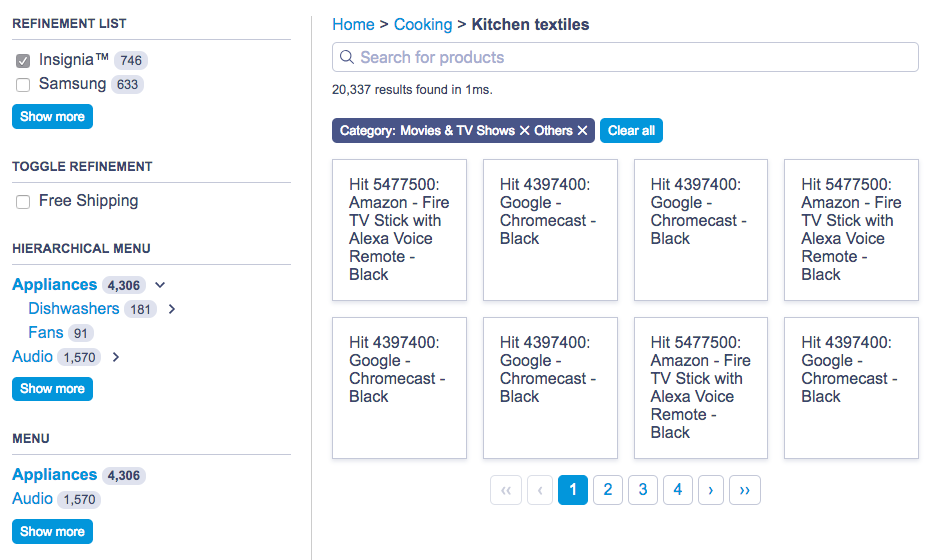 For more information, see [Style your widgets](/doc/guides/building-search-ui/widgets/customize-an-existing-widget/vue#style-your-widgets).
## Customize widgets
Algolia's predefined widgets, with their fixed behavior and output, may not fully meet your requirements.
For example, you might want to customize the rendering of the [`ais-menu`](/doc/api-reference/widgets/menu/vue) widget to display as a [`select`](https://developer.mozilla.org/en-US/docs/Web/HTML/Element/select) element instead of a list of links. You may also want to render it as a keyboard-controlled slideshow of images.
To address these limitations, Vue InstantSearch uses "connectors" to redefine widget behavior and DOM output.
For more information, see [Customize a Vue InstantSearch widget](/doc/guides/building-search-ui/widgets/customize-an-existing-widget/vue).
## Custom widgets
If none of the previous solutions work for you and you want to create a new widget from scratch, InstantSearch provides a third layer of API for this: **creating custom widgets**.
This requires two APIs: the first one lets you create a new connector, and the second one lets you create a new widget.
Both solutions give you full control of the render and behavior.
When building a new widget, be prepared to dive deep into the Algolia semantics to achieve what you want.
For more information, see [Create your own Vue InstantSearch widgets](/doc/guides/building-search-ui/widgets/create-your-own-widgets/vue).
## Resources
Use the following links and resources to learn more.
### See also
* [Install Vue InstantSearch](/doc/guides/building-search-ui/installation/vue)
* [Get started](/doc/guides/building-search-ui/getting-started/vue)
* [API reference](/doc/api-reference/widgets/vue)
* [Code Exchange](https://www.algolia.com/developers/code-exchange/?category=frontend-tools)
* [Support knowledge base](https://support.algolia.com/hc/en-us/sections/4406469062417-InstantSearch-Vue-InstantSearch)
### Join the community
Ask questions and find answers on those following platforms.
* [Algolia Community Discord](https://alg.li/discord)
* [Stack Overflow](https://stackoverflow.com/questions/tagged/instantsearch)
* [Changelog](https://github.com/algolia/instantsearch/blob/master/packages/vue-instantsearch/CHANGELOG.md).
For more information, see [Style your widgets](/doc/guides/building-search-ui/widgets/customize-an-existing-widget/vue#style-your-widgets).
## Customize widgets
Algolia's predefined widgets, with their fixed behavior and output, may not fully meet your requirements.
For example, you might want to customize the rendering of the [`ais-menu`](/doc/api-reference/widgets/menu/vue) widget to display as a [`select`](https://developer.mozilla.org/en-US/docs/Web/HTML/Element/select) element instead of a list of links. You may also want to render it as a keyboard-controlled slideshow of images.
To address these limitations, Vue InstantSearch uses "connectors" to redefine widget behavior and DOM output.
For more information, see [Customize a Vue InstantSearch widget](/doc/guides/building-search-ui/widgets/customize-an-existing-widget/vue).
## Custom widgets
If none of the previous solutions work for you and you want to create a new widget from scratch, InstantSearch provides a third layer of API for this: **creating custom widgets**.
This requires two APIs: the first one lets you create a new connector, and the second one lets you create a new widget.
Both solutions give you full control of the render and behavior.
When building a new widget, be prepared to dive deep into the Algolia semantics to achieve what you want.
For more information, see [Create your own Vue InstantSearch widgets](/doc/guides/building-search-ui/widgets/create-your-own-widgets/vue).
## Resources
Use the following links and resources to learn more.
### See also
* [Install Vue InstantSearch](/doc/guides/building-search-ui/installation/vue)
* [Get started](/doc/guides/building-search-ui/getting-started/vue)
* [API reference](/doc/api-reference/widgets/vue)
* [Code Exchange](https://www.algolia.com/developers/code-exchange/?category=frontend-tools)
* [Support knowledge base](https://support.algolia.com/hc/en-us/sections/4406469062417-InstantSearch-Vue-InstantSearch)
### Join the community
Ask questions and find answers on those following platforms.
* [Algolia Community Discord](https://alg.li/discord)
* [Stack Overflow](https://stackoverflow.com/questions/tagged/instantsearch)
* [Changelog](https://github.com/algolia/instantsearch/blob/master/packages/vue-instantsearch/CHANGELOG.md).