> ## Documentation Index
> Fetch the complete documentation index at: https://www.algolia.com/llms.txt
> Use this file to discover all available pages before exploring further.
# Native RMN orchestration
> Connect your retail media network once to inject sponsored ads. Algolia handles relevance, merging, and deduplication in a single Composition call.
This feature isn't available on every plan.
Refer to your [pricing plan](https://www.algolia.com/pricing) to see if it's included.
## Before you begin
* You need an account with a retail media network (RMN) provider, with live campaigns.
* Algolia supports any RMN provider, including Criteo, AdButler, and Zitcha. To add a provider that isn't listed, contact your customer success manager.
* You need an Algolia [composition](/doc/guides/compositions/smart-groups/search-based-groups#create-a-composition) with Retail Media enabled.
* The product IDs returned by your RMN must match the `objectID` values in your index.
## Connect your retail media provider
If your provider's ad request needs an API key or token, store it first.
Go to **Data sources > Retail Media > Credentials** and click **Add**:
* **Provider:** your RMN provider, for example, `Criteo`.
* **Name:** a name to select the credential by, for example, `criteo-prod`.
Use letters, numbers, hyphens, and underscores only.
* **API key:** the key from your provider.
Click **Create** to save.
Go to **Data sources > Retail Media** and click **New configuration**.
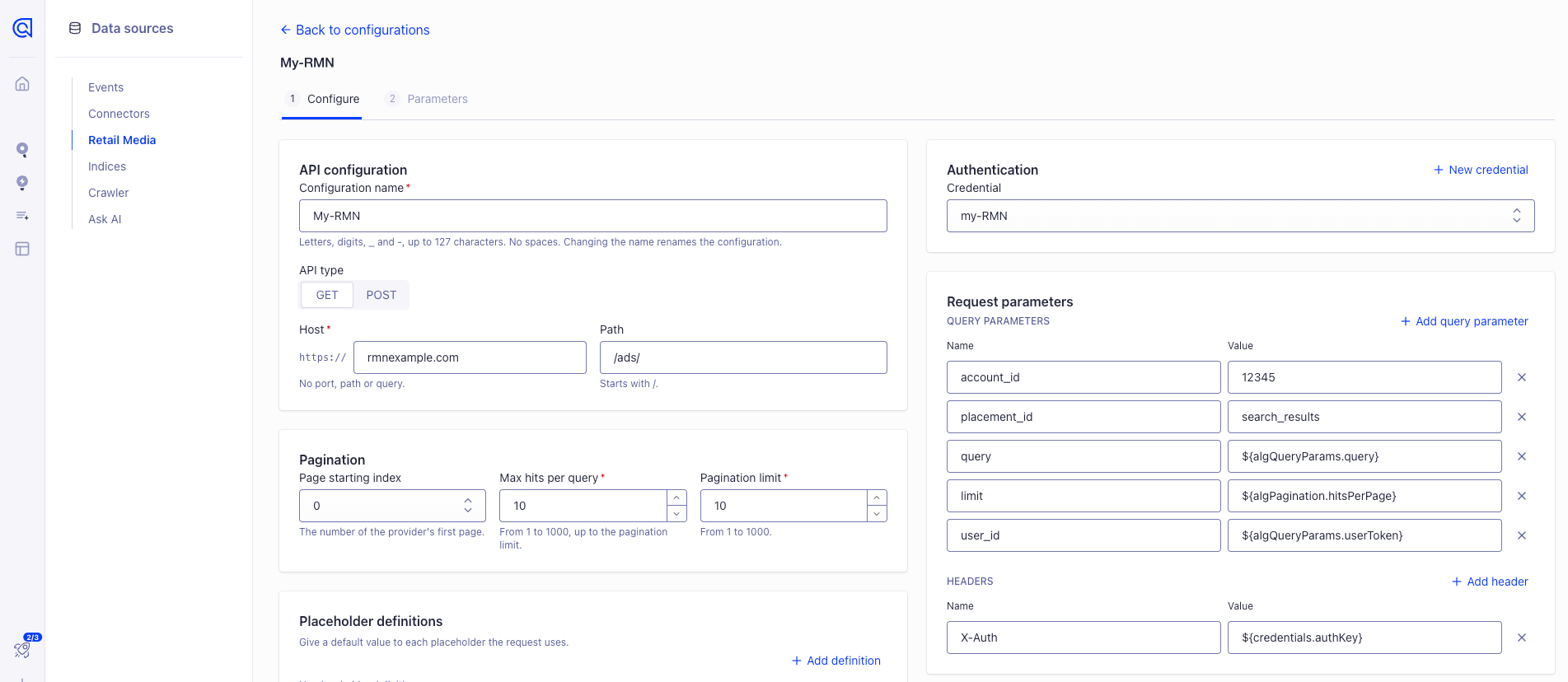
In **API configuration**:
* **Configuration name:** a name for this connection, used to select it in a Smart Group.
* **API type:** the HTTP method of your provider's ad request, usually **GET**.
* **Host** and **Path:** your provider's ad request endpoint.
In **Authentication**, select a **Credential** if your provider requires an API key or token.
Otherwise, select **None**.
Selecting a credential doesn't send it automatically.
Pass it to your provider in a header or query parameter with the `${credentials.authKey}` placeholder, as described below.
In **Request parameters**, add the query parameters that Algolia sends with every ad request to your RMN.
They tell your provider which ads to return, usually by identifying:
* **Your account:** which retailer's campaigns to use
* **The ad placement:** which ad slot the ads are for, for example, search results
* **The search:** the user's query, so ads match what they searched for
* **The page of ads:** which page to fetch and how many ads per page
* **The visitor:** an anonymous ID for attributing impressions and clicks
Click **Add query parameter** for each one, using the names from your provider's API documentation.
For values that change with each search, use these placeholders:
| Placeholder | Value |
| - | - |
| `${algQueryParams.query}` | The user's search query |
| `${algQueryParams.userToken}` | The user token sent with the search |
| `${algPagination.page}` | The page of ads Algolia requests |
| `${algPagination.hitsPerPage}` | The number of ads Algolia requests per page |
| `${credentials.authKey}` | The API key stored in the selected credential |
To use a value of your own, add it in **Placeholder definitions** with a default value.
Add headers only if your provider requires them, for example, to send the API key in an `Authorization` header with `${credentials.authKey}` as the value.
In **Pagination**:
* **Page starting index:** the number of your provider's first page, `0` or `1`.
* **Max hits per query:** the maximum number of ads your provider returns in a single page.
* **Pagination limit:** the maximum number of ads your provider returns across all pages.
If your provider doesn't paginate, set both to the maximum value: 1000.
The Smart Group's **Quantity** sets how many sponsored products appear.
Algolia uses these pagination settings, with the `${algPagination.page}` and `${algPagination.hitsPerPage}` placeholders, to fetch enough ads to fill the group, even after deduplication.
For example, if your provider returns at most 25 ads per page and the group's quantity is 30, Algolia sends two requests.
 Click **Test API configuration**.
A successful `2xx` response unlocks **Next**.
Click **Next**.
In **Response mapping**, click **Add row** for each field:
* **objectID:** the path to the product ID in your provider's response, for example, `.items[].product_id`.
These values must match the `objectID` values in your index.
* **metadata:** optional fields to pass through with each sponsored hit.
Enter a name of your choice and the path to the field in your provider's response.
For example, to pass through your provider's tracking URLs, add a row named `tracking` with the path to those URLs.
Click **Create configuration**.
## Add a Smart Group
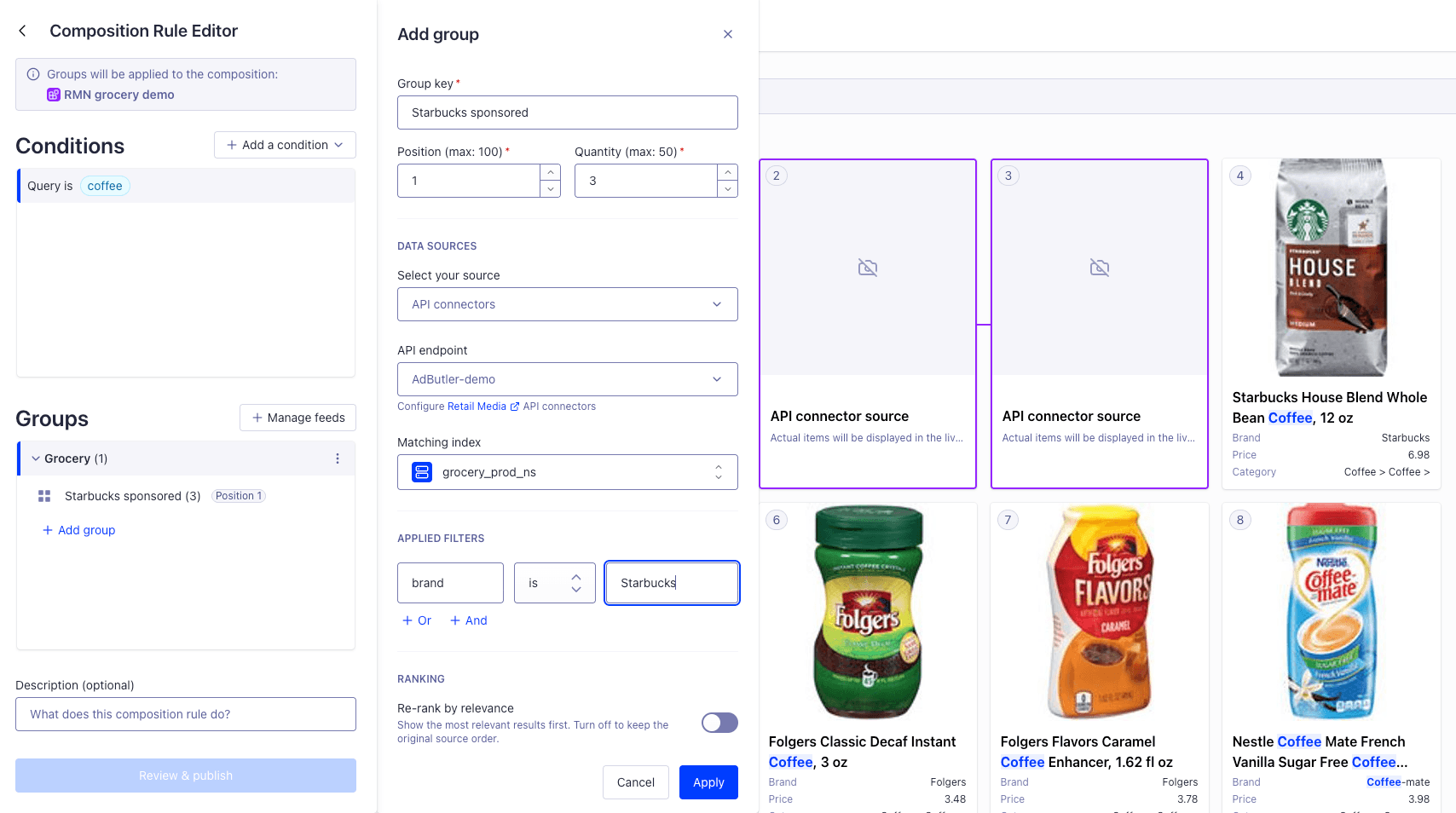
In your composition rule, click **Add group**:
* **Source:** **API connectors**, then your configuration
* **Matching index:** the index your product IDs come from
* **Position** and **Quantity:** where sponsored products go and how many
* **Filters:** optional. Filters apply to the ads your RMN returns, so Algolia removes ads that don't match, without an error.
Then click **Review & publish**.
Click **Test API configuration**.
A successful `2xx` response unlocks **Next**.
Click **Next**.
In **Response mapping**, click **Add row** for each field:
* **objectID:** the path to the product ID in your provider's response, for example, `.items[].product_id`.
These values must match the `objectID` values in your index.
* **metadata:** optional fields to pass through with each sponsored hit.
Enter a name of your choice and the path to the field in your provider's response.
For example, to pass through your provider's tracking URLs, add a row named `tracking` with the path to those URLs.
Click **Create configuration**.
## Add a Smart Group
In your composition rule, click **Add group**:
* **Source:** **API connectors**, then your configuration
* **Matching index:** the index your product IDs come from
* **Position** and **Quantity:** where sponsored products go and how many
* **Filters:** optional. Filters apply to the ads your RMN returns, so Algolia removes ads that don't match, without an error.
Then click **Review & publish**.
 ## Label sponsored hits
Set `metadata.hits.addItemKey` to `true` on the injected item.
Each sponsored hit then includes `_extra._injectedItemKey`, so your frontend can label it as sponsored.
For more information, see the [API reference](/doc/rest-api/composition/put-composition#body-behavior-one-of-0-injection-injected-items-items-metadata-hits-add-item-key).
## Track impressions and clicks
If you mapped your provider's tracking URLs as metadata, each sponsored hit includes them in `_extra`, under the name you chose, for example, `_extra.tracking`.
To report ad performance to your RMN provider, your frontend must send the tracking events your provider requires.
For example, many providers track when a sponsored product is displayed, when it's visible on screen, and when users click it.
Some providers generate tracking URLs for each request.
If yours does, don't cache them or reuse them across requests.
## Cookie and tracking compliance
Responses from your RMN provider may include beacons, tracking pixels, or other trackers used to measure ad performance.
Algolia passes these through to your app unchanged.
You're responsible for controlling when these events are triggered and ensuring compliance with applicable privacy laws, including obtaining user consent where required.
## Third-party APIs
The Retail Media connector is an open API integration.
Your RMN provider controls its own API and may change it without notice.
You're responsible for monitoring those changes and updating your configuration to match.
## Troubleshooting
| Symptom | Cause |
| - | - |
| No sponsored hits | The RMN didn't return any ads for the search, IDs don't match `objectID` values, or the Smart Group's filters remove every returned ad |
| Fewer ads than expected | Pagination limits cut the list, or some returned IDs aren't in your index |
| No `_extra` | The rule's condition doesn't match the search, or the rule isn't published |
## Label sponsored hits
Set `metadata.hits.addItemKey` to `true` on the injected item.
Each sponsored hit then includes `_extra._injectedItemKey`, so your frontend can label it as sponsored.
For more information, see the [API reference](/doc/rest-api/composition/put-composition#body-behavior-one-of-0-injection-injected-items-items-metadata-hits-add-item-key).
## Track impressions and clicks
If you mapped your provider's tracking URLs as metadata, each sponsored hit includes them in `_extra`, under the name you chose, for example, `_extra.tracking`.
To report ad performance to your RMN provider, your frontend must send the tracking events your provider requires.
For example, many providers track when a sponsored product is displayed, when it's visible on screen, and when users click it.
Some providers generate tracking URLs for each request.
If yours does, don't cache them or reuse them across requests.
## Cookie and tracking compliance
Responses from your RMN provider may include beacons, tracking pixels, or other trackers used to measure ad performance.
Algolia passes these through to your app unchanged.
You're responsible for controlling when these events are triggered and ensuring compliance with applicable privacy laws, including obtaining user consent where required.
## Third-party APIs
The Retail Media connector is an open API integration.
Your RMN provider controls its own API and may change it without notice.
You're responsible for monitoring those changes and updating your configuration to match.
## Troubleshooting
| Symptom | Cause |
| - | - |
| No sponsored hits | The RMN didn't return any ads for the search, IDs don't match `objectID` values, or the Smart Group's filters remove every returned ad |
| Fewer ads than expected | Pagination limits cut the list, or some returned IDs aren't in your index |
| No `_extra` | The rule's condition doesn't match the search, or the rule isn't published |