> ## Documentation Index
> Fetch the complete documentation index at: https://algolia.com/llms.txt
> Use this file to discover all available pages before exploring further.
# Smart Groups
> How to use Algolia Smart Groups to enable advanced results curation.
export const SearchQuery = () =>
search query
;
export const Index = () =>
index
;
export const Filter = () =>
filter
;
export const organicResultsDefinition = "These are the search results ranked by relevance and your configuration without compositions.";
export const OrganicResults = () =>
organic results
;
Smart Groups let you organize and place search results based on custom logic.
You can place groups of items that match specific criteria at specific positions in your search results.
Smart Groups let you organize and place search results based on rules,
so you don't need to manage product positions individually.
You can populate Smart Groups from these sources:
* **[Search-based groups](/doc/guides/compositions/smart-groups/search-based-groups)**: you define criteria (like brand or category) and Algolia automatically selects matching items from your .
* **[External source groups](/doc/guides/compositions/smart-groups/external-source-groups)**: you provide specific object IDs from an external system (like a retail media platform or recommendation engine).
* **[Recommend-based groups](/doc/guides/compositions/smart-groups/recommend-based-groups)**: Algolia populates the group with items returned by an [Algolia Recommend](/doc/guides/algolia-recommend/overview) model, such as Trending Items.
All approaches give you precise control over where promoted items appear in results, while automatically handling pagination and faceting.
Configure [deduplication strategies](/doc/guides/compositions/smart-groups/deduplication-strategy) to control how Algolia resolves duplicates between and injected results.
 ## Use cases
### Monetize with sponsored listings (external source groups)
With external source groups, you can integrate retail media platforms to display sponsored products based on real-time bids from brand partners.
This creates a new revenue stream beyond direct product sales.
For example, on a search for "running shoes,"
you could display two sponsored products from brands bidding through your retail media platform at positions 1 and 5,
while showing organic results on the rest of the page.
Retail media platforms (RMPs),
such as [Criteo](https://developers.criteo.com/retail-media-delivery/docs/sponsored-products),
[CitrusAd](https://developers.citrusad.com/integration/reference/requesting-product-ads-1),
and [Zitcha](https://docs.zitcha.com/apis/search),
manage sponsored product campaigns, handle ad inventories, bidding, targeting, and reporting.
RMPs provide APIs to fetch sponsored products for a or category,
which you can then inject into your search results at specific positions.
### Monetize your results grid (search-based groups)
Use search-based groups to highlight products or content from a preferred brand or partner.
For example, you want to promote a group of products based on a contract with a particular brand, to feature them in top positions on high-grossing categories or queries.
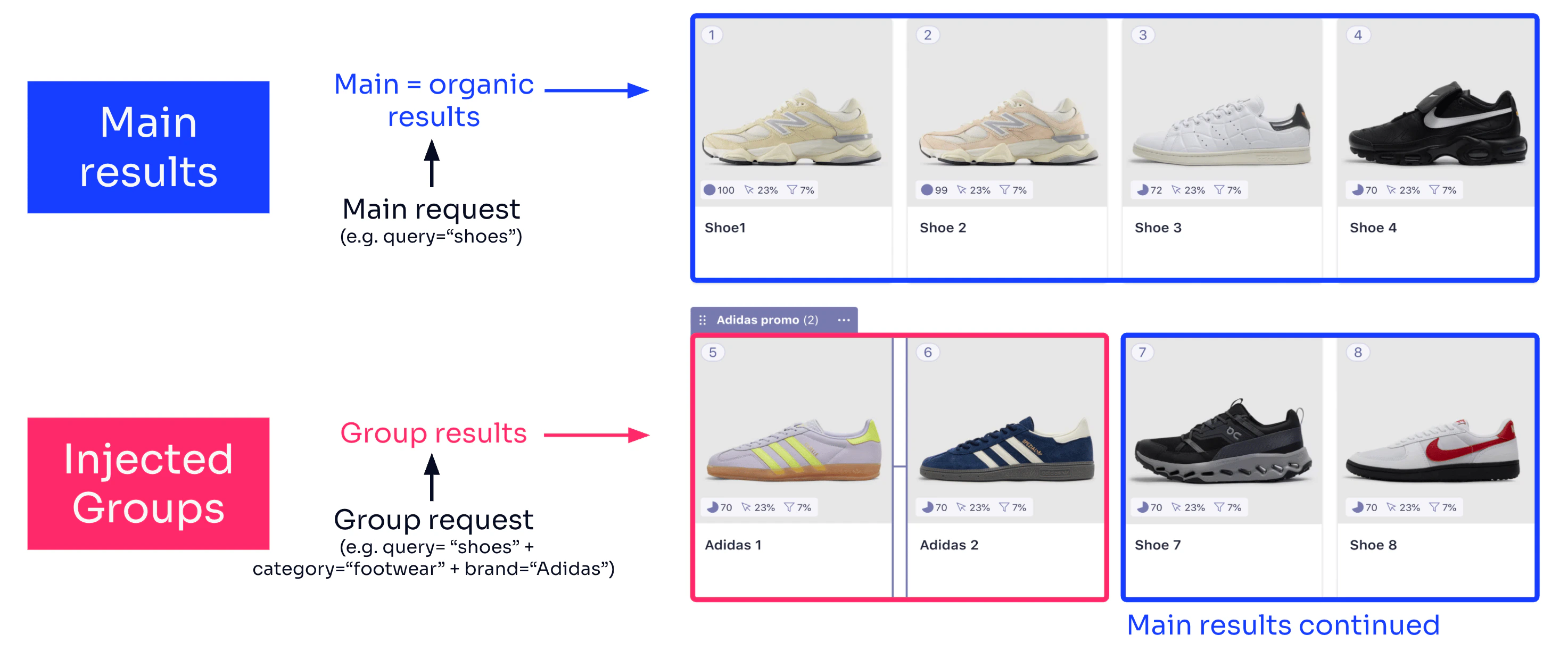
For your `Footwear` category, you create a group for `brand: Adidas` to place two items at position 5.
### Highlight new, trending, on-sale, high-margin results (search-based groups)
Promote on-sale, new, trending, highly rated, or high-margin products to support goals like increasing conversions or prioritizing high-margin items.
For example, you could create a Smart Group using a on the `high_margin: true` attribute, with four items injected at position 5 in the results grid.
### Create visual experiences by grouping results (search-based groups)
With Smart Groups, you can create visually cohesive experiences by grouping products or results that share similarities.
For example, during autumn campaigns, highlight products with warm tones in some categories.
For your `Women` category, create:
* A group filtered by the attribute `color: brown` with four items placed at position 1 in the results grid.
* A group filtered by the attribute `color: cream` with four items placed at position 5 in the results grid.
You can define up to three groups per composition. You can mix search-based groups with external source groups in the same composition.
## Decide between group types
The following table compares group types to help you choose the right approach:
| | **Search-based groups** | **External source groups** | **Recommend-based groups** |
| ---------------------- | -------------------------------------------------------------------------------------------------------------------------------------------------------------------------------------------------------- | -------------------------------------------------------------------------------------------------------------------------------- | ---------------------------------------------------------------------------------------------------------- |
| **Best fit when you** | • Have longer-running campaigns or brand partnerships
## Use cases
### Monetize with sponsored listings (external source groups)
With external source groups, you can integrate retail media platforms to display sponsored products based on real-time bids from brand partners.
This creates a new revenue stream beyond direct product sales.
For example, on a search for "running shoes,"
you could display two sponsored products from brands bidding through your retail media platform at positions 1 and 5,
while showing organic results on the rest of the page.
Retail media platforms (RMPs),
such as [Criteo](https://developers.criteo.com/retail-media-delivery/docs/sponsored-products),
[CitrusAd](https://developers.citrusad.com/integration/reference/requesting-product-ads-1),
and [Zitcha](https://docs.zitcha.com/apis/search),
manage sponsored product campaigns, handle ad inventories, bidding, targeting, and reporting.
RMPs provide APIs to fetch sponsored products for a or category,
which you can then inject into your search results at specific positions.
### Monetize your results grid (search-based groups)
Use search-based groups to highlight products or content from a preferred brand or partner.
For example, you want to promote a group of products based on a contract with a particular brand, to feature them in top positions on high-grossing categories or queries.
For your `Footwear` category, you create a group for `brand: Adidas` to place two items at position 5.
### Highlight new, trending, on-sale, high-margin results (search-based groups)
Promote on-sale, new, trending, highly rated, or high-margin products to support goals like increasing conversions or prioritizing high-margin items.
For example, you could create a Smart Group using a on the `high_margin: true` attribute, with four items injected at position 5 in the results grid.
### Create visual experiences by grouping results (search-based groups)
With Smart Groups, you can create visually cohesive experiences by grouping products or results that share similarities.
For example, during autumn campaigns, highlight products with warm tones in some categories.
For your `Women` category, create:
* A group filtered by the attribute `color: brown` with four items placed at position 1 in the results grid.
* A group filtered by the attribute `color: cream` with four items placed at position 5 in the results grid.
You can define up to three groups per composition. You can mix search-based groups with external source groups in the same composition.
## Decide between group types
The following table compares group types to help you choose the right approach:
| | **Search-based groups** | **External source groups** | **Recommend-based groups** |
| ---------------------- | -------------------------------------------------------------------------------------------------------------------------------------------------------------------------------------------------------- | -------------------------------------------------------------------------------------------------------------------------------- | ---------------------------------------------------------------------------------------------------------- |
| **Best fit when you** | • Have longer-running campaigns or brand partnerships
• Want to apply Algolia's highest ranked sponsored results for specific queries or categories
• Don't have a retail media platform (RMP) | • Have an RMP for bidding, reporting, and payments
• Prefer a real-time, bidding-based approach to select sponsored results | • Want to surface trending or recommended items among organic results
• Already use Algolia Recommend |
| **Configured through** | Merchandising Studio or Composition API | Merchandising Studio + API request payload | Merchandising Studio or Composition API |
## Rollout and rollback considerations
To show inserted groups in your UI, [integrate the Composition API with InstantSearch or an API client.](/doc/guides/compositions/smart-groups/search-based-groups#integrate-compositions).
* Test your implementation in development and staging environments before deploying to production.
* For [A/B testing](/doc/guides/ab-testing/what-is-ab-testing), consider using replica indices with and without inserted groups. Then associate A/B analytics with those indices.
* Keep your original Search API implementation alongside your Composition API implementation.
This gives you a rollback option if the Composition API doesn't meet your needs.
## Composition rules and index rules
[Index rules](/doc/guides/managing-results/rules/rules-overview) apply to both the main results
(organic results before group injection) and the group results.
To retrieve and rank relevant results, Algolia runs separate subqueries for both the main results and each group.
Each subquery can trigger index rules.
Each group subquery combines the top-level query and filters from the main results,
plus any filters you've defined specifically for the group.
 **Composition rules have higher precedence than index-level rules.**
For example, if an index-level rule pins a record to position 3 *and* you've configured a group to start at position 3,
Algolia inserts the group first, placing its items from position 3 onward based on the group's size.
Algolia moves the pinned item to the next available position after the group.
You can curate results (for example pin, hide, or further boost certain items) within a group using index rules that apply to the corresponding sub-query.
To learn more, see [Curate groups](/doc/guides/compositions/smart-groups/search-based-groups#curate-groups).
### Difference between Smart Groups and pinning and boosting
**Index-level pinning** places items statically, one by one.
You must keep your pins up-to-date over time, for example, when an item goes out of stock.
In contrast, **Smart Groups** inject items dynamically based on attribute filters.
Algolia uses a subquery to find the most relevant matches,
so you don't need to update the group manually.
Index-level pinning affects ranking but Smart Groups let you control where promoted items appear in the results.
## Next steps
* [Configure sorting strategies](/doc/guides/compositions/sorting-strategy)
* [View the Composition API reference](/doc/rest-api/composition)
* [Explore Composition SDK methods](/doc/libraries/sdk/methods/composition)
**Composition rules have higher precedence than index-level rules.**
For example, if an index-level rule pins a record to position 3 *and* you've configured a group to start at position 3,
Algolia inserts the group first, placing its items from position 3 onward based on the group's size.
Algolia moves the pinned item to the next available position after the group.
You can curate results (for example pin, hide, or further boost certain items) within a group using index rules that apply to the corresponding sub-query.
To learn more, see [Curate groups](/doc/guides/compositions/smart-groups/search-based-groups#curate-groups).
### Difference between Smart Groups and pinning and boosting
**Index-level pinning** places items statically, one by one.
You must keep your pins up-to-date over time, for example, when an item goes out of stock.
In contrast, **Smart Groups** inject items dynamically based on attribute filters.
Algolia uses a subquery to find the most relevant matches,
so you don't need to update the group manually.
Index-level pinning affects ranking but Smart Groups let you control where promoted items appear in the results.
## Next steps
* [Configure sorting strategies](/doc/guides/compositions/sorting-strategy)
* [View the Composition API reference](/doc/rest-api/composition)
* [Explore Composition SDK methods](/doc/libraries/sdk/methods/composition)