> ## Documentation Index
> Fetch the complete documentation index at: https://algolia.com/llms.txt
> Use this file to discover all available pages before exploring further.
# Place sponsored products in search results
export const SearchQuery = () =>
search query
;
export const Index = () =>
index
;
export const organicResultsDefinition = "These are the search results ranked by relevance and your configuration without compositions.";
export const OrganicResults = () =>
organic results
;
This guide shows how to inject sponsored products at fixed positions in your using a Smart Group.
The example below uses a Recommend `trending-items` model as the source, but the same pattern works with `search` or `external` sources.
The steps walk through both the API and Merchandising Studio paths.
Before you begin, review the [Composition API requirements](/doc/guides/compositions#before-you-begin-using-the-compositions-api).
Create the composition with the [Update and insert composition](/doc/rest-api/composition/put-composition) endpoint, then apply the `behavior` defined below.
To scope the behavior to a specific , category, or context, send the same `behavior` inside a composition rule's `consequence.behavior` with the [Update and insert composition rule](/doc/rest-api/composition/put-composition-rule) endpoint.
Set the main organic results to your products index.
To narrow them to in-stock items, add a filter on the `inStock` attribute:
```json JSON icon=braces expandable theme={"system"}
{
"behavior": {
"injection": {
"main": {
"source": {
"search": {
"index": "products",
"params": {
"filters": "inStock:true"
}
}
}
}
}
}
}
```
Add a Smart Group by appending an entry to `injection.injectedItems`, using `source.recommend` to populate it from the `trending-items` Recommend model.
The `position` and `length` fields control where the group appears in your organic results and how many items it includes.
```json JSON icon=braces expandable highlight={14-30} theme={"system"}
{
"behavior": {
"injection": {
"main": {
"source": {
"search": {
"index": "products",
"params": {
"filters": "inStock:true"
}
}
}
},
"injectedItems": [
{
"key": "trending-products",
"source": {
"recommend": {
"indexName": "products",
"model": "trending-items",
"threshold": 50,
"queryParameters": {
"filters": "inStock:true"
}
}
},
"position": 0,
"length": 4
}
]
}
}
}
```
In the Merchandising Studio, go to **Merch tools > Compositions > Composition Rules**, select your composition, and click **+ New Composition Rule**.
In the rule editor, click **+ Add Group**.
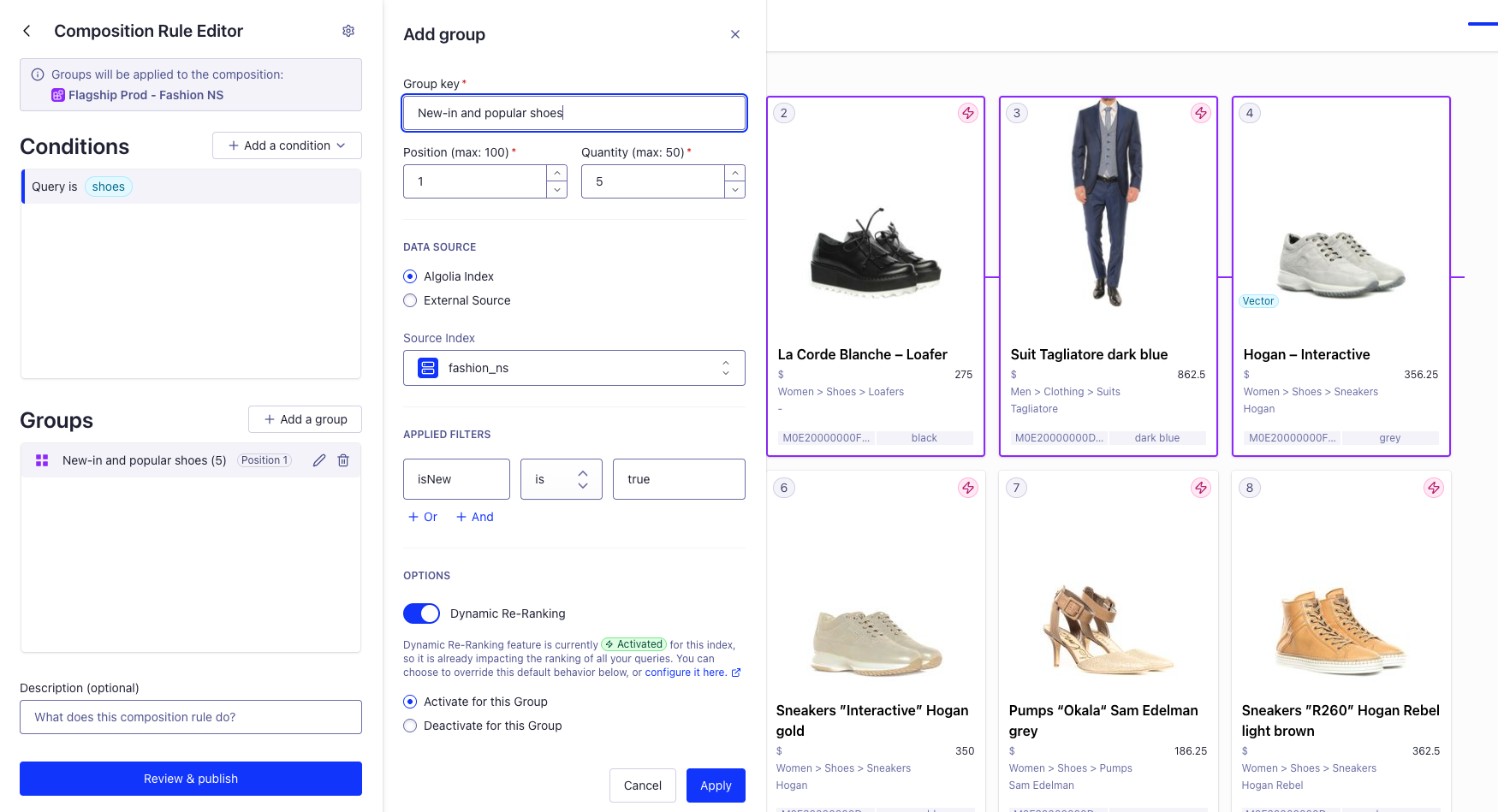 By default, the Smart Group is populated from your composition's Algolia .
To populate it from a Recommend model instead (for example, Trending items), choose **Recommend**.
If using your Algolia index as the source, add a filter where the `New_in` attribute is `true`.
The `New_in` attribute must be declared in [`attributesForFaceting`](/doc/api-reference/api-parameters/attributesForFaceting) so it can be used for filtering.
Select **Review & publish** to apply the rule.
## Sorting strategy
[Sort](/doc/guides/compositions/sorting-strategy) the organic results by price in descending order, while keeping the sponsored products in place.
```json JSON icon=braces expandable theme={"system"}
{
"behavior": {
"sortingStrategy": {
"Price descending": "products_price_descending"
},
"injection": {
"main": {
"source": {
"search": {
"index": "products",
"params": {
"filters": "inStock:true"
}
}
}
},
"injectedItems": [
{
"key": "trending-products",
"source": {
"recommend": {
"indexName": "products",
"model": "trending-items",
"threshold": 50,
"queryParameters": {
"filters": "inStock:true"
}
}
},
"position": 0,
"length": 4
}
]
}
}
}
```
## See also
* [Smart Groups](/doc/guides/compositions/smart-groups/smart-groups)
* [Search-based groups](/doc/guides/compositions/smart-groups/search-based-groups)
* [External source groups](/doc/guides/compositions/smart-groups/external-source-groups)
* [Recommend-based groups](/doc/guides/compositions/smart-groups/recommend-based-groups)
* [Composition REST API reference](/doc/rest-api/composition)
By default, the Smart Group is populated from your composition's Algolia .
To populate it from a Recommend model instead (for example, Trending items), choose **Recommend**.
If using your Algolia index as the source, add a filter where the `New_in` attribute is `true`.
The `New_in` attribute must be declared in [`attributesForFaceting`](/doc/api-reference/api-parameters/attributesForFaceting) so it can be used for filtering.
Select **Review & publish** to apply the rule.
## Sorting strategy
[Sort](/doc/guides/compositions/sorting-strategy) the organic results by price in descending order, while keeping the sponsored products in place.
```json JSON icon=braces expandable theme={"system"}
{
"behavior": {
"sortingStrategy": {
"Price descending": "products_price_descending"
},
"injection": {
"main": {
"source": {
"search": {
"index": "products",
"params": {
"filters": "inStock:true"
}
}
}
},
"injectedItems": [
{
"key": "trending-products",
"source": {
"recommend": {
"indexName": "products",
"model": "trending-items",
"threshold": 50,
"queryParameters": {
"filters": "inStock:true"
}
}
},
"position": 0,
"length": 4
}
]
}
}
}
```
## See also
* [Smart Groups](/doc/guides/compositions/smart-groups/smart-groups)
* [Search-based groups](/doc/guides/compositions/smart-groups/search-based-groups)
* [External source groups](/doc/guides/compositions/smart-groups/external-source-groups)
* [Recommend-based groups](/doc/guides/compositions/smart-groups/recommend-based-groups)
* [Composition REST API reference](/doc/rest-api/composition)