> ## Documentation Index
> Fetch the complete documentation index at: https://algolia.com/llms.txt
> Use this file to discover all available pages before exploring further.
# Create custom ranking attributes
> How to create custom ranking attributes according to your business needs, based on your own metrics, like sales or popularity.
export const Application = () =>
application
;
export const AlgoliaSearch = () => ;
Algolia offers good relevance out-of-the-box.
Yet, what makes search great is fine-tuning it according to business relevance.
Consider you're developing an app based on Twitter feeds.
When searching, you want to rank results by relevance and the custom attributes `likes` and `retweets`.
You can do this by using Algolia's [custom ranking feature](/doc/guides/managing-results/must-do/custom-ranking)
to specify what attributes to rank on.
You can configure these attributes with the [`customRanking`](/doc/api-reference/api-parameters/customRanking) parameter or through Algolia's dashboard.
## Example dataset
In this example, you're developing an app based on Twitter feeds and want to rank tweets by the number of likes and retweets.
Here's what the dataset would look like:
```json JSON icon=braces theme={"system"}
[
{
"tweet": "🎈 We're introducing Create InstantSearch App today: a CLI to bootstrap InstantSearch apps from the terminal. Read more in this blog post by @FrancoisChlfr!",
"retweets": 13,
"likes": 27
},
{
"tweet": "Designers from all horizons, don't forget to register for next #ParisDesignMeetup, taking place on Sept 25th!",
"retweets": 9,
"likes": 13
},
{
"tweet": "Are you ready for GSA to be a thing of the past? Register now for our webinar, where we'll help you with migration options, tips, and tricks to make your move as painless as possible. https://go.algolia.com/gsa-migration",
"retweets": 4,
"likes": 6
}
]
```
## Configure custom ranking in the dashboard
1. Go to the [Algolia dashboard](https://dashboard.algolia.com/explorer/browse) and select your Algolia .
2. On the left sidebar, select **Search**.
3. Select your Algolia index.
4. On the **Configuration** tab, go to **Ranking and Sorting**.
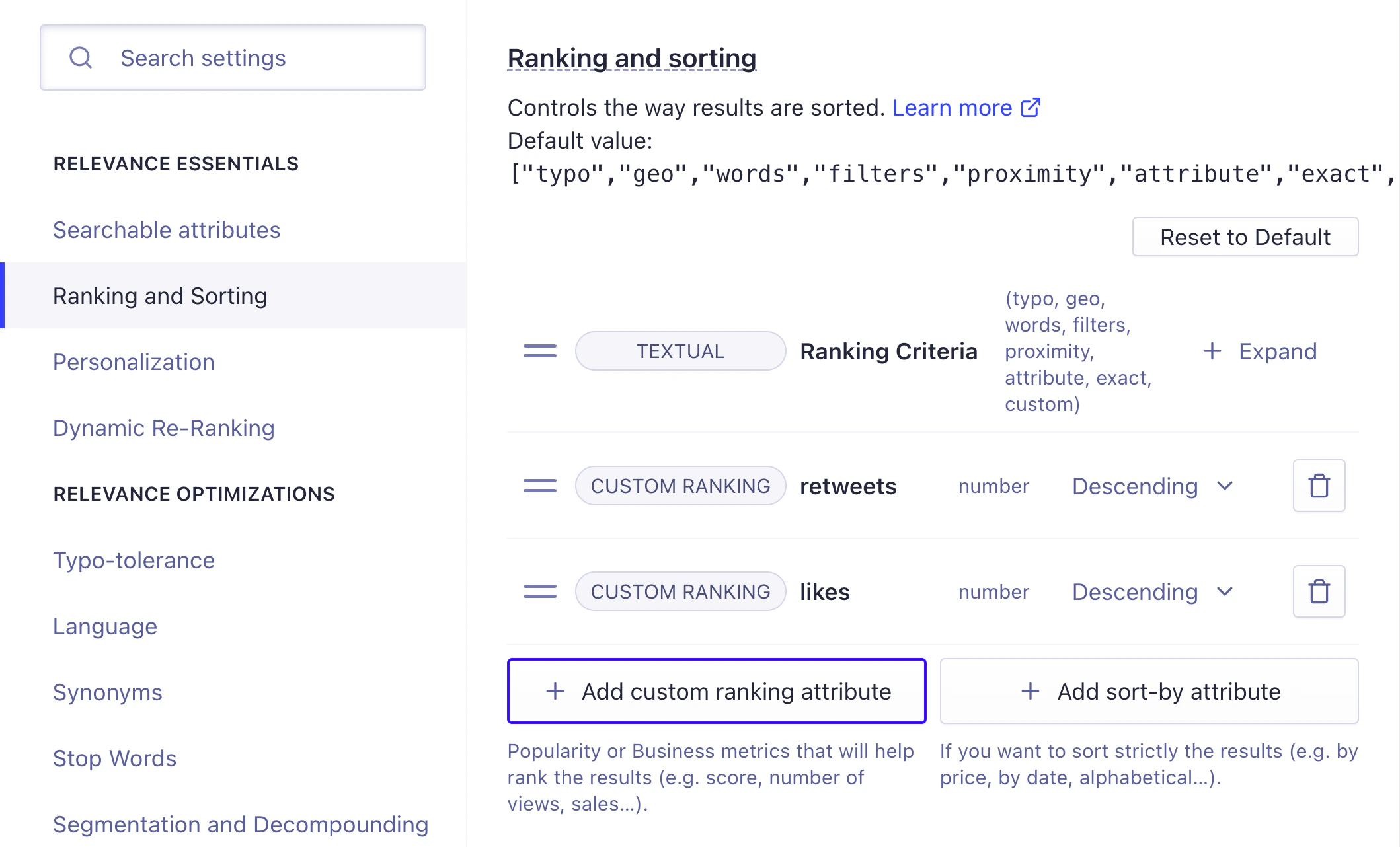
5. Click **Add custom ranking attribute** and select the attributes `retweets` and then `likes`.
6. Save your changes.
## Configure custom ranking with the API
To rank on retweets and likes,
set [`customRanking`](/doc/api-reference/api-parameters/customRanking).
criteria to be in ascending or descending order.
Custom ranking criteria are applied in order (in this example, first retweets and then likes).
To run the code examples, [install the latest API client](/doc/libraries/sdk/install).
```cs C# theme={"system"}
var response = await client.SetSettingsAsync(
"INDEX_NAME",
new IndexSettings
{
CustomRanking = new List { "desc(retweets)", "desc(likes)" },
}
);
```
```dart Dart theme={"system"}
final response = await client.setSettings(
indexName: "INDEX_NAME",
indexSettings: IndexSettings(
customRanking: [
"desc(retweets)",
"desc(likes)",
],
),
);
```
```go Go theme={"system"}
response, err := client.SetSettings(client.NewApiSetSettingsRequest(
"INDEX_NAME",
search.NewEmptyIndexSettings().SetCustomRanking(
[]string{"desc(retweets)", "desc(likes)"})))
if err != nil {
// handle the eventual error
panic(err)
}
```
```java Java theme={"system"}
UpdatedAtResponse response = client.setSettings(
"INDEX_NAME",
new IndexSettings().setCustomRanking(Arrays.asList("desc(retweets)", "desc(likes)"))
);
```
```js JavaScript theme={"system"}
const response = await client.setSettings({
indexName: 'theIndexName',
indexSettings: { customRanking: ['desc(retweets)', 'desc(likes)'] },
});
```
```kotlin Kotlin theme={"system"}
var response =
client.setSettings(
indexName = "INDEX_NAME",
indexSettings = IndexSettings(customRanking = listOf("desc(retweets)", "desc(likes)")),
)
```
```php PHP theme={"system"}
$response = $client->setSettings(
'INDEX_NAME',
['customRanking' => [
'desc(retweets)',
'desc(likes)',
],
],
);
```
```python Python theme={"system"}
response = client.set_settings(
index_name="INDEX_NAME",
index_settings={
"customRanking": [
"desc(retweets)",
"desc(likes)",
],
},
)
```
```ruby Ruby theme={"system"}
response = client.set_settings(
"INDEX_NAME",
Algolia::Search::IndexSettings.new(custom_ranking: ["desc(retweets)", "desc(likes)"])
)
```
```scala Scala theme={"system"}
val response = Await.result(
client.setSettings(
indexName = "INDEX_NAME",
indexSettings = IndexSettings(
customRanking = Some(Seq("desc(retweets)", "desc(likes)"))
)
),
Duration(100, "sec")
)
```
```swift Swift theme={"system"}
let response = try await client.setSettings(
indexName: "INDEX_NAME",
indexSettings: IndexSettings(customRanking: ["desc(retweets)", "desc(likes)"])
)
```
## Custom ranking on different attributes
**Custom ranking applies at the index level**.
This means records that don't have an attribute that's in the [`customRanking`](/doc/api-reference/api-parameters/customRanking) list are pushed to the bottom. For example, say you want to add Facebook posts to your dataset, and they have attributes `likes` and `comments`. Because `retweets` are a custom ranking attribute, and Facebook posts don't have a `retweets` attribute, they're unlikely to win the tie-break against a tweet.
You could solve this by creating a computed attribute.
For example, you could compute a single popularity attribute instead of having `likes` and `retweets` on one side and `likes` and `comments` on the other.
## Computed attributes
You might want to create a custom ranking attribute based on the calculated value of other attributes. In other words, a computed attribute. For example:
* [A Bayesian average of product ratings](/doc/guides/managing-results/must-do/custom-ranking/how-to/bayesian-average)
* A simple, combined score of other attributes (such as `popularity` being the sum of `likes` and `retweets`).
* A boolean value set to true or false based on whether another attribute is `null`.
To implement a computed attribute, you must create it as an attribute in your records. To populate the record with values for the computed attribute:
1. Retrieve every record in the index, using the [`browse`](/doc/libraries/sdk/v1/methods/browse) method.
2. For each record, calculate the computed attribute value.
3. Update each record's computed attribute in the index with the calculated value, using the [`partialUpdateObjects`](/doc/libraries/sdk/v1/methods/partial-update-objects) method.
The regularity of these updates depends on your use case: it might be once a month,
every week, daily, or even more frequently.
## Metric types
The custom ranking field accepts any numerical or boolean value that represents the relative relevance of your records.
The attribute type can be a raw value like the number of sales, views, or likes.
The field can also be a computed value such as a popularity score that you calculated before adding the record to Algolia.
What you set as your [`customRanking`](/doc/api-reference/api-parameters/customRanking) depends on your use case and what data you have available. Some retail metrics commonly used in [`customRanking`](/doc/api-reference/api-parameters/customRanking) include sales rank, stock levels, free shipping (boolean), on sale (boolean), and rating. Publish date (as a [timestamp](/doc/guides/sending-and-managing-data/prepare-your-data/in-depth/what-is-in-a-record#dates)), page views, and likes are often used in media applications.
Check that the numeric attributes used in [`customRanking`](/doc/api-reference/api-parameters/customRanking)
aren't formatted as strings.
This would cause the records to be ranked alphabetically.
### Boolean values
When using a boolean value attribute within the custom ranking,
the ascending and descending setting uses the alphabetical value of the true or false text.
* Descending: true before false
* Ascending: false before true
### String and null or absent values
If a custom ranking attribute is missing from a record or has a null value,
that record is always ordered last, regardless of its ascending or descending setting.
Records with null or missing values are considered equal.
Strings are sorted after numbers and before null or absent values.
Strings are also compared by lexicographical order.
Algolia compares only the first 50 bytes of each string (50 characters for ASCII text).
If records have the same first 50 bytes for a custom ranking attribute,
Algolia compares the next custom ranking attribute.
 6. Save your changes.
## Configure custom ranking with the API
To rank on retweets and likes,
set [`customRanking`](/doc/api-reference/api-parameters/customRanking).
criteria to be in ascending or descending order.
Custom ranking criteria are applied in order (in this example, first retweets and then likes).
To run the code examples, [install the latest API client](/doc/libraries/sdk/install).
6. Save your changes.
## Configure custom ranking with the API
To rank on retweets and likes,
set [`customRanking`](/doc/api-reference/api-parameters/customRanking).
criteria to be in ascending or descending order.
Custom ranking criteria are applied in order (in this example, first retweets and then likes).
To run the code examples, [install the latest API client](/doc/libraries/sdk/install).