> ## Documentation Index
> Fetch the complete documentation index at: https://algolia.com/llms.txt
> Use this file to discover all available pages before exploring further.
# Filter results inside a rectangle
> Use Algolia's geographical search capabilities to filter results inside a rectangle.
export const Index = () =>
index
;
In this tutorial, you'll see how to can filter results inside a rectangular area.
This location can either be set manually or taken from the current user position.
To run the code examples on this page, [install the latest API client](/doc/libraries/sdk/install).
## Dataset
The guide uses a dataset of the 3,000+ biggest airports in the world.
```json JSON icon="braces" theme={"system"}
[
{
"objectID": "3797",
"name": "John F Kennedy Intl",
"city": "New York",
"country": "United States",
"iata_code": "JFK",
"_geoloc": {
"lat": 40.639751,
"lng": -73.778925
},
"links_count": 911
}
]
```
To tell Algolia where each record is located,
the latitude and longitude must be stored in the `_geoloc` attribute.
## Initialize the client
1. [Download the data set](https://github.com/algolia/datasets/blob/master/airports/airports.json)
2. [Set up an API client and send your data to Algolia](/doc/guides/sending-and-managing-data/send-and-update-your-data/how-to/importing-with-the-api)
## Configure index settings
Even if you just want to sort by distance to a location, your textual relevance should also be good so that users can refine the search with a query.
To do that, you must configure the .
The searchable attributes are: `name`, `city`, `country`, and `iata_code`.
```cs C# theme={"system"}
var response = await client.SetSettingsAsync(
"INDEX_NAME",
new IndexSettings
{
SearchableAttributes = new List { "name", "country", "city", "iata_code" },
CustomRanking = new List { "desc(links_count)" },
}
);
```
```dart Dart theme={"system"}
final response = await client.setSettings(
indexName: "INDEX_NAME",
indexSettings: IndexSettings(
searchableAttributes: [
"name",
"country",
"city",
"iata_code",
],
customRanking: [
"desc(links_count)",
],
),
);
```
```go Go theme={"system"}
response, err := client.SetSettings(client.NewApiSetSettingsRequest(
"INDEX_NAME",
search.NewEmptyIndexSettings().SetSearchableAttributes(
[]string{"name", "country", "city", "iata_code"}).SetCustomRanking(
[]string{"desc(links_count)"})))
if err != nil {
// handle the eventual error
panic(err)
}
```
```java Java theme={"system"}
UpdatedAtResponse response = client.setSettings(
"INDEX_NAME",
new IndexSettings()
.setSearchableAttributes(Arrays.asList("name", "country", "city", "iata_code"))
.setCustomRanking(Arrays.asList("desc(links_count)"))
);
```
```js JavaScript theme={"system"}
const response = await client.setSettings({
indexName: 'theIndexName',
indexSettings: {
searchableAttributes: ['name', 'country', 'city', 'iata_code'],
customRanking: ['desc(links_count)'],
},
});
```
```kotlin Kotlin theme={"system"}
var response =
client.setSettings(
indexName = "INDEX_NAME",
indexSettings =
IndexSettings(
searchableAttributes = listOf("name", "country", "city", "iata_code"),
customRanking = listOf("desc(links_count)"),
),
)
```
```php PHP theme={"system"}
$response = $client->setSettings(
'INDEX_NAME',
['searchableAttributes' => [
'name',
'country',
'city',
'iata_code',
],
'customRanking' => [
'desc(links_count)',
],
],
);
```
```python Python theme={"system"}
response = client.set_settings(
index_name="INDEX_NAME",
index_settings={
"searchableAttributes": [
"name",
"country",
"city",
"iata_code",
],
"customRanking": [
"desc(links_count)",
],
},
)
```
```ruby Ruby theme={"system"}
response = client.set_settings(
"INDEX_NAME",
Algolia::Search::IndexSettings.new(
searchable_attributes: ["name", "country", "city", "iata_code"],
custom_ranking: ["desc(links_count)"]
)
)
```
```scala Scala theme={"system"}
val response = Await.result(
client.setSettings(
indexName = "INDEX_NAME",
indexSettings = IndexSettings(
searchableAttributes = Some(Seq("name", "country", "city", "iata_code")),
customRanking = Some(Seq("desc(links_count)"))
)
),
Duration(100, "sec")
)
```
```swift Swift theme={"system"}
let response = try await client.setSettings(
indexName: "INDEX_NAME",
indexSettings: IndexSettings(
searchableAttributes: ["name", "country", "city", "iata_code"],
customRanking: ["desc(links_count)"]
)
)
```
## Filtering inside a rectangle area
The USA can be considered as a polygon:
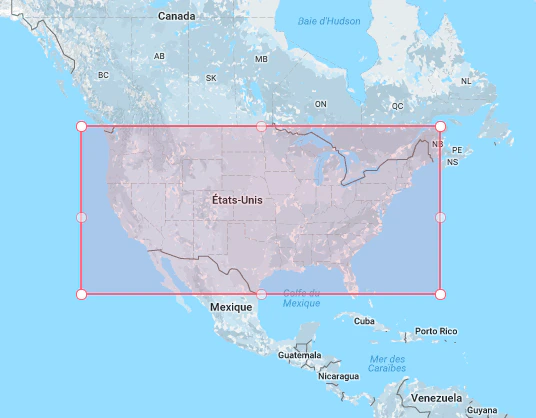 To filter inside this rectangle,
you need to pass the upper-left and bottom-right latitude and longitude to the `insideBoundingBox` parameter:
* 49.067996905313834, 65.73828125
* 25.905859247243498, 128.8046875
The empty query (`''`) returns all matching airports.
```cs C# theme={"system"}
var response = await client.SearchSingleIndexAsync(
"INDEX_NAME",
new SearchParams(
new SearchParamsObject
{
InsideBoundingBox = new InsideBoundingBox(
new List>
{
new List { 49.067996905313834, 65.73828125, 25.905859247243498, 128.8046875 },
}
),
}
)
);
```
```dart Dart theme={"system"}
final response = await client.searchSingleIndex(
indexName: "INDEX_NAME",
searchParams: SearchParamsObject(
insideBoundingBox: [
[
49.067996905313834,
65.73828125,
25.905859247243498,
128.8046875,
],
],
),
);
```
```go Go theme={"system"}
response, err := client.SearchSingleIndex(client.NewApiSearchSingleIndexRequest(
"INDEX_NAME").WithSearchParams(search.SearchParamsObjectAsSearchParams(
search.NewEmptySearchParamsObject().SetInsideBoundingBox(search.ArrayOfArrayOfFloat64AsInsideBoundingBox(
[][]float64{
{49.067996905313834, 65.73828125, 25.905859247243498, 128.8046875},
})))))
if err != nil {
// handle the eventual error
panic(err)
}
```
```java Java theme={"system"}
SearchResponse response = client.searchSingleIndex(
"INDEX_NAME",
new SearchParamsObject().setInsideBoundingBox(
InsideBoundingBox.of(Arrays.asList(Arrays.asList(49.067996905313834, 65.73828125, 25.905859247243498, 128.8046875)))
),
Hit.class
);
```
```js JavaScript theme={"system"}
const response = await client.searchSingleIndex({
indexName: 'indexName',
searchParams: { insideBoundingBox: [[49.067996905313834, 65.73828125, 25.905859247243498, 128.8046875]] },
});
```
```kotlin Kotlin theme={"system"}
var response =
client.searchSingleIndex(
indexName = "INDEX_NAME",
searchParams =
SearchParamsObject(
insideBoundingBox =
InsideBoundingBox.of(
listOf(listOf(49.067996905313834, 65.73828125, 25.905859247243498, 128.8046875))
)
),
)
```
```php PHP theme={"system"}
$response = $client->searchSingleIndex(
'INDEX_NAME',
['insideBoundingBox' => [
[
49.067996905313834,
65.73828125,
25.905859247243498,
128.8046875,
],
],
],
);
```
```python Python theme={"system"}
response = client.search_single_index(
index_name="INDEX_NAME",
search_params={
"insideBoundingBox": [
[
49.067996905313834,
65.73828125,
25.905859247243498,
128.8046875,
],
],
},
)
```
```ruby Ruby theme={"system"}
response = client.search_single_index(
"INDEX_NAME",
Algolia::Search::SearchParamsObject.new(
inside_bounding_box: [[49.067996905313834, 65.73828125, 25.905859247243498, 128.8046875]]
)
)
```
```scala Scala theme={"system"}
val response = Await.result(
client.searchSingleIndex(
indexName = "INDEX_NAME",
searchParams = Some(
SearchParamsObject(
insideBoundingBox =
Some(InsideBoundingBox(Seq(Seq(49.067996905313834, 65.73828125, 25.905859247243498, 128.8046875))))
)
)
),
Duration(100, "sec")
)
```
```swift Swift theme={"system"}
let response: SearchResponse = try await client.searchSingleIndex(
indexName: "INDEX_NAME",
searchParams: SearchSearchParams
.searchSearchParamsObject(SearchSearchParamsObject(insideBoundingBox: SearchInsideBoundingBox
.arrayOfArrayOfDouble([[
49.067996905313834,
65.73828125,
25.905859247243498,
128.8046875,
]])))
)
```
To filter inside this rectangle,
you need to pass the upper-left and bottom-right latitude and longitude to the `insideBoundingBox` parameter:
* 49.067996905313834, 65.73828125
* 25.905859247243498, 128.8046875
The empty query (`''`) returns all matching airports.
```cs C# theme={"system"}
var response = await client.SearchSingleIndexAsync(
"INDEX_NAME",
new SearchParams(
new SearchParamsObject
{
InsideBoundingBox = new InsideBoundingBox(
new List>
{
new List { 49.067996905313834, 65.73828125, 25.905859247243498, 128.8046875 },
}
),
}
)
);
```
```dart Dart theme={"system"}
final response = await client.searchSingleIndex(
indexName: "INDEX_NAME",
searchParams: SearchParamsObject(
insideBoundingBox: [
[
49.067996905313834,
65.73828125,
25.905859247243498,
128.8046875,
],
],
),
);
```
```go Go theme={"system"}
response, err := client.SearchSingleIndex(client.NewApiSearchSingleIndexRequest(
"INDEX_NAME").WithSearchParams(search.SearchParamsObjectAsSearchParams(
search.NewEmptySearchParamsObject().SetInsideBoundingBox(search.ArrayOfArrayOfFloat64AsInsideBoundingBox(
[][]float64{
{49.067996905313834, 65.73828125, 25.905859247243498, 128.8046875},
})))))
if err != nil {
// handle the eventual error
panic(err)
}
```
```java Java theme={"system"}
SearchResponse response = client.searchSingleIndex(
"INDEX_NAME",
new SearchParamsObject().setInsideBoundingBox(
InsideBoundingBox.of(Arrays.asList(Arrays.asList(49.067996905313834, 65.73828125, 25.905859247243498, 128.8046875)))
),
Hit.class
);
```
```js JavaScript theme={"system"}
const response = await client.searchSingleIndex({
indexName: 'indexName',
searchParams: { insideBoundingBox: [[49.067996905313834, 65.73828125, 25.905859247243498, 128.8046875]] },
});
```
```kotlin Kotlin theme={"system"}
var response =
client.searchSingleIndex(
indexName = "INDEX_NAME",
searchParams =
SearchParamsObject(
insideBoundingBox =
InsideBoundingBox.of(
listOf(listOf(49.067996905313834, 65.73828125, 25.905859247243498, 128.8046875))
)
),
)
```
```php PHP theme={"system"}
$response = $client->searchSingleIndex(
'INDEX_NAME',
['insideBoundingBox' => [
[
49.067996905313834,
65.73828125,
25.905859247243498,
128.8046875,
],
],
],
);
```
```python Python theme={"system"}
response = client.search_single_index(
index_name="INDEX_NAME",
search_params={
"insideBoundingBox": [
[
49.067996905313834,
65.73828125,
25.905859247243498,
128.8046875,
],
],
},
)
```
```ruby Ruby theme={"system"}
response = client.search_single_index(
"INDEX_NAME",
Algolia::Search::SearchParamsObject.new(
inside_bounding_box: [[49.067996905313834, 65.73828125, 25.905859247243498, 128.8046875]]
)
)
```
```scala Scala theme={"system"}
val response = Await.result(
client.searchSingleIndex(
indexName = "INDEX_NAME",
searchParams = Some(
SearchParamsObject(
insideBoundingBox =
Some(InsideBoundingBox(Seq(Seq(49.067996905313834, 65.73828125, 25.905859247243498, 128.8046875))))
)
)
),
Duration(100, "sec")
)
```
```swift Swift theme={"system"}
let response: SearchResponse = try await client.searchSingleIndex(
indexName: "INDEX_NAME",
searchParams: SearchSearchParams
.searchSearchParamsObject(SearchSearchParamsObject(insideBoundingBox: SearchInsideBoundingBox
.arrayOfArrayOfDouble([[
49.067996905313834,
65.73828125,
25.905859247243498,
128.8046875,
]])))
)
```