> ## Documentation Index
> Fetch the complete documentation index at: https://algolia.com/llms.txt
> Use this file to discover all available pages before exploring further.
# Sorting results
> Learn how to sort by an attribute using replicas.
export const Records = () =>
records
;
Although sorting occurs at each level of the [ranking formula](/doc/guides/managing-results/relevance-overview/in-depth/ranking-criteria), in this guidance, "sorting" refers to **ordering by a specific attribute** like release date or price.
## The challenge with sorting
Sorting exposes the difference between relevance and ranking.
Instead of ranking results based on [textual relevance](/doc/guides/managing-results/relevance-overview/in-depth/ranking-criteria) and [custom ranking](/doc/guides/managing-results/must-do/custom-ranking), sorting ranks results based on attributes like price.
This attribute may not be related to relevance.
That means that any result, no matter how relevant
it is, might be the first result.
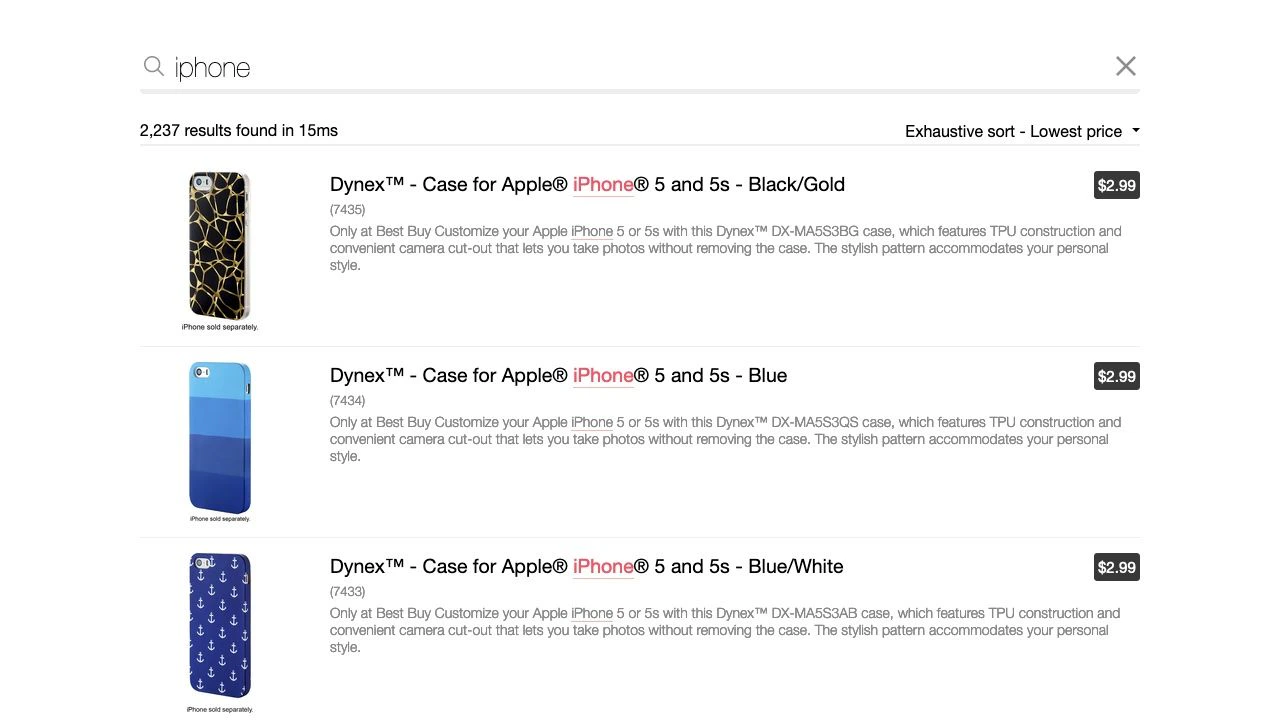
For example, if a user sorts on price from lowest to highest, a record with a low price may rank highest, even though it has less textual and business relevance than other records. This type of sorting is called exhaustive sorting or hard sorting. Despite being common, this behavior tends to hurt the search experience for most use cases because users don't necessarily get what they're looking for.
{/* vale Algolia.ProductNames = NO */}
Returning to the preceding example: suppose a user searches "iPhone" and sorts results from lowest to highest price.
The top results would be cheaper iPhone accessories such as cases when users were actually looking for the least expensive iPhones.
 To solve for this behavior when it's not explicitly required, Algolia supports two types of sorts.
## Exhaustive and relevant sorting
Algolia provides two types of sorts:
* Exhaustive or hard sorting
* Relevant sorting
Your use case determines which is a better fit.
### Exhaustive sorting
As [previously described](/doc/guides/managing-results/refine-results/sorting#the-challenge-with-sorting), [exhaustive sorting](/doc/guides/managing-results/refine-results/sorting/in-depth/exhaustive-sort) is "strict" because it reorders all results based on the sorting attributes. It's intended for use cases that require exhaustivity or where relevance isn't crucial, like an inventory app or other use cases similar to databases.
Exhaustive sorting uses [standard replicas](/doc/guides/managing-results/refine-results/sorting/in-depth/replicas).
### Relevant sorting
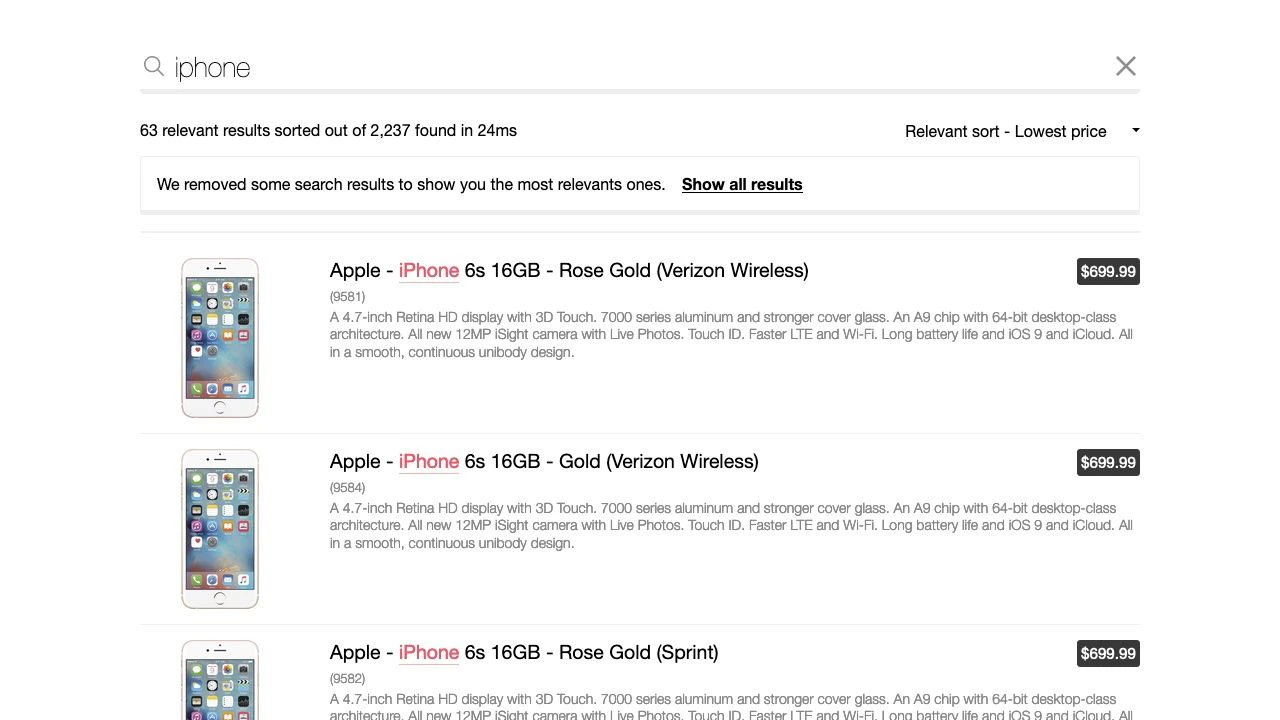
[Relevant sorting](/doc/guides/managing-results/refine-results/sorting/in-depth/relevant-sort) reorders only relevant results. This behavior is a state of the art sorting experience, especially in ecommerce, marketplace, and media content discovery.
Relevant sorting uses [virtual replicas](/doc/guides/managing-results/refine-results/sorting/in-depth/replicas).
To solve for this behavior when it's not explicitly required, Algolia supports two types of sorts.
## Exhaustive and relevant sorting
Algolia provides two types of sorts:
* Exhaustive or hard sorting
* Relevant sorting
Your use case determines which is a better fit.
### Exhaustive sorting
As [previously described](/doc/guides/managing-results/refine-results/sorting#the-challenge-with-sorting), [exhaustive sorting](/doc/guides/managing-results/refine-results/sorting/in-depth/exhaustive-sort) is "strict" because it reorders all results based on the sorting attributes. It's intended for use cases that require exhaustivity or where relevance isn't crucial, like an inventory app or other use cases similar to databases.
Exhaustive sorting uses [standard replicas](/doc/guides/managing-results/refine-results/sorting/in-depth/replicas).
### Relevant sorting
[Relevant sorting](/doc/guides/managing-results/refine-results/sorting/in-depth/relevant-sort) reorders only relevant results. This behavior is a state of the art sorting experience, especially in ecommerce, marketplace, and media content discovery.
Relevant sorting uses [virtual replicas](/doc/guides/managing-results/refine-results/sorting/in-depth/replicas).
 ## See also
* [Exhaustive sorting](/doc/guides/managing-results/refine-results/sorting/in-depth/exhaustive-sort)
* [Relevant sorting](/doc/guides/managing-results/refine-results/sorting/in-depth/relevant-sort)
## See also
* [Exhaustive sorting](/doc/guides/managing-results/refine-results/sorting/in-depth/exhaustive-sort)
* [Relevant sorting](/doc/guides/managing-results/refine-results/sorting/in-depth/relevant-sort)