> ## Documentation Index
> Fetch the complete documentation index at: https://algolia.com/llms.txt
> Use this file to discover all available pages before exploring further.
# Relevant sorting
> Learn about the relevant sorting feature and how you can use it to provide more relevant results for users.
export const SearchQuery = () =>
search query
;
export const Records = () =>
records
;
export const Index = () =>
index
;
export const Facet = () =>
facet
;
Use relevant sorting to only show the most relevant results for a user's search instead of displaying all (exhaustive sorting).
This feature isn't available on every plan.
Refer to your [pricing plan](https://www.algolia.com/pricing) to see if it's included.
## Examples
These examples illustrate the difference between [exhaustive](/doc/guides/managing-results/refine-results/sorting/in-depth/exhaustive-sort) and relevant sorting.
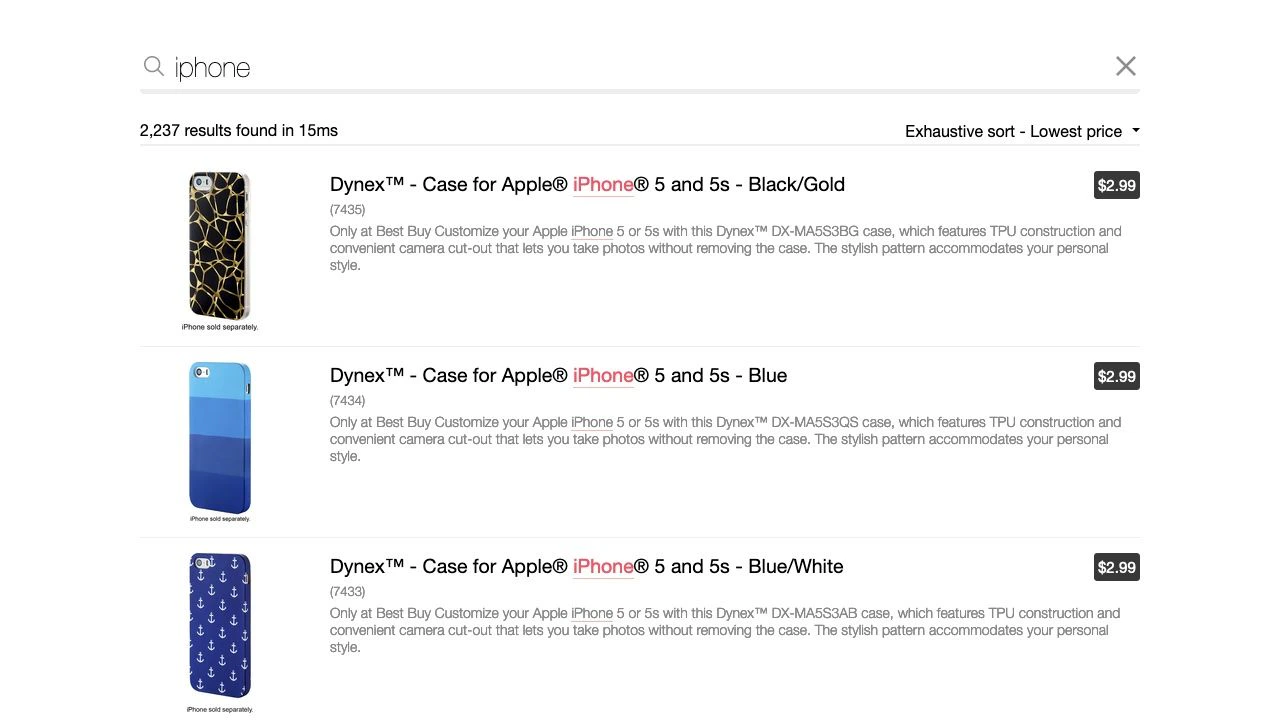
Exhaustive sorting returns and sorts all results that match the search term `iphone`:
here, a list of phone cases appear at the top of the results.
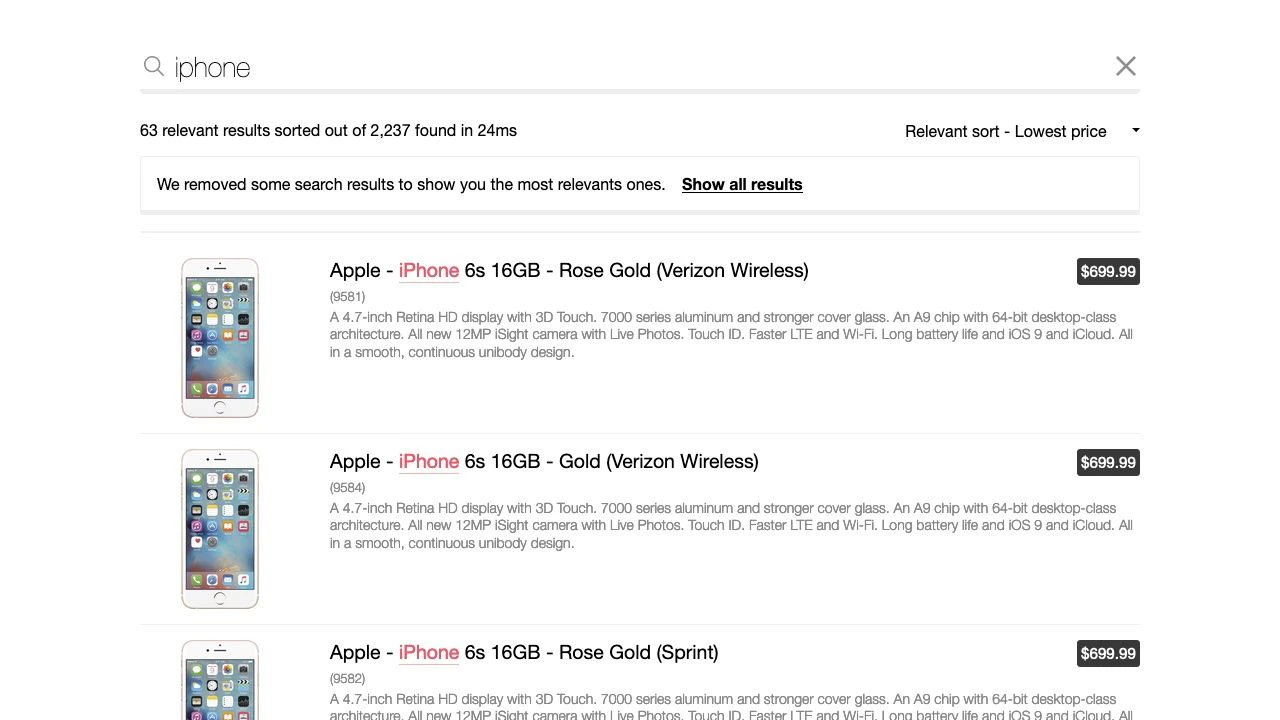
For the same search term, relevant sorting has applied a virtual replica's [custom ranking](/doc/guides/managing-results/must-do/custom-ranking) criteria to ensure that iPhone devices appear at the top of the results.
### Exhaustive sorting
 ### Relevant sorting
 ## Effect of relevant sorting on the ranking formula
Algolia's [ranking formula](/doc/guides/managing-results/relevance-overview/in-depth/ranking-criteria) isn't overridden when you use relevant sorting. Instead, the relevant sorting algorithm:
1. Sorts results using the ranking formula of the primary .
2. Selects the most relevant results. You can determine how strict this should be by adjusting [`relevancyStrictness`](/doc/api-reference/api-parameters/relevancyStrictness) on a [virtual replica](/doc/guides/managing-results/refine-results/sorting/in-depth/replicas#standard-and-virtual-replicas).
3. Orders the selected results according to the primary index's [`sortBy`](/doc/guides/managing-results/refine-results/sorting/how-to/sort-by-attribute) attributes (if present) and the virtual replica's [`customRanking`](/doc/api-reference/api-parameters/customRanking).
4. Settle remaining ties according to the [filter score](/doc/guides/managing-results/refine-results/filtering/in-depth/filter-scoring).
5. Returns the relevant results.
The ranking formula determines which results are most relevant to the ,
but custom ranking determines the order of results.
This means that parameters that affect the ranking formula don't affect result ordering.
If multiple results have the same value for a sorting attribute,
the other sorting attributes are used to decide which one comes first.
For example, if you sort according to price and then popularity,
and three results have the same cost,
the engine will prioritize them according to their popularity score.
For more information, see:
* [Sort by attribute](/doc/guides/managing-results/refine-results/sorting/how-to/sort-by-attribute)
* [Sort an index by date](/doc/guides/managing-results/refine-results/sorting/how-to/sort-an-index-by-date)
## Relevant sorting considerations
Relevant sorting interacts with other features in ways you might not expect.
### Other re-ranking features can affect results
Other re-ranking features, such as rules, apply after relevant sorting and will modify sort order.
For example, if [Personalization](/doc/guides/personalization/classic-personalization/what-is-personalization) promotes expensive items for a particular user based on their past actions,
that user might see expensive items at the top of the results, even if they've chosen to *relevant sort* from lowest to highest price.
To ensure predictable behavior, don't use the following features or parameters with relevant sorting:
* [`distinct`](/doc/api-reference/api-parameters/distinct) > 1
* [Dynamic Re-ranking](/doc/guides/algolia-ai/re-ranking)
* [Personalization](/doc/guides/personalization/classic-personalization/personalizing-results)
### Facets count
When relevant sorting is enabled, Algolia still computes each on all results, not just those defined by the relevant sort.
A [UI banner](/doc/guides/managing-results/rules/merchandising-and-promoting/how-to/add-banners) detailing the behavior of the relevant sort may help manage user expectations.
### Enabling relevant sorting reduces the number of results
Essentially, that's the point: it gives users more relevant results, not all results ([exhaustive sorting](/doc/guides/managing-results/refine-results/sorting/in-depth/exhaustive-sort)).
For example, you search for `chromebook` on an ecommerce site and get Chromebook computers at the top of your results (so far, so good).
However, if you then sort by ascending price (because you want a cheaper computer),
the top (cheapest) listed items might be "Chromebook power adapters".
With a relevant sort, you get fewer results but only see the relevant items (computers).
Using a virtual replica even with `relevancyStrictness` set to 0 can't mimic the exhaustive sorting of a standard replica because it doesn't use the same algorithm. Be aware that a virtual replica:
* Doesn't duplicate the data. It sorts at query time.
* Can only retrieve a maximum of 20k results, so there's no guarantee that it will fetch the "deepest" hits.
When using virtual replicas, use `nbSortedHits` rather than `nbHits` to get the number of results.
### Relevant sort doesn't apply when browsing an index
When you use the [Browse](/doc/libraries/sdk/methods/search/browse) method on a virtual replica index, records are returned in the same order as the primary index.
This means that relevant sort parameters, such as [relevancy strictness](/doc/api-reference/api-parameters/relevancyStrictness), have no effect.
## How to configure relevant sorting
### Create a virtual replica index
If you want to configure relevant sorting,
you first need to create a [virtual replica index](/doc/guides/managing-results/refine-results/sorting/in-depth/replicas#standard-and-virtual-replicas) for each attribute you want to sort by.
Virtual replicas provide an alternative "view" of the primary index.
Virtual replicas reuse the primary's ranking formula to return relevant results.
For that reason, you can't change the [`ranking`](/doc/api-reference/api-parameters/ranking)
on virtual replicas but can use [`customRanking`](/doc/api-reference/api-parameters/customRanking)
to define the sort criteria.
For more information, see:
* [Understanding replicas](/doc/guides/managing-results/refine-results/sorting/in-depth/replicas)
* [What is the effect of a replica on the number of records?](/doc/guides/managing-results/refine-results/sorting/in-depth/replicas-impact-on-pricing)
### Connect your UI to your index
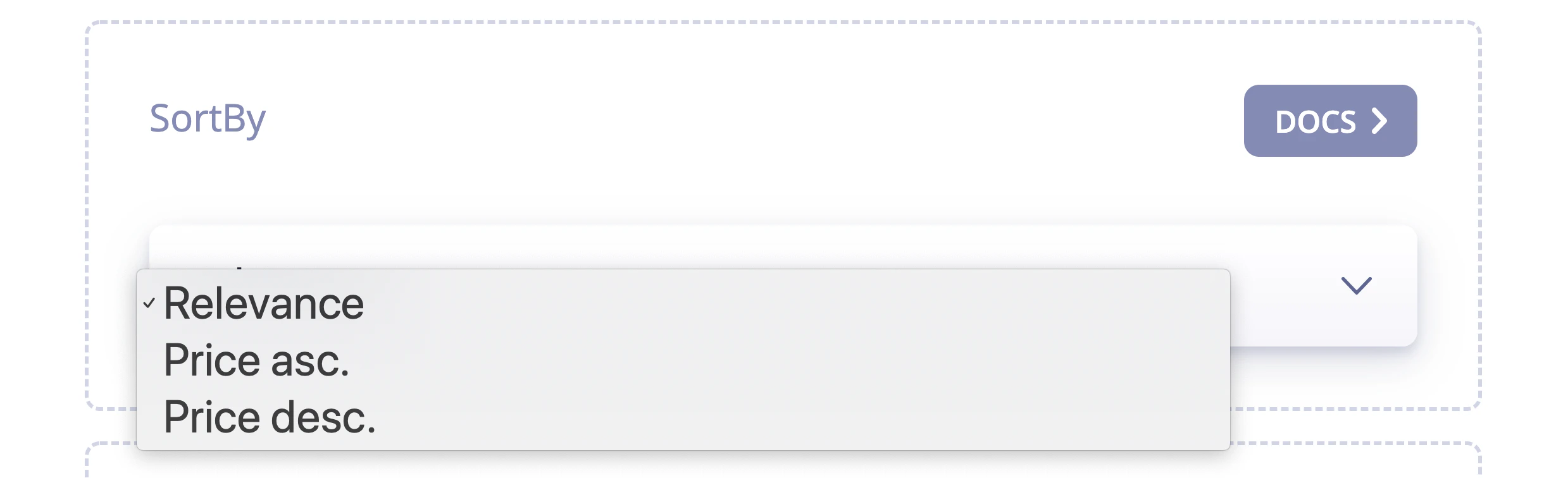
Virtual replica indices manage the backend of sorting, but you still need to implement the frontend. You can do this with either custom logic or [InstantSearch](/doc/guides/building-search-ui/what-is-instantsearch/js).
If you're using InstantSearch, you should use the [`sortBy` UI widget](/doc/guides/managing-results/refine-results/sorting/how-to/use-sorting-ui-widget).
## Effect of relevant sorting on the ranking formula
Algolia's [ranking formula](/doc/guides/managing-results/relevance-overview/in-depth/ranking-criteria) isn't overridden when you use relevant sorting. Instead, the relevant sorting algorithm:
1. Sorts results using the ranking formula of the primary .
2. Selects the most relevant results. You can determine how strict this should be by adjusting [`relevancyStrictness`](/doc/api-reference/api-parameters/relevancyStrictness) on a [virtual replica](/doc/guides/managing-results/refine-results/sorting/in-depth/replicas#standard-and-virtual-replicas).
3. Orders the selected results according to the primary index's [`sortBy`](/doc/guides/managing-results/refine-results/sorting/how-to/sort-by-attribute) attributes (if present) and the virtual replica's [`customRanking`](/doc/api-reference/api-parameters/customRanking).
4. Settle remaining ties according to the [filter score](/doc/guides/managing-results/refine-results/filtering/in-depth/filter-scoring).
5. Returns the relevant results.
The ranking formula determines which results are most relevant to the ,
but custom ranking determines the order of results.
This means that parameters that affect the ranking formula don't affect result ordering.
If multiple results have the same value for a sorting attribute,
the other sorting attributes are used to decide which one comes first.
For example, if you sort according to price and then popularity,
and three results have the same cost,
the engine will prioritize them according to their popularity score.
For more information, see:
* [Sort by attribute](/doc/guides/managing-results/refine-results/sorting/how-to/sort-by-attribute)
* [Sort an index by date](/doc/guides/managing-results/refine-results/sorting/how-to/sort-an-index-by-date)
## Relevant sorting considerations
Relevant sorting interacts with other features in ways you might not expect.
### Other re-ranking features can affect results
Other re-ranking features, such as rules, apply after relevant sorting and will modify sort order.
For example, if [Personalization](/doc/guides/personalization/classic-personalization/what-is-personalization) promotes expensive items for a particular user based on their past actions,
that user might see expensive items at the top of the results, even if they've chosen to *relevant sort* from lowest to highest price.
To ensure predictable behavior, don't use the following features or parameters with relevant sorting:
* [`distinct`](/doc/api-reference/api-parameters/distinct) > 1
* [Dynamic Re-ranking](/doc/guides/algolia-ai/re-ranking)
* [Personalization](/doc/guides/personalization/classic-personalization/personalizing-results)
### Facets count
When relevant sorting is enabled, Algolia still computes each on all results, not just those defined by the relevant sort.
A [UI banner](/doc/guides/managing-results/rules/merchandising-and-promoting/how-to/add-banners) detailing the behavior of the relevant sort may help manage user expectations.
### Enabling relevant sorting reduces the number of results
Essentially, that's the point: it gives users more relevant results, not all results ([exhaustive sorting](/doc/guides/managing-results/refine-results/sorting/in-depth/exhaustive-sort)).
For example, you search for `chromebook` on an ecommerce site and get Chromebook computers at the top of your results (so far, so good).
However, if you then sort by ascending price (because you want a cheaper computer),
the top (cheapest) listed items might be "Chromebook power adapters".
With a relevant sort, you get fewer results but only see the relevant items (computers).
Using a virtual replica even with `relevancyStrictness` set to 0 can't mimic the exhaustive sorting of a standard replica because it doesn't use the same algorithm. Be aware that a virtual replica:
* Doesn't duplicate the data. It sorts at query time.
* Can only retrieve a maximum of 20k results, so there's no guarantee that it will fetch the "deepest" hits.
When using virtual replicas, use `nbSortedHits` rather than `nbHits` to get the number of results.
### Relevant sort doesn't apply when browsing an index
When you use the [Browse](/doc/libraries/sdk/methods/search/browse) method on a virtual replica index, records are returned in the same order as the primary index.
This means that relevant sort parameters, such as [relevancy strictness](/doc/api-reference/api-parameters/relevancyStrictness), have no effect.
## How to configure relevant sorting
### Create a virtual replica index
If you want to configure relevant sorting,
you first need to create a [virtual replica index](/doc/guides/managing-results/refine-results/sorting/in-depth/replicas#standard-and-virtual-replicas) for each attribute you want to sort by.
Virtual replicas provide an alternative "view" of the primary index.
Virtual replicas reuse the primary's ranking formula to return relevant results.
For that reason, you can't change the [`ranking`](/doc/api-reference/api-parameters/ranking)
on virtual replicas but can use [`customRanking`](/doc/api-reference/api-parameters/customRanking)
to define the sort criteria.
For more information, see:
* [Understanding replicas](/doc/guides/managing-results/refine-results/sorting/in-depth/replicas)
* [What is the effect of a replica on the number of records?](/doc/guides/managing-results/refine-results/sorting/in-depth/replicas-impact-on-pricing)
### Connect your UI to your index
Virtual replica indices manage the backend of sorting, but you still need to implement the frontend. You can do this with either custom logic or [InstantSearch](/doc/guides/building-search-ui/what-is-instantsearch/js).
If you're using InstantSearch, you should use the [`sortBy` UI widget](/doc/guides/managing-results/refine-results/sorting/how-to/use-sorting-ui-widget).
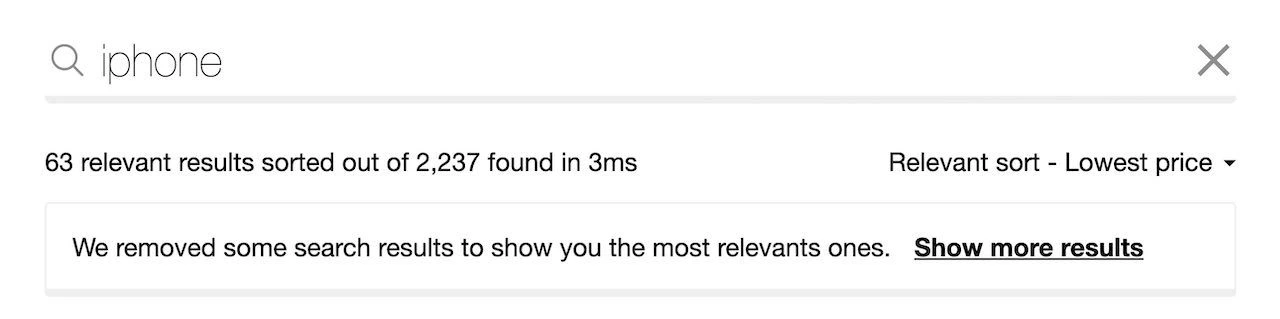
 To ensure users understand how relevant sort works and how they can control their experience:
* Indicate that sorting removed some results
* Offer them the option of displaying more.
You can do this with the `relevantSort` widget:
To ensure users understand how relevant sort works and how they can control their experience:
* Indicate that sorting removed some results
* Offer them the option of displaying more.
You can do this with the `relevantSort` widget:
 For more details, see:
* [`sortBy` widget](/doc/api-reference/widgets/sort-by/js)
* [`relevantSort` widget](/doc/api-reference/widgets/relevant-sort/js)
For more details, see:
* [`sortBy` widget](/doc/api-reference/widgets/sort-by/js)
* [`relevantSort` widget](/doc/api-reference/widgets/relevant-sort/js)