> ## Documentation Index
> Fetch the complete documentation index at: https://algolia.com/llms.txt
> Use this file to discover all available pages before exploring further.
# The eight ranking criteria
> Discover the eight tie-breaking criteria that Algolia uses to rank your results.
export const Records = () =>
records
;
export const Index = () =>
index
;
Algolia's **eight ranking criteria** help define what's both [textually and business relevant](/doc/guides/managing-results/relevance-overview/in-depth/defining-relevance#ranking-putting-the-best-at-the-top).
## Typo
Algolia is [typo-tolerant](/doc/guides/managing-results/optimize-search-results/typo-tolerance).
The Typo criterion in the ranking formula ensures the following ranking of search results for queries:
1. Queries without typos (exact matches)
2. Queries with one typo
3. Queries with two typos
### Typo versus Exact versus Words
Algolia's [Exact](#exact), [Words](#words-if-applicable), and Typo ranking criteria are all used to determine how well a record matches a query.
However, they differ in the following ways:
| Criterion | Behavior | Helpful when |
| --------- | ------------------------------------------------------------------------------------------------------------------------------------------------------- | -------------------------------------------------------------------------------------------------------------------------------- |
| **Typo** | Returns results for queries that match all words in a record, including words with typos. However, matches without typos in the query terms rank higher | Users make typing errors |
| **Exact** | Returns results for queries that match all words in a record. The ranking favors records where the query sequence matches the record's word order | Users type the query as written, such as the name of a well-known product or company |
| **Words** | Returns results for queries that match some words in a record. | Misinterpretation of user input is more common such as in a [voice-to-text search](/doc/guides/solutions/ecommerce/voice-search) |
## Geo (if applicable)
If you're using the [geo-search feature](/doc/guides/managing-results/refine-results/geolocation),
results are ranked by distance, from the closest to the farthest.
The [`aroundPrecision`](/doc/api-reference/api-parameters/aroundPrecision) parameter sets the precision of this ranking.
## Words (if applicable)
This criterion only breaks ties if you're using the [`optionalWords` setting](/doc/guides/managing-results/optimize-search-results/empty-or-insufficient-results#create-a-list-of-optional-words).
If you're not using `optionalWords`,
this criterion will have the same value for each result.
By default, Algolia only matches results that contain all the query's words.
With `optionalWords`,
you can declare some words as optional.
The Words criterion ranks them by the number of matching words typed by users (not the number of times the word appears in the record).
For example, if a user typed two words,
the maximum score for this criterion is 2—even if a record contains this word 10 times.
## Filters
If a query uses [filters](/doc/api-reference/api-parameters/filters) or [optional filters](/doc/api-reference/api-parameters/optionalFilters),
this criterion ranks according to the **number of matching filters** so that records that don't match a filter score 0 and records that match two filters score 2.
You can adjust the scoring with:
* [Filter scoring](/doc/guides/managing-results/refine-results/filtering/in-depth/filter-scoring#how-scoring-is-calculated), you can assign different scores to each filter.
* Using [sumOrFiltersScores](/doc/guides/managing-results/refine-results/filtering/in-depth/filter-scoring#accumulating-scores-with-sumorfiltersscores) to accumulate the scores of disjunctive (OR) matches to create a **total score**.
The Filters criterion can be helpful when defining relevance—for example, when [promoting results](/doc/guides/managing-results/rules/merchandising-and-promoting).
## Proximity
For a query with two or more words,
Proximity calculates how near those words are to each other in the matching record.
This criterion prioritizes records that have words closer to each other.
For example, consider two records with an `actor_name` attribute:
`George Clooney` and `George Timothy Clooney`.
If a user searches for "george clooney",
`George Clooney` has a better proximity distance (the two query words are 1 word apart) compared to `George Timothy Clooney` (the two query words are 2 words apart).
## Attribute
This criterion only considers [`searchableAttributes`](/doc/api-reference/api-parameters/searchableAttributes):
attributes at the top of the `searchableAttributes` list rank higher than lower ones.
The [order](/doc/guides/managing-results/must-do/searchable-attributes/how-to/configuring-searchable-attributes-the-right-way#word-position) of matches within the attribute itself is also important. By default, records with matched words closer to the beginning of a given attribute rank higher.
## Exact
Records with words that match query terms without typos will rank higher.
The more matching words in a record's attribute,
the higher that record's rank.
By default:
* **An exact match** is when a complete word in a query,
without typos, matches a word in an attribute.
Single-word queries are only exact if they match a single-word attribute.
* **An inexact match** has typos or only matches a prefix.
Synonym matching and singular/plural matching are considered exact.
Thus, a word is considered an exact match if its synonym matches a query.
You can [change the settings for the Exact criterion](/doc/guides/managing-results/optimize-search-results/override-search-engine-defaults/in-depth/adjust-exact-settings).
## Custom
This criterion takes into account your [custom ranking](/doc/guides/managing-results/must-do/custom-ranking) attributes.
With multiple custom ranking attributes, the behavior is the same as other criteria:
a criterion is only used if there is a tie between all the previous criteria.
For example, in the following custom ranking:
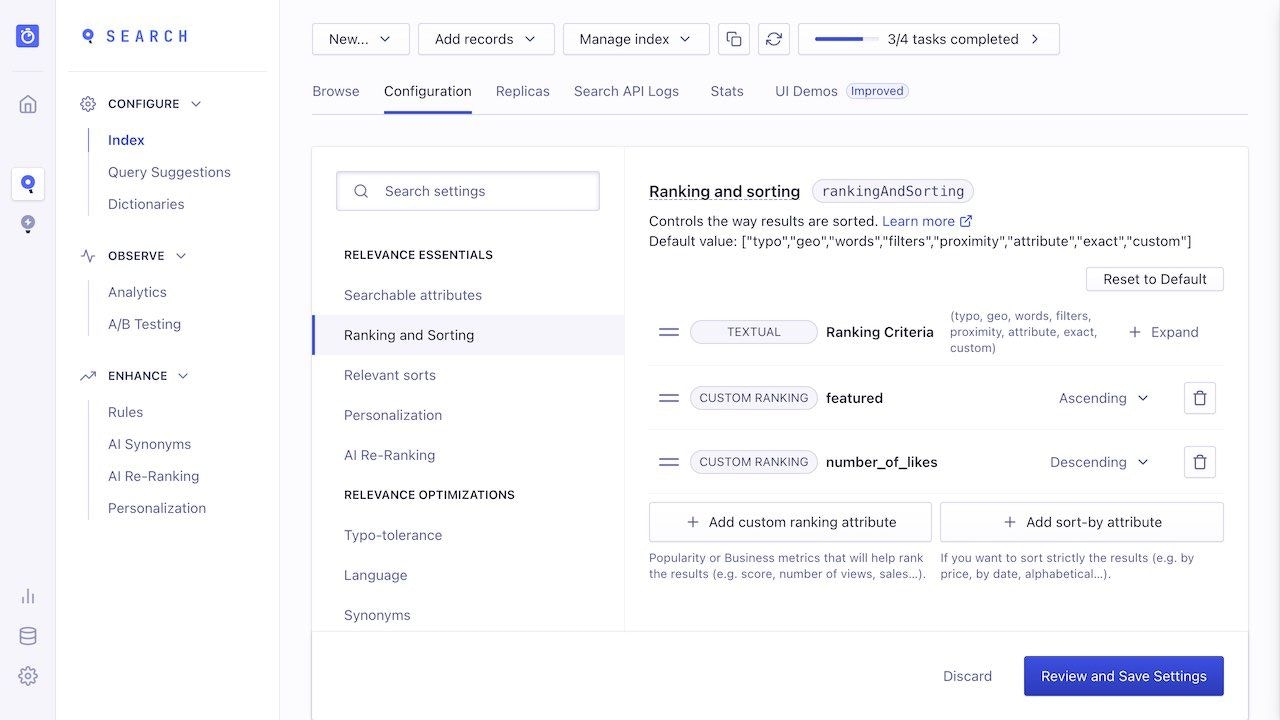 1. `asc(featured)` ranks records where the `featured` attribute is `false` higher than records where it's `true`.
2. `desc(number_of_likes)` ranks records by the number of likes: from the most to the least liked.
## Attribute and proximity combinations
When Proximity appears before Attribute in the ranking,
the calculation of Attribute ranking is different than if Proximity appears after Attribute.
This is called the **best-matched attribute**.
This ordering is a subtle distinction.
You should keep the default ranking since Proximity usually leads to better identification of the best-matched attribute.
### Best-matched attribute
To determine the best-matched attribute,
Algolia uses two methods:
* **Closest in proximity.** Ranking is based on how close two or more query terms are to each other.
* **Best position.** Considers words near the beginning of an attribute to be better than those towards the end.
Algolia's default ranking formula puts Proximity before Attribute,
which has a subtle but important effect on computing the best-matched attribute:
attributes with matched terms **closest** to each other will rank highest.
If you put Proximity after Attribute or remove the Proximity criterion,
the best-matched attributes are those whose matched terms are in the **best position**.
### Example
For example, consider an with two searchable attributes, `profession` and `full-name`, and the following two records:
```json JSON icon=braces theme={"system"}
[
{
"profession": "Singer and comedian",
"full-name": "Jerry Lewis",
"objectID": "3"
},
{
"profession": "Born a singer",
"full-name": "Jerry Singer",
"objectID": "1"
}
]
```
Consider the search query "Jerry Singer".
The default ranking formula order is **Proximity before Attribute**.
In this case, the record containing the two words "jerry" and "singer" in closest proximity ranks higher (regardless of attribute order).
For the two example records:
* `objectID` 1 has the query words side-by-side in the full-name attribute
* `objectID` 3 has the query words in different attributes.
Because the former has a better Proximity, it's ranked first.
However, if you put **Proximity after Attribute**,
the ranking is based on the **best position** of the matched terms in the searchable attributes (`profession` and `full-name`).
With the query "jerry singer",
the term "singer" appears in `profession` before `full-name`.
1. `asc(featured)` ranks records where the `featured` attribute is `false` higher than records where it's `true`.
2. `desc(number_of_likes)` ranks records by the number of likes: from the most to the least liked.
## Attribute and proximity combinations
When Proximity appears before Attribute in the ranking,
the calculation of Attribute ranking is different than if Proximity appears after Attribute.
This is called the **best-matched attribute**.
This ordering is a subtle distinction.
You should keep the default ranking since Proximity usually leads to better identification of the best-matched attribute.
### Best-matched attribute
To determine the best-matched attribute,
Algolia uses two methods:
* **Closest in proximity.** Ranking is based on how close two or more query terms are to each other.
* **Best position.** Considers words near the beginning of an attribute to be better than those towards the end.
Algolia's default ranking formula puts Proximity before Attribute,
which has a subtle but important effect on computing the best-matched attribute:
attributes with matched terms **closest** to each other will rank highest.
If you put Proximity after Attribute or remove the Proximity criterion,
the best-matched attributes are those whose matched terms are in the **best position**.
### Example
For example, consider an with two searchable attributes, `profession` and `full-name`, and the following two records:
```json JSON icon=braces theme={"system"}
[
{
"profession": "Singer and comedian",
"full-name": "Jerry Lewis",
"objectID": "3"
},
{
"profession": "Born a singer",
"full-name": "Jerry Singer",
"objectID": "1"
}
]
```
Consider the search query "Jerry Singer".
The default ranking formula order is **Proximity before Attribute**.
In this case, the record containing the two words "jerry" and "singer" in closest proximity ranks higher (regardless of attribute order).
For the two example records:
* `objectID` 1 has the query words side-by-side in the full-name attribute
* `objectID` 3 has the query words in different attributes.
Because the former has a better Proximity, it's ranked first.
However, if you put **Proximity after Attribute**,
the ranking is based on the **best position** of the matched terms in the searchable attributes (`profession` and `full-name`).
With the query "jerry singer",
the term "singer" appears in `profession` before `full-name`.