> ## Documentation Index
> Fetch the complete documentation index at: https://algolia.com/llms.txt
> Use this file to discover all available pages before exploring further.
# Merchandising
> Merchandise search results, facets, and category pages with Algolia. Apply rules to influence the ranking of individual records or whole categories.
export const SearchQuery = () =>
search query
;
export const Records = () =>
records
;
export const Index = () =>
index
;
export const Filter = () =>
filter
;
export const ConversionRate = () =>
conversion rate (CVR)
;
export const AcademyLink = ({href, title}) => {
return Learn more about: {title};
};
Merchandising is the promotion of specific products or categories of products.
Depending on your goals, merchandising lets you:
* Offer recommendations to your users
* Highlight your best products
* Follow trends
* Improve
Algolia offers multiple merchandising capabilities, all powered by rules.
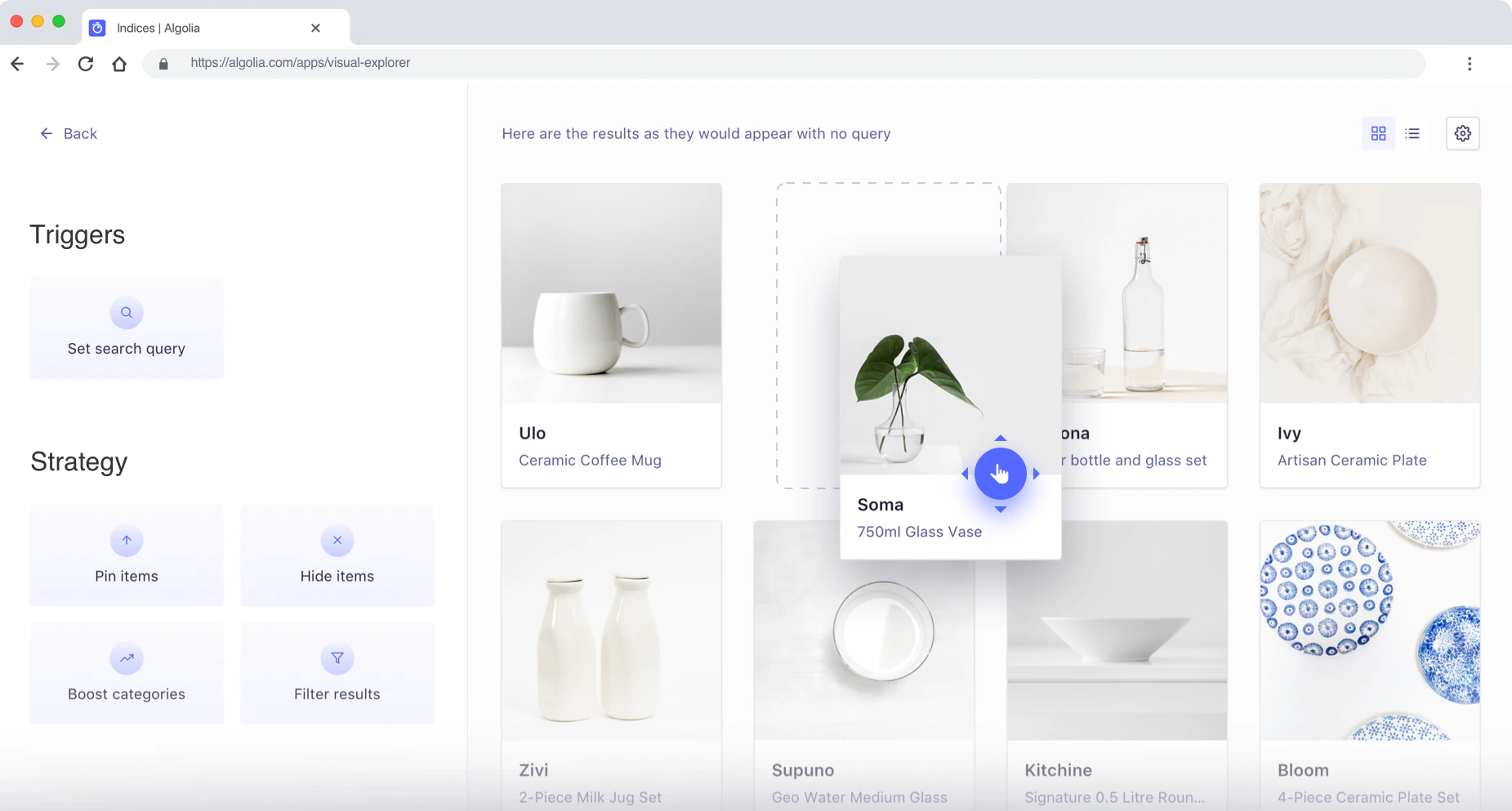
In the Algolia dashboard, you can create and configure rules with the Manual Editor or Visual Editor:
* The **Visual Editor** lets you create rules and set search results for specific queries without code, giving you direct control over search results and promotions.
* The **Manual Editor** is more powerful, but you have to enter the rules as JSON.
 For more control and dynamic compositions of your results feed,
see [Smart Groups](/doc/guides/managing-results/compositions/smart-groups).
For more information, see:
* [Rules overview](/doc/guides/managing-results/rules/rules-overview)
* [Merchandising category pages](https://www.algolia.com/ecommerce-merchandising-playbook/merchandise-category-pages/)
* [Merchandising search results pages](https://www.algolia.com/ecommerce-merchandising-playbook/merchandise-search-results-page/)
* [What can I do with the Visual Editor?](https://support.algolia.com/hc/en-us/articles/4406981935761)
## Merchandising Studio
This feature isn't available on every plan.
Refer to your [pricing plan](https://www.algolia.com/pricing) to see if it's included.
The [Merchandising Studio](https://www.algolia.com/industries-and-solutions/ecommerce/digital-merchandising/) is an optional feature designed for digital merchandisers who prefer a no-code approach.
It allows ecommerce users to focus on search merchandising, category merchandising, and facet merchandising.
## Promote hits
[Promoting a hit](/doc/guides/managing-results/rules/merchandising-and-promoting/how-to/promote-hits) means you want it to appear first in results for a specific .
For example:
* A bookstore may want to recommend a Harry Potter box set whenever the term "Harry Potter" appears in the search.
* You may want to manage new releases for the latest iPhone. With custom ranking, you've placed best-selling items at the top of your search results. Unfortunately, this doesn't work well with new releases, which have no sales yet (meaning they're probably listed last). With rules, you can force new releases to the top of the results list without changing your custom ranking.
You can promote up to 300 hits in a single rule.
For more information, see:
* [Promoting hits](/doc/guides/managing-results/rules/merchandising-and-promoting/how-to/promote-hits)
* [Custom ranking](/doc/guides/managing-results/must-do/custom-ranking)
## Hide hits
You can [hide hits](/doc/guides/managing-results/rules/merchandising-and-promoting/how-to/how-to-hide-hits) if required.
Your may contain relevant only to a specific search.
For example, you have a website where people can search for dishes from restaurants with a home delivery service
If someone types "gluten free", you don't want to show items with gluten (even though gluten is in the search query).
Hiding hits lets you remove all gluten items from the results.
## Redirect to URL
You can [add a redirect](/doc/guides/managing-results/rules/merchandising-and-promoting/how-to/redirects) to a specific URL. For example, consider that you find in your search analytics that a lot of your users are searching for "help" but don't get any results. You can add a redirect for this query to your website's FAQ or support page. This improves the user experience and reduces the no-results rate.
Other examples include searching for a category. For example the query "TV" redirects users to the corresponding category page. Or, searching for a specific product or brand redirects users to a seasonal promotional page for it.
## Display banners
You can [display a banner](/doc/guides/managing-results/rules/merchandising-and-promoting/how-to/add-banners) to promote an item, a group of products, a business-wide sale, and so on. Using the same logic as hits promotion (looking for specific keywords in a query), you can create a rule with the necessary data to display a banner: the text, HTML, CSS, and associated images.
## Dynamically promote filters
You can use a rule to promote products based on [user intent](/doc/guides/managing-results/rules/detecting-intent).
For example, if a user appears interested in an important product category,
you can apply a dynamic to promote relevant items.
You can also generate optional filters based on the user's behavior.
### Use optional filters
Optional filters let you favor some filters over others.
They behave like regular filters, except that with optional filtering, **results that don't match a filter aren't excluded altogether**: they're only ranked lower in the results.
For example, if you know a user is interested in the brand Samsung, you can promote that brand with optional filters: when users type "phone", all Samsung phones will be returned first, followed by all other phones.
For more information, see:
* [Promote records with optional filters](/doc/guides/managing-results/rules/merchandising-and-promoting/how-to/how-to-promote-with-optional-filters)
* [Optional filters](/doc/guides/managing-results/rules/merchandising-and-promoting/in-depth/optional-filters)
## Combine rules
You can use the merchandising techniques individually or [in combination](/doc/guides/managing-results/rules/merchandising-and-promoting/how-to/combining-multiple-consequences): one condition can have more than one consequence.
For example, if a user types "Harry Potter", you can simultaneously:
* Promote movies over books
* Set the most recent Harry Potter box set as the first result
* Add filters for J. K. Rowling, children's novels, or the fantasy genre.
For more control and dynamic compositions of your results feed,
see [Smart Groups](/doc/guides/managing-results/compositions/smart-groups).
For more information, see:
* [Rules overview](/doc/guides/managing-results/rules/rules-overview)
* [Merchandising category pages](https://www.algolia.com/ecommerce-merchandising-playbook/merchandise-category-pages/)
* [Merchandising search results pages](https://www.algolia.com/ecommerce-merchandising-playbook/merchandise-search-results-page/)
* [What can I do with the Visual Editor?](https://support.algolia.com/hc/en-us/articles/4406981935761)
## Merchandising Studio
This feature isn't available on every plan.
Refer to your [pricing plan](https://www.algolia.com/pricing) to see if it's included.
The [Merchandising Studio](https://www.algolia.com/industries-and-solutions/ecommerce/digital-merchandising/) is an optional feature designed for digital merchandisers who prefer a no-code approach.
It allows ecommerce users to focus on search merchandising, category merchandising, and facet merchandising.
## Promote hits
[Promoting a hit](/doc/guides/managing-results/rules/merchandising-and-promoting/how-to/promote-hits) means you want it to appear first in results for a specific .
For example:
* A bookstore may want to recommend a Harry Potter box set whenever the term "Harry Potter" appears in the search.
* You may want to manage new releases for the latest iPhone. With custom ranking, you've placed best-selling items at the top of your search results. Unfortunately, this doesn't work well with new releases, which have no sales yet (meaning they're probably listed last). With rules, you can force new releases to the top of the results list without changing your custom ranking.
You can promote up to 300 hits in a single rule.
For more information, see:
* [Promoting hits](/doc/guides/managing-results/rules/merchandising-and-promoting/how-to/promote-hits)
* [Custom ranking](/doc/guides/managing-results/must-do/custom-ranking)
## Hide hits
You can [hide hits](/doc/guides/managing-results/rules/merchandising-and-promoting/how-to/how-to-hide-hits) if required.
Your may contain relevant only to a specific search.
For example, you have a website where people can search for dishes from restaurants with a home delivery service
If someone types "gluten free", you don't want to show items with gluten (even though gluten is in the search query).
Hiding hits lets you remove all gluten items from the results.
## Redirect to URL
You can [add a redirect](/doc/guides/managing-results/rules/merchandising-and-promoting/how-to/redirects) to a specific URL. For example, consider that you find in your search analytics that a lot of your users are searching for "help" but don't get any results. You can add a redirect for this query to your website's FAQ or support page. This improves the user experience and reduces the no-results rate.
Other examples include searching for a category. For example the query "TV" redirects users to the corresponding category page. Or, searching for a specific product or brand redirects users to a seasonal promotional page for it.
## Display banners
You can [display a banner](/doc/guides/managing-results/rules/merchandising-and-promoting/how-to/add-banners) to promote an item, a group of products, a business-wide sale, and so on. Using the same logic as hits promotion (looking for specific keywords in a query), you can create a rule with the necessary data to display a banner: the text, HTML, CSS, and associated images.
## Dynamically promote filters
You can use a rule to promote products based on [user intent](/doc/guides/managing-results/rules/detecting-intent).
For example, if a user appears interested in an important product category,
you can apply a dynamic to promote relevant items.
You can also generate optional filters based on the user's behavior.
### Use optional filters
Optional filters let you favor some filters over others.
They behave like regular filters, except that with optional filtering, **results that don't match a filter aren't excluded altogether**: they're only ranked lower in the results.
For example, if you know a user is interested in the brand Samsung, you can promote that brand with optional filters: when users type "phone", all Samsung phones will be returned first, followed by all other phones.
For more information, see:
* [Promote records with optional filters](/doc/guides/managing-results/rules/merchandising-and-promoting/how-to/how-to-promote-with-optional-filters)
* [Optional filters](/doc/guides/managing-results/rules/merchandising-and-promoting/in-depth/optional-filters)
## Combine rules
You can use the merchandising techniques individually or [in combination](/doc/guides/managing-results/rules/merchandising-and-promoting/how-to/combining-multiple-consequences): one condition can have more than one consequence.
For example, if a user types "Harry Potter", you can simultaneously:
* Promote movies over books
* Set the most recent Harry Potter box set as the first result
* Add filters for J. K. Rowling, children's novels, or the fantasy genre.