> ## Documentation Index
> Fetch the complete documentation index at: https://algolia.com/llms.txt
> Use this file to discover all available pages before exploring further.
# Promote records with optional filters
> Learn how to use optional filters to modify your custom ranking.
export const Application = () =>
application
;
export const AlgoliaSearch = () => ;
Optional filters are a powerful tool for influencing the ranking of search results.
Use them to boost or bury records based on specific criteria, but without hiding those records.
For example, on a website that handles fast food deliveries, if a user types "hungry" and clicks the "deliver quickly" option, the website will show the restaurants that can deliver the fastest at the top of the list but still show other restaurants.
You can also use negative optional filters to demote records.
For example, to lower the ranking of restaurants with poor reviews.
This feature isn't available on every plan.
Refer to your [pricing plan](https://www.algolia.com/pricing) to see if it's included.
## Update your records
Since optional filters only work with exact matches,
you might need to update your records.
Using the fast food delivery website as an example,
flag restaurants that can deliver within 20 minutes by adding a boolean attribute called `can_deliver_quickly`
and set it to `true` or `false` for each record.
```json JSON icon=braces theme={"system"}
[
{
"name": "Pasta Bolognese",
"restaurant": "Millbrook Deli",
"delivery_waiting_time": 20,
"can_deliver_quickly": true,
"popularity": 80
},
{
"name": "Pasta Bolognese",
"restaurant": "The Hive",
"delivery_waiting_time": 15,
"can_deliver_quickly": true,
"popularity": 80
},
{
"name": "Pasta Bolognese",
"restaurant": "Bert's Inn",
"delivery_waiting_time": 40,
"can_deliver_quickly": false,
"popularity": 90
}
]
```
## How to apply optional filters
To use optional filters, you need to:
* Set the attribute as an `attributeForFaceting` at indexing time.
You can do this either through the API or the Algolia dashboard.
* Add the optional filter to your query with the API.
### Using the dashboard
Set the attribute to use for faceting in your Algolia dashboard:
1. Go to the [Algolia dashboard](https://dashboard.algolia.com/explorer/browse) and select your Algolia .
2. On the left sidebar, select **Search**.
3. Select your Algolia index and go to the **Configuration** tab.
4. Under **Filtering and Faceting > Facets**, click **Add an attribute** and select the optional filter attributes (for example, `can_deliver_quickly`).
5. Save your changes.
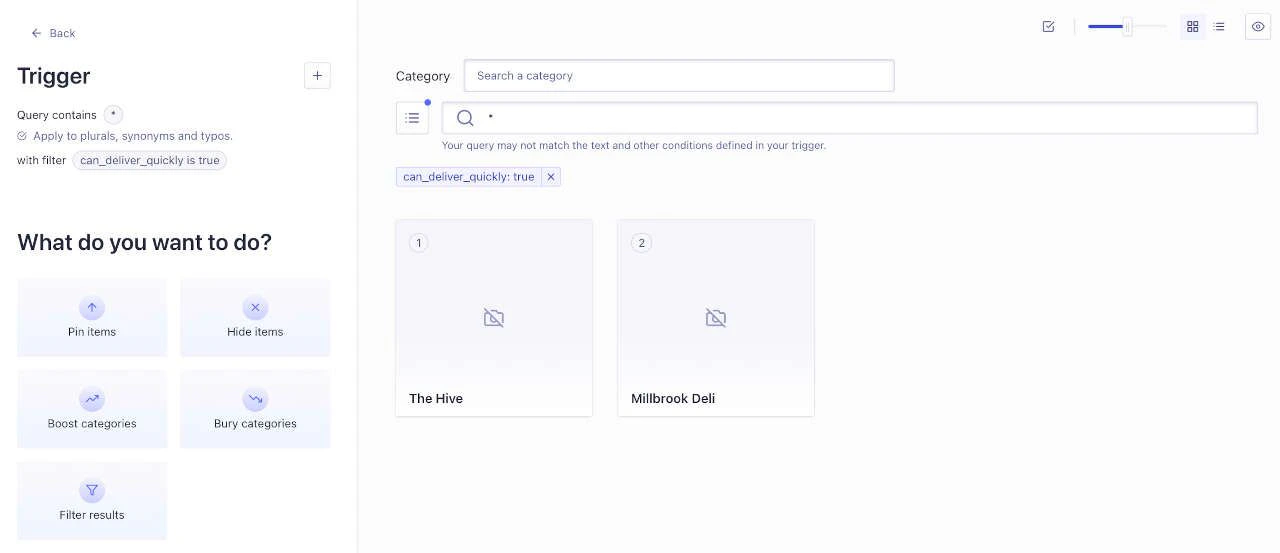
You can test filters in the Visual Editor before using them in your code:
1. In the sidebar, select \[**Enhance > Rules**] **[Rules](https://dashboard.algolia.com/rules/)**.
2. Click **New rule** and select **Visual Editor**.
3. Under **Conditions**, select **Set query condition(s)**.
4. Click **Filters**. In the **Name** field, enter the name of your optional filter (for example, `can_deliver_quickly`). In the **Value** field, enter `true`.
5. Type something into the **Query** box, such as `*` (to display all matching records)
6. Click **Apply**.
Using the [example dataset](#update-your-records) and the query \`\*\`\`,
two out of three records will be displayed.
### Using the API
To run the code examples on this page, [install the latest API client](/doc/libraries/sdk/install).
Set the attribute to use for faceting with [`attributesForFaceting`](/doc/api-reference/api-parameters/attributesForFaceting).
For example:
```cs C# theme={"system"}
var response = await client.SetSettingsAsync(
"INDEX_NAME",
new IndexSettings
{
AttributesForFaceting = new List { "can_deliver_quickly", "restaurant" },
}
);
```
```dart Dart theme={"system"}
final response = await client.setSettings(
indexName: "INDEX_NAME",
indexSettings: IndexSettings(
attributesForFaceting: [
"can_deliver_quickly",
"restaurant",
],
),
);
```
```go Go theme={"system"}
response, err := client.SetSettings(client.NewApiSetSettingsRequest(
"INDEX_NAME",
search.NewEmptyIndexSettings().SetAttributesForFaceting(
[]string{"can_deliver_quickly", "restaurant"})))
if err != nil {
// handle the eventual error
panic(err)
}
```
```java Java theme={"system"}
UpdatedAtResponse response = client.setSettings(
"INDEX_NAME",
new IndexSettings().setAttributesForFaceting(Arrays.asList("can_deliver_quickly", "restaurant"))
);
```
```js JavaScript theme={"system"}
const response = await client.setSettings({
indexName: 'INDEX_NAME',
indexSettings: { attributesForFaceting: ['can_deliver_quickly', 'restaurant'] },
});
```
```kotlin Kotlin theme={"system"}
var response =
client.setSettings(
indexName = "INDEX_NAME",
indexSettings =
IndexSettings(attributesForFaceting = listOf("can_deliver_quickly", "restaurant")),
)
```
```php PHP theme={"system"}
$response = $client->setSettings(
'INDEX_NAME',
['attributesForFaceting' => [
'can_deliver_quickly',
'restaurant',
],
],
);
```
```python Python theme={"system"}
response = client.set_settings(
index_name="INDEX_NAME",
index_settings={
"attributesForFaceting": [
"can_deliver_quickly",
"restaurant",
],
},
)
```
```ruby Ruby theme={"system"}
response = client.set_settings(
"INDEX_NAME",
Algolia::Search::IndexSettings.new(attributes_for_faceting: ["can_deliver_quickly", "restaurant"])
)
```
```scala Scala theme={"system"}
val response = Await.result(
client.setSettings(
indexName = "INDEX_NAME",
indexSettings = IndexSettings(
attributesForFaceting = Some(Seq("can_deliver_quickly", "restaurant"))
)
),
Duration(100, "sec")
)
```
```swift Swift theme={"system"}
let response = try await client.setSettings(
indexName: "INDEX_NAME",
indexSettings: IndexSettings(attributesForFaceting: ["can_deliver_quickly", "restaurant"])
)
```
Send the optional filters with your query.
For example:
```cs C# theme={"system"}
var response = await client.SearchSingleIndexAsync(
"INDEX_NAME",
new SearchParams(
new SearchParamsObject
{
OptionalFilters = new OptionalFilters(
new List { new OptionalFilters("can_deliver_quickly:true") }
),
}
)
);
```
```dart Dart theme={"system"}
final response = await client.searchSingleIndex(
indexName: "INDEX_NAME",
searchParams: SearchParamsObject(
optionalFilters: [
"can_deliver_quickly:true",
],
),
);
```
```go Go theme={"system"}
response, err := client.SearchSingleIndex(client.NewApiSearchSingleIndexRequest(
"INDEX_NAME").WithSearchParams(search.SearchParamsObjectAsSearchParams(
search.NewEmptySearchParamsObject().SetOptionalFilters(search.ArrayOfOptionalFiltersAsOptionalFilters(
[]search.OptionalFilters{*search.StringAsOptionalFilters("can_deliver_quickly:true")})))))
if err != nil {
// handle the eventual error
panic(err)
}
```
```java Java theme={"system"}
SearchResponse response = client.searchSingleIndex(
"INDEX_NAME",
new SearchParamsObject().setOptionalFilters(OptionalFilters.of(Arrays.asList(OptionalFilters.of("can_deliver_quickly:true")))),
Hit.class
);
```
```js JavaScript theme={"system"}
const response = await client.searchSingleIndex({
indexName: 'indexName',
searchParams: { optionalFilters: ['can_deliver_quickly:true'] },
});
```
```kotlin Kotlin theme={"system"}
var response =
client.searchSingleIndex(
indexName = "INDEX_NAME",
searchParams =
SearchParamsObject(
optionalFilters =
OptionalFilters.of(listOf(OptionalFilters.of("can_deliver_quickly:true")))
),
)
```
```php PHP theme={"system"}
$response = $client->searchSingleIndex(
'INDEX_NAME',
['optionalFilters' => [
'can_deliver_quickly:true',
],
],
);
```
```python Python theme={"system"}
response = client.search_single_index(
index_name="INDEX_NAME",
search_params={
"optionalFilters": [
"can_deliver_quickly:true",
],
},
)
```
```ruby Ruby theme={"system"}
response = client.search_single_index(
"INDEX_NAME",
Algolia::Search::SearchParamsObject.new(optional_filters: ["can_deliver_quickly:true"])
)
```
```scala Scala theme={"system"}
val response = Await.result(
client.searchSingleIndex(
indexName = "INDEX_NAME",
searchParams = Some(
SearchParamsObject(
optionalFilters = Some(OptionalFilters(Seq(OptionalFilters("can_deliver_quickly:true"))))
)
)
),
Duration(100, "sec")
)
```
```swift Swift theme={"system"}
let response: SearchResponse = try await client.searchSingleIndex(
indexName: "INDEX_NAME",
searchParams: SearchSearchParams
.searchSearchParamsObject(SearchSearchParamsObject(optionalFilters: SearchOptionalFilters
.arrayOfSearchOptionalFilters([SearchOptionalFilters.string("can_deliver_quickly:true")])))
)
```
You can also add negative optional filters.
For example, to demote a specific restaurant:
```cs C# theme={"system"}
var response = await client.SearchSingleIndexAsync(
"INDEX_NAME",
new SearchParams(
new SearchParamsObject
{
Query = "query",
OptionalFilters = new OptionalFilters(
new List { new OptionalFilters("restaurant:-Bert's Inn") }
),
}
)
);
```
```dart Dart theme={"system"}
final response = await client.searchSingleIndex(
indexName: "INDEX_NAME",
searchParams: SearchParamsObject(
query: "query",
optionalFilters: [
"restaurant:-Bert's Inn",
],
),
);
```
```go Go theme={"system"}
response, err := client.SearchSingleIndex(client.NewApiSearchSingleIndexRequest(
"INDEX_NAME").WithSearchParams(search.SearchParamsObjectAsSearchParams(
search.NewEmptySearchParamsObject().SetQuery("query").SetOptionalFilters(search.ArrayOfOptionalFiltersAsOptionalFilters(
[]search.OptionalFilters{*search.StringAsOptionalFilters("restaurant:-Bert's Inn")})))))
if err != nil {
// handle the eventual error
panic(err)
}
```
```java Java theme={"system"}
SearchResponse response = client.searchSingleIndex(
"INDEX_NAME",
new SearchParamsObject()
.setQuery("query")
.setOptionalFilters(OptionalFilters.of(Arrays.asList(OptionalFilters.of("restaurant:-Bert's Inn")))),
Hit.class
);
```
```js JavaScript theme={"system"}
const response = await client.searchSingleIndex({
indexName: 'indexName',
searchParams: { query: 'query', optionalFilters: ["restaurant:-Bert's Inn"] },
});
```
```kotlin Kotlin theme={"system"}
var response =
client.searchSingleIndex(
indexName = "INDEX_NAME",
searchParams =
SearchParamsObject(
query = "query",
optionalFilters =
OptionalFilters.of(listOf(OptionalFilters.of("restaurant:-Bert's Inn"))),
),
)
```
```php PHP theme={"system"}
$response = $client->searchSingleIndex(
'INDEX_NAME',
['query' => 'query',
'optionalFilters' => [
"restaurant:-Bert's Inn",
],
],
);
```
```python Python theme={"system"}
response = client.search_single_index(
index_name="INDEX_NAME",
search_params={
"query": "query",
"optionalFilters": [
"restaurant:-Bert's Inn",
],
},
)
```
```ruby Ruby theme={"system"}
response = client.search_single_index(
"INDEX_NAME",
Algolia::Search::SearchParamsObject.new(query: "query", optional_filters: ["restaurant:-Bert's Inn"])
)
```
```scala Scala theme={"system"}
val response = Await.result(
client.searchSingleIndex(
indexName = "INDEX_NAME",
searchParams = Some(
SearchParamsObject(
query = Some("query"),
optionalFilters = Some(OptionalFilters(Seq(OptionalFilters("restaurant:-Bert's Inn"))))
)
)
),
Duration(100, "sec")
)
```
```swift Swift theme={"system"}
let response: SearchResponse = try await client.searchSingleIndex(
indexName: "INDEX_NAME",
searchParams: SearchSearchParams.searchSearchParamsObject(SearchSearchParamsObject(
query: "query",
optionalFilters: SearchOptionalFilters
.arrayOfSearchOptionalFilters([SearchOptionalFilters.string("restaurant:-Bert's Inn")])
))
)
```
## Optional or facet filters
Whether to use optional filters or [facet filters](/doc/guides/managing-results/refine-results/filtering/in-depth/filters-and-facetfilters)
depends on your goals:
* Use optional filters to boost records.
* Use facet filters if you need to filter out records.
## See also
* [Filter scoring](/doc/guides/managing-results/refine-results/filtering/in-depth/filter-scoring)
* [Fuzzy search: optional filters](https://www.algolia.com/blog/engineering/discover-what-fuzzy-search-is-with-fuzzy-matching)
 ### Using the API
To run the code examples on this page, [install the latest API client](/doc/libraries/sdk/install).
Set the attribute to use for faceting with [`attributesForFaceting`](/doc/api-reference/api-parameters/attributesForFaceting).
For example:
### Using the API
To run the code examples on this page, [install the latest API client](/doc/libraries/sdk/install).
Set the attribute to use for faceting with [`attributesForFaceting`](/doc/api-reference/api-parameters/attributesForFaceting).
For example: