> ## Documentation Index
> Fetch the complete documentation index at: https://algolia.com/llms.txt
> Use this file to discover all available pages before exploring further.
# Troubleshooting relevance
> Troubleshooting relevance - debugging, getting ranking info, using the dashboard.
Try these strategies to troubleshoot any relevance issue:
* **Get ranking information with the `getRankingInfo` parameter**.
This parameter lets you look at and analyze the criteria Algolia uses to rank results.
For a given query it returns the value for each ranking criteria.
By understanding those values you can understand why a result appears before or after another.
* **Reproducing a problem on a small dataset and solving it by process of elimination**.
This strategy can be used alongside the `getRankingInfo` parameter.
It helps you improve the results of specific queries.
The idea is to create a small index that mirrors your main index,
and to test different configurations one-by-one until you've singled out the problem or inefficiency.
* **Analytics and Insights**.
This lets you follow your users' behavior with [Analytics](/doc/guides/search-analytics/overview).
## The engine's ranking decisions
You can find out why a record is ranked the way it is,
and use this information to troubleshoot your data and relevance settings.
You can do this in the Algolia dashboard or with the API.
### Troubleshooting in the dashboard
If you go to your dashboard and search, you have a "Ranking Info" section that details how Algolia ranked this record.
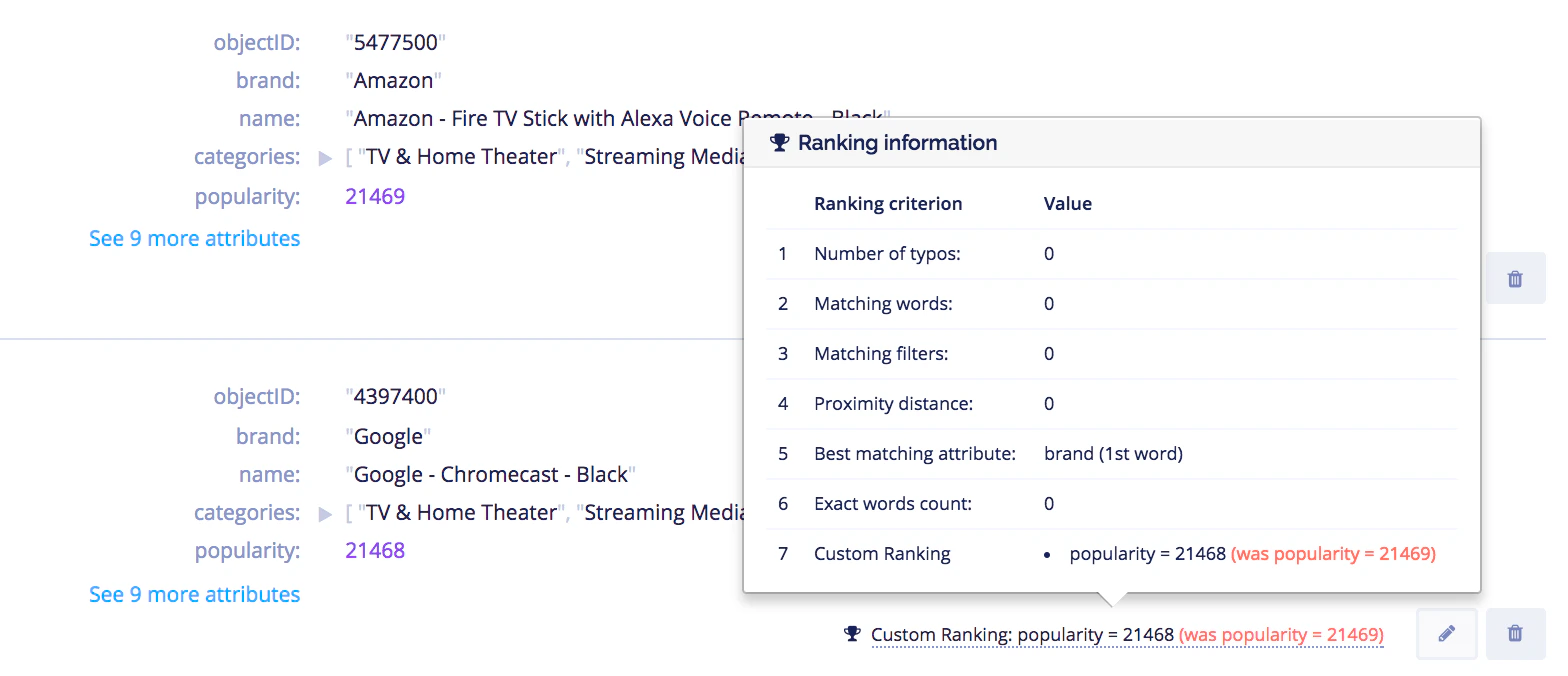 If you look at the second hit, you'll have the difference between this object and the one preceding it.
### Troubleshooting with the API
Ranking information can be retrieved with the API.
For that, you need to use the parameter [`getRankingInfo`](/doc/api-reference/api-parameters/getRankingInfo) and set it to true.
To run the code examples on this page, [install the latest API client](/doc/libraries/sdk/install).
#### Initialize the client
[Set up an API client and send your data to Algolia](/doc/guides/sending-and-managing-data/send-and-update-your-data/how-to/importing-with-the-api).
#### Search with `getRankingInfo`
```cs C# theme={"system"}
var response = await client.SearchSingleIndexAsync(
"INDEX_NAME",
new SearchParams(new SearchParamsObject { Query = "query", GetRankingInfo = true })
);
```
```dart Dart theme={"system"}
final response = await client.searchSingleIndex(
indexName: "INDEX_NAME",
searchParams: SearchParamsObject(
query: "query",
getRankingInfo: true,
),
);
```
```go Go theme={"system"}
response, err := client.SearchSingleIndex(client.NewApiSearchSingleIndexRequest(
"INDEX_NAME").WithSearchParams(search.SearchParamsObjectAsSearchParams(
search.NewEmptySearchParamsObject().SetQuery("query").SetGetRankingInfo(true))))
if err != nil {
// handle the eventual error
panic(err)
}
```
```java Java theme={"system"}
SearchResponse response = client.searchSingleIndex(
"INDEX_NAME",
new SearchParamsObject().setQuery("query").setGetRankingInfo(true),
Hit.class
);
```
```js JavaScript theme={"system"}
const response = await client.searchSingleIndex({
indexName: 'indexName',
searchParams: { query: 'query', getRankingInfo: true },
});
```
```kotlin Kotlin theme={"system"}
var response =
client.searchSingleIndex(
indexName = "INDEX_NAME",
searchParams = SearchParamsObject(query = "query", getRankingInfo = true),
)
```
```php PHP theme={"system"}
$response = $client->searchSingleIndex(
'INDEX_NAME',
['query' => 'query',
'getRankingInfo' => true,
],
);
```
```python Python theme={"system"}
response = client.search_single_index(
index_name="INDEX_NAME",
search_params={
"query": "query",
"getRankingInfo": True,
},
)
```
```ruby Ruby theme={"system"}
response = client.search_single_index(
"INDEX_NAME",
Algolia::Search::SearchParamsObject.new(query: "query", get_ranking_info: true)
)
```
```scala Scala theme={"system"}
val response = Await.result(
client.searchSingleIndex(
indexName = "INDEX_NAME",
searchParams = Some(
SearchParamsObject(
query = Some("query"),
getRankingInfo = Some(true)
)
)
),
Duration(100, "sec")
)
```
```swift Swift theme={"system"}
let response: SearchResponse = try await client.searchSingleIndex(
indexName: "INDEX_NAME",
searchParams: SearchSearchParams.searchSearchParamsObject(SearchSearchParamsObject(
query: "query",
getRankingInfo: true
))
)
```
This gives you ranking info.
Take a look at the following results in the `_rankingInfo` attribute:
```json JSON icon=braces theme={"system"}
{
"_rankingInfo": {
"nbTypos": 0,
"firstMatchedWord": 0,
"proximityDistance": 0,
"userScore": 7,
"geoDistance": 1600,
"geoPrecision": 1,
"nbExactWords": 0,
"words": 0,
"filters": 0,
"matchedGeoLocation": {
"lat": 37.3688,
"lng": -122.036,
"distance": 1600
}
}
}
```
For more information, see [`_rankingInfo` in the search response](/doc/rest-api/search/search-single-index#response-hits-items-ranking-info).
If you look at the second hit, you'll have the difference between this object and the one preceding it.
### Troubleshooting with the API
Ranking information can be retrieved with the API.
For that, you need to use the parameter [`getRankingInfo`](/doc/api-reference/api-parameters/getRankingInfo) and set it to true.
To run the code examples on this page, [install the latest API client](/doc/libraries/sdk/install).
#### Initialize the client
[Set up an API client and send your data to Algolia](/doc/guides/sending-and-managing-data/send-and-update-your-data/how-to/importing-with-the-api).
#### Search with `getRankingInfo`
```cs C# theme={"system"}
var response = await client.SearchSingleIndexAsync(
"INDEX_NAME",
new SearchParams(new SearchParamsObject { Query = "query", GetRankingInfo = true })
);
```
```dart Dart theme={"system"}
final response = await client.searchSingleIndex(
indexName: "INDEX_NAME",
searchParams: SearchParamsObject(
query: "query",
getRankingInfo: true,
),
);
```
```go Go theme={"system"}
response, err := client.SearchSingleIndex(client.NewApiSearchSingleIndexRequest(
"INDEX_NAME").WithSearchParams(search.SearchParamsObjectAsSearchParams(
search.NewEmptySearchParamsObject().SetQuery("query").SetGetRankingInfo(true))))
if err != nil {
// handle the eventual error
panic(err)
}
```
```java Java theme={"system"}
SearchResponse response = client.searchSingleIndex(
"INDEX_NAME",
new SearchParamsObject().setQuery("query").setGetRankingInfo(true),
Hit.class
);
```
```js JavaScript theme={"system"}
const response = await client.searchSingleIndex({
indexName: 'indexName',
searchParams: { query: 'query', getRankingInfo: true },
});
```
```kotlin Kotlin theme={"system"}
var response =
client.searchSingleIndex(
indexName = "INDEX_NAME",
searchParams = SearchParamsObject(query = "query", getRankingInfo = true),
)
```
```php PHP theme={"system"}
$response = $client->searchSingleIndex(
'INDEX_NAME',
['query' => 'query',
'getRankingInfo' => true,
],
);
```
```python Python theme={"system"}
response = client.search_single_index(
index_name="INDEX_NAME",
search_params={
"query": "query",
"getRankingInfo": True,
},
)
```
```ruby Ruby theme={"system"}
response = client.search_single_index(
"INDEX_NAME",
Algolia::Search::SearchParamsObject.new(query: "query", get_ranking_info: true)
)
```
```scala Scala theme={"system"}
val response = Await.result(
client.searchSingleIndex(
indexName = "INDEX_NAME",
searchParams = Some(
SearchParamsObject(
query = Some("query"),
getRankingInfo = Some(true)
)
)
),
Duration(100, "sec")
)
```
```swift Swift theme={"system"}
let response: SearchResponse = try await client.searchSingleIndex(
indexName: "INDEX_NAME",
searchParams: SearchSearchParams.searchSearchParamsObject(SearchSearchParamsObject(
query: "query",
getRankingInfo: true
))
)
```
This gives you ranking info.
Take a look at the following results in the `_rankingInfo` attribute:
```json JSON icon=braces theme={"system"}
{
"_rankingInfo": {
"nbTypos": 0,
"firstMatchedWord": 0,
"proximityDistance": 0,
"userScore": 7,
"geoDistance": 1600,
"geoPrecision": 1,
"nbExactWords": 0,
"words": 0,
"filters": 0,
"matchedGeoLocation": {
"lat": 37.3688,
"lng": -122.036,
"distance": 1600
}
}
}
```
For more information, see [`_rankingInfo` in the search response](/doc/rest-api/search/search-single-index#response-hits-items-ranking-info).