> ## Documentation Index
> Fetch the complete documentation index at: https://algolia.com/llms.txt
> Use this file to discover all available pages before exploring further.
# A/B test Advanced Personalization
> Learn how to A/B test Advanced Personalization
export const Index = () =>
index
;
For Advanced Personalization, A/B testing compares two sets of search results to determine which one performs better.
The A and B variants are based on the [personalization re-ranking level](/doc/guides/personalization/advanced-personalization/configure/setup/personalization-reranking).
This helps you find the level that maximizes user engagement and satisfaction.
This feature isn't available on every plan.
Refer to your [pricing plan](https://www.algolia.com/pricing) to see if it's included.
## Prepare to A/B test Advanced Personalization
Before setting up an A/B test,
make sure you have configured Advanced Personalization on the dashboard:
* [Configure indices to personalize](/doc/guides/personalization/advanced-personalization/configure/setup/indices)
* [Configure user events](/doc/guides/personalization/advanced-personalization/configure/setup/events)
* [Set personalization re-ranking](/doc/guides/personalization/advanced-personalization/configure/setup/personalization-reranking)
Alternatively, you can use the [Advanced Personalization API](/doc/rest-api/advanced-personalization) to configure Advanced Personalization.
## Launch an A/B test
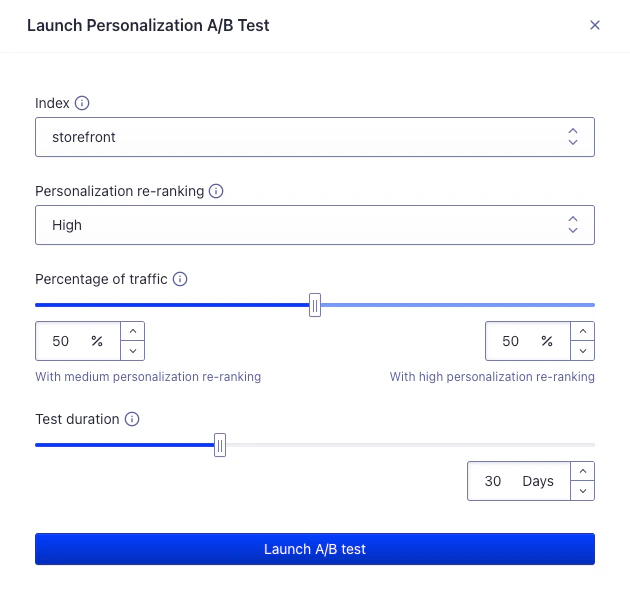 You can launch an A/B test directly from the [Advanced Personalization dashboard](https://dashboard.algolia.com/advanced-personalization/overview):
1. **Select the on which you want to A/B test personalization.**
This is the index for which search results will be compared.
You only have access to indices that are configured to use Advanced Personalization.
2. **Define the personalization re-ranking level for the A/B test.**
This is the level of personalization you want to A/B test against the personalization re-ranking from the configuration.
3. **Set the percentage of traffic.**
This is the share of searches that will be boosted according to the personalization re-ranking level set.
4. **Set the duration of the test.**
This is the maximum duration of time the A/B test will be live after you start it.
For the best results, set a duration that's more likely to lead to high confidence in results.
5. **Launch A/B test.**
This triggers the launch of the A/B test.
Your users now receive personalized search results based on your setup.
## View the results of an A/B test
You can [view the results](/doc/guides/ab-testing/what-is-ab-testing/how-to/create-and-run-an-ab-test#view-the-results)
of all Advanced Personalization A/B tests in the [A/B testing dashboard](https://dashboard.algolia.com/ab-tests).
## A/B test real-time personalization
**Beta**
Real-time personalization is a **beta feature** according to [Algolia's Terms of Service ("Beta Services")](https://www.algolia.com/policies/terms/).
You can also use A/B testing to determine if [real-time personalization](/doc/guides/personalization/advanced-personalization/what-is-advanced-personalization/in-depth/real-time-personalization-and-historical-personalization) is the right option for your application. After testing historical personalization, you can test the impact of real-time personalization to see if this approach leads to more engagement.
You can measure the impact of real-time personalization in two ways.
* If you **aren't yet using historical personalization**, you can [measure the combined impact](/doc/guides/personalization/advanced-personalization/monitor/in-depth/ab-test#measure-combined-impact-of-real-time-and-historical-personalization) of real-time personalization and historical personalization.
* If you **are already using historical personalization**, you need to stop using historical personalization for all users by [setting personalization re-ranking to `none`](/doc/guides/personalization/advanced-personalization/configure/setup/personalization-reranking), then [measure the combined impact](#measure-combined-impact-of-real-time-and-historical-personalization) of real-time personalization and no personalization.
### Measure combined impact of real-time and historical personalization
1. Ensure that you have [setup real-time personalization](/doc/guides/personalization/advanced-personalization/configure/setup/enable-real-time-personalization) in the [Advanced Personalization dashboard](https://dashboard.algolia.com/advanced-personalization/configuration/real-time).
2. Repeat the [Launch an A/B test](/doc/guides/personalization/advanced-personalization/monitor/in-depth/ab-test#launch-an-a%2Fb-test) steps.
The results of the A/B test will show you how real-time personalization combined with historical personalization affects user engagement compared to no personalization.
## Next steps
* [How A/B test scores are calculated](/doc/guides/ab-testing/what-is-ab-testing/in-depth/how-ab-test-scores-are-calculated)
* [How to interpret A/B test results](/doc/guides/ab-testing/what-is-ab-testing/how-to/create-and-run-an-ab-test#how-to-interpret-results)
You can launch an A/B test directly from the [Advanced Personalization dashboard](https://dashboard.algolia.com/advanced-personalization/overview):
1. **Select the on which you want to A/B test personalization.**
This is the index for which search results will be compared.
You only have access to indices that are configured to use Advanced Personalization.
2. **Define the personalization re-ranking level for the A/B test.**
This is the level of personalization you want to A/B test against the personalization re-ranking from the configuration.
3. **Set the percentage of traffic.**
This is the share of searches that will be boosted according to the personalization re-ranking level set.
4. **Set the duration of the test.**
This is the maximum duration of time the A/B test will be live after you start it.
For the best results, set a duration that's more likely to lead to high confidence in results.
5. **Launch A/B test.**
This triggers the launch of the A/B test.
Your users now receive personalized search results based on your setup.
## View the results of an A/B test
You can [view the results](/doc/guides/ab-testing/what-is-ab-testing/how-to/create-and-run-an-ab-test#view-the-results)
of all Advanced Personalization A/B tests in the [A/B testing dashboard](https://dashboard.algolia.com/ab-tests).
## A/B test real-time personalization
**Beta**
Real-time personalization is a **beta feature** according to [Algolia's Terms of Service ("Beta Services")](https://www.algolia.com/policies/terms/).
You can also use A/B testing to determine if [real-time personalization](/doc/guides/personalization/advanced-personalization/what-is-advanced-personalization/in-depth/real-time-personalization-and-historical-personalization) is the right option for your application. After testing historical personalization, you can test the impact of real-time personalization to see if this approach leads to more engagement.
You can measure the impact of real-time personalization in two ways.
* If you **aren't yet using historical personalization**, you can [measure the combined impact](/doc/guides/personalization/advanced-personalization/monitor/in-depth/ab-test#measure-combined-impact-of-real-time-and-historical-personalization) of real-time personalization and historical personalization.
* If you **are already using historical personalization**, you need to stop using historical personalization for all users by [setting personalization re-ranking to `none`](/doc/guides/personalization/advanced-personalization/configure/setup/personalization-reranking), then [measure the combined impact](#measure-combined-impact-of-real-time-and-historical-personalization) of real-time personalization and no personalization.
### Measure combined impact of real-time and historical personalization
1. Ensure that you have [setup real-time personalization](/doc/guides/personalization/advanced-personalization/configure/setup/enable-real-time-personalization) in the [Advanced Personalization dashboard](https://dashboard.algolia.com/advanced-personalization/configuration/real-time).
2. Repeat the [Launch an A/B test](/doc/guides/personalization/advanced-personalization/monitor/in-depth/ab-test#launch-an-a%2Fb-test) steps.
The results of the A/B test will show you how real-time personalization combined with historical personalization affects user engagement compared to no personalization.
## Next steps
* [How A/B test scores are calculated](/doc/guides/ab-testing/what-is-ab-testing/in-depth/how-ab-test-scores-are-calculated)
* [How to interpret A/B test results](/doc/guides/ab-testing/what-is-ab-testing/how-to/create-and-run-an-ab-test#how-to-interpret-results)