> ## Documentation Index
> Fetch the complete documentation index at: https://algolia.com/llms.txt
> Use this file to discover all available pages before exploring further.
# Manage your Algolia applications
> Set up different Algolia applications for your production, testing, or other environments.
export const Records = () =>
records
;
export const ApplicationID = () =>
application ID
;
export const Application = () =>
application
;
Set up different Algolia applications to organize and isolate environments and projects.
## Manage environments
If you have several environments, such as development, staging, and production, you can choose:
* [Use one index for each environment in the same Algolia application.](#one-index-for-each-environment-in-the-same-algolia-application)
* [Use one Algolia application for each environment.](#separate-algolia-applications-for-each-environment)
You can use different datasets in environments other than production.
For example, index a small subset of your production data to reduce indexing operations.
### One index for each environment in the same Algolia application
If you're using a single Algolia ,
you can separate your production from your development and testing environments by creating separate indices.
To distinguish the different environments,
make sure to name your indices consistently,
for example, by using prefixes or suffixes:
`dev_index`, `staging_index`, `prod_index`.
#### Control access to your indices
Indices on the same Algolia application share the same .
To **control access to the index**, create an Algolia user for each environment with different search and admin API keys.
To create a dedicated user per environment, you need the Team Advanced Permissions feature.
Team Advanced Permissions is available as part of the Enterprise add-on to your [pricing plan](https://dashboard.algolia.com/info/plans/).
To create a new team member with access to all indices of a single environment:
1. Sign in to the [Algolia dashboard](https://dashboard.algolia.com/).
2. On the left sidebar, select Settings **Settings**.
3. In the **Team and Access** section, click [**Team**](https://dashboard.algolia.com/account/teams).
4. Click **Add Team Member** and select the application to which you want to grant access.
5. Select the **Index restrictions** option and add the indices to which you want to grant access.
Use `"*"` (asterisk) as wildcards, for example, `dev_*`, `staging_*` to grant access to all indices with a common prefix.
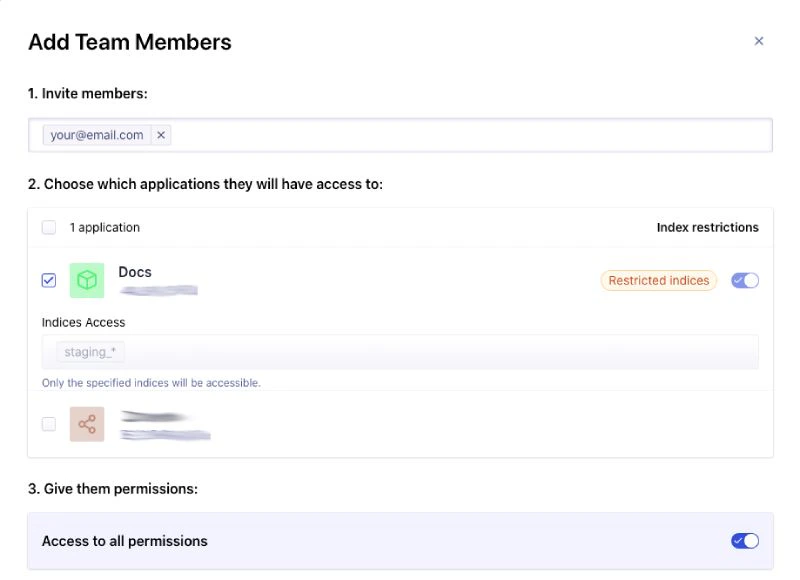 You can further refine the permissions in the **Give them permissions** section.
This gives your team members access to individual indices in your application.
You can repeat the same operation for all your environments.
The only shared elements between your environments are the number of and operations since they belong to the same Algolia application.
### Separate Algolia applications for each environment
If you need complete isolation between your development, staging, and production environments, create an Algolia application for each.
**Separate Algolia applications each have their own pricing plan.**
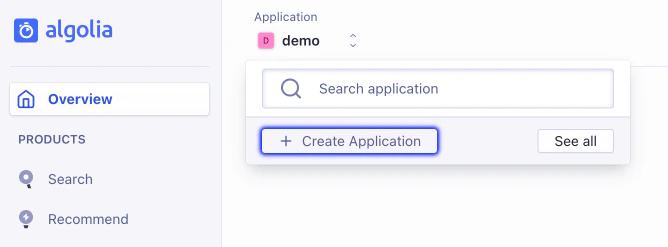
Create new Algolia applications on the [**Applications**](https://dashboard.algolia.com/account/applications) page in the Algolia dashboard.
You can further refine the permissions in the **Give them permissions** section.
This gives your team members access to individual indices in your application.
You can repeat the same operation for all your environments.
The only shared elements between your environments are the number of and operations since they belong to the same Algolia application.
### Separate Algolia applications for each environment
If you need complete isolation between your development, staging, and production environments, create an Algolia application for each.
**Separate Algolia applications each have their own pricing plan.**
Create new Algolia applications on the [**Applications**](https://dashboard.algolia.com/account/applications) page in the Algolia dashboard.
 A dedicated cluster of servers is available as part of the Enterprise add-on to your [pricing plan](https://dashboard.algolia.com/info/plans/).
## Manage your Algolia applications
Manage your Algolia applications from the dashboard.
For example, to delete an unwanted Algolia application:
1. Go to the [**Applications**](https://dashboard.algolia.com/account/applications) page in the Algolia dashboard.
2. Click **Application actions** and select **Delete**.
If you don't own this application, select **Leave** instead.
3. Confirm your request.
There's no API for programmatic application management.
## See also
* [Choose between one or more indices](/doc/guides/sending-and-managing-data/manage-indices-and-apps/manage-indices/concepts/one-or-more-indices)
A dedicated cluster of servers is available as part of the Enterprise add-on to your [pricing plan](https://dashboard.algolia.com/info/plans/).
## Manage your Algolia applications
Manage your Algolia applications from the dashboard.
For example, to delete an unwanted Algolia application:
1. Go to the [**Applications**](https://dashboard.algolia.com/account/applications) page in the Algolia dashboard.
2. Click **Application actions** and select **Delete**.
If you don't own this application, select **Leave** instead.
3. Confirm your request.
There's no API for programmatic application management.
## See also
* [Choose between one or more indices](/doc/guides/sending-and-managing-data/manage-indices-and-apps/manage-indices/concepts/one-or-more-indices)