> ## Documentation Index
> Fetch the complete documentation index at: https://algolia.com/llms.txt
> Use this file to discover all available pages before exploring further.
# Transform your data with code
> Transform your data with JavaScript before writing to your Algolia index.
export const Records = () =>
records
;
export const Index = () =>
index
;
export const ApplicationID = () =>
application ID
;
export const Application = () =>
application
;
You can add transformations to your connector's destination to manipulate data before it's written to your Algolia indices.
To use transformations, create a task that specifies the data source and the destination (usually an Algolia ).
Add transformations during task creation or apply them directly to existing destinations.
To learn more about connectors, read the [Connectors overview](/doc/guides/sending-and-managing-data/send-and-update-your-data/connectors/overview).
Code transformations are small JavaScript functions.
You can only add one transformation to a destination.
## Get started with code transformations
1. Go to the Algolia dashboard and select your Algolia .
2. On the left sidebar, select **Data sources**.
3. Open the [**Connectors**](https://dashboard.algolia.com/connectors) page.
4. Select a connector and click **Connect** to start creating your task.
5. Configure your data source: create a new source or select an existing one.
6. To create your transformation function, click **Create transformation**.
When writing a transformation, you can:
* Use the code editor, which includes autocompletion and syntax highlighting.
For more information, see [Write your transformation](#write-your-transformation).
* Use predefined [helper functions](#helper-functions) for common Algolia-specific tasks.
To use a helper function, click **Helper functions** and select from the list.
7. Configure your destination: create a new destination or select an existing one.
8. Configure when your task should run and specify the operation type for writing your Algolia .
9. Confirm whether you want to run your task immediately.
To see your transformation in action, click **Run** and inspect your index records after the task finishes.
## Write your transformation
The signature of the transformation function is as follows.
You can't change its names or its arguments:
```js JavaScript icon=code theme={"system"}
async function transform(record, helper) {
// Your transformation code here
}
```
The transformation function returns a record or an array of records and receives two arguments:
* `record`. The record to transform.
It's an editable JavaScript object representing a data source record,
like a JSON array item or a CSV row.
* `helper`. A helper object that provides access to utility methods and contextual information to help you build your transformation.
The term **helper** can refer to two related but distinct concepts:
* **Helper object methods.**
Methods available on the `helper` object passed to the transformation function.
These give access to secrets and metadata.
* **Helper functions.**
Pre-built utilities that help you change or enrich your records during transformation.
### Helper object methods
The `helper` object includes utility methods for accessing secrets and metadata:
* `helper.secrets.get(secretName)`: retrieve a secret value from the vault.
* `helper.getMetadata().appID`: retrieve the Algolia for the running task.
* `helper.getMetadata().indexName`: retrieve the target index name for the record.
* `helper.getMetadata().taskID`: retrieve the ID of the running task.
* `helper.getMetadata().actionType`: retrieve the action type for this record. For more information about possible values, see the [API reference documentation](/doc/libraries/sdk/v1/methods/batch#param-action).
## Helper functions
Use these pre-built functions to change or enrich your records:
| Helper function | Description |
| -------------------- | ----------------------------------------------------------------------------------------------------------------------------------------------------- |
| Reshape | Add or remove record attributes. |
| Filters | Exclude records based on conditions. |
| Convert | Change attribute data types, trim or normalize values, and convert to ISO formats. |
| Compute | Create new attributes, such as a calculated discount price. |
| Ranking | Optimize [custom ranking](/doc/guides/managing-results/must-do/custom-ranking) by prioritizing recent activity and adjusting attribute importance. |
| Query Categorization | Convert a flat list into a hierarchical category structure. |
| Fetch/API | [Enrich records with data from external APIs.](/doc/guides/sending-and-managing-data/send-and-update-your-data/how-to/enrich-your-records-with-fetch) |
## Preview transformation results
When you create a transformation, you can preview the function on the right side of the code editor.
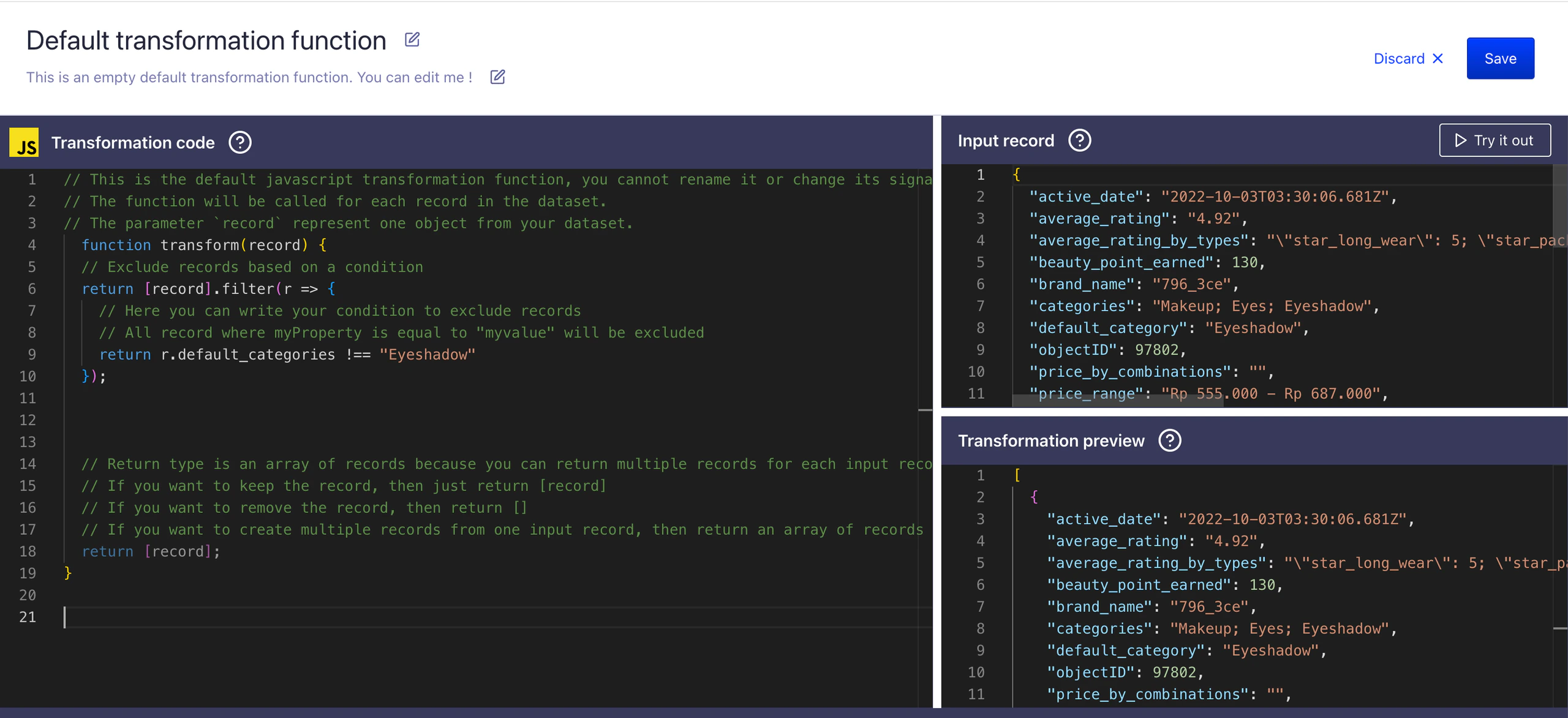 The preview includes the following information:
* **Input Record**.
A sample record, taken from the data source before applying the transformation.
* **Transformation Preview**.
Click **Try it out** to see the results of your transformation on the sample record.
Not all connectors support fetching sample records.
## Debug transformations
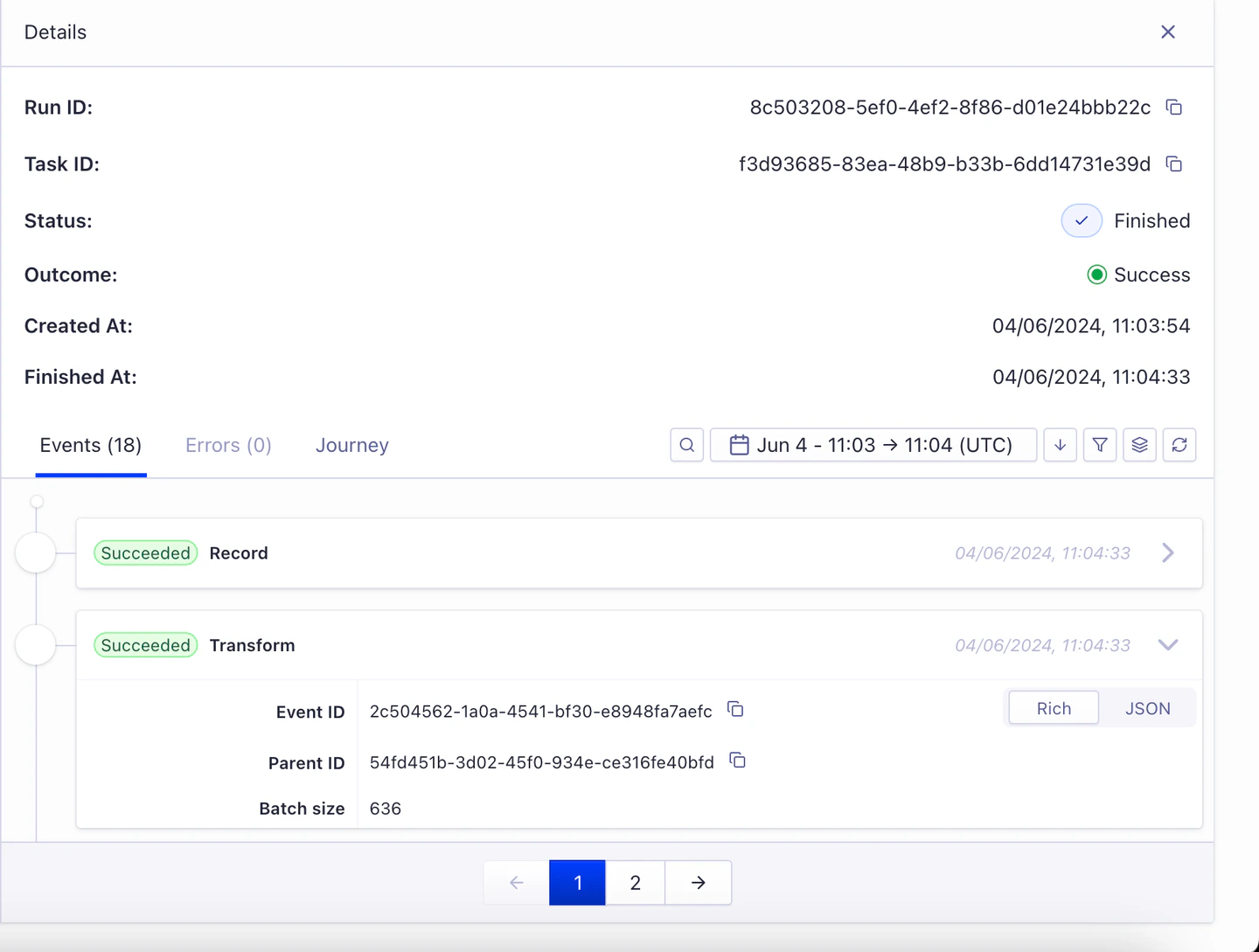
Use the [**Connector Debugger**](https://dashboard.algolia.com/connectors/debugger) for insights into the status of your tasks,
including transformations.
The preview includes the following information:
* **Input Record**.
A sample record, taken from the data source before applying the transformation.
* **Transformation Preview**.
Click **Try it out** to see the results of your transformation on the sample record.
Not all connectors support fetching sample records.
## Debug transformations
Use the [**Connector Debugger**](https://dashboard.algolia.com/connectors/debugger) for insights into the status of your tasks,
including transformations.
 ## Error handling
If your transformation function throws an error, it may fail the task depending on the task type and setup.
Take care to avoid errors when writing transformation functions.
Use `try` and `catch` blocks to handle errors gracefully.
```js JavaScript icon=code theme={"system"}
async function transform(record, helper) {
try {
// Your transformation code here.
} catch (error) {
// Return the original record to avoid breaking the task,
// or return undefined to delete and ignore the record.
return record;
}
}
```
You should also make allowances for when your transformation function doesn't work as expected.
For example, use [optional chaining](https://developer.mozilla.org/en-US/docs/Web/JavaScript/Reference/Operators/Optional_chaining) to access missing properties.
```js JavaScript icon=code theme={"system"}
async function transform(record, helper) {
// Accessing a property that may not exist.
const value = record?.property?.nestedProperty;
// Your transformation code here.
}
```
### Broken transformations and consecutive failures
Algolia stops your transformation if it encounters several consecutive failures within a short period.
The transformation restarts if its code changes or after a specific time.
To avoid this, write transformation functions to [avoid errors](#error-handling) and [preview the transformation](#preview-transformation-results) before running it.
## Performance considerations
Adding a transformation adds an overhead to the ingestion process.
Try to keep the JavaScript transformation as simple as possible.
## Indexing strategy impact
Data transformations change your records before indexing.
By default, the entire record is returned after transformation.
However, the correct approach depends on the [indexing strategy](/doc/guides/sending-and-managing-data/send-and-update-your-data/in-depth/the-different-synchronization-strategies) you choose.
The following example adds a new property to the record and returns it.
This is the default behavior.
```js JavaScript icon=code theme={"system"}
async function transform(record, helper) {
record.newProperty = "foo";
return record;
}
```
If your data has several sources such as API clients, connectors, or ecommerce integrations, choose an indexing strategy that avoids data conflicts.
Sometimes, returning the whole record can lead to data loss or other unwanted behavior.
The following sections describe various synchronization strategies and how they influence output.
### Full reindexing and full record updates
Since these methods completely replace an existing record,
your transformation must return the entire modified record, including any additions, deletions, or changes.
Change an existing or a new record:
```js JavaScript icon=code theme={"system"}
async function transform(record, helper) {
// Add a property.
record.newProperty = "foo";
// Remove a property.
delete record.existingProperty;
// Modify a property.
record.existingProperty2 = "a new value";
// Return the full modified record.
return record;
}
```
Delete record:
```js JavaScript icon=code theme={"system"}
async function transform(record, helper) {
return undefined;
}
```
Create new records:
```js JavaScript icon=code theme={"system"}
async function transform(record, helper) {
// Create a new record. Set the objectID yourself!
newRecord = {};
newRecord.objectID = "my-new-object";
// Create a new object from the current record. Change the objectID!
copyRecord = { ...record };
copyRecord.objectID = record.objectID + "-copy";
// Return the initial, copy, and new record
return [record, newRecord, copyRecord];
}
```
### Partial record updates
This method only updates specific attributes
Your transformation should only return the object ID and the modified or added attributes.
Existing attributes not included in the returned object remain unchanged.
You can't delete records with partial updates.
Change an existing record:
```js JavaScript icon=code theme={"system"}
async function transform(record, helper) {
// We only keep the objectID
let partialRecord = { objectID: record.objectID };
// We only add or modify what we need.
partialRecord.newProperty = "foo";
partialRecord.existingProperty = "new value";
return partialRecord;
}
```
Add new records:
```js JavaScript icon=code theme={"system"}
async function transform(record, helper) {
// Create a brand new record. You have to set yourself the objectID!
newRecord = {};
newRecord.objectID = "my-new-object";
// Return the new record. The original record will be untouched.
return [newRecord];
}
```
## Error handling
If your transformation function throws an error, it may fail the task depending on the task type and setup.
Take care to avoid errors when writing transformation functions.
Use `try` and `catch` blocks to handle errors gracefully.
```js JavaScript icon=code theme={"system"}
async function transform(record, helper) {
try {
// Your transformation code here.
} catch (error) {
// Return the original record to avoid breaking the task,
// or return undefined to delete and ignore the record.
return record;
}
}
```
You should also make allowances for when your transformation function doesn't work as expected.
For example, use [optional chaining](https://developer.mozilla.org/en-US/docs/Web/JavaScript/Reference/Operators/Optional_chaining) to access missing properties.
```js JavaScript icon=code theme={"system"}
async function transform(record, helper) {
// Accessing a property that may not exist.
const value = record?.property?.nestedProperty;
// Your transformation code here.
}
```
### Broken transformations and consecutive failures
Algolia stops your transformation if it encounters several consecutive failures within a short period.
The transformation restarts if its code changes or after a specific time.
To avoid this, write transformation functions to [avoid errors](#error-handling) and [preview the transformation](#preview-transformation-results) before running it.
## Performance considerations
Adding a transformation adds an overhead to the ingestion process.
Try to keep the JavaScript transformation as simple as possible.
## Indexing strategy impact
Data transformations change your records before indexing.
By default, the entire record is returned after transformation.
However, the correct approach depends on the [indexing strategy](/doc/guides/sending-and-managing-data/send-and-update-your-data/in-depth/the-different-synchronization-strategies) you choose.
The following example adds a new property to the record and returns it.
This is the default behavior.
```js JavaScript icon=code theme={"system"}
async function transform(record, helper) {
record.newProperty = "foo";
return record;
}
```
If your data has several sources such as API clients, connectors, or ecommerce integrations, choose an indexing strategy that avoids data conflicts.
Sometimes, returning the whole record can lead to data loss or other unwanted behavior.
The following sections describe various synchronization strategies and how they influence output.
### Full reindexing and full record updates
Since these methods completely replace an existing record,
your transformation must return the entire modified record, including any additions, deletions, or changes.
Change an existing or a new record:
```js JavaScript icon=code theme={"system"}
async function transform(record, helper) {
// Add a property.
record.newProperty = "foo";
// Remove a property.
delete record.existingProperty;
// Modify a property.
record.existingProperty2 = "a new value";
// Return the full modified record.
return record;
}
```
Delete record:
```js JavaScript icon=code theme={"system"}
async function transform(record, helper) {
return undefined;
}
```
Create new records:
```js JavaScript icon=code theme={"system"}
async function transform(record, helper) {
// Create a new record. Set the objectID yourself!
newRecord = {};
newRecord.objectID = "my-new-object";
// Create a new object from the current record. Change the objectID!
copyRecord = { ...record };
copyRecord.objectID = record.objectID + "-copy";
// Return the initial, copy, and new record
return [record, newRecord, copyRecord];
}
```
### Partial record updates
This method only updates specific attributes
Your transformation should only return the object ID and the modified or added attributes.
Existing attributes not included in the returned object remain unchanged.
You can't delete records with partial updates.
Change an existing record:
```js JavaScript icon=code theme={"system"}
async function transform(record, helper) {
// We only keep the objectID
let partialRecord = { objectID: record.objectID };
// We only add or modify what we need.
partialRecord.newProperty = "foo";
partialRecord.existingProperty = "new value";
return partialRecord;
}
```
Add new records:
```js JavaScript icon=code theme={"system"}
async function transform(record, helper) {
// Create a brand new record. You have to set yourself the objectID!
newRecord = {};
newRecord.objectID = "my-new-object";
// Return the new record. The original record will be untouched.
return [newRecord];
}
```