> ## Documentation Index
> Fetch the complete documentation index at: https://algolia.com/llms.txt
> Use this file to discover all available pages before exploring further.
# Override index settings
> Learn how you can override the index settings either from the Magento admin panel or programmatically.
The Magento extension writes various configuration settings to your Algolia indices.
That's why the extension **may overwrite** changes you make directly in the Algolia dashboard.
## Settings managed by Magento
For each entity (data type) and store managed in Magento there is typically at least one associated index.
Magento manages these configurations for the following entities:
**[Products](/doc/integration/magento-2/how-it-works/indexing#index-settings)**
* [`searchableAttributes`](/doc/api-reference/api-parameters/searchableAttributes)
* [`customRanking`](/doc/api-reference/api-parameters/customRanking)
* [`unretrievableAttributes`](/doc/api-reference/api-parameters/unretrievableAttributes)
* [`attributesForFaceting`](/doc/api-reference/api-parameters/attributesForFaceting)
* [`renderingContent`](/doc/api-reference/api-parameters/renderingContent)
* [`maxValuesPerFacet`](/doc/api-reference/api-parameters/maxValuesPerFacet)
* [`removeWordsIfNoResults`](/doc/api-reference/api-parameters/removeWordsIfNoResults)
**[Categories](/doc/integration/magento-2/how-it-works/indexing#index-settings)**
* [`searchableAttributes`](/doc/api-reference/api-parameters/searchableAttributes)
* [`customRanking`](/doc/api-reference/api-parameters/customRanking)
* [`unretrievableAttributes`](/doc/api-reference/api-parameters/unretrievableAttributes)
**[Pages](/doc/integration/magento-2/how-it-works/indexing#index-settings-2)**
* [`searchableAttributes`](/doc/api-reference/api-parameters/searchableAttributes): `unordered(slug)`, `unordered(name)`, `unordered(content)`
* [`attributesToSnippet`](/doc/api-reference/api-parameters/attributesToSnippet): `content:7`
**[Query Suggestions](/doc/integration/magento-2/how-it-works/indexing#index-settings-3)**
* [`searchableAttributes`](/doc/api-reference/api-parameters/searchableAttributes): `unordered(query)`
* [`customRanking`](/doc/api-reference/api-parameters/customRanking): `desc(popularity)`, `desc(number_of_results)`
* [`typoTolerance`](/doc/api-reference/api-parameters/typoTolerance): `false`
* [`attributesToRetrieve`](/doc/api-reference/api-parameters/attributesToRetrieve): `query`
* [`removeWordsIfNoResults`](/doc/api-reference/api-parameters/removeWordsIfNoResults): `lastWords`
**[Additional sections](/doc/integration/magento-2/how-it-works/indexing#index-settings-4)**
* [`searchableAttributes`](/doc/api-reference/api-parameters/searchableAttributes): `unordered(value)`
Any settings **not** in this list can be managed independently.
## Settings in the Algolia dashboard
You can configure settings that aren't [managed by Magento](#settings-managed-by-magento)
in the Algolia dashboard.
### Example
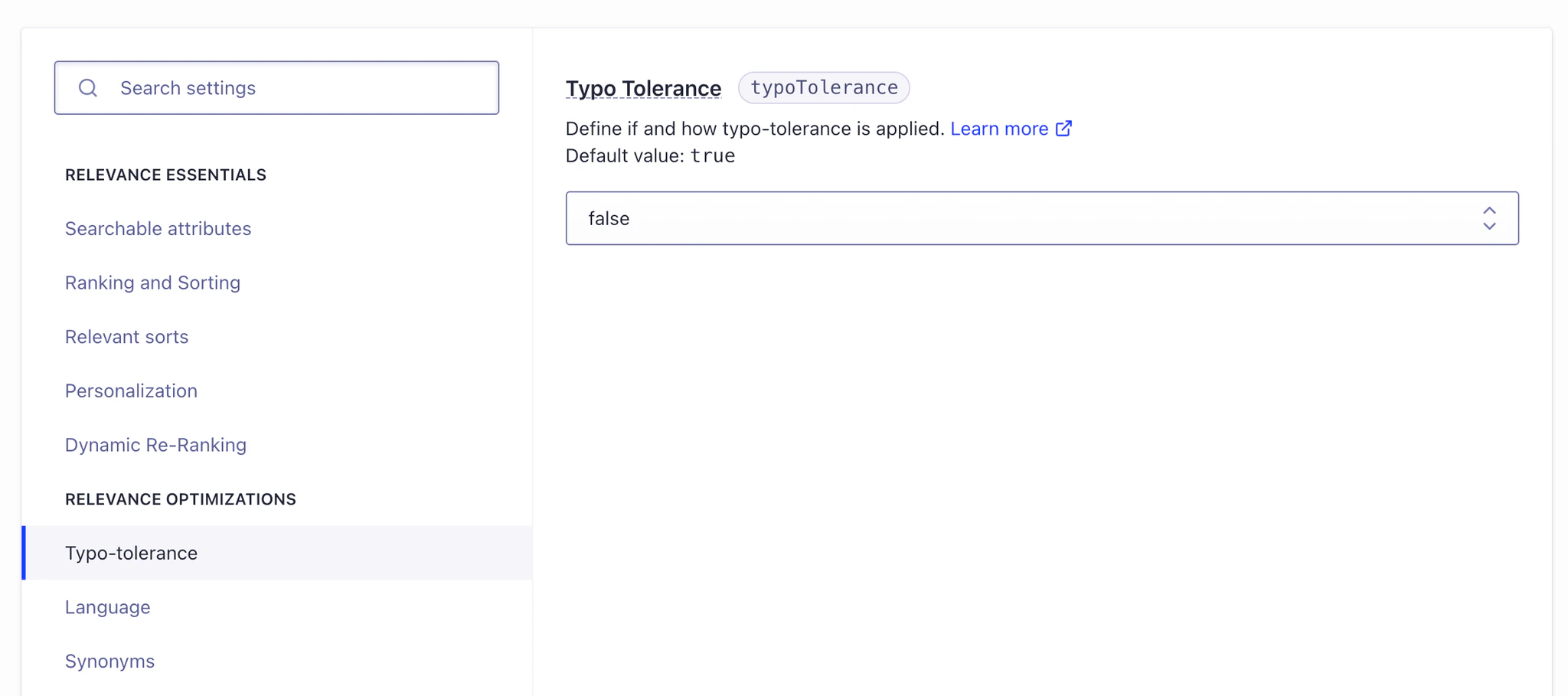
The index setting `typoTolerance` is [set to `true` by default](/doc/api-reference/api-parameters/typoTolerance#options) on any
new index unless you explicitly set it to `false`.
Since the Magento extension doesn't manage this setting for product indices,
it's initially set to `true`.
However, the value of `typoTolerance` for product indices can be configured from the Algolia dashboard.
Subsequent indexing operations from the Magento extension shouldn't alter this value unless you [explicitly configure Magento](/doc/integration/magento-2/customize/override-index-settings#customize-magento-index-settings) to do so.
 ## Customize Magento index settings
You can customize how Magento writes index settings to Algolia:
1. [Advanced Algolia indices settings](#advanced-algolia-indices-settings)
2. [Backend events](/doc/integration/magento-2/customize/custom-back-end-events#modify-index-settings)
### Advanced Algolia indices settings
To have Magento enforce an index setting value other than the default,
specify that value in the Magento admin panel under:
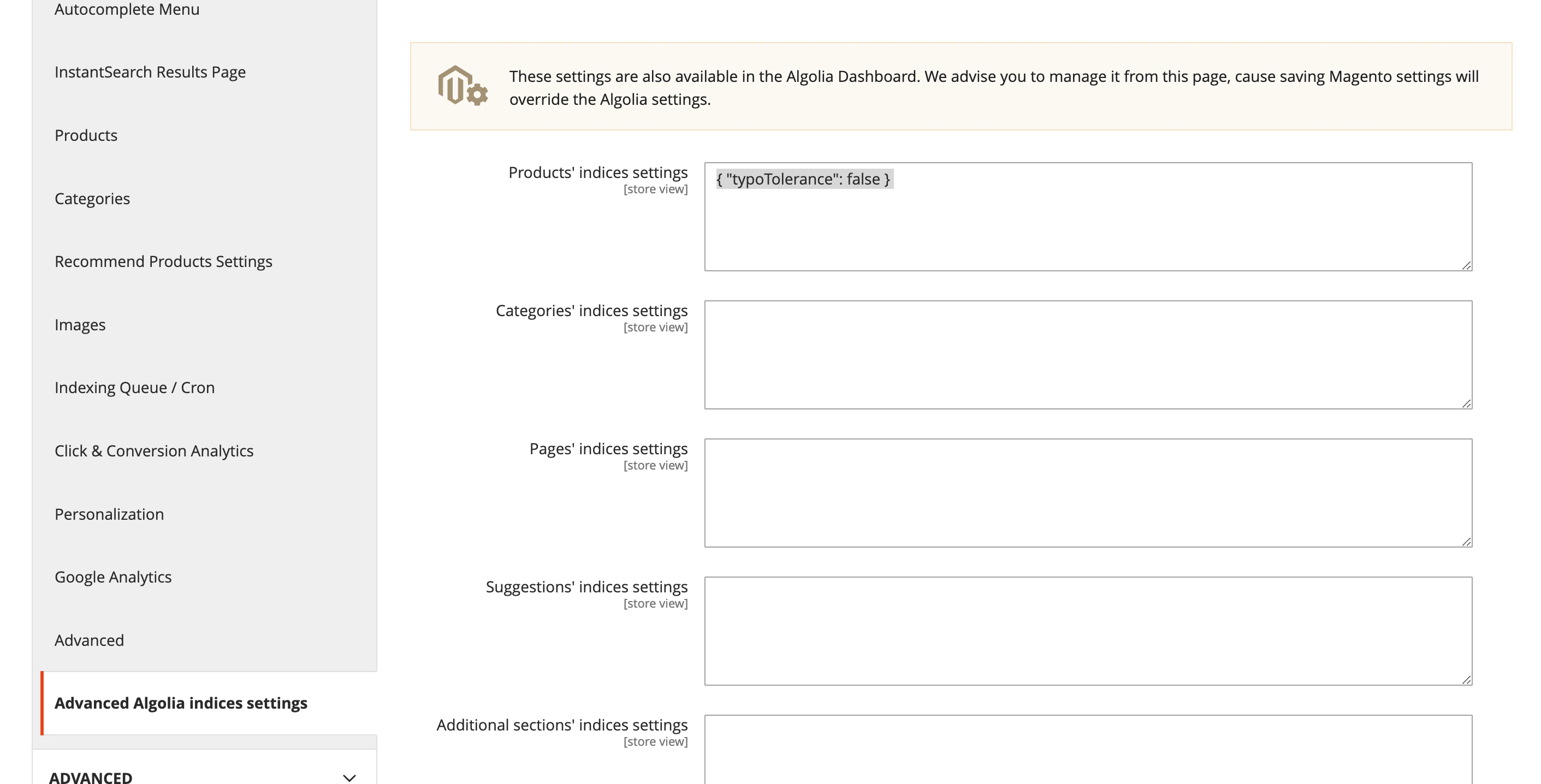
**Stores > Configuration > Algolia Search > Advanced Algolia indices settings**
This configuration page features a section for each entity that Magento manages.
Specify your desired configuration using JSON syntax.
#### Example
To specify an alternate value for the `typoTolerance` setting,
add the following JSON configuration under "Products' indices settings":
```json JSON icon=braces theme={"system"}
{ "typoTolerance": false }
```
## Customize Magento index settings
You can customize how Magento writes index settings to Algolia:
1. [Advanced Algolia indices settings](#advanced-algolia-indices-settings)
2. [Backend events](/doc/integration/magento-2/customize/custom-back-end-events#modify-index-settings)
### Advanced Algolia indices settings
To have Magento enforce an index setting value other than the default,
specify that value in the Magento admin panel under:
**Stores > Configuration > Algolia Search > Advanced Algolia indices settings**
This configuration page features a section for each entity that Magento manages.
Specify your desired configuration using JSON syntax.
#### Example
To specify an alternate value for the `typoTolerance` setting,
add the following JSON configuration under "Products' indices settings":
```json JSON icon=braces theme={"system"}
{ "typoTolerance": false }
```
 ### Backend events
For more programmatic control over how the Magento extension writes settings to the Algolia indices,
create an observer class to handle one or more [entity-specific index setting events](/doc/integration/magento-2/customize/custom-back-end-events#modify-index-settings).
### Backend events
For more programmatic control over how the Magento extension writes settings to the Algolia indices,
create an observer class to handle one or more [entity-specific index setting events](/doc/integration/magento-2/customize/custom-back-end-events#modify-index-settings).