> ## Documentation Index
> Fetch the complete documentation index at: https://algolia.com/llms.txt
> Use this file to discover all available pages before exploring further.
# Click and conversion events
> Learn how to track click and conversion analytics in Magento with the Algolia extension.
To analyze how users are interacting with your search experience in your Magento installation,
you can track [clicks and conversions](/doc/guides/sending-events/concepts/event-types).
For both the Autocomplete and InstantSearch Results page,
you can track which products are clicked more often,
and which searches have the highest conversion rate.
To enable click and conversion analytics,
go to **Stores > Configuration > Algolia Search > Click & Conversion Analytics** from the Magento Admin panel.
## Enable click analytics
Set **Enable Click Analytics** to **Yes** to turn on click and conversion analytics.
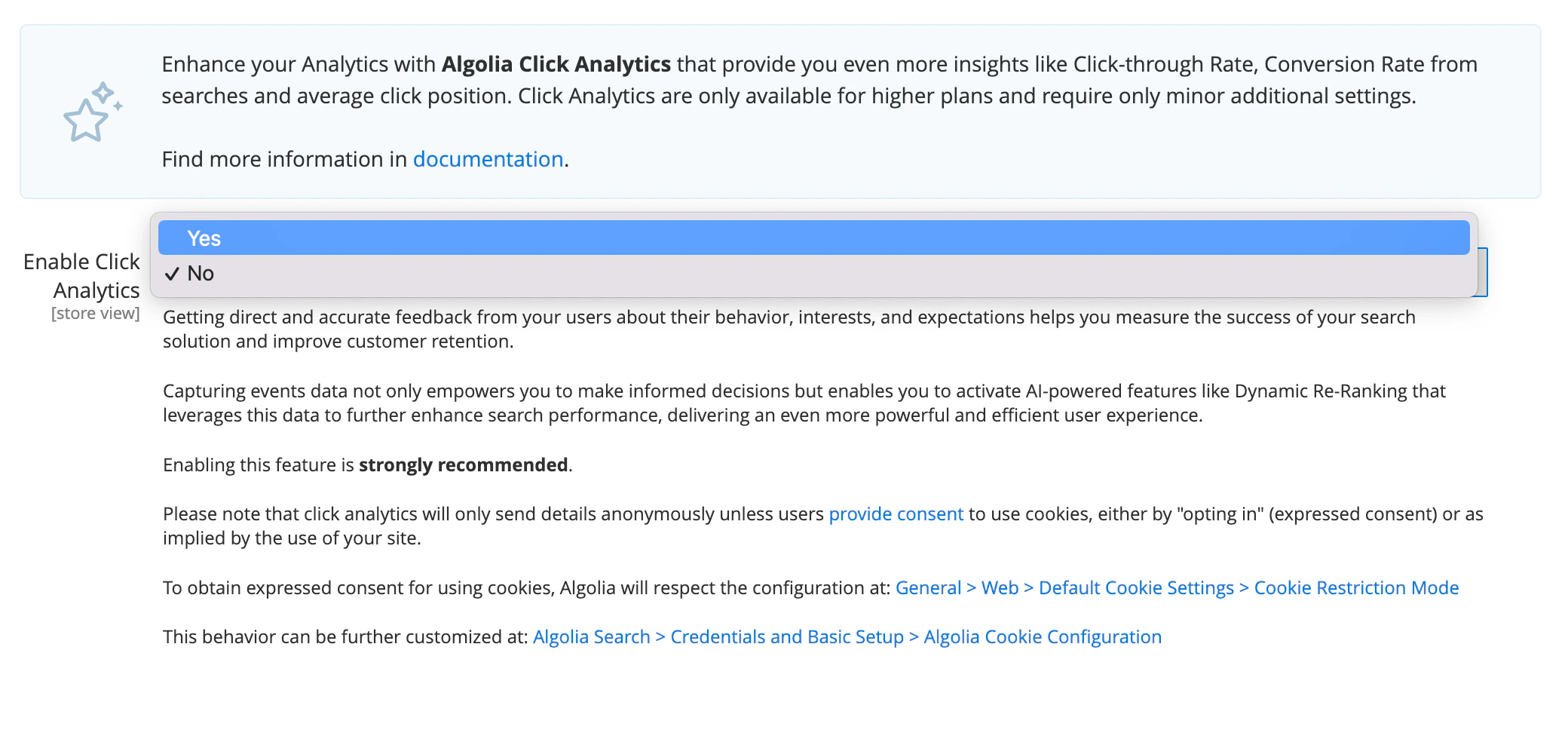 This adds the parameter `clickAnalytics=true` to every search.
The default for this setting is **No**.
## DOM selector of a result container on InstantSearch page
Enter a DOM selector for the search results container to define which elements on your page are tracked.
The elements selected **must have** the `data-objectid` and `data-position` attributes.
This default DOM selector is `.ais-Hits-item a.result, .ais-InfiniteHits-item a.result`.
## Enable conversion tracking
To determine how well Algolia helps achieve your business objectives,
enable conversion tracking.
Previous versions of the extension required you to specify which event you would like to track as a conversion,
either *Add to cart* or *Place order*.
From version `3.14` Algolia tracks *both* types of conversions.
To do this, set **Enable Click Analytics** to **Yes**:
This adds the parameter `clickAnalytics=true` to every search.
The default for this setting is **No**.
## DOM selector of a result container on InstantSearch page
Enter a DOM selector for the search results container to define which elements on your page are tracked.
The elements selected **must have** the `data-objectid` and `data-position` attributes.
This default DOM selector is `.ais-Hits-item a.result, .ais-InfiniteHits-item a.result`.
## Enable conversion tracking
To determine how well Algolia helps achieve your business objectives,
enable conversion tracking.
Previous versions of the extension required you to specify which event you would like to track as a conversion,
either *Add to cart* or *Place order*.
From version `3.14` Algolia tracks *both* types of conversions.
To do this, set **Enable Click Analytics** to **Yes**:
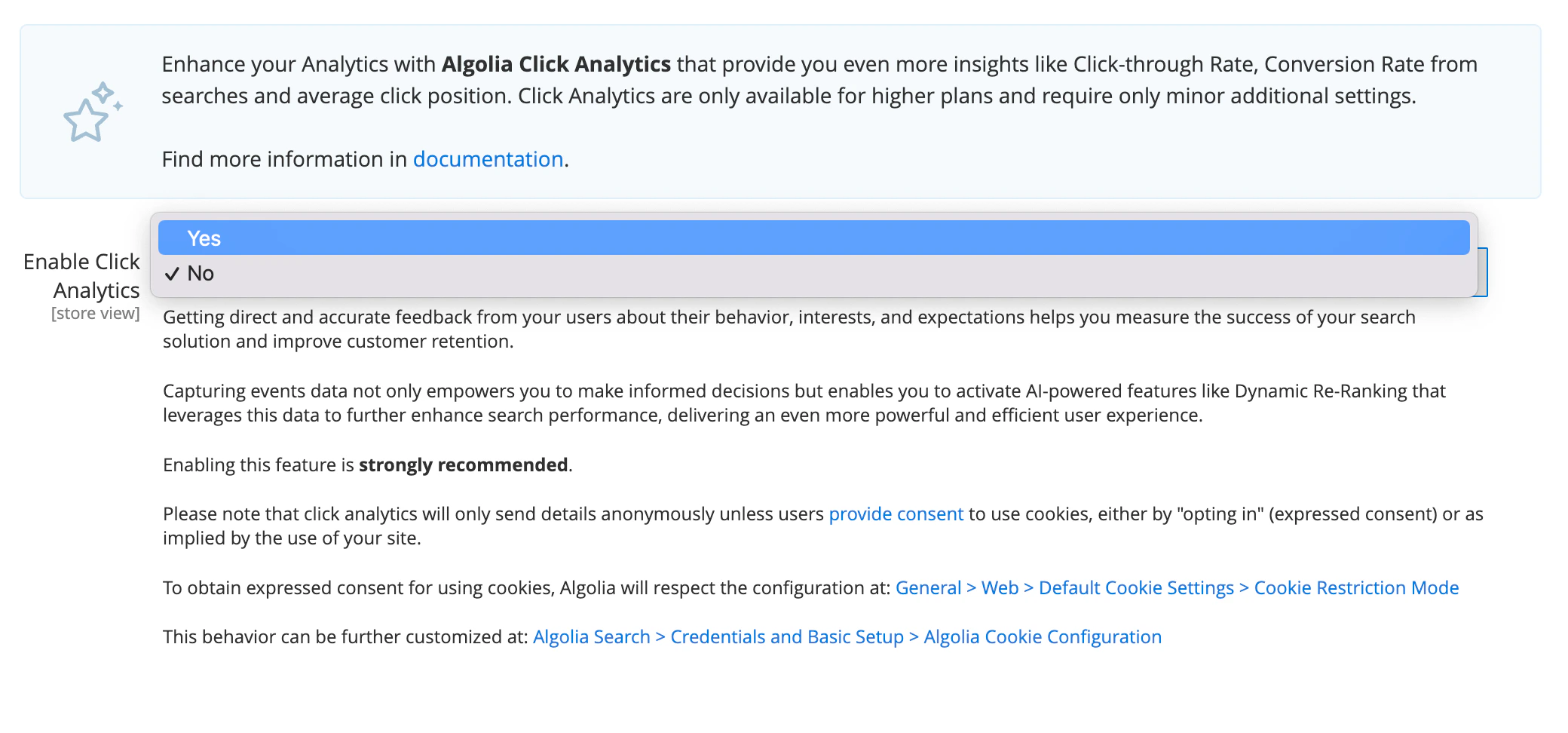 After making this change, save your settings and clear your configuration cache.
Conversions are determined as follows:
| Conversion types | Description |
| ---------------- | -------------------------------------------------------------------------------------------------------------------------------------------------- |
| **Add to cart** | A conversion event is triggered as soon as a user clicks the **Add to cart** button. This can either be on the search results or the product page. |
| **Place order** | A conversion event is triggered when a user lands on the *Checkout Successful* page. |
To be considered a conversion,
a user **must** have interacted with your search at least **once** during the session for the product being considered.
To connect searches to conversion events, the Algolia extension adds URL parameters for the [`queryID`](/doc/guides/sending-events/guides/queryid), `objectID`, and `indexName` parameters.
You need to include these parameters for your clicks and conversions to work.
For better SEO, you should use [canonical link meta tags](https://docs.magento.com/user-guide/marketing/meta-canonical.html) for your product pages.
To enable canonical links, go to **Stores > Configuration > Catalog > Catalog** and set **Use Canonical Link Meta Tag For Products** to **Yes**.
If you're using an alternative method to track the `queryID`, `objectID`, and `indexName` parameters for your conversion events,
you can remove the URL parameters by editing the
[`common.js`](https://github.com/algolia/algoliasearch-magento-2/blob/3.1.0/view/frontend/web/internals/common.js#L180-L197) file.
### URL parameters added to product links
From version 2 and later, URL parameters are appended to the product links in your search if you enable [conversion tracking](/doc/integration/magento-2/how-it-works/events#enable-conversion-tracking).
This is so search can be tied to a conversion event using the `queryID` parameter.
As best SEO practice, use canonical links for your product pages.
Enable this setting by going to **Stores > Configuration > Catalog > Catalog > Search Engine Optimization > Use Canonical Link Meta Tag For Products** in your store's Admin
## Revenue analytics
This feature isn't available on every plan.
Refer to your [pricing plan](https://www.algolia.com/pricing) to see if it's included.
Versions 3.14 and later support [revenue analytics](/doc/guides/search-analytics/concepts/metrics#revenue) for [qualifying plans](/doc/guides/search-analytics/overview#click-conversion-and-revenue-analytics).
When conversion tracking is enabled, Magento also sends [revenue data](/doc/guides/search-analytics/concepts/query-aggregation#revenue-transactions) with all *Add to cart* and *Place order* conversion events.
Revenue data sent to Algolia takes into account any discounts or special pricing that may apply.
Discounts are applied to conversion event types as follows:
| | Add to cart | Place order |
| ---------------------- | ---------------------------- | ---------------------------- |
| Special price | | |
| Catalog price rule | | |
| Cart price rule | | |
| Customer group pricing | | |
Revenue is calculated based on the final sale price of an item (after all discounts are applied) multiplied by the quantity ordered for that item.
Since Magento shopping cart price rules only take effect in the context of the entire order,
these particular discounts are only included when calculating the revenue data that's sent with the *Place order* event.
Version 3.14 uses version 4 of the Algolia PHP API client to support this feature.
Version 4 of the client requires **PHP 8**.
Plan for this upgrade accordingly before pushing to production.
## DOM selector of Add to cart buttons
Enter a selector for the **Add to cart** button if the conversion analytics mode is set to *Add to cart*.
The elements targeted by this selector **must have** the `data-objectid` attribute (unique product identifier).
The default is `.action.primary.tocart`.
After making this change, save your settings and clear your configuration cache.
Conversions are determined as follows:
| Conversion types | Description |
| ---------------- | -------------------------------------------------------------------------------------------------------------------------------------------------- |
| **Add to cart** | A conversion event is triggered as soon as a user clicks the **Add to cart** button. This can either be on the search results or the product page. |
| **Place order** | A conversion event is triggered when a user lands on the *Checkout Successful* page. |
To be considered a conversion,
a user **must** have interacted with your search at least **once** during the session for the product being considered.
To connect searches to conversion events, the Algolia extension adds URL parameters for the [`queryID`](/doc/guides/sending-events/guides/queryid), `objectID`, and `indexName` parameters.
You need to include these parameters for your clicks and conversions to work.
For better SEO, you should use [canonical link meta tags](https://docs.magento.com/user-guide/marketing/meta-canonical.html) for your product pages.
To enable canonical links, go to **Stores > Configuration > Catalog > Catalog** and set **Use Canonical Link Meta Tag For Products** to **Yes**.
If you're using an alternative method to track the `queryID`, `objectID`, and `indexName` parameters for your conversion events,
you can remove the URL parameters by editing the
[`common.js`](https://github.com/algolia/algoliasearch-magento-2/blob/3.1.0/view/frontend/web/internals/common.js#L180-L197) file.
### URL parameters added to product links
From version 2 and later, URL parameters are appended to the product links in your search if you enable [conversion tracking](/doc/integration/magento-2/how-it-works/events#enable-conversion-tracking).
This is so search can be tied to a conversion event using the `queryID` parameter.
As best SEO practice, use canonical links for your product pages.
Enable this setting by going to **Stores > Configuration > Catalog > Catalog > Search Engine Optimization > Use Canonical Link Meta Tag For Products** in your store's Admin
## Revenue analytics
This feature isn't available on every plan.
Refer to your [pricing plan](https://www.algolia.com/pricing) to see if it's included.
Versions 3.14 and later support [revenue analytics](/doc/guides/search-analytics/concepts/metrics#revenue) for [qualifying plans](/doc/guides/search-analytics/overview#click-conversion-and-revenue-analytics).
When conversion tracking is enabled, Magento also sends [revenue data](/doc/guides/search-analytics/concepts/query-aggregation#revenue-transactions) with all *Add to cart* and *Place order* conversion events.
Revenue data sent to Algolia takes into account any discounts or special pricing that may apply.
Discounts are applied to conversion event types as follows:
| | Add to cart | Place order |
| ---------------------- | ---------------------------- | ---------------------------- |
| Special price | | |
| Catalog price rule | | |
| Cart price rule | | |
| Customer group pricing | | |
Revenue is calculated based on the final sale price of an item (after all discounts are applied) multiplied by the quantity ordered for that item.
Since Magento shopping cart price rules only take effect in the context of the entire order,
these particular discounts are only included when calculating the revenue data that's sent with the *Place order* event.
Version 3.14 uses version 4 of the Algolia PHP API client to support this feature.
Version 4 of the client requires **PHP 8**.
Plan for this upgrade accordingly before pushing to production.
## DOM selector of Add to cart buttons
Enter a selector for the **Add to cart** button if the conversion analytics mode is set to *Add to cart*.
The elements targeted by this selector **must have** the `data-objectid` attribute (unique product identifier).
The default is `.action.primary.tocart`.