> ## Documentation Index
> Fetch the complete documentation index at: https://algolia.com/llms.txt
> Use this file to discover all available pages before exploring further.
# Google Analytics
> Learn how to track Search Analytics in the Algolia extension for Adobe Commerce and Magento Open Source.
The Google Analytics feature of the extension is handled by the [Analytics widget](/doc/api-reference/widgets/analytics/js) of the [InstantSearch.js](/doc/api-reference/widgets/js) library.
The widget sends all searches to analytics tools, such as Google Analytics, Segment.io, or Kissmetrics.
The analytics feaeture only works on the InstantSearch page,
not in the autocomplete menu.
## Configuration
The Analytics feature has three variables that you can configure.
### Delay
The delay **in milliseconds**.
Each keystroke in the search box will trigger a search in Algolia to provide a search-as-you-type experience,
which is great for the user experience.
For the analytics, however, it generates a lot of unnecessary data and noise in analytics if all the queries would be pushed to the analytics service.
The delay setting defines how long the widget should wait between keystrokes before pushing data to the analytics service.
Only the last search after this delay is sent to the analytics service.
### Push before delay on UI interaction
If the delay set is too high, it could happen that a user interacts with the search results - clicking one of the results for example - before the delay is actually finished.
This could prevent the search event from being sent to the analytics service.
When this setting is true, the search event is sent to the analytics service,
even if it occurred within the delay parameter set.
### Push after initial search
If users land on the search page directly from a shared URL,
the search is automatically triggered without any user interaction.
At the same time, the load of the page triggers the default Google Analytics code for a page view.
This setting specifies if you should send a search event in such non-interactive search scenarios.
## Push function
The [`analytics`](/doc/api-reference/widgets/analytics/js#param-push-function) widget calls the `push` function every time it has to send analytics data to an analytics service.
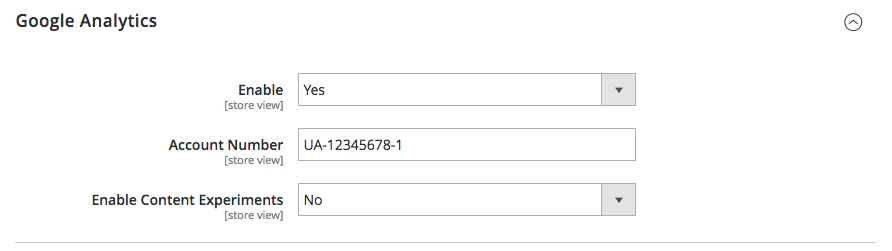
If [Google Analytics](https://docs.magento.com/user-guide/marketing/google-universal-analytics.html) is enabled in Magento,
the widget will automatically configure the `push` function to send the data to Google Analytics.
You can configure Magento's Google Analytics settings under **Stores > Configuration > Sales > Google API > Google Analytics**.
 Each search is tracked as a page view in Google Analytics.
The URL of the page view has the following format:
`/catalogsearch/result/?q=[[search_term]]&[[selected_filters]]&numberOfHits=[[number_of_results]]`
You can find the code for the `push` function on [GitHub](https://github.com/algolia/algoliasearch-magento-2/blob/3.0.2/view/frontend/web/instantsearch.js#L577-L596).
## Other analytics services
If you need to send data to analytics services other than Google Analytics,
you need to write a custom `push` function.
To do this, define a `algoliaAnalyticsPushFunction` variable,
and assign the custom function to it.
The widget automatically calls the custom function.
### Examples
```js JavaScript icon=code theme={"system"}
const algoliaAnalyticsPushFunction = (
formattedParameters,
{ query },
{ nbHits },
) => {
// Google Analytics
window.ga(
"set",
"page",
`/search/query/?query=${query}&${formattedParameters}&numberOfHits=${nbHits}`,
);
window.ga("send", "pageView");
// GTM
dataLayer.push({
event: "search",
"Search Query": query,
"Facet Parameters": formattedParameters,
"Number of Hits": nbHits,
});
// Segment.io
analytics.page("[SEGMENT] instantsearch", {
path: `/instantsearch/?query=${query}&${formattedParameters}`,
});
// KissMetrics
const objParams = JSON.parse(
`{"${decodeURI(formattedParameters.replace(/&/g, '","').replace(/=/g, '":"'))}"}`,
);
const arrParams = $.map(objParams, (value, index) => [value]);
_kmq.push([
"record",
"[KM] Viewed Result page",
{
Query: query,
"Number of Hits": nbHits,
"Search Params": arrParams,
},
]);
// Or any other service
};
```
Each search is tracked as a page view in Google Analytics.
The URL of the page view has the following format:
`/catalogsearch/result/?q=[[search_term]]&[[selected_filters]]&numberOfHits=[[number_of_results]]`
You can find the code for the `push` function on [GitHub](https://github.com/algolia/algoliasearch-magento-2/blob/3.0.2/view/frontend/web/instantsearch.js#L577-L596).
## Other analytics services
If you need to send data to analytics services other than Google Analytics,
you need to write a custom `push` function.
To do this, define a `algoliaAnalyticsPushFunction` variable,
and assign the custom function to it.
The widget automatically calls the custom function.
### Examples
```js JavaScript icon=code theme={"system"}
const algoliaAnalyticsPushFunction = (
formattedParameters,
{ query },
{ nbHits },
) => {
// Google Analytics
window.ga(
"set",
"page",
`/search/query/?query=${query}&${formattedParameters}&numberOfHits=${nbHits}`,
);
window.ga("send", "pageView");
// GTM
dataLayer.push({
event: "search",
"Search Query": query,
"Facet Parameters": formattedParameters,
"Number of Hits": nbHits,
});
// Segment.io
analytics.page("[SEGMENT] instantsearch", {
path: `/instantsearch/?query=${query}&${formattedParameters}`,
});
// KissMetrics
const objParams = JSON.parse(
`{"${decodeURI(formattedParameters.replace(/&/g, '","').replace(/=/g, '":"'))}"}`,
);
const arrParams = $.map(objParams, (value, index) => [value]);
_kmq.push([
"record",
"[KM] Viewed Result page",
{
Query: query,
"Number of Hits": nbHits,
"Search Params": arrParams,
},
]);
// Or any other service
};
```