> ## Documentation Index
> Fetch the complete documentation index at: https://algolia.com/llms.txt
> Use this file to discover all available pages before exploring further.
# Personalization
> Learn how to track events for Personalization in the Algolia extension for Adobe Commerce and Magento Open Source.
export const UserToken = () =>
user token
;
Personalization strengthens your search: it adds a personal layer to the overall relevance and experience of a user.
Taking personal preferences into account can drive conversion by guiding users to your products that they like.
With versions 2 and later,
you can configure [Personalization](/doc/guides/personalization/classic-personalization/what-is-personalization)
from the back office of your Magento store.
This feature isn't available on every plan.
Refer to your [pricing plan](https://www.algolia.com/pricing) to see if it's included.
## Configure Personalization for Magento
You can't personalize user experiences if you don't know their preferences.
To learn about these preferences, you must capture storefront signals (events).
1. Enable personalization for your storefront:
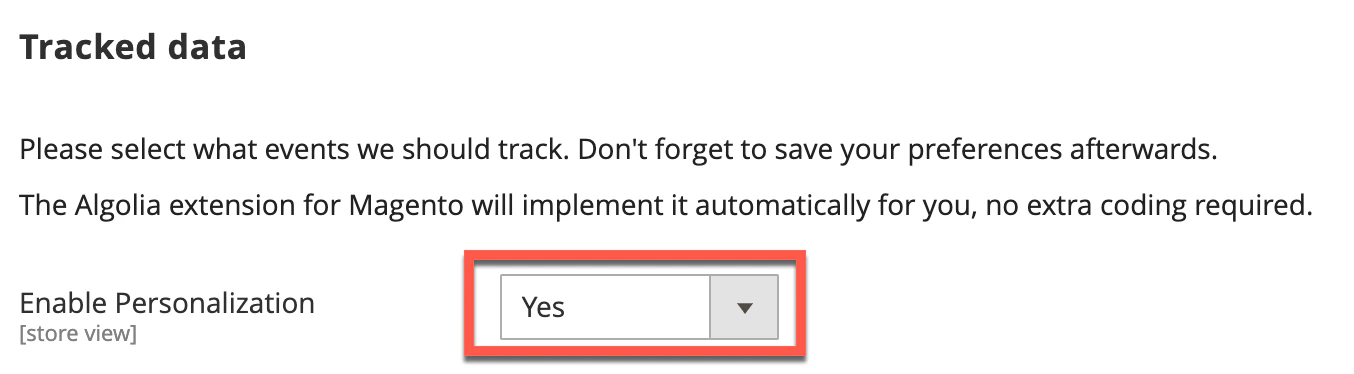 2. Go to **Stores > Configuration > Algolia Search > Personalization** in your store's Admin panel and select the events you wish to track:
* **View events**
* Viewed product
* **Click events**
* Product clicked
* Product recommendation clicked
* Facet clicked
* **Conversion events**
* Product added to wishlist
* Product added to cart
* Placed order
3. Save and clear your configuration cache.
The enabled events are now automatically sent to Algolia.
Algolia provides both Personalization and analytics,
and while they work together, they have different purposes:
* **Personalization** personalizes search results for your users.
Algolia only receives the data required to support this feature.
* **Analytics** tracks search effectiveness or performs things like A/B testing.
For analytics, you need to enable [click and conversion events](/doc/integration/magento-2/how-it-works/events).
## How Personalization works with Magento
When personalization is enabled in Magento,
view and click events are automatically sent to Algolia from the frontend of your store.
Conversion events are sent from the backend using Magento's default dispatched event observers.
### User token
To personalize results, Personalization requires a for all events you track and for your search.
The extension automatically handles the generation of this token.
For first-time customers (not logged in) an anonymous `userToken` is created by the Algolia [`search-insights`](/doc/libraries/search-insights) library.
If a customer consents to using cookies on your site, the anonymous token is stored in the `_ALGOLIA` cookie.
If consent isn't granted, the token will be regenerated on every request:
this means you can't track that user's activity or provide them with personalized search results.
To retain personalization data across sessions, once a customer logs into their account, a unique 64-character `authenticatedUserToken` is generated from Magento based on email address and customer ID.
However, to comply with data privacy laws, this information is one-way encrypted to avoid exposure of any Personally Identifiable Information (PII) in the underlying event data.
Algolia stores this token in a cookie named:
* `_ALGOLIA_MAGENTO_AUTH` from version `3.14.x`
* `aa-search` for previous versions.
The token persists for a year.
The cookie is only updated when the user logs in again.
If the customer logs out explicitly, the cookie is deleted.
### Customer journey
Starting with version 3.14, to correlate activities that a user performs before *and* after logging in,
Algolia tracks the entire customer journey by sending *both* the anonymous token and authenticated token with events.
This ensures that activities performed before the login event are included when determining the customer's shopping preferences.
The following table shows which tokens are used for the various scenarios that may occur during the customer journey:
| | `userToken` | `authenticatedUserToken` |
| ------------------------ | ---------------------------- | ---------------------------- |
| First time visitor | | |
| Customer logs in | | |
| Customer session expires | | |
| Customer logs out | | |
The Magento extension retains the authenticated user token unless the customer explicitly logs out of their account.
This is so you can continue personalizing their experience based on their `authenticatedToken` and not rely solely on a potentially ephemeral anonymous token.
### Query token
In addition to tracking user activity for personalization,
`userToken` also [improves analytics accuracy](/doc/guides/search-analytics/guides/usertoken)
by sending the [Insights events token](/doc/api-reference/api-parameters/userToken) with queries.
However, because queries can only be associated with a single `userToken`,
once a customer has logged in to their account the `authenticatedToken` is sent with all queries instead of the anonymous user token.
### Cookie law compliance and user consent
In many countries,
you must obtain the user's permission before storing data in cookies, such as the `userToken`.
For information about how the Algolia extension determines consent,
see [cookie law compliance](/doc/integration/magento-2/how-it-works/cookie-law-compliance) .
## How to track custom Personalization events
You can add custom events for Personalization with the `afterInsightsBindEvents` frontend event.
This hook exposes the `algoliaInsights` object, which lets you append events to the list of pre-configured events.
The `algoliaInsights` object has three methods for adding new Personalization events:
* `trackClick`
* `trackView`
* `trackConversion`
Each method requires an object with specific formatting for insights. You can easily create events in the correct format by using the `buildEventData` method on the `algoliaInsights` object. To create a personalization event in the correct format, `buildEventData` requires an `eventName`, `objectID` and `indexName`.
The following code snippet shows how to add a custom click event using the `afterInsightsBindEvents` hook:
```js JavaScript icon=code theme={"system"}
algolia.registerHook("afterInsightsBindEvents", function (algoliaInsights) {
var selectors = document.querySelectorAll(".class-selector");
selectors.forEach(function (e) {
e.addEventListener("click", function (event) {
// selector in this example has an data-objectid attribute
// with the objectID as the value
var objectId = this.dataset.objectid;
// use the buildEventData function to format event data
var eventData = algoliaInsights.buildEventData(
"Clicked Event Name", // eventName
objectId, // objectID
algoliaConfig.indexName + "_products", // indexName
);
algoliaInsights.trackClick(eventData);
// Available methods
// algoliaInsights.trackView(eventData);
// algoliaInsights.trackConversion(eventData);
});
});
});
```
2. Go to **Stores > Configuration > Algolia Search > Personalization** in your store's Admin panel and select the events you wish to track:
* **View events**
* Viewed product
* **Click events**
* Product clicked
* Product recommendation clicked
* Facet clicked
* **Conversion events**
* Product added to wishlist
* Product added to cart
* Placed order
3. Save and clear your configuration cache.
The enabled events are now automatically sent to Algolia.
Algolia provides both Personalization and analytics,
and while they work together, they have different purposes:
* **Personalization** personalizes search results for your users.
Algolia only receives the data required to support this feature.
* **Analytics** tracks search effectiveness or performs things like A/B testing.
For analytics, you need to enable [click and conversion events](/doc/integration/magento-2/how-it-works/events).
## How Personalization works with Magento
When personalization is enabled in Magento,
view and click events are automatically sent to Algolia from the frontend of your store.
Conversion events are sent from the backend using Magento's default dispatched event observers.
### User token
To personalize results, Personalization requires a for all events you track and for your search.
The extension automatically handles the generation of this token.
For first-time customers (not logged in) an anonymous `userToken` is created by the Algolia [`search-insights`](/doc/libraries/search-insights) library.
If a customer consents to using cookies on your site, the anonymous token is stored in the `_ALGOLIA` cookie.
If consent isn't granted, the token will be regenerated on every request:
this means you can't track that user's activity or provide them with personalized search results.
To retain personalization data across sessions, once a customer logs into their account, a unique 64-character `authenticatedUserToken` is generated from Magento based on email address and customer ID.
However, to comply with data privacy laws, this information is one-way encrypted to avoid exposure of any Personally Identifiable Information (PII) in the underlying event data.
Algolia stores this token in a cookie named:
* `_ALGOLIA_MAGENTO_AUTH` from version `3.14.x`
* `aa-search` for previous versions.
The token persists for a year.
The cookie is only updated when the user logs in again.
If the customer logs out explicitly, the cookie is deleted.
### Customer journey
Starting with version 3.14, to correlate activities that a user performs before *and* after logging in,
Algolia tracks the entire customer journey by sending *both* the anonymous token and authenticated token with events.
This ensures that activities performed before the login event are included when determining the customer's shopping preferences.
The following table shows which tokens are used for the various scenarios that may occur during the customer journey:
| | `userToken` | `authenticatedUserToken` |
| ------------------------ | ---------------------------- | ---------------------------- |
| First time visitor | | |
| Customer logs in | | |
| Customer session expires | | |
| Customer logs out | | |
The Magento extension retains the authenticated user token unless the customer explicitly logs out of their account.
This is so you can continue personalizing their experience based on their `authenticatedToken` and not rely solely on a potentially ephemeral anonymous token.
### Query token
In addition to tracking user activity for personalization,
`userToken` also [improves analytics accuracy](/doc/guides/search-analytics/guides/usertoken)
by sending the [Insights events token](/doc/api-reference/api-parameters/userToken) with queries.
However, because queries can only be associated with a single `userToken`,
once a customer has logged in to their account the `authenticatedToken` is sent with all queries instead of the anonymous user token.
### Cookie law compliance and user consent
In many countries,
you must obtain the user's permission before storing data in cookies, such as the `userToken`.
For information about how the Algolia extension determines consent,
see [cookie law compliance](/doc/integration/magento-2/how-it-works/cookie-law-compliance) .
## How to track custom Personalization events
You can add custom events for Personalization with the `afterInsightsBindEvents` frontend event.
This hook exposes the `algoliaInsights` object, which lets you append events to the list of pre-configured events.
The `algoliaInsights` object has three methods for adding new Personalization events:
* `trackClick`
* `trackView`
* `trackConversion`
Each method requires an object with specific formatting for insights. You can easily create events in the correct format by using the `buildEventData` method on the `algoliaInsights` object. To create a personalization event in the correct format, `buildEventData` requires an `eventName`, `objectID` and `indexName`.
The following code snippet shows how to add a custom click event using the `afterInsightsBindEvents` hook:
```js JavaScript icon=code theme={"system"}
algolia.registerHook("afterInsightsBindEvents", function (algoliaInsights) {
var selectors = document.querySelectorAll(".class-selector");
selectors.forEach(function (e) {
e.addEventListener("click", function (event) {
// selector in this example has an data-objectid attribute
// with the objectID as the value
var objectId = this.dataset.objectid;
// use the buildEventData function to format event data
var eventData = algoliaInsights.buildEventData(
"Clicked Event Name", // eventName
objectId, // objectID
algoliaConfig.indexName + "_products", // indexName
);
algoliaInsights.trackClick(eventData);
// Available methods
// algoliaInsights.trackView(eventData);
// algoliaInsights.trackConversion(eventData);
});
});
});
```