> ## Documentation Index
> Fetch the complete documentation index at: https://algolia.com/llms.txt
> Use this file to discover all available pages before exploring further.
# Troubleshoot data, index, and queue issues
> Troubleshooting data, index, or queue issues on Magento.
export const Records = () =>
records
;
export const Index = () =>
index
;
Most errors that you encounter when using Algolia for Magento are data or indexing related.
This page addresses the most common issues.
## Empty search results
When Algolia for Magento is installed, it automatically fetches the Magento product data, transforms it to a JSON structure and pushes this data to Algolia.
If you run into problems, check that:
* The [application ID and API keys](/doc/integration/magento-2/getting-started/quick-start) are correct
* The [queue is running](/doc/integration/magento-2/how-it-works/indexing-queue#configure-the-queue) in case automatic indexing is turned on.
## Outdated search results
With automatic indexing turned on, the indexing happens asynchronously.
It may take [some time](/doc/integration/magento-2/how-it-works/indexing-queue) for your data to be updated.
It's possible for the indexing queue to crash under certain circumstances.
Below is a list of the most common problems you can encounter.
## Network error
Network errors are typically resolved automatically by the queueing process. If the network error persists over multiple queue runs, there may be a problem with the underlying infrastructure of the Magento app.
When in doubt: if the problem lies with the Algolia infrastructure,
check the [status page](https://status.algolia.com) for any issues.
## Memory error
Magento has known memory leaks that can lead to problems as memory usage increases.
These issues become more pronounced with larger .
For this reason, Algolia has a maximum record size of 10 KB to 100 KB, based on your [plan](https://www.algolia.com/pricing/)
(10 KB maximum for the Build plan).
Records that exceed this limit result in a "Record is too big" error.
## Record size
If the total size of the exceeds this limit, you should turn on [automatic indexing through the queue](/doc/integration/magento-2/how-it-works/indexing-queue).
The cron job running the indexing breaks up large indices into chunks within the size limit.
When indexing without the cron job, or with the `EMPTY_QUEUE=1` argument in the job, the index size isn't checked.
## Failed reindexing jobs
To see if any of the created jobs have failed, check the `algoliasearch_queue` table.
If a job fails, it needs to be restarted.
This will continue the indexing job from where it stopped, so it won't run it in its entirety again.
If the queue is enabled, the restart will happen automatically.
The indexing job can be restarted manually by pressing the *restart* link.
This can be found by clicking the index on the Magento Dashboard.
## Incomplete search results
In case some products are missing from the search,
note that the Algolia extension doesn't index products for which one of the following statements is true:
* The product is deleted
* The product is turned off
* The product is out of stock **and** the web shop hides products that are out of stock
* The product isn't visible in the search **and** in the web shop
Only when none of the preceding statements are true will Algolia index the product,
and will it show up in the search results.
## Price index dependencies
Even if the product meets all of the [criteria for visibility](#incomplete-search-results), products still might not sync with Algolia if the core
Magento "Product Price" index isn't [up to date](/doc/integration/magento-2/how-it-works/indexing#price-indexing).
To ensure that the price index is up to date, it can be run before executing the Algolia index with this Magento CLI command:
```sh Command line icon=square-terminal theme={"system"}
bin/magento indexer:reindex catalog_product_price
```
When all indexers are set to run on schedule as [recommended](/doc/integration/magento-2/how-it-works/indexing-queue#magento-indexing-modes),
Algolia monitors changes to products using [Materialized Views](https://developer.adobe.com/commerce/php/development/components/indexing/#mview).
With the indexing queue enabled,
the affected products may be processed asynchronously later,
at which point the price indexer may become out of date.
 Sometimes records may be missing in the price index even if the index appears to be valid.
If products aren't found in the price index,
Algolia treats them as "removed" and issues a [`deleteObject` request](/doc/rest-api/search/delete-object) in the corresponding Algolia index.
This means certain products may "disappear" from the website.
To determine if this is happening, [carefully review the logs](/doc/integration/magento-2/troubleshooting/back-end-issues#investigate-the-logs).
If you've verified that this is happening, and running the `catalog_product_price` before the Algolia indexer isn't practical, enable automatic price indexing from the extension's advanced configuration:
**Stores > Configuration > Algolia Search > Advanced > Advanced > Enable automatic price indexing**
Sometimes records may be missing in the price index even if the index appears to be valid.
If products aren't found in the price index,
Algolia treats them as "removed" and issues a [`deleteObject` request](/doc/rest-api/search/delete-object) in the corresponding Algolia index.
This means certain products may "disappear" from the website.
To determine if this is happening, [carefully review the logs](/doc/integration/magento-2/troubleshooting/back-end-issues#investigate-the-logs).
If you've verified that this is happening, and running the `catalog_product_price` before the Algolia indexer isn't practical, enable automatic price indexing from the extension's advanced configuration:
**Stores > Configuration > Algolia Search > Advanced > Advanced > Enable automatic price indexing**
 To minimize the marginal impact on processing time when this feature is enabled,
[ensure the indexing queue is optimized](/doc/integration/magento-2/how-it-works/indexing-queue#configure-the-queue).
## Parsing errors
This error can occur during indexing when the indexed data fails to encode to JSON.
```txt theme={"system"}
JSON parsing error: syntax error
```
This could be due to incorrect syntax like un-escaped values in your attributes.
### Errors from suggestions index
The `suggestions` index often triggers this error. In the extension, the suggestions index pulls data from Magento's [Search Terms](https://docs.magento.com/user-guide/marketing/search-terms.html) collection. Search Terms is a collection of all submitted queries made by the search form. The extension indexes the `query_text` value as is, which can sometimes throw errors if Search Terms contain malignant queries generated by bad actors like robots. Lax conditions allow indexing of irrelevant queries.
You can enforce higher conditions to reduce the less relevant Search Terms by increasing the numeric values in **Stores > Algolia Search > Autocomplete Menu**.
To minimize the marginal impact on processing time when this feature is enabled,
[ensure the indexing queue is optimized](/doc/integration/magento-2/how-it-works/indexing-queue#configure-the-queue).
## Parsing errors
This error can occur during indexing when the indexed data fails to encode to JSON.
```txt theme={"system"}
JSON parsing error: syntax error
```
This could be due to incorrect syntax like un-escaped values in your attributes.
### Errors from suggestions index
The `suggestions` index often triggers this error. In the extension, the suggestions index pulls data from Magento's [Search Terms](https://docs.magento.com/user-guide/marketing/search-terms.html) collection. Search Terms is a collection of all submitted queries made by the search form. The extension indexes the `query_text` value as is, which can sometimes throw errors if Search Terms contain malignant queries generated by bad actors like robots. Lax conditions allow indexing of irrelevant queries.
You can enforce higher conditions to reduce the less relevant Search Terms by increasing the numeric values in **Stores > Algolia Search > Autocomplete Menu**.
 The extension indexes search terms based on these configurations:
```php PHP icon=code theme={"system"}
/* @see \Algolia\AlgoliaSearch\Helper\Entity\SuggestionHelper::getSuggestionCollectionQuery() */
$collection->getSelect()->where(
'num_results >= ' . $this->configHelper->getMinNumberOfResults($storeId) . '
AND popularity >= ' . $this->configHelper->getMinPopularity($storeId) . '
AND query_text != "__empty__"'
);
```
To return more relevant results, increase these configuration values or clean up your search terms by manually deleting problematic `query_texts` values from the collection.
## Record too big errors
Algolia [limits individual record size for performance reasons](https://support.algolia.com/hc/en-us/articles/4406981897617-Is-there-a-size-limit-for-my-index-records-). The limits depend on your plan. If a record is larger than the threshold, Algolia returns the error message `Record is too big`.
To reduce the amount of errors thrown, the extension truncates or skips attributes with values that are larger than a certain size:
The extension indexes search terms based on these configurations:
```php PHP icon=code theme={"system"}
/* @see \Algolia\AlgoliaSearch\Helper\Entity\SuggestionHelper::getSuggestionCollectionQuery() */
$collection->getSelect()->where(
'num_results >= ' . $this->configHelper->getMinNumberOfResults($storeId) . '
AND popularity >= ' . $this->configHelper->getMinPopularity($storeId) . '
AND query_text != "__empty__"'
);
```
To return more relevant results, increase these configuration values or clean up your search terms by manually deleting problematic `query_texts` values from the collection.
## Record too big errors
Algolia [limits individual record size for performance reasons](https://support.algolia.com/hc/en-us/articles/4406981897617-Is-there-a-size-limit-for-my-index-records-). The limits depend on your plan. If a record is larger than the threshold, Algolia returns the error message `Record is too big`.
To reduce the amount of errors thrown, the extension truncates or skips attributes with values that are larger than a certain size:
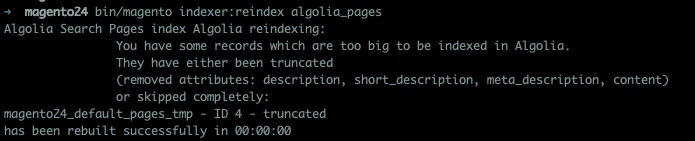 The function below throws the warning error:
`\Algolia\AlgoliaSearch\Helper\AlgoliaHelper::prepareRecords()`
The private method [`handleTooBigRecord`](https://github.com/algolia/algoliasearch-magento-2/blob/develop/Helper/AlgoliaHelper.php#L661-L705) evaluates attributes and flags large ones.
This preventive strategy isn't always perfect as some attributes are important for search.
### How to resolve
Resolve this error by upgrading your [plan](https://www.algolia.com/pricing) or reducing attribute size.
#### Upgrade your plan
By default, the Algolia extension has a [record size limit](https://support.algolia.com/hc/en-us/articles/4406981897617).
If your Algolia plan allows a higher record size limit, you can [customize the record size limit](https://support.algolia.com/hc/en-us/articles/11387560783505).
#### Reduce attribute size
Attributes like `description`, have a lot of content or hidden script tags that aren't necessary for search.
To reduce the size of this attribute, strip the HTML tags before indexing.
To change attributes before indexing, create an observer on the dispatched event for the entity you need.
For products, this event is: [`algolia_after_create_product_object`](/doc/integration/magento-2/customize/custom-back-end-events#update-attribute-data)
```php PHP icon=code theme={"system"}
getData('custom_data');
$product = $observer->getData('productObject');
// modify description to strip tags
$description = $data->getData('description');
$data->setData('description', strip_tags($description));
}
}
```
## 404 not found error in Magento configuration
Log out and then log back in to the Magento Admin Panel.
The function below throws the warning error:
`\Algolia\AlgoliaSearch\Helper\AlgoliaHelper::prepareRecords()`
The private method [`handleTooBigRecord`](https://github.com/algolia/algoliasearch-magento-2/blob/develop/Helper/AlgoliaHelper.php#L661-L705) evaluates attributes and flags large ones.
This preventive strategy isn't always perfect as some attributes are important for search.
### How to resolve
Resolve this error by upgrading your [plan](https://www.algolia.com/pricing) or reducing attribute size.
#### Upgrade your plan
By default, the Algolia extension has a [record size limit](https://support.algolia.com/hc/en-us/articles/4406981897617).
If your Algolia plan allows a higher record size limit, you can [customize the record size limit](https://support.algolia.com/hc/en-us/articles/11387560783505).
#### Reduce attribute size
Attributes like `description`, have a lot of content or hidden script tags that aren't necessary for search.
To reduce the size of this attribute, strip the HTML tags before indexing.
To change attributes before indexing, create an observer on the dispatched event for the entity you need.
For products, this event is: [`algolia_after_create_product_object`](/doc/integration/magento-2/customize/custom-back-end-events#update-attribute-data)
```php PHP icon=code theme={"system"}
getData('custom_data');
$product = $observer->getData('productObject');
// modify description to strip tags
$description = $data->getData('description');
$data->setData('description', strip_tags($description));
}
}
```
## 404 not found error in Magento configuration
Log out and then log back in to the Magento Admin Panel.