> ## Documentation Index
> Fetch the complete documentation index at: https://algolia.com/llms.txt
> Use this file to discover all available pages before exploring further.
# Custom preferences
> Preferences in your Salesforce B2C Commerce Business Manager module related to Algolia.
export const Index = () =>
index
;
You can configure these preferences in the Algolia BM module (**Business Manager > Merchant Tools > Algolia > Algolia**).
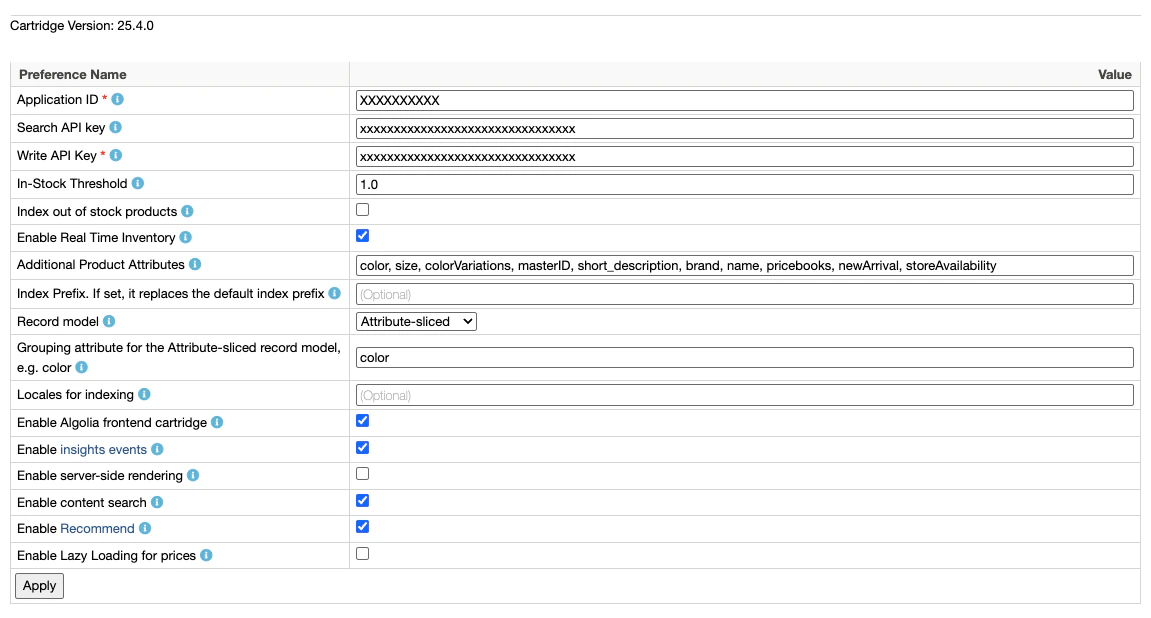 `Algolia_ApplicationID` (required)
This is your unique Algolia application identifier.
Find it in the [Algolia dashboard](https://dashboard.algolia.com/account/api-keys/).
`Algolia_SearchApiKey` (required, optional for [headless](/doc/integration/salesforce-commerce-cloud-b2c/guides/headless))
This is your Algolia public API key to use in your frontend code.
Find it in the [Algolia dashboard](https://dashboard.algolia.com/account/api-keys/).
`Algolia_AdminApiKey` (required)
This is your Algolia write API key. **Keep this key secret, and only use it in the backend**. Algolia uses this key to create, update, and delete your records and indices.
Consider using restricted API keys for increased security.
For more information, see [API key restrictions](/doc/guides/security/api-keys/in-depth/api-key-restrictions).
`Algolia_InStockThreshold` (optional, default value: `1`)
A product is considered in stock when the available quantity is greater than or equal to this threshold.
`Algolia_IndexOutOfStock` (default value: `false`)
Index out of stock products.
When this setting is off, only in-stock products whose available-to-sell (ATS) quantity meets or exceeds `Algolia_InStockThreshold` are indexed.
`Algolia_EnableRealTimeInventory` (default value: `false`)
If enabled, the cartridge sends inventory updates to Algolia after each order if a product is out of stock.
`Algolia_AdditionalAttributes` (optional)
Any [additional product attributes](/doc/integration/salesforce-commerce-cloud-b2c/indexing/product-indexing/indexing-attributes#configurable-attributes) to send to Algolia (comma-separated list).
To select the recommended [`ProductActiveData`](https://salesforcecommercecloud.github.io/b2c-dev-doc/docs/current/scriptapi/html/index.html?target=class_dw_catalog_ProductActiveData.html) fields for [custom ranking](/doc/guides/managing-results/must-do/custom-ranking), use [Active data for custom ranking](#active-data-for-custom-ranking) instead.
To index any other `ProductActiveData` field, add its ID here without the `activeData.` prefix.
Before you do, see the privacy warning under [Active data for custom ranking](#active-data-for-custom-ranking).
`Algolia_CustomRankingActiveData` (optional)
Select the recommended [`ProductActiveData`](https://salesforcecommercecloud.github.io/b2c-dev-doc/docs/current/scriptapi/html/index.html?target=class_dw_catalog_ProductActiveData.html) fields to index at the record root for [custom ranking](/doc/guides/managing-results/relevance-overview/in-depth/ranking-criteria).
The checkbox list includes these fields:
* `conversionMonth`.
* `conversionWeek`
* `ordersMonth`
* `ordersWeek`
* `revenueMonth`
* `revenueWeek`
The cartridge has built-in handlers for all `ProductActiveData` attributes.
To index any field not in the checkbox list, add its ID (without the `activeData.` prefix) to [Additional Product Attributes](#additional-product-attributes).
When you save this preference, the cartridge checks every existing product index it writes to and warns if any selected field is missing from [`unretrievableAttributes`](/doc/api-reference/api-parameters/unretrievableAttributes).
Indices that don't exist yet, and replica indices, aren't checked.
Active data values are returned in search responses by default, whether you select them here or add them through [Additional Product Attributes](#additional-product-attributes).
If you use active data only as ranking signals, add the same field IDs as [unretrievable attributes](/doc/api-reference/api-parameters/unretrievableAttributes) on every product index the cartridge writes to.
Unretrievable attributes are ignored when a query is authenticated with the Admin API key.
Use a Search API key instead.
For more information, see [Make active data attributes unretrievable](/doc/integration/salesforce-commerce-cloud-b2c/indexing/product-indexing/indexing-attributes#make-active-data-attributes-unretrievable).
`Algolia_IndexPrefix` (optional)
If set, it replaces the first two segments of the index name.
The default names are: `____products__` and `____categories__`.
`Algolia_RecordModel` (default value: `Variation product`)
Define the shape of the records generated by the cartridge. For more information, see [Record models](/doc/integration/salesforce-commerce-cloud-b2c/indexing/product-indexing/indexing-attributes#record-models).
`Algolia_AttributeSlicedRecordModel_GroupingAttribute` (required only if Attribute-sliced is selected as the record model)
Choose the variation attribute that base products with multiple variation attributes are grouped by when using the Attribute-sliced record model, for example `color`.
`Algolia_IndexingAPI` (default value: `Search API`)
The Algolia API to use for indexing requests.
The **Ingestion API** unlocks features such as Collections and Transformations, but has higher per-request overhead.
If you don't need those features, keep the default **Search API**.
For more information, see [Index with the Ingestion API](/doc/integration/salesforce-commerce-cloud-b2c/guides/ingestion-api).
`Algolia_AnalyticsRegion` (required when **Indexing API** is set to **Ingestion API**)
The analytics region of your Algolia application.
Allowed values are `us` and `eu`.
Find your region under [**Infrastructure > Analytics**](https://dashboard.algolia.com/account/infrastructure/analytics) in the Algolia dashboard.
Ignored when **Indexing API** is set to **Search API**.
`Algolia_LocalesForIndexing` (optional - leaving this empty indexes all locales assigned to your site)
Specify which locales to index in a comma-separated list, for all job types. Locales are case-sensitive.
`Algolia_Enable` (default value: `true`)
Enable the SFRA or SiteGenesis cartridge on the Salesforce B2C Commerce storefront.
`Algolia_EnableInsights` (default value: `false`)
If `true`, the Storefront sends [Insights API events](/doc/guides/sending-events/concepts/event-types) to Algolia:, including views, clicks, add-to-cart actions, and purchases.
`Algolia_EnableSSR` (default value: `false`)
Enables [server-side rendering](/doc/integration/salesforce-commerce-cloud-b2c/guides/ssr-caching) for category landing pages and search results to improve SEO for public search engines. Applies only to SFRA cartridges.
`Algolia_EnableContentSearch` (default value: `false`)
Enable Algolia Content Search on the SFRA storefront cartridge.
`Algolia_EnableRecommendations` (default value: `false`)
Enable [Algolia Recommend](/doc/guides/algolia-recommend/overview) on the SFRA storefront cartridge.
`Algolia_EnablePricingLazyLoading` (default value: `false`)
Enable lazy loading of pricing and promotions data from SFCC.
`Algolia_ApplicationID` (required)
This is your unique Algolia application identifier.
Find it in the [Algolia dashboard](https://dashboard.algolia.com/account/api-keys/).
`Algolia_SearchApiKey` (required, optional for [headless](/doc/integration/salesforce-commerce-cloud-b2c/guides/headless))
This is your Algolia public API key to use in your frontend code.
Find it in the [Algolia dashboard](https://dashboard.algolia.com/account/api-keys/).
`Algolia_AdminApiKey` (required)
This is your Algolia write API key. **Keep this key secret, and only use it in the backend**. Algolia uses this key to create, update, and delete your records and indices.
Consider using restricted API keys for increased security.
For more information, see [API key restrictions](/doc/guides/security/api-keys/in-depth/api-key-restrictions).
`Algolia_InStockThreshold` (optional, default value: `1`)
A product is considered in stock when the available quantity is greater than or equal to this threshold.
`Algolia_IndexOutOfStock` (default value: `false`)
Index out of stock products.
When this setting is off, only in-stock products whose available-to-sell (ATS) quantity meets or exceeds `Algolia_InStockThreshold` are indexed.
`Algolia_EnableRealTimeInventory` (default value: `false`)
If enabled, the cartridge sends inventory updates to Algolia after each order if a product is out of stock.
`Algolia_AdditionalAttributes` (optional)
Any [additional product attributes](/doc/integration/salesforce-commerce-cloud-b2c/indexing/product-indexing/indexing-attributes#configurable-attributes) to send to Algolia (comma-separated list).
To select the recommended [`ProductActiveData`](https://salesforcecommercecloud.github.io/b2c-dev-doc/docs/current/scriptapi/html/index.html?target=class_dw_catalog_ProductActiveData.html) fields for [custom ranking](/doc/guides/managing-results/must-do/custom-ranking), use [Active data for custom ranking](#active-data-for-custom-ranking) instead.
To index any other `ProductActiveData` field, add its ID here without the `activeData.` prefix.
Before you do, see the privacy warning under [Active data for custom ranking](#active-data-for-custom-ranking).
`Algolia_CustomRankingActiveData` (optional)
Select the recommended [`ProductActiveData`](https://salesforcecommercecloud.github.io/b2c-dev-doc/docs/current/scriptapi/html/index.html?target=class_dw_catalog_ProductActiveData.html) fields to index at the record root for [custom ranking](/doc/guides/managing-results/relevance-overview/in-depth/ranking-criteria).
The checkbox list includes these fields:
* `conversionMonth`.
* `conversionWeek`
* `ordersMonth`
* `ordersWeek`
* `revenueMonth`
* `revenueWeek`
The cartridge has built-in handlers for all `ProductActiveData` attributes.
To index any field not in the checkbox list, add its ID (without the `activeData.` prefix) to [Additional Product Attributes](#additional-product-attributes).
When you save this preference, the cartridge checks every existing product index it writes to and warns if any selected field is missing from [`unretrievableAttributes`](/doc/api-reference/api-parameters/unretrievableAttributes).
Indices that don't exist yet, and replica indices, aren't checked.
Active data values are returned in search responses by default, whether you select them here or add them through [Additional Product Attributes](#additional-product-attributes).
If you use active data only as ranking signals, add the same field IDs as [unretrievable attributes](/doc/api-reference/api-parameters/unretrievableAttributes) on every product index the cartridge writes to.
Unretrievable attributes are ignored when a query is authenticated with the Admin API key.
Use a Search API key instead.
For more information, see [Make active data attributes unretrievable](/doc/integration/salesforce-commerce-cloud-b2c/indexing/product-indexing/indexing-attributes#make-active-data-attributes-unretrievable).
`Algolia_IndexPrefix` (optional)
If set, it replaces the first two segments of the index name.
The default names are: `____products__` and `____categories__`.
`Algolia_RecordModel` (default value: `Variation product`)
Define the shape of the records generated by the cartridge. For more information, see [Record models](/doc/integration/salesforce-commerce-cloud-b2c/indexing/product-indexing/indexing-attributes#record-models).
`Algolia_AttributeSlicedRecordModel_GroupingAttribute` (required only if Attribute-sliced is selected as the record model)
Choose the variation attribute that base products with multiple variation attributes are grouped by when using the Attribute-sliced record model, for example `color`.
`Algolia_IndexingAPI` (default value: `Search API`)
The Algolia API to use for indexing requests.
The **Ingestion API** unlocks features such as Collections and Transformations, but has higher per-request overhead.
If you don't need those features, keep the default **Search API**.
For more information, see [Index with the Ingestion API](/doc/integration/salesforce-commerce-cloud-b2c/guides/ingestion-api).
`Algolia_AnalyticsRegion` (required when **Indexing API** is set to **Ingestion API**)
The analytics region of your Algolia application.
Allowed values are `us` and `eu`.
Find your region under [**Infrastructure > Analytics**](https://dashboard.algolia.com/account/infrastructure/analytics) in the Algolia dashboard.
Ignored when **Indexing API** is set to **Search API**.
`Algolia_LocalesForIndexing` (optional - leaving this empty indexes all locales assigned to your site)
Specify which locales to index in a comma-separated list, for all job types. Locales are case-sensitive.
`Algolia_Enable` (default value: `true`)
Enable the SFRA or SiteGenesis cartridge on the Salesforce B2C Commerce storefront.
`Algolia_EnableInsights` (default value: `false`)
If `true`, the Storefront sends [Insights API events](/doc/guides/sending-events/concepts/event-types) to Algolia:, including views, clicks, add-to-cart actions, and purchases.
`Algolia_EnableSSR` (default value: `false`)
Enables [server-side rendering](/doc/integration/salesforce-commerce-cloud-b2c/guides/ssr-caching) for category landing pages and search results to improve SEO for public search engines. Applies only to SFRA cartridges.
`Algolia_EnableContentSearch` (default value: `false`)
Enable Algolia Content Search on the SFRA storefront cartridge.
`Algolia_EnableRecommendations` (default value: `false`)
Enable [Algolia Recommend](/doc/guides/algolia-recommend/overview) on the SFRA storefront cartridge.
`Algolia_EnablePricingLazyLoading` (default value: `false`)
Enable lazy loading of pricing and promotions data from SFCC.