> ## Documentation Index
> Fetch the complete documentation index at: https://algolia.com/llms.txt
> Use this file to discover all available pages before exploring further.
# Indexing attributes
> Learn how to index data to Algolia daily.
export const Records = () =>
records
;
export const Index = () =>
index
;
export const Application = () =>
application
;
The cartridge can index various **product**, **price**, **inventory** and **categories** data from Salesforce B2C Commerce environments.
## Record models
The cartridge can generate three types of ,
depending on your **record model** preference:
* **Variation product** records: create one record per product variant (default), with all properties at the root level of the Algolia record.
* **Base product** records: create one record per base product, containing all the variants in a `variants` array. Simple products will also have a `variants` array for consistency.
* **Attribute-sliced** records use a similar structure to **Base product** records but group variants by a shared attribute. For example, if the grouping attribute is `color`, a product with multiple colors and sizes will generate one record per color. Each record includes all size variations for that color: one for red, one for blue, and so on.
To use the **[Attribute-sliced](#attribute-sliced-record-example)** record model,
you must configure a [grouping attribute](/doc/integration/salesforce-commerce-cloud-b2c/getting-started/custom-preferences#grouping-attribute-for-the-attribute-sliced-record-model) such as `color`.
The **[Attribute-sliced](#attribute-sliced-record-example)** record model is conceptually similar to [Salesforce B2C Commerce’s variation group and slicing features](https://trailhead.salesforce.com/content/learn/modules/b2c-catalog-category-product/b2c-configure-variation-groups-slicing).
However, you don’t need to create variation groups or slicing rules to use this feature.
If the base product has the configured variation attribute value,
Algolia splits it into multiple records.
For more information about which model best suits your needs, see [Ecommerce records](/doc/guides/sending-and-managing-data/prepare-your-data/how-to/ecommerce-records).
### Variation product record example
```json JSON expandable icon=braces theme={"system"}
{
"name": "Apple iPod Classic",
"categoryPageId": [
"electronics",
"electronics-digital-media-players"
],
"in_stock": true,
"price": { "USD": 219.99 },
"image_groups": [
{
"_type": "image_group",
"images": [
{
"_type": "image",
"alt": "Apple iPod Classic, Silver, large",
"dis_base_link": "/images/large/ipod-classic-silver.jpg",
"title": "Apple iPod Classic, Silver"
}
],
"view_type": "large"
}
],
"url": "/electronics/ipod%20%26%20mp3%20players/apple-ipod-classic-silver-120gM.html"
"__primary_category": {
"0": "Electronics",
"1": "Electronics > iPod & MP3 Players"
},
"objectID": "apple-ipod-classic-silver-120gM"
}
```
### Base product record example
```json JSON expandable icon=braces theme={"system"}
{
"name": "Apple iPod Classic",
"categoryPageId": ["electronics", "electronics-digital-media-players"],
"__primary_category": {
"0": "Electronics",
"1": "Electronics > iPod & MP3 Players"
},
"defaultVariantID": "apple-ipod-classic-silver-120gM",
"variants": [
{
"variantID": "apple-ipod-classic-silver-120gM",
"in_stock": true,
"price": { "USD": 219.99 },
"color": "Silver",
"url": "/electronics/ipod%20%26%20mp3%20players/apple-ipod-classic-silver-120gM.html"
},
{
"variantID": "apple-ipod-classic-black-120gM",
"in_stock": true,
"price": { "USD": 199 },
"color": "Black",
"url": "/electronics/ipod%20%26%20mp3%20players/apple-ipod-classic-black-120gM.html"
}
],
"colorVariations": [
{
"image_groups": [
{
"_type": "image_group",
"images": [
{
"_type": "image",
"alt": "Apple iPod Classic, Silver, large",
"dis_base_link": "/images/large/ipod-classic-silver.jpg",
"title": "Apple iPod Classic, Silver"
}
],
"view_type": "large"
}
],
"variationURL": "/electronics/ipod%20%26%20mp3%20players/apple-ipod-classicM.html?dwvar_apple-ipod-classicM_color=Silver",
"color": "Silver"
},
{
"image_groups": [
{
"_type": "image_group",
"images": [
{
"_type": "image",
"alt": "Apple iPod Classic, Black, large",
"dis_base_link": "/images/large/ipod-classic-black.jpg",
"title": "Apple iPod Classic, Black"
}
],
"view_type": "large"
}
],
"variationURL": "/electronics/ipod%20%26%20mp3%20players/apple-ipod-classicM.html?dwvar_apple-ipod-classicM_color=Black",
"color": "Black"
}
],
"objectID": "apple-ipod-classicM"
}
```
Simple products also include a `variants` array for compatibility and consistency with the **Base product** record model.
This array contains the same properties as in base products,
such as `in_stock`, `price`, and `url`.
To optimize record size, `image_groups` aren't stored in each variant.
For a given color, all size variations have the same `image_groups`.
Instead of duplicating `image_groups` in all variants, only one is stored for each color: in the `colorVariations` attribute.
The Algolia integration for Salesforce B2C Commerce uses a variant's `color` information to determine which image to display.
### Attribute-sliced record example
The Attribute-sliced record model is similar to the Base product record model, but base products which have
the variation attribute configured in the site preferences are split into multiple records.
The `variants` array contains all the non-common attributes of the variants that share the same variation attribute value (for example "color" of "red").
Here is an example of such a record grouped by the `color` variation attribute:
```json JSON expandable icon=braces theme={"system"}
{
"objectID": "apple-ipod-classicM-Silver",
"name": "Apple iPod Classic",
"categoryPageId": ["electronics", "electronics-digital-media-players"],
"__primary_category": {
"0": "Electronics",
"1": "Electronics > iPod & MP3 Players"
},
"defaultVariantID": "apple-ipod-classic-silver-120gM",
"variants": [
{
"variantID": "apple-ipod-classic-silver-120gM",
"in_stock": true,
"price": { "USD": 219.99 },
"color": "Silver",
"url": "/electronics/ipod%20%26%20mp3%20players/apple-ipod-classic-silver-120gM.html"
},
{
"variantID": "apple-ipod-classic-silver-256gM",
"in_stock": true,
"price": { "USD": 299 },
"color": "Silver",
"url": "/electronics/ipod%20%26%20mp3%20players/apple-ipod-classic-silver-256gM.html"
}
],
"image_groups": [
{
"_type": "image_group",
"images": [
{
"_type": "image",
"alt": "Apple iPod Classic, Silver, large",
"dis_base_link": "/images/large/ipod-classic-silver.jpg",
"title": "Apple iPod Classic, Silver"
}
],
"view_type": "large"
}
],
"colorVariations": [
{
"image_groups": [
{
"_type": "image_group",
"images": [
{
"_type": "image",
"alt": "Apple iPod Classic, Silver, large",
"dis_base_link": "/images/large/ipod-classic-silver.jpg",
"title": "Apple iPod Classic, Silver"
}
],
"view_type": "large"
}
],
"variationURL": "/electronics/ipod%20%26%20mp3%20players/apple-ipod-classicM.html?dwvar_apple-ipod-classicM_color=Silver",
"color": "Silver"
},
{
"image_groups": [
{
"_type": "image_group",
"images": [
{
"_type": "image",
"alt": "Apple iPod Classic, Black, large",
"dis_base_link": "/images/large/ipod-classic-black.jpg",
"title": "Apple iPod Classic, Black"
}
],
"view_type": "large"
}
],
"variationURL": "/electronics/ipod%20%26%20mp3%20players/apple-ipod-classicM.html?dwvar_apple-ipod-classicM_color=Black",
"color": "Black"
}
]
}
```
Base products without a configured variation attribute in the **Grouping attribute for the Attribute-sliced record model** site preference use the same record format
but aren't split into multiple records.
Simple products also have a `variants` array to ensure compatibility with the **Attribute-sliced** record model.
### Example
A site might have the following configurations:
* hostname: `example.com`
* site-id: `clothing`
* Two locales: `en_US`, `fr_FR`
* Two currencies: `USD`, `EUR`
* Five additional product attributes: `short_description`, `long_description`, `brand`, `color`, `size`
This setup will generate the following indices in Algolia:
* `example-com__clothing__products__en_US`
* `example-com__clothing__products__fr_FR`
* `example-com__clothing__categories__en_US`
* `example-com__clothing__categories__fr_FR`
Algolia generates a separate product and category for each locale to give you the most flexibility in terms of configuration.
This setup lets you to have synonyms, rules, and other locale-specific settings on your index without interfering with the settings for other locales.
The prefix `${hostname}__${site_id}` prevents accidental name collisions between your environments.
It makes using a single Algolia [with multiple sandboxes or sites completely safe](/doc/integration/salesforce-commerce-cloud-b2c/guides/multi-instance-indexing).
You can always change the prefix with the **Algolia\_IndexPrefix** custom site preference.
A typical **Variation product**-type record in these indices has the following structure:
```jsonc JSON expandable icon=braces theme={"system"}
// index: example-com__clothing__products__en_US
// Base set (non-configurable attributes)
// theses fields are always added to your product record
{
"objectID": "8987698M",
"name": "Red T-shirt from PopularBrand",
"categoryPageId": [
"womens",
"womens-tops",
"womens-tops-tshirts"
],
"__primary_category": {
"0": "Womens",
"1": "Womens > Tops",
"2": "Womens > Tops > T-shirts"
},
"in_stock": true,
"price": {
"USD": 12.99,
"EUR": 11.99
},
"image_groups": [ /* */ ],
"url": "/s/RefArch/womens/tops/tshirts/8987698M?lang=en_US"
// configurable attributes
"short_description": "Short description of this red t-shirt",
"long_description": "A much longer description of this red t-shirt",
"brand": "PopularBrand",
"color": "Red",
"size": "L",
}
```
## Configure product record attributes
You can configure the list of attributes that are exported to your Algolia index. The list has a set of base attributes which you can extend to match your business needs.
Configure the product attributes to send to Algolia by adding them to the **Additional Product Attributes** preference.
You should do this *before* performing a complete (re)index of your data.
1. Go to **Merchant Tools > Algolia > Algolia**
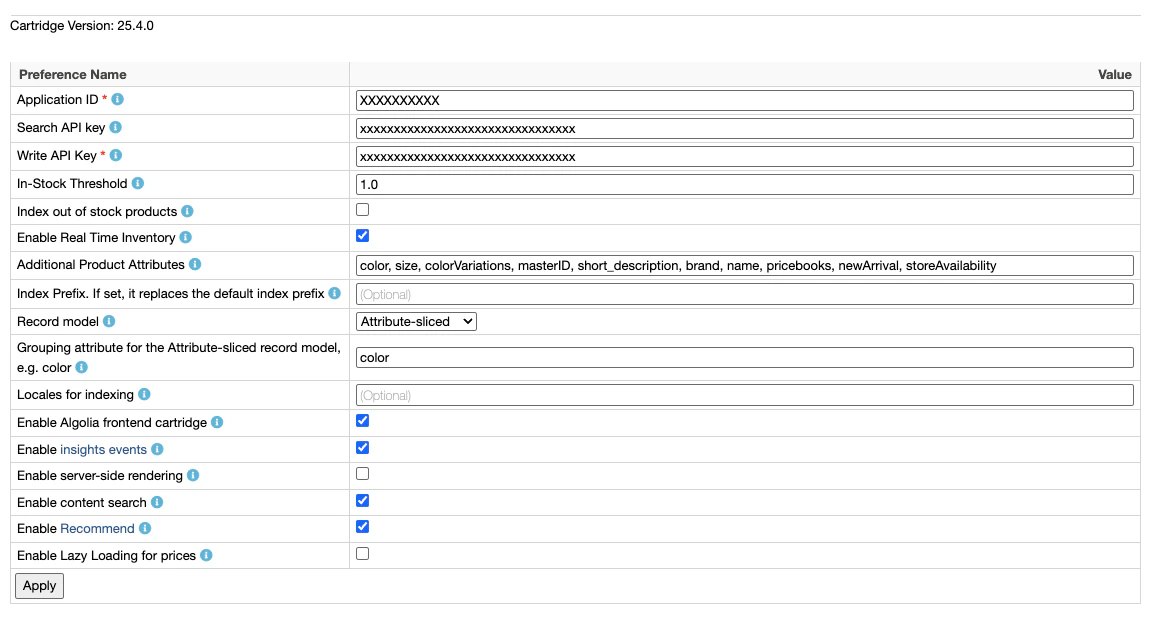 2. Set up your **Additional Product Attributes**:
 ### Base attributes (non-configurable)
The base set of attributes is always included in product indexing,
except when using the [`attributeListOverride` job step parameter](/doc/integration/salesforce-commerce-cloud-b2c/indexing/product-indexing/ongoing-indexing#scope),
which overrides both the base attributes and any additional product attributes configured for that job.
| Attribute | Description |
| -------------------- | ------------------------------------------------------------------------------------------------------------------------------------------------------------------------------------------------------------ |
| `name` | Name of the product |
| `__primary_category` | A hierarchy of the primary category. Used to create a [`hierarchicalMenu`](/doc/api-reference/widgets/hierarchical-menu/js). |
| `categoryPageId` | Array of category IDs assigned to the product. Used to create [category pages](/doc/guides/solutions/ecommerce/browse/tutorials/category-pages) |
| `url` | URL of the product's product detail page (PDP) |
| `image_groups` | Array of product image URLs |
| `in_stock` | `true` if the number of products available is greater than or equal to [In-Stock Threshold](/doc/integration/salesforce-commerce-cloud-b2c/getting-started/custom-preferences) you've set, `false` otherwise |
| `price` | Product price |
### Configurable attributes
You can choose to send additional Product record attributes such as the following to Algolia by defining them in **Additional Product Attributes**.
You should start with the following attributes: `short_description`, `long_description`, then expand the list according to your use case (for example `brand`, `color`, `size`).
| Attribute | Description |
| ------------------- | ------------------------------------------------------------------------------------------------------------------------------------------------------------------------------------------------------ |
| `EAN` | European Article Number of the product |
| `UPC` | Universal Product Code of the product |
| `brand` | Brand of the product. |
| `bundle` | Whether this product instance is a product bundle |
| `bundled` | Whether this product instance is bundled within at least one product bundle |
| `bundledProducts` | Collection containing all products that participate in the product bundle |
| `color` | Product color |
| `colorVariations` | Array with an entry for each color variation. Each entry contains the `image_groups` of the variation, the `variationUrl`, and the variation `color` |
| `long_description` | Full description of product |
| `lsImage` | Expose the first product image at the root of the Algolia record. Used by the [Looking Similar widget](/doc/integration/salesforce-commerce-cloud-b2c/guides/algolia-recommend#looking-similar-widget) |
| `manufacturerName` | Name of the product manufacturer |
| `manufacturerSKU` | Value of the manufacturer's stock keeping unit |
| `master` | Whether this product instance is a product master |
| `masterID` | ID of the master product |
| `newArrival` | Whether this product is part of the `newarrivals` category |
| `online` | Online status of the product. This is determined based on the product's `online` status flag, and the `onlineFrom` and `onlineTo` dates |
| `optionProduct` | Whether the product has options |
| `pageDescription` | Product page description in the default locale |
| `pageKeywords` | Product page keywords in the default locale |
| `pageTitle` | Product page title in the default locale |
| `productSetProduct` | Whether this product is part of any product set |
| `productSet` | Whether the instance represents a product set |
| `promotionalPrice` | Product's lowest promotional price, from the currently active promotions. |
| `promotions` | Array of promotions associated with the product. |
| `refinementColor` | Search refinement bucket of the `color`. |
| `searchable` | Whether the product is searchable |
| `size` | Product size |
| `short_description` | Short description of the product |
| `unit` | Sales unit of the product |
| `variant` | Whether this product instance belongs to a product master |
### Flexible attribute indexing based on default behavior
From version 24.5.0, the Algolia cartridge supports indexing any product attribute, even if they aren't explicitly listed as [configurable attributes](#configurable-attributes).
This feature simplifies the process of indexing custom or specific attributes, allowing for more flexible and comprehensive product data in your Algolia index without requiring extensive configuration.
For attributes that aren't explicitly listed, the cartridge uses the following default indexing configuration:
```js JavaScript icon=code theme={"system"}
{
attribute: attributeName,
localized: false,
variantAttribute: true
}
```
This means that by default, all unlisted attributes:
* Aren't localized
* Are indexed in the `variants` array (for the **[Base product](#base-product-record-example)** and **[Attribute-sliced](#attribute-sliced-record-example)** record models)
* Use the default Salesforce B2C Commerce attribute name (with dot notation)
To change this default behavior, override it with [advanced attributes configuration](#advanced-attributes-configuration).
#### Nested attributes
Nested attributes are grouped under their parent object in the Algolia record.
For example, if you want to index `activeData.impressionsDay` and `activeData.revenueDay`, they will be indexed in Algolia as:
```json JSON icon=braces theme={"system"}
{
"activeData": {
"impressionsDay": 5,
"revenueDay": 141
}
}
```
If you prefer indexing these attributes at the root level of your Algolia records, use the method described in the [advanced attributes configuration](#advanced-attributes-configuration) section.
### Usage
To use this feature:
1. Add the corresponding Salesforce B2C attribute names (including nested attributes) to the **Additional Product Attributes** list in the Algolia Business Manager module [Custom Preferences](/doc/integration/salesforce-commerce-cloud-b2c/getting-started/custom-preferences). Refer to custom attributes as `custom.`.
2. Apply the Custom Preference changes and run a full [re-index](/doc/integration/salesforce-commerce-cloud-b2c/indexing/product-indexing/full-indexing).
Check your Algolia index after the indexing job finishes.
It should contain these new attributes in the product records now.
## Advanced attributes configuration
### Extend attributes declarations
The cartridge has an extension mechanism that lets you add new attributes, modify existing ones, or remove [base attributes](#base-attributes-non-configurable).
Create a `productAttributesConfig.js` file in the `int_algolia/cartridge/configuration/` directory.
For an example, see [this file in the cartridge code](https://github.com/algolia/algoliasearch-sfcc-b2c/blob/master/cartridges/int_algolia/cartridge/configuration/productAttributesConfig.example.js).
This file must export a configuration object. The keys of this object are the name of the attributes in your Algolia records.
Each key holds an object with the following properties:
| Property Name | Type | Description |
| ------------------------- | -------------------- | -------------------------------------------------------------------------------------------------------------------------------------------------------------------------------------------------------------------------------------- |
| `attribute` | `string or function` | The attribute declaration. It can be:
### Base attributes (non-configurable)
The base set of attributes is always included in product indexing,
except when using the [`attributeListOverride` job step parameter](/doc/integration/salesforce-commerce-cloud-b2c/indexing/product-indexing/ongoing-indexing#scope),
which overrides both the base attributes and any additional product attributes configured for that job.
| Attribute | Description |
| -------------------- | ------------------------------------------------------------------------------------------------------------------------------------------------------------------------------------------------------------ |
| `name` | Name of the product |
| `__primary_category` | A hierarchy of the primary category. Used to create a [`hierarchicalMenu`](/doc/api-reference/widgets/hierarchical-menu/js). |
| `categoryPageId` | Array of category IDs assigned to the product. Used to create [category pages](/doc/guides/solutions/ecommerce/browse/tutorials/category-pages) |
| `url` | URL of the product's product detail page (PDP) |
| `image_groups` | Array of product image URLs |
| `in_stock` | `true` if the number of products available is greater than or equal to [In-Stock Threshold](/doc/integration/salesforce-commerce-cloud-b2c/getting-started/custom-preferences) you've set, `false` otherwise |
| `price` | Product price |
### Configurable attributes
You can choose to send additional Product record attributes such as the following to Algolia by defining them in **Additional Product Attributes**.
You should start with the following attributes: `short_description`, `long_description`, then expand the list according to your use case (for example `brand`, `color`, `size`).
| Attribute | Description |
| ------------------- | ------------------------------------------------------------------------------------------------------------------------------------------------------------------------------------------------------ |
| `EAN` | European Article Number of the product |
| `UPC` | Universal Product Code of the product |
| `brand` | Brand of the product. |
| `bundle` | Whether this product instance is a product bundle |
| `bundled` | Whether this product instance is bundled within at least one product bundle |
| `bundledProducts` | Collection containing all products that participate in the product bundle |
| `color` | Product color |
| `colorVariations` | Array with an entry for each color variation. Each entry contains the `image_groups` of the variation, the `variationUrl`, and the variation `color` |
| `long_description` | Full description of product |
| `lsImage` | Expose the first product image at the root of the Algolia record. Used by the [Looking Similar widget](/doc/integration/salesforce-commerce-cloud-b2c/guides/algolia-recommend#looking-similar-widget) |
| `manufacturerName` | Name of the product manufacturer |
| `manufacturerSKU` | Value of the manufacturer's stock keeping unit |
| `master` | Whether this product instance is a product master |
| `masterID` | ID of the master product |
| `newArrival` | Whether this product is part of the `newarrivals` category |
| `online` | Online status of the product. This is determined based on the product's `online` status flag, and the `onlineFrom` and `onlineTo` dates |
| `optionProduct` | Whether the product has options |
| `pageDescription` | Product page description in the default locale |
| `pageKeywords` | Product page keywords in the default locale |
| `pageTitle` | Product page title in the default locale |
| `productSetProduct` | Whether this product is part of any product set |
| `productSet` | Whether the instance represents a product set |
| `promotionalPrice` | Product's lowest promotional price, from the currently active promotions. |
| `promotions` | Array of promotions associated with the product. |
| `refinementColor` | Search refinement bucket of the `color`. |
| `searchable` | Whether the product is searchable |
| `size` | Product size |
| `short_description` | Short description of the product |
| `unit` | Sales unit of the product |
| `variant` | Whether this product instance belongs to a product master |
### Flexible attribute indexing based on default behavior
From version 24.5.0, the Algolia cartridge supports indexing any product attribute, even if they aren't explicitly listed as [configurable attributes](#configurable-attributes).
This feature simplifies the process of indexing custom or specific attributes, allowing for more flexible and comprehensive product data in your Algolia index without requiring extensive configuration.
For attributes that aren't explicitly listed, the cartridge uses the following default indexing configuration:
```js JavaScript icon=code theme={"system"}
{
attribute: attributeName,
localized: false,
variantAttribute: true
}
```
This means that by default, all unlisted attributes:
* Aren't localized
* Are indexed in the `variants` array (for the **[Base product](#base-product-record-example)** and **[Attribute-sliced](#attribute-sliced-record-example)** record models)
* Use the default Salesforce B2C Commerce attribute name (with dot notation)
To change this default behavior, override it with [advanced attributes configuration](#advanced-attributes-configuration).
#### Nested attributes
Nested attributes are grouped under their parent object in the Algolia record.
For example, if you want to index `activeData.impressionsDay` and `activeData.revenueDay`, they will be indexed in Algolia as:
```json JSON icon=braces theme={"system"}
{
"activeData": {
"impressionsDay": 5,
"revenueDay": 141
}
}
```
If you prefer indexing these attributes at the root level of your Algolia records, use the method described in the [advanced attributes configuration](#advanced-attributes-configuration) section.
### Usage
To use this feature:
1. Add the corresponding Salesforce B2C attribute names (including nested attributes) to the **Additional Product Attributes** list in the Algolia Business Manager module [Custom Preferences](/doc/integration/salesforce-commerce-cloud-b2c/getting-started/custom-preferences). Refer to custom attributes as `custom.`.
2. Apply the Custom Preference changes and run a full [re-index](/doc/integration/salesforce-commerce-cloud-b2c/indexing/product-indexing/full-indexing).
Check your Algolia index after the indexing job finishes.
It should contain these new attributes in the product records now.
## Advanced attributes configuration
### Extend attributes declarations
The cartridge has an extension mechanism that lets you add new attributes, modify existing ones, or remove [base attributes](#base-attributes-non-configurable).
Create a `productAttributesConfig.js` file in the `int_algolia/cartridge/configuration/` directory.
For an example, see [this file in the cartridge code](https://github.com/algolia/algoliasearch-sfcc-b2c/blob/master/cartridges/int_algolia/cartridge/configuration/productAttributesConfig.example.js).
This file must export a configuration object. The keys of this object are the name of the attributes in your Algolia records.
Each key holds an object with the following properties:
| Property Name | Type | Description |
| ------------------------- | -------------------- | -------------------------------------------------------------------------------------------------------------------------------------------------------------------------------------------------------------------------------------- |
| `attribute` | `string or function` | The attribute declaration. It can be:
- The full path to the SFCC Product attribute name, separated by dots.
- A function that takes the current product as parameter and returns data to be indexed in the Algolia record. |
| `localized` | `boolean` | (*Optional*, default: `false`) Should be true if the attribute is localized. |
| `variantAttribute` | `boolean` | (*Optional*, default: `false`) Only used with the **[Base product](#base-product-record-example)** and **[Attribute-sliced](#attribute-sliced-record-example)** record models, to identify attributes indexed in the `variants` array. |
| `computedFromBaseProduct` | `boolean` | (*Optional*, default: `false`) Only used with the **[Variation product](#variation-product-record-example)** record model, to identify attributes computed once from the base product, and indexed into each variant. |
The `attribute` property lets you declare attributes with their direct name (simple values like `name`, `brand`, etc.) or their "path", for nested values with direct access.
For example, you can access the `revenueWeek` attribute of a product's `activeData` object by declaring `activeData.revenueWeek`.
Other values are more complex and must be computed.
For that, the `attribute` property accepts a function to define how to export such complex attributes.
```js JavaScript expandable icon=code theme={"system"}
/* productAttributesConfig.js */
module.exports = {
/* ... */
algoliaAttributeName: {
/* Access directly a product's property (or nested property) */
attribute: "activeData.revenueWeek",
localized: false,
},
siblings: {
/* Compute an array of variants IDs from the base product */
attribute: function (product) {
const variantIds = [];
const variantsIt = product.variants.iterator();
while (variantsIt.hasNext()) {
var variant = variantsIt.next();
if (variant.getAvailabilityModel().isInStock()) {
variantIds.push(variant.ID);
}
}
return variantIds;
},
computedFromBaseProduct: true,
},
};
```
A more complete example is available [in the cartridge code](https://github.com/algolia/algoliasearch-sfcc-b2c/blob/master/cartridges/int_algolia/cartridge/configuration/productAttributesConfig.example.js).
Any new attribute declared must be added to the **Additional Product Attributes** site preference in the Algolia BM module.
You can also remove the base attributes by adding an empty declaration:
```js JavaScript icon=code theme={"system"}
module.exports = {
in_stock: {},
};
```
The frontend uses the following attributes.
Removing or modifying them can break the default UI:
* `id`
* `primary_category_id`
* `__primary_category`
* `categories`
* `variants`
### Post-processing customization
To customize your records just before sending them to Algolia,
create a `productRecordCustomizer.js` file in the `int_algolia/cartridge/configuration/` directory.
This lets the cartridge post-process the final records, after fetching all attributes.
This file must export a function that takes as parameter the final Algolia record and does modifications on it:
```js JavaScript icon=code theme={"system"}
/* productRecordCustomizer.js */
module.exports = function (productRecord) {
if (productRecord.colorVariations) {
productRecord["availableColors"] = productRecord.colorVariations.length;
}
};
```
## Configure extra attributes for `AlgoliaProductPriceIndex_v2` and `AlgoliaProductInventoryIndex_v2`
To extend the list of attributes sent by these jobs, select the job you want to configure in BM, go to the **Jobs Steps** tab, select the job step and edit the `attributeListOverride` parameter.
Additional attributes can increase the job's total runtime depending on the complexity of retrieving the attribute:
* Nested attributes from B2C model classes take longer to retrieve than the product's own properties
* Calculated values take longer to retrieve than static values.
By default, these jobs send the following attributes:
* `AlgoliaProductPriceIndex_v2`: `price`
* `AlgoliaProductInventoryIndex_v2`: `in_stock`
If you extend the list of exported attributes, make sure to add the same attributes to the **Additional Product Attributes** site preference in the Algolia BM module as well so that the product delta export job also includes those attributes and updates them during its run.
## Index active data
Index [`ProductActiveData`](https://salesforcecommercecloud.github.io/b2c-dev-doc/docs/current/scriptapi/html/index.html?target=class_dw_catalog_ProductActiveData.html) fields, such as orders, revenue, and conversion metrics,
to use them for [custom ranking](/doc/guides/managing-results/must-do/custom-ranking).
The cartridge supports these fields by default, without a `productAttributesConfig.js` override.
### Index active data at the record root
To index recommended `ProductActiveData` fields at the record root, use the **Active data for custom ranking** site preference in Business Manager.
1. Go to **Merchant Tools > Algolia > Algolia**.
2. In **Active data for custom ranking**, select the fields to index: `ordersWeek`, `revenueWeek`, `conversionWeek`, `ordersMonth`, `revenueMonth`, or `conversionMonth`.
3. Click **Apply**.
4. To reindex your data, go to **Administration > Operations > Jobs** and run the `AlgoliaProductIndex_v2` job.
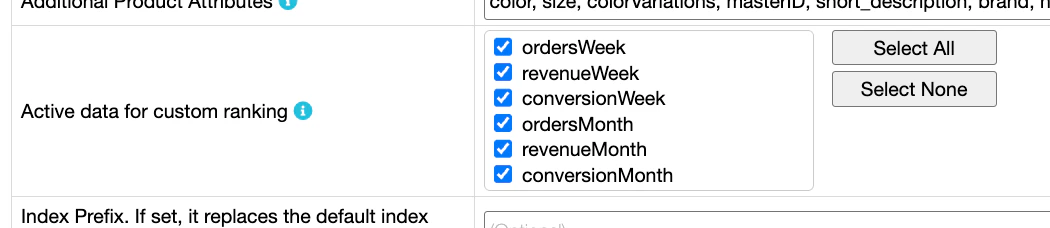 The cartridge adds the selected values to the record root.
You can use them as custom ranking attributes.
* In the **Base product** and **Attribute-sliced** record models, these values come from the base product.
* In the **Variation product** record model, these values come from each variant.
The cartridge has built-in handlers for all `ProductActiveData` attributes.
To index a property that isn't in the checkbox list, add its ID (without the `activeData.` prefix) to **Additional Product Attributes**:
```text Additional product attributes theme={"system"}
revenueYear, ordersYear, salesVelocityWeek
```
#### Attribute-sliced records use base product active data
In the **Attribute-sliced** model, active data added with the bare field name, such as `revenueWeek`, comes from the base product.
The cartridge creates one record for each variation value, such as one record for each color.
However, it doesn't calculate active data for only the variants in that slice.
Each slice gets the same value, calculated across all variants of the base product.
For example, a red slice doesn't get the `revenueWeek` value for only the red variants. It gets the base product's `revenueWeek` value.
To index active data for each slice, compute the value with a custom function using the [extension mechanism](#extend-attributes-declarations).
### Index per-variant active data
To index active data for each variant in the `variants[]` array of the **Base product** or **Attribute-sliced** record models, use a nested or flat approach.
They produce different shapes inside each variant.
#### Nested per-variant value
Add the dotted field name, such as `activeData.`, to **Additional Product Attributes**.
```text Additional product attributes theme={"system"}
[…], activeData.revenueWeek, […]
```
For example, `activeData.revenueWeek` is indexed as `variants[i].activeData.revenueWeek`.
#### Flat per-variant value
Use the [extension mechanism](#extend-attributes-declarations) to publish active data fields under different Algolia attribute names.
To move an active data field from the record root into each variant, add an entry with the same key as the handler and set `variantAttribute` to `true`.
```js JavaScript icon=code theme={"system"}
/* productAttributesConfig.js */
module.exports = {
/* ... */
revenueWeek: {
attribute: "activeData.revenueWeek",
localized: false,
variantAttribute: true,
},
};
```
```text Additional product attributes theme={"system"}
[…], revenueWeek, […]
```
Each variant gets a flat `revenueWeek` field at its root inside `variants[]`, with the same value as `variant.activeData.revenueWeek`.
The override replaces the built-in placement: the value no longer appears at the master record root.
After saving the file, run the `AlgoliaProductIndex_v2` job to apply the change.
The same pattern works for any `ProductActiveData` IDs, and for any handler in `attributeConfig_v2`.
### Rename an active data field
Use the [extension mechanism](#extend-attributes-declarations) to publish active data fields under different Algolia attribute names.
```js JavaScript icon=code theme={"system"}
/* productAttributesConfig.js */
module.exports = {
/* ... */
popularity: {
/* Rename: `revenueWeek` is published as `popularity` in Algolia. */
attribute: "activeData.revenueWeek",
localized: false,
},
};
```
After saving the file, add the Algolia key, such as `popularity`, to **Additional Product Attributes** and run the `AlgoliaProductIndex_v2` job.
### Use a custom function
Use a custom function to group several fields under a common top-level attribute, such as `revenueData`.
1. In the extension configuration file (`productAttributesConfig.js`), add a `revenueData` declaration with the `attribute` property being a function that returns the data to index.
```js JavaScript expandable icon=code theme={"system"}
/* productAttributesConfig.js */
module.exports = {
/* ... */
revenueData: {
attribute: function (product) {
var activeData = product.getActiveData();
return {
quantityLast7Days: activeData.ordersWeek,
revenueLast7Days: activeData.revenueWeek,
quantityLast30Days: activeData.ordersMonth,
revenueLast30Days: activeData.revenueMonth,
};
},
localized: false,
},
};
```
2. In Business Manager, go to **Merchant Tools > Algolia > Algolia**. Find **Additional Product Attributes** and add `revenueData`.
3. To reindex your data, go to **Administration > Operations > Jobs** and run the `AlgoliaProductIndex_v2` job.
### Make active data attributes unretrievable
Active data fields you index are returned in search responses by default.
If you use them only as ranking signals, add them as [`unretrievableAttributes`](/doc/api-reference/api-parameters/unretrievableAttributes) on every product index the cartridge writes to.
Unretrievable attributes are ignored when a query is authenticated with the Admin API key.
Use a Search API key instead.
Apply `unretrievableAttributes` to every product index the cartridge writes to.
The cartridge creates one product index per locale per site, named `____products__`.
```js JavaScript icon=code theme={"system"}
await client.setSettings({
indexName: 'INDEX_NAME',
indexSettings: {
unretrievableAttributes: [
'ordersWeek', 'revenueWeek', 'conversionWeek',
'ordersMonth', 'revenueMonth', 'conversionMonth',
],
},
forwardToReplicas: true,
});
```
If you use replicas for alternative sort orders, set `forwardToReplicas` to `true`.
When you save **Active data for custom ranking** in Business Manager, the cartridge checks every existing product index and warns if any selected field is missing from `unretrievableAttributes`.
The cartridge skips indices that don't exist yet, so run [`AlgoliaProductIndex_v2`](/doc/integration/salesforce-commerce-cloud-b2c/indexing/product-indexing/full-indexing) first to create them, then save the preference again to clear the warning.
The cartridge doesn't check replica indices.
Apply `unretrievableAttributes` to each replica directly, or set `forwardToReplicas` to `true` when applying settings on the primary index.
The cartridge adds the selected values to the record root.
You can use them as custom ranking attributes.
* In the **Base product** and **Attribute-sliced** record models, these values come from the base product.
* In the **Variation product** record model, these values come from each variant.
The cartridge has built-in handlers for all `ProductActiveData` attributes.
To index a property that isn't in the checkbox list, add its ID (without the `activeData.` prefix) to **Additional Product Attributes**:
```text Additional product attributes theme={"system"}
revenueYear, ordersYear, salesVelocityWeek
```
#### Attribute-sliced records use base product active data
In the **Attribute-sliced** model, active data added with the bare field name, such as `revenueWeek`, comes from the base product.
The cartridge creates one record for each variation value, such as one record for each color.
However, it doesn't calculate active data for only the variants in that slice.
Each slice gets the same value, calculated across all variants of the base product.
For example, a red slice doesn't get the `revenueWeek` value for only the red variants. It gets the base product's `revenueWeek` value.
To index active data for each slice, compute the value with a custom function using the [extension mechanism](#extend-attributes-declarations).
### Index per-variant active data
To index active data for each variant in the `variants[]` array of the **Base product** or **Attribute-sliced** record models, use a nested or flat approach.
They produce different shapes inside each variant.
#### Nested per-variant value
Add the dotted field name, such as `activeData.`, to **Additional Product Attributes**.
```text Additional product attributes theme={"system"}
[…], activeData.revenueWeek, […]
```
For example, `activeData.revenueWeek` is indexed as `variants[i].activeData.revenueWeek`.
#### Flat per-variant value
Use the [extension mechanism](#extend-attributes-declarations) to publish active data fields under different Algolia attribute names.
To move an active data field from the record root into each variant, add an entry with the same key as the handler and set `variantAttribute` to `true`.
```js JavaScript icon=code theme={"system"}
/* productAttributesConfig.js */
module.exports = {
/* ... */
revenueWeek: {
attribute: "activeData.revenueWeek",
localized: false,
variantAttribute: true,
},
};
```
```text Additional product attributes theme={"system"}
[…], revenueWeek, […]
```
Each variant gets a flat `revenueWeek` field at its root inside `variants[]`, with the same value as `variant.activeData.revenueWeek`.
The override replaces the built-in placement: the value no longer appears at the master record root.
After saving the file, run the `AlgoliaProductIndex_v2` job to apply the change.
The same pattern works for any `ProductActiveData` IDs, and for any handler in `attributeConfig_v2`.
### Rename an active data field
Use the [extension mechanism](#extend-attributes-declarations) to publish active data fields under different Algolia attribute names.
```js JavaScript icon=code theme={"system"}
/* productAttributesConfig.js */
module.exports = {
/* ... */
popularity: {
/* Rename: `revenueWeek` is published as `popularity` in Algolia. */
attribute: "activeData.revenueWeek",
localized: false,
},
};
```
After saving the file, add the Algolia key, such as `popularity`, to **Additional Product Attributes** and run the `AlgoliaProductIndex_v2` job.
### Use a custom function
Use a custom function to group several fields under a common top-level attribute, such as `revenueData`.
1. In the extension configuration file (`productAttributesConfig.js`), add a `revenueData` declaration with the `attribute` property being a function that returns the data to index.
```js JavaScript expandable icon=code theme={"system"}
/* productAttributesConfig.js */
module.exports = {
/* ... */
revenueData: {
attribute: function (product) {
var activeData = product.getActiveData();
return {
quantityLast7Days: activeData.ordersWeek,
revenueLast7Days: activeData.revenueWeek,
quantityLast30Days: activeData.ordersMonth,
revenueLast30Days: activeData.revenueMonth,
};
},
localized: false,
},
};
```
2. In Business Manager, go to **Merchant Tools > Algolia > Algolia**. Find **Additional Product Attributes** and add `revenueData`.
3. To reindex your data, go to **Administration > Operations > Jobs** and run the `AlgoliaProductIndex_v2` job.
### Make active data attributes unretrievable
Active data fields you index are returned in search responses by default.
If you use them only as ranking signals, add them as [`unretrievableAttributes`](/doc/api-reference/api-parameters/unretrievableAttributes) on every product index the cartridge writes to.
Unretrievable attributes are ignored when a query is authenticated with the Admin API key.
Use a Search API key instead.
Apply `unretrievableAttributes` to every product index the cartridge writes to.
The cartridge creates one product index per locale per site, named `____products__`.
```js JavaScript icon=code theme={"system"}
await client.setSettings({
indexName: 'INDEX_NAME',
indexSettings: {
unretrievableAttributes: [
'ordersWeek', 'revenueWeek', 'conversionWeek',
'ordersMonth', 'revenueMonth', 'conversionMonth',
],
},
forwardToReplicas: true,
});
```
If you use replicas for alternative sort orders, set `forwardToReplicas` to `true`.
When you save **Active data for custom ranking** in Business Manager, the cartridge checks every existing product index and warns if any selected field is missing from `unretrievableAttributes`.
The cartridge skips indices that don't exist yet, so run [`AlgoliaProductIndex_v2`](/doc/integration/salesforce-commerce-cloud-b2c/indexing/product-indexing/full-indexing) first to create them, then save the preference again to clear the warning.
The cartridge doesn't check replica indices.
Apply `unretrievableAttributes` to each replica directly, or set `forwardToReplicas` to `true` when applying settings on the primary index.