> ## Documentation Index
> Fetch the complete documentation index at: https://algolia.com/llms.txt
> Use this file to discover all available pages before exploring further.
# Add custom hooks
> Custom hooks let you customize the behavior of the Algolia AI Search & Discovery app.
Shopify apps can't modify theme code directly.
To integrate Autocomplete and InstantSearch,
use the Algolia AI Search & Discovery app's **App Embed** and **App Blocks**.
For more information, see:
* [Manual theme configuration](/doc/integration/shopify/getting-started/quick-start#manual-theme-configuration)
* [Shopify Algolia configuration](/doc/integration/shopify/sending-and-managing-data/algolia-config)
Hooks are functions that run at specific points while the Algolia AI Search & Discovery app loads and runs.
Use hooks to customize the app's behavior.
To see which hooks are available for your store,
run `window.algoliaShopify.hooks.allowedHooks` in your browser's developer tools.
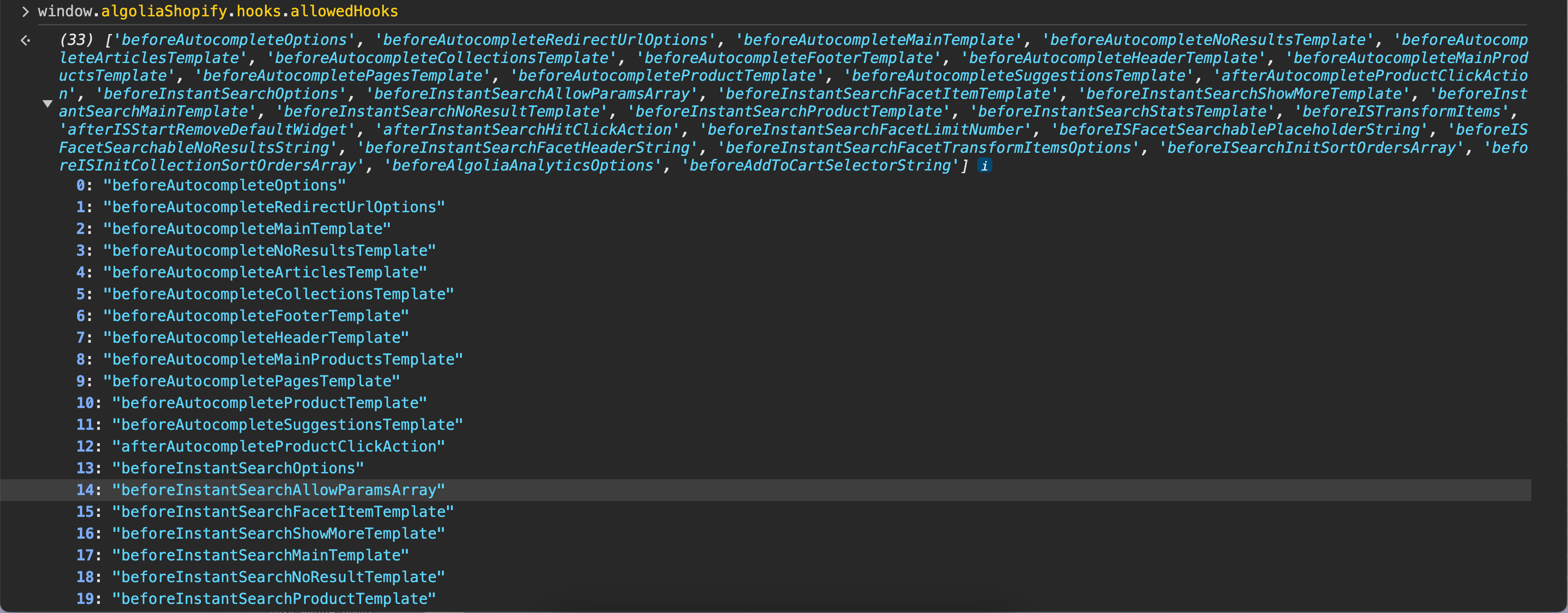 ## Add custom hooks
To add custom hooks, add a new JavaScript file, register the hook, and include that file in your theme.
1. In your store's Shopify admin, go to **Sales channels > Online Store > Themes**.
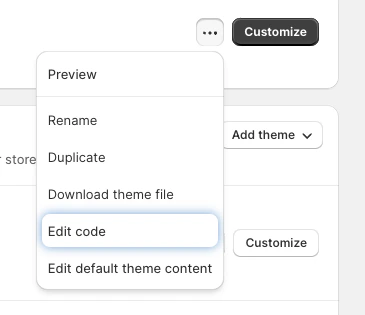
2. Select the theme you want to edit and click **Click for more theme actions > Edit code**.
## Add custom hooks
To add custom hooks, add a new JavaScript file, register the hook, and include that file in your theme.
1. In your store's Shopify admin, go to **Sales channels > Online Store > Themes**.
2. Select the theme you want to edit and click **Click for more theme actions > Edit code**.
 3. In the **assets** section, click **New file**.
4. Enter a filename, for example, `algolia_custom_hooks.js`.
1. Open the custom hooks JavaScript file you created in the last step (for example, `algolia_custom_hooks.js`).
2. Add an event listener to the `algolia.hooks.initialize` event and call the `algoliaShopify.hooks.registerHook` function. For example:
```js JavaScript icon=code theme={"system"}
document.addEventListener("algolia.hooks.initialize",
function () {
algoliaShopify.hooks.registerHook(
"beforeAutocompleteOptions",
function (options) {
// ...
},
);
}
);
```
1. Under **layouts**, open the `theme.liquid` file.
2. Go to the bottom of the `theme.liquid` file and add the following code just before the `` tag. Replace `NEW_FILE` with the JavaScript file that contains your custom hooks, for example `algolia_custom_hooks`:
```html HTML icon=code-xml theme={"system"}
3. In the **assets** section, click **New file**.
4. Enter a filename, for example, `algolia_custom_hooks.js`.
1. Open the custom hooks JavaScript file you created in the last step (for example, `algolia_custom_hooks.js`).
2. Add an event listener to the `algolia.hooks.initialize` event and call the `algoliaShopify.hooks.registerHook` function. For example:
```js JavaScript icon=code theme={"system"}
document.addEventListener("algolia.hooks.initialize",
function () {
algoliaShopify.hooks.registerHook(
"beforeAutocompleteOptions",
function (options) {
// ...
},
);
}
);
```
1. Under **layouts**, open the `theme.liquid` file.
2. Go to the bottom of the `theme.liquid` file and add the following code just before the `` tag. Replace `NEW_FILE` with the JavaScript file that contains your custom hooks, for example `algolia_custom_hooks`:
```html HTML icon=code-xml theme={"system"}