> ## Documentation Index
> Fetch the complete documentation index at: https://algolia.com/llms.txt
> Use this file to discover all available pages before exploring further.
# Recommend
> Implement product recommendations in your Shopify app with Algolia Recommend
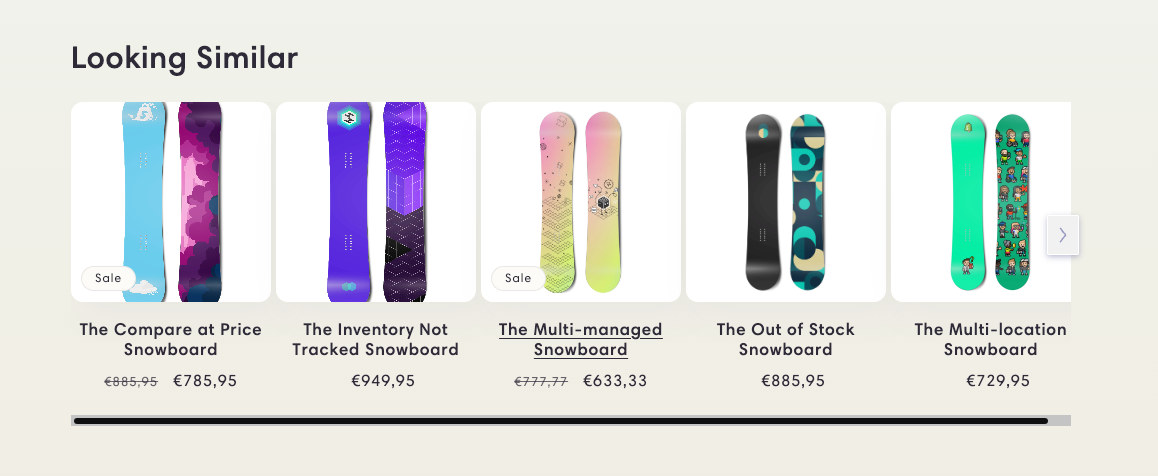
The Algolia AI Search & Discovery app for Shopify includes an
[app block](https://shopify.dev/docs/storefronts/themes/architecture/blocks/app-blocks)
built with [Algolia Recommend](/doc/guides/algolia-recommend/overview)
that you can add to your store's pages to show product recommendations.
 ## Before you begin
Before you can show recommendations in your store,
check that you've set up Recommend:
* [Enable Algolia for your Shopify theme](/doc/integration/shopify/getting-started/quick-start#before-you-begin).
* Send [click and conversion events](/doc/integration/bigcommerce/search-settings/events).
Algolia Recommend relies on click and conversion events to continuously improve its recommendations.
You can also [upload events from a CSV file](/doc/guides/algolia-recommend/how-to/csv-upload) to get started.
* You have a trained [Recommend model](/doc/guides/algolia-recommend/how-to/set-up#train-the-recommend-models) in your Algolia dashboard.
* Recommend isn't compatible with Shopify Markets.
## Enable Recommend
1. To add the Algolia Recommend app block to your theme,
open your [theme editor](https://help.shopify.com/en/manual/online-store/themes/customizing-themes/edit),
click **Add section**, go to the **Apps** tab, and select **Algolia Recommend**.
## Before you begin
Before you can show recommendations in your store,
check that you've set up Recommend:
* [Enable Algolia for your Shopify theme](/doc/integration/shopify/getting-started/quick-start#before-you-begin).
* Send [click and conversion events](/doc/integration/bigcommerce/search-settings/events).
Algolia Recommend relies on click and conversion events to continuously improve its recommendations.
You can also [upload events from a CSV file](/doc/guides/algolia-recommend/how-to/csv-upload) to get started.
* You have a trained [Recommend model](/doc/guides/algolia-recommend/how-to/set-up#train-the-recommend-models) in your Algolia dashboard.
* Recommend isn't compatible with Shopify Markets.
## Enable Recommend
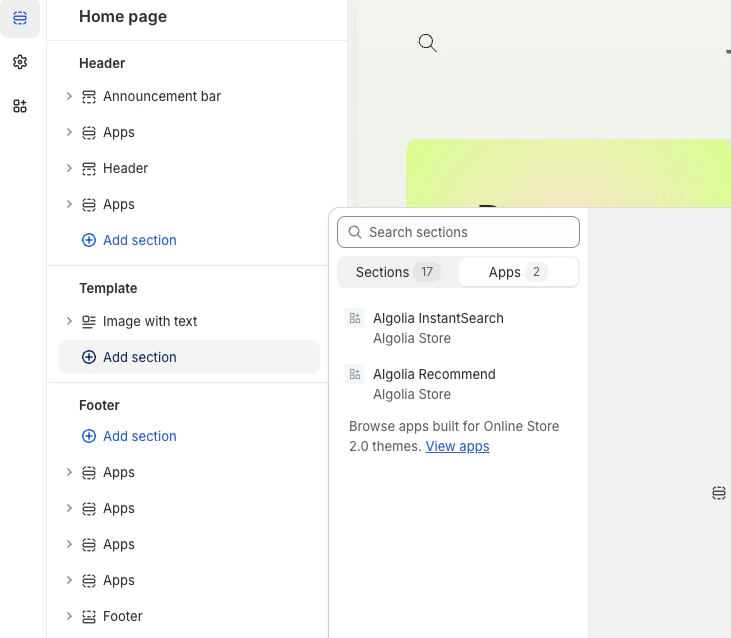
1. To add the Algolia Recommend app block to your theme,
open your [theme editor](https://help.shopify.com/en/manual/online-store/themes/customizing-themes/edit),
click **Add section**, go to the **Apps** tab, and select **Algolia Recommend**.
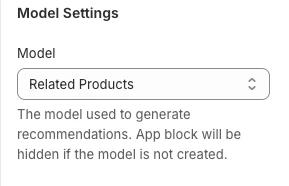
 2. Select the Recommend model for the app block, complete the settings, save your changes.
 After the model training is complete and meets the criteria set for the app block,
the recommendations app block is shown on your store's page.
### Available models
Only the **Trending items** model is available outside the product page.
The other [Recommend models](/doc/guides/algolia-recommend/overview#recommend-models) require a variant ID.
### Customize
To customize how your recommendations are rendered,
use [custom hooks](/doc/integration/shopify/building-search-ui/insights-recommend-hooks#recommend-hook).
After the model training is complete and meets the criteria set for the app block,
the recommendations app block is shown on your store's page.
### Available models
Only the **Trending items** model is available outside the product page.
The other [Recommend models](/doc/guides/algolia-recommend/overview#recommend-models) require a variant ID.
### Customize
To customize how your recommendations are rendered,
use [custom hooks](/doc/integration/shopify/building-search-ui/insights-recommend-hooks#recommend-hook).