> ## Documentation Index
> Fetch the complete documentation index at: https://algolia.com/llms.txt
> Use this file to discover all available pages before exploring further.
# Inventory location indexing
> Index product quantities by Shopify location.
This is a **beta feature** according to [Algolia's Terms of Service ("Beta Services")](https://www.algolia.com/policies/terms/).
[Shopify Locations](https://help.shopify.com/en/manual/fulfillment/setup/locations/index) is a feature to track inventory quantities by physical locations.
A location can be any place where you change inventory quantities, such as retail stores or warehouses.
Indexing locations and their inventory quantities with Algolia lets you use location-based features,
such as searching and filtering by location or BOPIS (buy online, pick up in store).
## Turn on inventory location indexing
Make sure your store is set up with more than one location on Shopify.
This results in additional API requests to Shopify,
which can delay indexing if Shopify imposes rate limits on these requests.
To turn on inventory location indexing:
1. In your Shopify admin, open the Algolia AI Search & Discovery app.
2. Go to the **Indexing** tab.
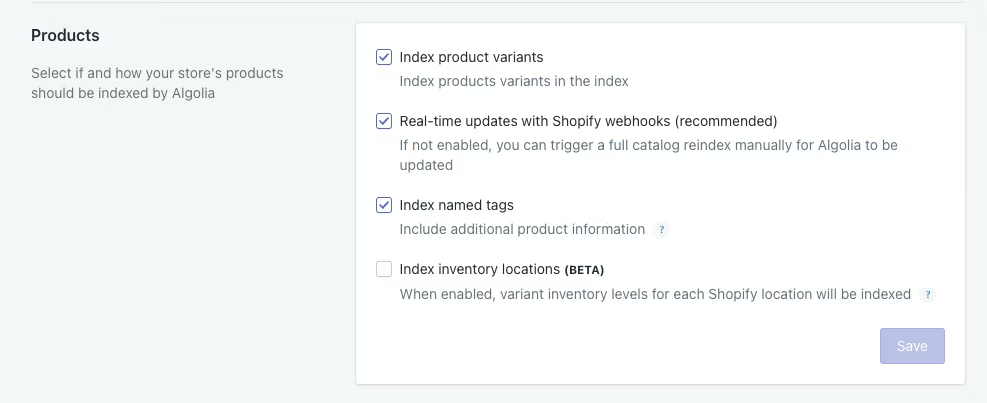
3. In the **Products** section, select **Index inventory locations (BETA)** and click **Save**.
This triggers a product reindexing.
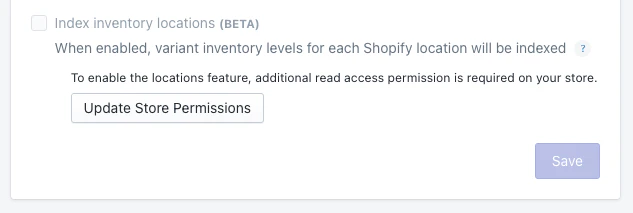
 If you see a message with a request for additional read access permissons,
click **Update Store Permissions**.
If you see a message with a request for additional read access permissons,
click **Update Store Permissions**.
 4. When the reindex is complete, check your products records for the new `locations_inventory` attribute.
## Schema
Inventory locations are individual key-value pairs in the `locations_inventory` attribute of each product record.
The key is the location ID (auto-generated by Shopify), and the value is the inventory quantity at that location.
The following example shows the `location_inventory` attribute with three locations:
```js JavaScript icon=code theme={"system"}
{
// ...
locations_inventory: {
"123456789": 10,
"987654321": 5,
"123123123": 0
}
}
```
## Next steps
To share feedback about this beta feature,
send an [email](mailto:support+shopify@algolia.com) or join the [Community](https://alg.li/discord).
4. When the reindex is complete, check your products records for the new `locations_inventory` attribute.
## Schema
Inventory locations are individual key-value pairs in the `locations_inventory` attribute of each product record.
The key is the location ID (auto-generated by Shopify), and the value is the inventory quantity at that location.
The following example shows the `location_inventory` attribute with three locations:
```js JavaScript icon=code theme={"system"}
{
// ...
locations_inventory: {
"123456789": 10,
"987654321": 5,
"123123123": 0
}
}
```
## Next steps
To share feedback about this beta feature,
send an [email](mailto:support+shopify@algolia.com) or join the [Community](https://alg.li/discord).