> ## Documentation Index
> Fetch the complete documentation index at: https://algolia.com/llms.txt
> Use this file to discover all available pages before exploring further.
# Index schema
> Learn more about the schema Algolia uses to index your Shopify data.
export const Records = () =>
records
;
export const Index = () =>
index
;
Algolia transforms and stores your Shopify data in a format that's optimal for your search experience.
## Products and variants
Algolia stores [variants](https://help.shopify.com/en/manual/products/variants), not products,
in an `PREFIX_products`. The default prefix is `shopify`.
Variants are stored as independent .
For products without variants,
the product attributes are first transformed into a schema that parallels the structure of the variant's schema and then uploaded.
The Algolia AI Search & Discovery app only supports indexing products in the "Online Store" sales channel.
### Product variant schema
Algolia stores your product variants in the following format:
```js JavaScript expandable theme={"system"}
{
objectID, // Variant id (unique identifier also used by Algolia)
sku,
barcode,
id, // Product id
title, // Name of the product
variant_title, // Name of the variant
product_type,
vendor,
handle, // URL handle for the product
tags,
named_tags: { // Key value association from tags like this: "key:value" (See Named tags section)
TAG_KEY
},
named_tags_names: [
TAG_KEY // Array of keys from named_tags
],
body_html_safe, // Description (without HTML, truncated to 2,000 characters)
compare_at_price, // Initial price
price, // Actual (optionally discounted) price
price_ratio,
price_range,
variants_count, // Total count of the variants of the related product
variants_min_price, // Min price of all the variants of the related product (only relevant with distinct enabled)
variants_max_price, // Max price of all the variants of the related product (only relevant with distinct enabled)
variants_compare_at_price_min // Min compare_at_price of all the variants of the related product
variants_compare_at_price_max // Max compare_at_price of all the variants of the related product
option1, // Variant option 1
option2, // Variant option 2
option3, // Variant option 3
options: { // Hash containing the option `names: value`
OPTION_NAME
},
option_names, // Array containing the option names, in order
requires_shipping,
taxable,
grams,
weight, // Weight with its original unit
image,
product_image,
inventory_quantity, // Number of available items in the inventory
position, // Position of the variant in the list of products
template_suffix,
meta: { // Metafields (See Metafields section)
namespace1: {
key1,
key2
},
},
created_at,
updated_at,
published_at,
recently_ordered_count, // How much have recently been ordered : useful for ranking
inventory_available,
inventory_policy, // Whether customers are allowed to place an order for the product variant when it's out of stock
collections: [
'collection-1-handle', // Array of product collection handles
// ...
],
collection_ids: [
123456,
// ... // Array of product collection IDs
],
locations_inventory: {
key1: value1, // Object with location_id:quantity - location_id is auto-generated
key2: value2
},
variants_inventory_count, // Total inventory count of all variants for a product
_tags: [], // Array of internal tags. Please do not modify.
category: {}, // Hierarchical categories from Shopify's product taxonomy
}
```
The `image` attribute uses the variant's image if it exists,
otherwise it uses the first image of the associated product.
### Retrievable attributes
By default, when performing a search,
users can view results with the matching records and records data for each indexed attribute.
This process occurs regardless of whether you display the information in your user interface.
This approach lets you fully take advantage of Algolia's ready-to-use Autocomplete,
InstantSearch, and Recommend features,
and gives you the necessary resources to further customize the experience.
For example, you can use this information to create experiences that encourage your users to "buy now" when inventory is below a certain amount.
If you want to turn off public visibility of specific attributes,
you can make them [unretrievable](/doc/api-reference/api-parameters/unretrievableAttributes).
The quickest way to configure this is by going to Algolia's dashboard,
under **Search > Configuration > Search Behavior > Retrieved Attributes > Unretrievable attributes > Add an attribute**.
You can also access the configuration in app in one of the following ways:
* **Quickstart Checklist.**
For all new users,
this is done in step 4 of the checklist.
Existing users can access this by clicking **Quick Start** in the Algolia app.
* **App Admin.**
On the **Search Options** tab, under **Additional settings > Retrieved attributes**.
Setting specific attributes as unretrievable might break your search experience
if you are using Algolia's frontend components.
{/* vale off */}
| Attribute | Impact of setting as unretrievable |
| ------------------------------------------ | -------------------------------------------------------------------------------------------------------------------------------------------------------------------------------------------------------------------------------------------------------------------------------------------------------------------------------------------------------------------------------------------------------------------------------------------------------------------------------------------------------------------------------------------------------------------------------------------------------------------------------------------------------------------------------------------------------------------------------------- |
| `objectID` | This is always retrieved as the integration requires this as a unique identifier for each record. |
| `id` | InstantSearch's hit template will not have a `data-product-id` attribute. This can also affect [Pixel](/doc/integration/shopify/building-search-ui/events?client=ruby#shopify-web-pixels). |
| `handle` | Users can't navigate to product detail pages (PDP). |
| `title`, `product_type`, `vendor` | This won't be included in the [hits template](/doc/api-reference/widgets/hits/js) and this information will not display in search results. |
| `variant_title` | This won't be included in the hits template. It only affects InstantSearch and Autocomplete if there is more than one product variant. |
| `compare_at_price` | Discounts and strikethrough pricing can't be displayed. |
| `price`, `price_ratio` | The value shows as "NaN" on search results. |
| `variants_min_price`, `variants_max_price` | With [distinct enabled](/doc/api-reference/api-parameters/distinct), the minimum and/or maximum price will not be displayed on InstantSearch results. |
| `image` | "No image" is shown on InstantSearch and Autocomplete. |
| `product_image` | "No image" is shown on Recommend. |
| `inventory_quantity`, `inventory_policy` | These fields are used in combination to control when an item can be added to the user's cart.
If both `inventory_policy` and `inventory_quantity` are unretrievable, then the item is marked out of stock.
If only `inventory_policy` is unretrievable and `inventory_quantity` > 0, then the item can be added to the user's cart.
If `inventory_quantity <= 0`, then the item is marked out of stock.
If only `inventory_quantity` is unretrievable and the product or variant's [inventory is tracked](https://help.shopify.com/en/manual/products/inventory/getting-started-with-inventory/set-up-inventory-tracking), then it is marked out of stock.
If it is not tracked, then it can be added to cart |
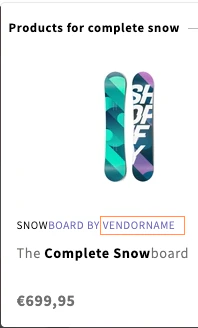
#### Example: Setting the attribute "vendor" as unretrievable
| Retrievable | Unretrievable |
| ------------------------------------------------------------------------------------------------------------------------------------------------------------------------------------------------------------------------------------------------------------------------------------------------------------------------------------------------------------------------------------------------------------------------------------------------------------------------------------------------------------------------------------------------------------------------------------------------------------------------------------------------------------------------------------------------------------------------------------------------------------------------------------------------------------------------------------------------------------------------------------------------------------------------------------------------------------------------------------------------------------------------------------------------------------------------------------------------------------------------------------------------------------------------------------------------------------------------------------------------------------------------------------------------------------------------------------------------------------------------------------------------------------------------------------------------------------------------------------------------------------------------------------------------------------------------------------------------------------------------------------------------------------------------------------------------------------------------------------------------------------------------------------------------------------------------------------------------------- | ---------------------------------------------------------------------------------------------------------------------------------------------------------------------------------------------------------------------------------------------------------------------------------------------------------------------------------------------------------------------------------------------------------------------------------------------------------------------------------------------------------------------------------------------------------------------------------------------------------------------------------------------------------------------------------------------------------------------------------------------------------------------------------------------------------------------------------------------------------------------------------------------------------------------------------------------------------------------------------------------------------------------------------------------------------------------------------------------------------------------------------------------------------------------------------------------------------------------------------------------------------------------------------------------------------------------------------------------------------------------------------------------------------------------------------------------------------------------------------------------------------------------------------------------------------------------------------------------------------------------------------------------------------------------------------------------------------------------------------------------------------------------------------------------------------------------------------------------------------------------------- |
|  |
| 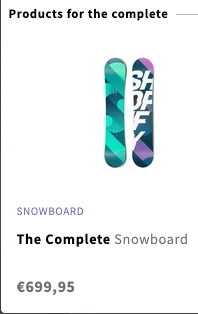 |
| If `vendor` is retrievable, the attribute is included in the results display. | If `vendor` unretrievable, it isn't displayed and not included in the search results. |
* **Default attributes set to unretrievable**
Algolia's Shopify integration automatically sets certain attributes to unretrievable,
such as `recently_ordered_count`, `variants_inventory_count`, `locations_inventory`, and `inventory_quantity`.
* **Facets**
If an attribute is set as both an unretrievable and as a [facet](/doc/api-reference/api-parameters/attributesForFaceting),
that attribute's data for the matching record isn't retrieved.
However, facet information, such as counts, are retrieved.
* **Additional indices**
The preceding attributes only apply to product indices.
For other indices, such as pages, blogs, or collections,
review their attributes and mark them as unretrievable in the Algolia dashboard.
Before going live,
review which attributes are indexed,
configure your desired settings,
and test your search to ensure the correct attributes are returned and that search performs according to your needs.
In addition, follow all [implementation checklist items](/doc/guides/going-to-production/implementation-checklist#you-re-not-revealing-any-sensitive-information)
to ensure an optimal user experience.
### Recently ordered count
The recently ordered count attribute represents all orders **since the last full reindex**.
Initially, it doesn't exist when the index is first created.
It gets added when you sell products.
For example, if a shopper buys two blue t-shirts in size S,
the value of this attribute increases by two.
The recently ordered count attribute is used for the **Most Popular** [sort order](/doc/integration/shopify/getting-started/configuration#sort-orders).
The `recently_ordered_count` attribute is reset during a full reindex.
Therefore, it's a count of all orders since the last reindex, not since the beginning.
The `recently_ordered_count` attribute is preserved during [real-time indexing](/doc/integration/shopify/sending-and-managing-data/introduction-to-shopify-indexing#automatic-updates).
### Searchable attributes for products
By default, these attributes are [searchable](/doc/guides/managing-results/must-do/searchable-attributes).
They're ranked in order of relevance.
For example, results with a match in the `vendor` attribute rank before results with a match in the `title` attribute:
1. `unordered(vendor)`
2. `unordered(title)`
3. `unordered(variant_title)`
4. `product_type`
5. `unordered(tags)`
6. `unordered(handle)`
7. `sku`
8. `barcode`
9. `unordered(body_html_safe)`
### Show products instead of variants
To only show the most relevant variant instead of all variants in your search results:
1. Go to the Shopify admin and go to the Algolia AI Search & Discovery app.
2. On the **Search options** tab, in the **Variants** section, select **Show products instead of variants**.
### Remove products from search results
Products are indexed if they have the following properties:
* "Active" status and published to a sales channel
* No publishing date in the future
* No `algolia-ignore` tag in their list of tags
* No `[hidden]` in their title
To hide a product from the search results—for example,
a product that's not released yet,
you can make one of these changes:
* Add `algolia-ignore` to the product's list of tags
* Add `[hidden]` to its title
* Set the status to "Draft"
* Archive the product
### Remove variants from search results
To remove a variant from the search results add `[hidden]` to the variant's name.
The position of the string `[hidden]` in the title doesn't matter.
For example, if you want to hide a variant "blue" from the search results,
change its title to `blue [hidden]` or `[hidden] blue`.
## Collections
If you enabled [Collection pages](/doc/integration/shopify/advanced-customization/collection-search-page),
Algolia stores your collections in a dedicated index `PREFIX_collections`. The default prefix is `shopify`.
The relationship between products and collections is stored in the product records,
in the `collection_ids` and `collections` attributes.
The Algolia AI Search & Discovery app only supports indexing collections in the "Online Store" sales channel.
### Collections schema
Algolia stores your collections in the following format:
```js JavaScript expandable theme={"system"}
{
objectID, // Collection id (in Shopify and Algolia)
title,
handle, // URL handle
body_html, // Description (with HTML, truncated to 2,000 characters)
body_html_safe, // Description (without HTML, truncated to 2,000 characters)
image,
products_count, // Product count in the collection (not updated in real time)
template_suffix,
meta: { // Metafields (See Metafields section)
namespace1: {
key1,
key2
},
},
updated_at
}
```
### Searchable attributes for collections
The following attributes are [searchable](/doc/guides/managing-results/must-do/searchable-attributes).
They're ranked in order of relevance.
For example, results with a match in the `title` attribute rank before results with a match in the `handle` attribute:
1. `title`
2. `handle`
3. `unordered(body_html_safe)`
### Remove collections from search results
Collections are indexed if they have these properties:
* Published to a sales channel
* No publishing date in the future
* At least one product
* No `[hidden]` in their title
You can remove a collection from the search results by performing one of these actions:
* Exclude it from the "Online Store" sales channel
* Add `[hidden]` to the collection title
Hiding a collection from search results won't hide the products within the collection.
## Blogs
If you select **Index blog posts** (on the **Indexing** tab of the Algolia AI Search & Discovery app),
Algolia stores your Shopify blog posts in a dedicated index `PREFIX_articles`.
The default prefix is `shopify`.
### Blogs schema
Algolia stores your blogs in the following format:
```js JavaScript expandable theme={"system"}
{
_tags: [
blog_id,
],
author: {
name,
objectID,
},
blog: {
commentable,
created_at,
feedburner,
feedburner_location,
handle,
objectID,
title,
updated_at
},
body_html,
body_html_safe,
created_at,
handle,
image,
meta,
named_tags: {},
objectID,
published_at,
tags: [],
title,
updated_at,
}
```
### Searchable attributes for blogs
By default, these attributes are [searchable](/doc/guides/managing-results/must-do/searchable-attributes).
They're ranked in order of relevance.
For example, results with a match in the `title` attribute rank before results with a match in the `handle` attribute:
1. `title`
2. `handle`
3. `tags`
4. `blog.title`
5. `blog.handle`
6. `unordered(author.name)`
7. `unordered(body_html_safe)`
### Remove blog posts from search results
To remove a blog post from the search results:
* Add `algolia-ignore` to its list of tags
* Add `[hidden]` to its title
### Remove entire blogs from search results
Blog posts belong to blogs.
To remove all articles from a blog from the search results,
add `[hidden]` to the blog name.
## Pages
If you select **Index pages** (on the **Indexing** tab of the Algolia AI Search & Discovery app),
Algolia stores your Shopify blog posts in a dedicated index `PREFIX_pages`.
The default prefix is `shopify`.
### Pages schema
Algolia stores your pages in the following format:
```js JavaScript expandable theme={"system"}
{
author,
body_html,
body_html_safe,
created_at,
handle,
meta,
objectID,
published_at,
shop_id,
template_suffix,
title,
updated_at,
}
```
### Searchable attributes for pages
By default, these attributes are [searchable](/doc/guides/managing-results/must-do/searchable-attributes).
They're ranked in order of relevance—for example, results with a match in the `author` attribute rank before results with a match in the `body_html` attribute:
1. `author`
2. `body_html`
3. `title`
### Remove pages from search results
To remove a page from the search results,
add `[hidden]` to its title.
To hide the `[hidden]` phrase on your page,
replace `{{ page.title }}` with `{{ page.title | replace: "[hidden]", "" }}`.
For more information, see [`replace`](https://shopify.github.io/liquid/filters/replace).
|
| If `vendor` is retrievable, the attribute is included in the results display. | If `vendor` unretrievable, it isn't displayed and not included in the search results. |
* **Default attributes set to unretrievable**
Algolia's Shopify integration automatically sets certain attributes to unretrievable,
such as `recently_ordered_count`, `variants_inventory_count`, `locations_inventory`, and `inventory_quantity`.
* **Facets**
If an attribute is set as both an unretrievable and as a [facet](/doc/api-reference/api-parameters/attributesForFaceting),
that attribute's data for the matching record isn't retrieved.
However, facet information, such as counts, are retrieved.
* **Additional indices**
The preceding attributes only apply to product indices.
For other indices, such as pages, blogs, or collections,
review their attributes and mark them as unretrievable in the Algolia dashboard.
Before going live,
review which attributes are indexed,
configure your desired settings,
and test your search to ensure the correct attributes are returned and that search performs according to your needs.
In addition, follow all [implementation checklist items](/doc/guides/going-to-production/implementation-checklist#you-re-not-revealing-any-sensitive-information)
to ensure an optimal user experience.
### Recently ordered count
The recently ordered count attribute represents all orders **since the last full reindex**.
Initially, it doesn't exist when the index is first created.
It gets added when you sell products.
For example, if a shopper buys two blue t-shirts in size S,
the value of this attribute increases by two.
The recently ordered count attribute is used for the **Most Popular** [sort order](/doc/integration/shopify/getting-started/configuration#sort-orders).
The `recently_ordered_count` attribute is reset during a full reindex.
Therefore, it's a count of all orders since the last reindex, not since the beginning.
The `recently_ordered_count` attribute is preserved during [real-time indexing](/doc/integration/shopify/sending-and-managing-data/introduction-to-shopify-indexing#automatic-updates).
### Searchable attributes for products
By default, these attributes are [searchable](/doc/guides/managing-results/must-do/searchable-attributes).
They're ranked in order of relevance.
For example, results with a match in the `vendor` attribute rank before results with a match in the `title` attribute:
1. `unordered(vendor)`
2. `unordered(title)`
3. `unordered(variant_title)`
4. `product_type`
5. `unordered(tags)`
6. `unordered(handle)`
7. `sku`
8. `barcode`
9. `unordered(body_html_safe)`
### Show products instead of variants
To only show the most relevant variant instead of all variants in your search results:
1. Go to the Shopify admin and go to the Algolia AI Search & Discovery app.
2. On the **Search options** tab, in the **Variants** section, select **Show products instead of variants**.
### Remove products from search results
Products are indexed if they have the following properties:
* "Active" status and published to a sales channel
* No publishing date in the future
* No `algolia-ignore` tag in their list of tags
* No `[hidden]` in their title
To hide a product from the search results—for example,
a product that's not released yet,
you can make one of these changes:
* Add `algolia-ignore` to the product's list of tags
* Add `[hidden]` to its title
* Set the status to "Draft"
* Archive the product
### Remove variants from search results
To remove a variant from the search results add `[hidden]` to the variant's name.
The position of the string `[hidden]` in the title doesn't matter.
For example, if you want to hide a variant "blue" from the search results,
change its title to `blue [hidden]` or `[hidden] blue`.
## Collections
If you enabled [Collection pages](/doc/integration/shopify/advanced-customization/collection-search-page),
Algolia stores your collections in a dedicated index `PREFIX_collections`. The default prefix is `shopify`.
The relationship between products and collections is stored in the product records,
in the `collection_ids` and `collections` attributes.
The Algolia AI Search & Discovery app only supports indexing collections in the "Online Store" sales channel.
### Collections schema
Algolia stores your collections in the following format:
```js JavaScript expandable theme={"system"}
{
objectID, // Collection id (in Shopify and Algolia)
title,
handle, // URL handle
body_html, // Description (with HTML, truncated to 2,000 characters)
body_html_safe, // Description (without HTML, truncated to 2,000 characters)
image,
products_count, // Product count in the collection (not updated in real time)
template_suffix,
meta: { // Metafields (See Metafields section)
namespace1: {
key1,
key2
},
},
updated_at
}
```
### Searchable attributes for collections
The following attributes are [searchable](/doc/guides/managing-results/must-do/searchable-attributes).
They're ranked in order of relevance.
For example, results with a match in the `title` attribute rank before results with a match in the `handle` attribute:
1. `title`
2. `handle`
3. `unordered(body_html_safe)`
### Remove collections from search results
Collections are indexed if they have these properties:
* Published to a sales channel
* No publishing date in the future
* At least one product
* No `[hidden]` in their title
You can remove a collection from the search results by performing one of these actions:
* Exclude it from the "Online Store" sales channel
* Add `[hidden]` to the collection title
Hiding a collection from search results won't hide the products within the collection.
## Blogs
If you select **Index blog posts** (on the **Indexing** tab of the Algolia AI Search & Discovery app),
Algolia stores your Shopify blog posts in a dedicated index `PREFIX_articles`.
The default prefix is `shopify`.
### Blogs schema
Algolia stores your blogs in the following format:
```js JavaScript expandable theme={"system"}
{
_tags: [
blog_id,
],
author: {
name,
objectID,
},
blog: {
commentable,
created_at,
feedburner,
feedburner_location,
handle,
objectID,
title,
updated_at
},
body_html,
body_html_safe,
created_at,
handle,
image,
meta,
named_tags: {},
objectID,
published_at,
tags: [],
title,
updated_at,
}
```
### Searchable attributes for blogs
By default, these attributes are [searchable](/doc/guides/managing-results/must-do/searchable-attributes).
They're ranked in order of relevance.
For example, results with a match in the `title` attribute rank before results with a match in the `handle` attribute:
1. `title`
2. `handle`
3. `tags`
4. `blog.title`
5. `blog.handle`
6. `unordered(author.name)`
7. `unordered(body_html_safe)`
### Remove blog posts from search results
To remove a blog post from the search results:
* Add `algolia-ignore` to its list of tags
* Add `[hidden]` to its title
### Remove entire blogs from search results
Blog posts belong to blogs.
To remove all articles from a blog from the search results,
add `[hidden]` to the blog name.
## Pages
If you select **Index pages** (on the **Indexing** tab of the Algolia AI Search & Discovery app),
Algolia stores your Shopify blog posts in a dedicated index `PREFIX_pages`.
The default prefix is `shopify`.
### Pages schema
Algolia stores your pages in the following format:
```js JavaScript expandable theme={"system"}
{
author,
body_html,
body_html_safe,
created_at,
handle,
meta,
objectID,
published_at,
shop_id,
template_suffix,
title,
updated_at,
}
```
### Searchable attributes for pages
By default, these attributes are [searchable](/doc/guides/managing-results/must-do/searchable-attributes).
They're ranked in order of relevance—for example, results with a match in the `author` attribute rank before results with a match in the `body_html` attribute:
1. `author`
2. `body_html`
3. `title`
### Remove pages from search results
To remove a page from the search results,
add `[hidden]` to its title.
To hide the `[hidden]` phrase on your page,
replace `{{ page.title }}` with `{{ page.title | replace: "[hidden]", "" }}`.
For more information, see [`replace`](https://shopify.github.io/liquid/filters/replace).