> ## Documentation Index
> Fetch the complete documentation index at: https://algolia.com/llms.txt
> Use this file to discover all available pages before exploring further.
# Frontend configuration
> Learn how to configure your Netlify frontend.
export const Index = () =>
index
;
With the official Algolia plugin for Netlify, Algolia recommends to use this frontend bundle.
It's designed to be compatible with the structure extracted by Algolia's Netlify plugin.
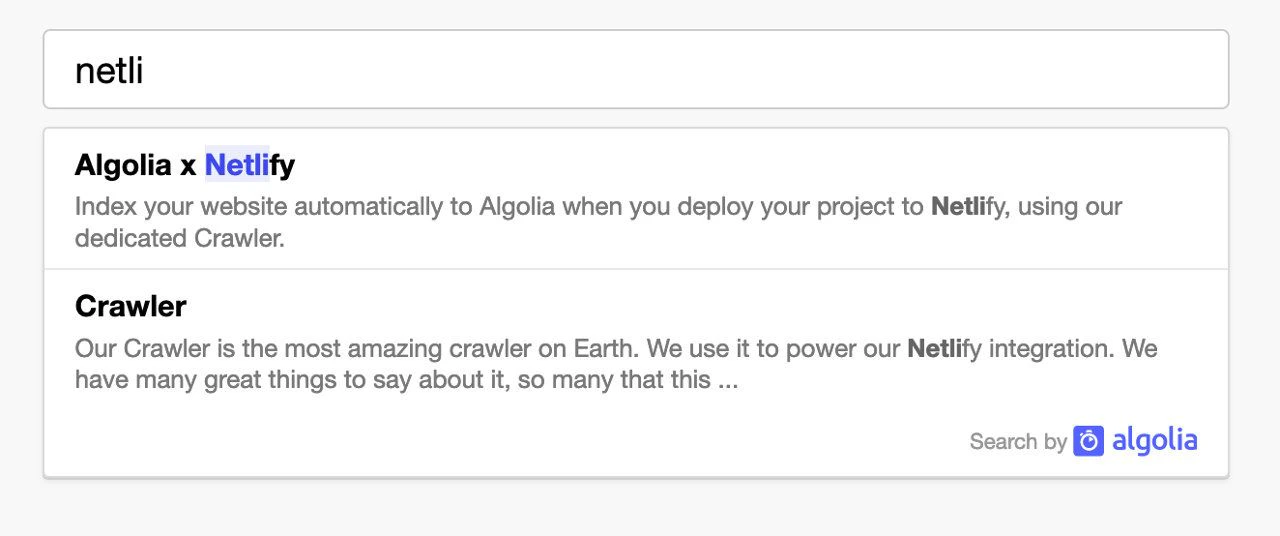
It creates a new search input on your site with an Autocomplete menu, providing search as you type results.
## Usage
```html HTML icon=code-xml theme={"system"}
```
## Available parameters
| Parameter | Required? | Type | Description |
| ------------- | --------- | ------- | ----------------------------------------------------------------------------------------------------------------------------------------------------------------------------------------------------------------------------------------------------------------------------- |
| `appId` | Yes | String | Find the Application ID in the [Algolia dashboard](https://dashboard.algolia.com/account/api-keys/) |
| `apiKey` | Yes | String | Find the API key in the [Algolia dashboard](https://dashboard.algolia.com/account/api-keys/) |
| `siteID` | Yes | String | Find the Netlify Site ID in [crawler.algolia.com](https://crawler.algolia.com/admin/netlify) |
| `branch` | Yes | String | Target git branch or [branches](#multiple-git-branches). It's either fixed, such as **main**, or dynamic using `process.env.HEAD` |
| `selector` | Yes | String | The HTML element that the Autocomplete menu will replace. It may not be an `input` element. Default is `div#search`. |
| `analytics` | No | Boolean | Indicates whether to enable [search analytics](/doc/guides/search-analytics/overview). Default is `true` |
| `hitsPerPage` | No | Number | Number of results to display. Default is `5` |
| `placeholder` | No | String | Search input placeholder text. Default is `Search...` |
| `openOnFocus` | No | Boolean | Indicates whether to open the panel on focus when there's no query. Default is `true` |
| `detached` | No | String | Decide when the search popup should open in *detached mode* (full screen, modal). Can be set to `true` or `false` to always or never go into detached mode. Default is: `{` `detached: { mediaQuery: '(max-width: 500px)' },` `detached: false,` `}` |
| `theme` | No | Object | Change the [appearance of the Autocomplete menu](#theme). |
## Multiple git branches
If you've set up the plugin to index multiple branches using the `branches` option,
each configured branch has a dedicated index.
You also need to pass the information of which index you want to search in using the `branch` parameter of the integration.
To get access to the currently building branch,
you can configure your build tool to forward the `HEAD` environment variable.
For instance, with [`webpack`'s environment plugin](https://webpack.js.org/plugins/environment-plugin/) configured to forward `HEAD`, you would pass `branch: process.env.HEAD`.
If you've configured your plugin to index only specific branches, you need to duplicate the logic here so that it picks the correct branch only when appropriate.
You can also use wildcards in the branch names.
For instance, with `branches = ['main', 'develop', 'feat/*']`, and using webpack's environment plugin to inject `HEAD`, here's how the snippet could look like:
```js JavaScript icon=code theme={"system"}
const currentBranch = process.env.HEAD; // Injected by your build tool
let targetBranch = "main";
if (currentBranch === "develop" || currentBranch.startsWith("feat/")) {
targetBranch = currentBranch;
}
algoliasearchNetlify({
// ...
branch: targetBranch,
});
```
## Theme
You can theme the input and the autocomplete by using the `theme` property.
```js JavaScript icon=code theme={"system"}
// Example of dark theme:
{
theme: {
mark: "#fff",
background: "#23263b",
selected: "#111432",
text: "#d6d6e7",
colorSourceIcon: "#d6d6e7",
},
}
```
To go further, check the [autocomplete.js documentation](/doc/ui-libraries/autocomplete/introduction/what-is-autocomplete),
or implement your own search with [InstantSearch.js](/doc/guides/building-search-ui/what-is-instantsearch/js).
 ## Usage
```html HTML icon=code-xml theme={"system"}
```
## Available parameters
| Parameter | Required? | Type | Description |
| ------------- | --------- | ------- | ----------------------------------------------------------------------------------------------------------------------------------------------------------------------------------------------------------------------------------------------------------------------------- |
| `appId` | Yes | String | Find the Application ID in the [Algolia dashboard](https://dashboard.algolia.com/account/api-keys/) |
| `apiKey` | Yes | String | Find the API key in the [Algolia dashboard](https://dashboard.algolia.com/account/api-keys/) |
| `siteID` | Yes | String | Find the Netlify Site ID in [crawler.algolia.com](https://crawler.algolia.com/admin/netlify) |
| `branch` | Yes | String | Target git branch or [branches](#multiple-git-branches). It's either fixed, such as **main**, or dynamic using `process.env.HEAD` |
| `selector` | Yes | String | The HTML element that the Autocomplete menu will replace. It may not be an `input` element.
## Usage
```html HTML icon=code-xml theme={"system"}
```
## Available parameters
| Parameter | Required? | Type | Description |
| ------------- | --------- | ------- | ----------------------------------------------------------------------------------------------------------------------------------------------------------------------------------------------------------------------------------------------------------------------------- |
| `appId` | Yes | String | Find the Application ID in the [Algolia dashboard](https://dashboard.algolia.com/account/api-keys/) |
| `apiKey` | Yes | String | Find the API key in the [Algolia dashboard](https://dashboard.algolia.com/account/api-keys/) |
| `siteID` | Yes | String | Find the Netlify Site ID in [crawler.algolia.com](https://crawler.algolia.com/admin/netlify) |
| `branch` | Yes | String | Target git branch or [branches](#multiple-git-branches). It's either fixed, such as **main**, or dynamic using `process.env.HEAD` |
| `selector` | Yes | String | The HTML element that the Autocomplete menu will replace. It may not be an `input` element.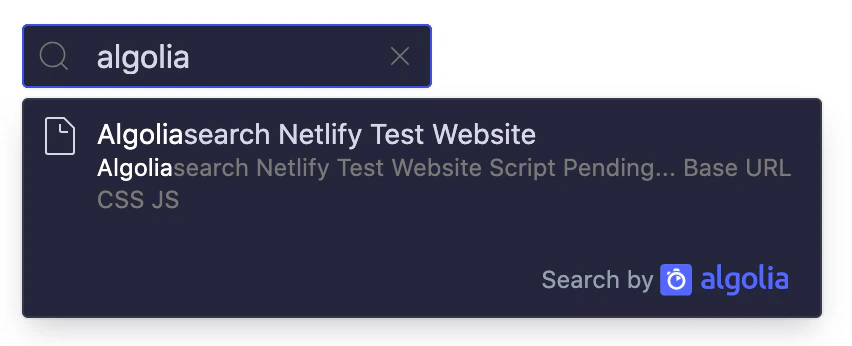 To go further, check the [autocomplete.js documentation](/doc/ui-libraries/autocomplete/introduction/what-is-autocomplete),
or implement your own search with [InstantSearch.js](/doc/guides/building-search-ui/what-is-instantsearch/js).
To go further, check the [autocomplete.js documentation](/doc/ui-libraries/autocomplete/introduction/what-is-autocomplete),
or implement your own search with [InstantSearch.js](/doc/guides/building-search-ui/what-is-instantsearch/js).