> ## Documentation Index
> Fetch the complete documentation index at: https://algolia.com/llms.txt
> Use this file to discover all available pages before exploring further.
# Debugging
> Learn about browser-based debugging strategies for Autocomplete.
Autocomplete is also available as an experimental widget in InstantSearch,
making it easier to integrate into your search experience.
For more information,
see the API reference for [InstantSearch.js](/doc/api-reference/widgets/autocomplete/js) or
[React InstantSearch](/doc/api-reference/widgets/autocomplete/react).
## Use debug mode to inspect panel elements
Setting the [`debug`](/doc/ui-libraries/autocomplete/api-reference/autocomplete-js/autocomplete#param-debug) option to `true` keeps the panel open when inspecting elements in your browser DevTools. This option defaults to `false`, meaning that the autocomplete panel closes when the [blur event](https://developer.mozilla.org/en-US/docs/Web/API/Element/blur_event) occurs. You should only use this option during development.
## Emulate a focused page in Chrome DevTools
You can enable the "Emulate a focused page" option from [Chrome DevTools](https://developer.chrome.com/docs/devtools/) to keep the autocomplete panel open when inspecting the DOM.
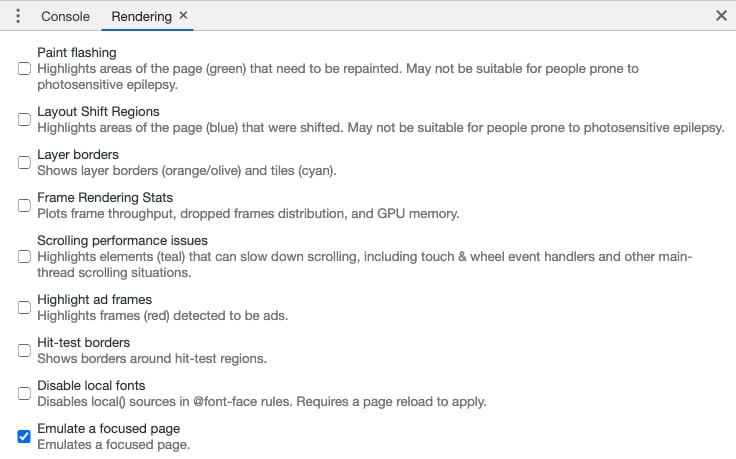 You can also find this option by pressing `Cmd+Shift+P` or `Ctrl+Shift+P` and searching for it.
 ## Help and discussion
If you're having trouble implementing Autocomplete,
or have questions or feature requests,
reach out on [GitHub Discussions](https://github.com/algolia/autocomplete/discussions/new)
or join the community on Algolia's [Discord server](https://alg.li/discord).
## Help and discussion
If you're having trouble implementing Autocomplete,
or have questions or feature requests,
reach out on [GitHub Discussions](https://github.com/algolia/autocomplete/discussions/new)
or join the community on Algolia's [Discord server](https://alg.li/discord).