> ## Documentation Index
> Fetch the complete documentation index at: https://algolia.com/llms.txt
> Use this file to discover all available pages before exploring further.
# Integrate Autocomplete with InstantSearch.js
> Learn how to use Autocomplete with InstantSearch.js.
export const Index = () =>
index
;
Autocomplete is also available as an experimental widget in InstantSearch,
making it easier to integrate into your search experience.
For more information,
see the API reference for [InstantSearch.js](/doc/api-reference/widgets/autocomplete/js) or
[React InstantSearch](/doc/api-reference/widgets/autocomplete/react).
When you think of search experiences on sites like Amazon (ecommerce) or YouTube (media),
you may notice that both sites use an autocomplete experience.
It's the autocomplete, and not just a search input, that powers the search page.
If you have an existing InstantSearch implementation,
**you can create a similar experience by adding Autocomplete to your InstantSearch application**.
Adding Autocomplete to an existing InstantSearch implementation lets you enhance the search experience and create a richer,
more contextual search.
You can use context from the current user and how they interacted with your site,
save their recent searches, provide suggested queries, and more.
This autocomplete can work as a rich search box in a search page,
and a portable all-in-one search experience anywhere else on your site.
This guide shows you how to integrate Autocomplete with InstantSearch on your site.
Run and edit the Autocomplete with InstantSearch.js example in CodeSandbox.
Browse the source for the Autocomplete with InstantSearch.js example on GitHub.
This guide starts from a brand new InstantSearch application,
but you can adapt it to integrate Autocomplete in your existing implementation.
## Create a search page with InstantSearch
First, begin with some starter code.
In a new project, create an `index.html` file and add the following code:
```html HTML icon=code-xml theme={"system"}
InstantSearch | Autocomplete
```
The search page uses a two-column layout with categories on the left,
and a search box, hits, and a pagination widget on the right.
Next, create the `app.js` file to instantiate InstantSearch.
```js JavaScript icon=code theme={"system"}
// app.js
import { liteClient as algoliasearch } from "algoliasearch/lite";
import instantsearch from "instantsearch.js";
import historyRouter from "instantsearch.js/es/lib/routers/history";
import {
searchBox,
hierarchicalMenu,
hits,
pagination,
} from "instantsearch.js/es/widgets";
import "@algolia/autocomplete-theme-classic";
const searchClient = algoliasearch(
"latency",
"6be0576ff61c053d5f9a3225e2a90f76",
);
const INSTANT_SEARCH_INDEX_NAME = "instant_search";
const instantSearchRouter = historyRouter();
const search = instantsearch({
searchClient,
indexName: INSTANT_SEARCH_INDEX_NAME,
routing: instantSearchRouter,
});
search.addWidgets([
searchBox({
container: "#searchbox",
placeholder: "Search for products",
}),
hierarchicalMenu({
container: "#categories",
attributes: ["hierarchicalCategories.lvl0", "hierarchicalCategories.lvl1"],
}),
hits({
container: "#hits",
}),
pagination({
container: "#pagination",
}),
]);
search.start();
```
This InstantSearch implementation imports the default `historyRouter` router which you want to reuse in your Autocomplete integration.
This lets InstantSearch understand query parameters from the URL to derive its state.
If your Algolia doesn't have hierarchical attributes, you can use a regular attribute with a `menu` widget.
You should now have a working InstantSearch application.
## Use Autocomplete as a search box
InstantSearch ships with a `searchBox` component,
but it doesn't provide autocomplete features like you see on YouTube and Amazon. Instead,
you can replace the `searchBox` with an autocomplete experience, using Autocomplete.
Start by removing the InstantSearch `#searchbox` container and adding the Autocomplete container,
named `#autocomplete` here.
```html HTML icon=code-xml theme={"system"}
InstantSearch | Autocomplete
```
You want the Autocomplete experience to be available on all the pages of the site,
not only the search page,
so you can move its container to a header or navigation bar instead of the page content.
Next, you can virtualize the `searchBox` from your InstantSearch implementation and instantiate Autocomplete in your `app.js` file.
```js JavaScript icon=code theme={"system"}
// app.js
import { autocomplete } from "@algolia/autocomplete-js";
import { liteClient as algoliasearch } from "algoliasearch/lite";
import instantsearch from "instantsearch.js";
import historyRouter from "instantsearch.js/es/lib/routers/history";
import { connectSearchBox } from "instantsearch.js/es/connectors";
import {
hierarchicalMenu,
hits,
pagination,
} from "instantsearch.js/es/widgets";
import "@algolia/autocomplete-theme-classic";
const searchClient = algoliasearch(
"latency",
"6be0576ff61c053d5f9a3225e2a90f76",
);
const INSTANT_SEARCH_INDEX_NAME = "instant_search";
const instantSearchRouter = historyRouter();
const search = instantsearch({
searchClient,
indexName: INSTANT_SEARCH_INDEX_NAME,
routing: instantSearchRouter,
});
// Mount a virtual search box to manipulate InstantSearch's `query` UI
// state parameter.
const virtualSearchBox = connectSearchBox(() => {});
search.addWidgets([
virtualSearchBox({}),
hierarchicalMenu({
container: "#categories",
attributes: ["hierarchicalCategories.lvl0", "hierarchicalCategories.lvl1"],
}),
hits({
container: "#hits",
templates: {
item(hit, { html, components }) {
return html`
${components.Highlight({ attribute: "name", hit })}
`;
},
},
}),
pagination({
container: "#pagination",
}),
]);
search.start();
// Set the InstantSearch index UI state from external events.
function setInstantSearchUiState(indexUiState) {
search.setUiState((uiState) => ({
...uiState,
[INSTANT_SEARCH_INDEX_NAME]: {
...uiState[INSTANT_SEARCH_INDEX_NAME],
// We reset the page when the search state changes.
page: 1,
...indexUiState,
},
}));
}
// Return the InstantSearch index UI state.
function getInstantSearchUiState() {
const uiState = instantSearchRouter.read();
return (uiState && uiState[INSTANT_SEARCH_INDEX_NAME]) || {};
}
const searchPageState = getInstantSearchUiState();
let skipInstantSearchUiStateUpdate = false;
const { setQuery } = autocomplete({
container: "#autocomplete",
placeholder: "Search for products",
detachedMediaQuery: "none",
initialState: {
query: searchPageState.query || "",
},
onSubmit({ state }) {
setInstantSearchUiState({ query: state.query });
},
onReset() {
setInstantSearchUiState({ query: "" });
},
onStateChange({ prevState, state }) {
if (!skipInstantSearchUiStateUpdate && prevState.query !== state.query) {
setInstantSearchUiState({ query: state.query });
}
skipInstantSearchUiStateUpdate = false;
},
});
// This keeps Autocomplete aware of state changes coming from routing
// and updates its query accordingly
window.addEventListener("popstate", () => {
skipInstantSearchUiStateUpdate = true;
setQuery(search.helper?.state.query || "");
});
```
This replaces the InstantSearch search box with Autocomplete, and acts exactly like before.
But you can now add many more interesting features.
## Add recent searches
When you make a search on YouTube or Google and come back to the search box later on,
the autocomplete displays your recent searches.
This pattern lets users quickly access content by using the same path they took to find it in the first place.
Autocomplete lets you add recent searches with the `@algolia/autocomplete-plugin-recent-searches` package.
It exposes a [`createLocalStorageRecentSearchesPlugin`](/doc/ui-libraries/autocomplete/api-reference/autocomplete-plugin-recent-searches/createLocalStorageRecentSearchesPlugin) function to let you create a recent searches plugin.
```js JavaScript theme={"system"}
import { autocomplete } from "@algolia/autocomplete-js";
import { createLocalStorageRecentSearchesPlugin } from "@algolia/autocomplete-plugin-recent-searches";
// ...
// Build URLs that InstantSearch understands.
function getInstantSearchUrl(indexUiState) {
return search.createURL({ [INSTANT_SEARCH_INDEX_NAME]: indexUiState });
}
// Detect when an event is modified with a special key to let the browser
// trigger its default behavior.
function isModifierEvent(event) {
const isMiddleClick = event.button === 1;
return (
isMiddleClick ||
event.altKey ||
event.ctrlKey ||
event.metaKey ||
event.shiftKey
);
}
function onSelect({ setIsOpen, setQuery, event, query }) {
// You want to trigger the default browser behavior if the event is modified.
if (isModifierEvent(event)) {
return;
}
setQuery(query);
setIsOpen(false);
setInstantSearchUiState({ query });
}
function getItemUrl({ query }) {
return getInstantSearchUrl({ query });
}
function createItemWrapperTemplate({ children, query, html }) {
const uiState = { query };
return html`
${children}
`;
}
const recentSearchesPlugin = createLocalStorageRecentSearchesPlugin({
key: "instantsearch",
limit: 3,
transformSource({ source }) {
return {
...source,
getItemUrl({ item }) {
return getItemUrl({
query: item.label,
});
},
onSelect({ setIsOpen, setQuery, item, event }) {
onSelect({
setQuery,
setIsOpen,
event,
query: item.label,
});
},
// Update the default `item` template to wrap it with a link
// and plug it to the InstantSearch router.
templates: {
...source.templates,
item(params) {
const { children } = source.templates.item(params).props;
return createItemWrapperTemplate({
query: params.item.label,
children,
html: params.html,
});
},
},
};
},
});
const { setQuery } = autocomplete({
// You want recent searches to appear with an empty query.
openOnFocus: true,
// Add the recent searches plugin.
plugins: [recentSearchesPlugin],
// ...
});
```
```jsx JSX theme={"system"}
/** @jsx h */
import { autocomplete } from "@algolia/autocomplete-js";
import { createLocalStorageRecentSearchesPlugin } from "@algolia/autocomplete-plugin-recent-searches";
import { h } from "preact";
// ...
// Build URLs that InstantSearch understands.
function getInstantSearchUrl(indexUiState) {
return search.createURL({ [INSTANT_SEARCH_INDEX_NAME]: indexUiState });
}
// Detect when an event is modified with a special key to let the browser
// trigger its default behavior.
function isModifierEvent(event) {
const isMiddleClick = event.button === 1;
return (
isMiddleClick ||
event.altKey ||
event.ctrlKey ||
event.metaKey ||
event.shiftKey
);
}
function onSelect({ setIsOpen, setQuery, event, query }) {
// You want to trigger the default browser behavior if the event is modified.
if (isModifierEvent(event)) {
return;
}
setQuery(query);
setIsOpen(false);
setInstantSearchUiState({ query });
}
function getItemUrl({ query }) {
return getInstantSearchUrl({ query });
}
function ItemWrapper({ children, query }) {
const uiState = { query };
return (
{
if (!isModifierEvent(event)) {
// Bypass the original link behavior if there's no event modifier
// to set the InstantSearch UI state without reloading the page.
event.preventDefault();
}
}}
>
{children}
);
}
const recentSearchesPlugin = createLocalStorageRecentSearchesPlugin({
key: "instantsearch",
limit: 3,
transformSource({ source }) {
return {
...source,
getItemUrl({ item }) {
return getItemUrl({
query: item.label,
});
},
onSelect({ setIsOpen, setQuery, item, event }) {
onSelect({
setQuery,
setIsOpen,
event,
query: item.label,
});
},
// Update the default `item` template to wrap it with a link
// and plug it to the InstantSearch router.
templates: {
...source.templates,
item(params) {
const { children } = source.templates.item(params).props;
return (
{children}
);
},
},
};
},
});
const { setQuery } = autocomplete({
// You want recent searches to appear with an empty query.
openOnFocus: true,
// Add the recent searches plugin.
plugins: [recentSearchesPlugin],
// ...
});
```
Some of this code is abstracted away in the following sections to simplify the examples.
Since the `recentSearchesPlugin` reads from [`localStorage`](https://developer.mozilla.org/en-US/docs/Web/API/Window/localStorage), you can't see any recent searches until you perform at least one query. To submit a search, make sure to press Enter on the query. Once you do, you'll see it appear as a recent search.
See also:
* [Recent searches](/doc/ui-libraries/autocomplete/guides/adding-recent-searches)
* [Recent searches plugin](/doc/ui-libraries/autocomplete/api-reference/autocomplete-plugin-recent-searches)
## Add Query Suggestions
**The most typical pattern you can see on every autocomplete is suggestions**.
They're predictions of queries that match what users are currently typing, and that guarantee to return results.
For example, when typing "how to" in Google, the search engine suggests matching suggestions for users to complete their query.
It's especially useful on mobile, where typing is harder than on a physical keyboard.
Autocomplete lets you add Query Suggestions with the `@algolia/autocomplete-plugin-query-suggestions` package.
It exposes a [`createQuerySuggestionsPlugin`](/doc/ui-libraries/autocomplete/api-reference/autocomplete-plugin-query-suggestions/createQuerySuggestionsPlugin)
function to let you create a Query Suggestions plugin.
This plugin requires a [Query Suggestions](/doc/guides/building-search-ui/ui-and-ux-patterns/query-suggestions/js) index.
```js JavaScript theme={"system"}
// ...
import { createQuerySuggestionsPlugin } from "@algolia/autocomplete-plugin-query-suggestions";
// ...
const querySuggestionsPlugin = createQuerySuggestionsPlugin({
searchClient,
indexName: "instant_search_demo_query_suggestions",
getSearchParams() {
// This creates a shared `hitsPerPage` value once the duplicates
// between recent searches and Query Suggestions are removed.
return recentSearchesPlugin.data.getAlgoliaSearchParams({
hitsPerPage: 6,
});
},
transformSource({ source }) {
return {
...source,
sourceId: "querySuggestionsPlugin",
getItemUrl({ item }) {
return getItemUrl({
query: item.query,
});
},
onSelect({ setIsOpen, setQuery, event, item }) {
onSelect({
setQuery,
setIsOpen,
event,
query: item.query,
});
},
getItems(params) {
// We don't display Query Suggestions when there's no query.
if (!params.state.query) {
return [];
}
return source.getItems(params);
},
templates: {
...source.templates,
item(params) {
const { children } = source.templates.item(params).props;
return createItemWrapperTemplate({
query: params.item.label,
children,
html: params.html,
});
},
},
};
},
});
const { setQuery } = autocomplete({
// ...
// Add the recent searches and Query Suggestions plugins.
plugins: [recentSearchesPlugin, querySuggestionsPlugin],
});
```
```jsx JSX theme={"system"}
// ...
import { createQuerySuggestionsPlugin } from "@algolia/autocomplete-plugin-query-suggestions";
// ...
const querySuggestionsPlugin = createQuerySuggestionsPlugin({
searchClient,
indexName: "instant_search_demo_query_suggestions",
getSearchParams() {
// This creates a shared `hitsPerPage` value once the duplicates
// between recent searches and Query Suggestions are removed.
return recentSearchesPlugin.data.getAlgoliaSearchParams({
hitsPerPage: 6,
});
},
transformSource({ source }) {
return {
...source,
sourceId: "querySuggestionsPlugin",
getItemUrl({ item }) {
return getItemUrl({
query: item.query,
});
},
onSelect({ setIsOpen, setQuery, event, item }) {
onSelect({
setQuery,
setIsOpen,
event,
query: item.query,
});
},
getItems(params) {
// We don't display Query Suggestions when there's no query.
if (!params.state.query) {
return [];
}
return source.getItems(params);
},
templates: {
...source.templates,
item(params) {
const { children } = source.templates.item(params).props;
return (
{children}
);
},
},
};
},
});
const { setQuery } = autocomplete({
// ...
// Add the recent searches and Query Suggestions plugins.
plugins: [recentSearchesPlugin, querySuggestionsPlugin],
});
```
See also:
* [Search suggestions](/doc/ui-libraries/autocomplete/guides/adding-suggested-searches)
* [Autocomplete Query Suggestions plugin](/doc/ui-libraries/autocomplete/api-reference/autocomplete-plugin-query-suggestions)
## Debounce search results
Having two sets of results update as you type generates many UI flashes.
This is distracting for users, because two distinct sections of the page are competing for their attention.
You can mitigate this problem by debouncing search results.
```js JavaScript icon=code theme={"system"}
function debounce(fn, time) {
let timerId = undefined;
return function (...args) {
if (timerId) {
clearTimeout(timerId);
}
timerId = setTimeout(() => fn(...args), time);
};
}
const debouncedSetInstantSearchUiState = debounce(setInstantSearchUiState, 500);
const { setQuery } = autocomplete({
// ...
onStateChange({ prevState, state }) {
if (!skipInstantSearchUiStateUpdate && prevState.query !== state.query) {
debouncedSetInstantSearchUiState({ query: state.query });
}
skipInstantSearchUiStateUpdate = false;
},
});
```
## Support categories in Query Suggestions
**A key feature to Autocomplete is to pre-configure your InstantSearch page**.
The Query Suggestions plugin supports categories that you can use to refine both the query and the category in a single interaction
This pattern brings users to the right category without interacting with the [`hierarchicalMenu`](/doc/api-reference/widgets/hierarchical-menu/js) widget, only with the autocomplete.
You need to support categories in the helpers you created at the beginning:
```js JavaScript theme={"system"}
function onSelect({ setIsOpen, setQuery, event, query, category }) {
// You want to trigger the default browser behavior if the event is modified.
if (isModifierEvent(event)) {
return;
}
setQuery(query);
setIsOpen(false);
setInstantSearchUiState({
query,
hierarchicalMenu: {
[INSTANT_SEARCH_HIERARCHICAL_ATTRIBUTE]: [category],
},
});
}
function getItemUrl({ query, category }) {
return getInstantSearchUrl({
query,
hierarchicalMenu: {
[INSTANT_SEARCH_HIERARCHICAL_ATTRIBUTE]: [category],
},
});
}
function createItemWrapperTemplate({ children, query, category, html }) {
const uiState = {
query,
hierarchicalMenu: {
[INSTANT_SEARCH_HIERARCHICAL_ATTRIBUTE]: [category],
},
};
return html`
${children}
`;
}
```
```jsx JSX theme={"system"}
function onSelect({ setIsOpen, setQuery, event, query, category }) {
// You want to trigger the default browser behavior if the event is modified.
if (isModifierEvent(event)) {
return;
}
setQuery(query);
setIsOpen(false);
setInstantSearchUiState({
query,
hierarchicalMenu: {
[INSTANT_SEARCH_HIERARCHICAL_ATTRIBUTE]: [category],
},
});
}
function getItemUrl({ query, category }) {
return getInstantSearchUrl({
query,
hierarchicalMenu: {
[INSTANT_SEARCH_HIERARCHICAL_ATTRIBUTE]: [category],
},
});
}
function ItemWrapper({ children, query, category }) {
const uiState = {
query,
hierarchicalMenu: {
[INSTANT_SEARCH_HIERARCHICAL_ATTRIBUTE]: [category],
},
};
return (
{
if (!isModifierEvent(event)) {
// Bypass the original link behavior if there's no event modifier
// to set the InstantSearch UI state without reloading the page.
event.preventDefault();
}
}}
>
{children}
);
}
```
Update the plugins to forward the category to the helpers:
```js JavaScript theme={"system"}
const recentSearchesPlugin = createLocalStorageRecentSearchesPlugin({
key: "instantsearch",
limit: 3,
transformSource({ source }) {
return {
...source,
getItemUrl({ item }) {
return getItemUrl({
query: item.label,
category: item.category,
});
},
onSelect({ setIsOpen, setQuery, item, event }) {
onSelect({
setQuery,
setIsOpen,
event,
query: item.label,
category: item.category,
});
},
templates: {
...source.templates,
// Update the default `item` template to wrap it with a link
// and plug it to the InstantSearch router.
item(params) {
const { children } = source.templates.item(params).props;
return createItemWrapperTemplate({
query: params.item.label,
category: params.item.category,
children,
html: params.html,
});
},
},
};
},
});
const querySuggestionsPlugin = createQuerySuggestionsPlugin({
searchClient,
indexName: "instant_search_demo_query_suggestions",
getSearchParams() {
// This creates a shared `hitsPerPage` value once the duplicates
// between recent searches and Query Suggestions are removed.
return recentSearchesPlugin.data.getAlgoliaSearchParams({
hitsPerPage: 6,
});
},
// Add categories to the suggestions.
categoryAttribute: [
INSTANT_SEARCH_INDEX_NAME,
"facets",
"exact_matches",
INSTANT_SEARCH_HIERARCHICAL_ATTRIBUTE,
],
transformSource({ source }) {
return {
...source,
sourceId: "querySuggestionsPlugin",
getItemUrl({ item }) {
return getItemUrl({
query: item.query,
category: item.__autocomplete_qsCategory,
});
},
onSelect({ setIsOpen, setQuery, event, item }) {
onSelect({
setQuery,
setIsOpen,
event,
query: item.query,
category: item.__autocomplete_qsCategory,
});
},
getItems(params) {
if (!params.state.query) {
return [];
}
return source.getItems(params);
},
templates: {
...source.templates,
item(params) {
const { children } = source.templates.item(params).props;
return createItemWrapperTemplate({
query: params.item.label,
category: params.item.__autocomplete_qsCategory,
children,
html: params.html,
});
},
},
};
},
});
```
```jsx JSX theme={"system"}
const recentSearchesPlugin = createLocalStorageRecentSearchesPlugin({
key: "instantsearch",
limit: 3,
transformSource({ source }) {
return {
...source,
getItemUrl({ item }) {
return getItemUrl({
query: item.label,
category: item.category,
});
},
onSelect({ setIsOpen, setQuery, item, event }) {
onSelect({
setQuery,
setIsOpen,
event,
query: item.label,
category: item.category,
});
},
templates: {
...source.templates,
// Update the default `item` template to wrap it with a link
// and plug it to the InstantSearch router.
item(params) {
const { children } = source.templates.item(params).props;
return (
{children}
);
},
},
};
},
});
const querySuggestionsPlugin = createQuerySuggestionsPlugin({
searchClient,
indexName: "instant_search_demo_query_suggestions",
getSearchParams() {
// This creates a shared `hitsPerPage` value once the duplicates
// between recent searches and Query Suggestions are removed.
return recentSearchesPlugin.data.getAlgoliaSearchParams({
hitsPerPage: 6,
});
},
// Add categories to the suggestions.
categoryAttribute: [
INSTANT_SEARCH_INDEX_NAME,
"facets",
"exact_matches",
INSTANT_SEARCH_HIERARCHICAL_ATTRIBUTE,
],
transformSource({ source }) {
return {
...source,
sourceId: "querySuggestionsPlugin",
getItemUrl({ item }) {
return getItemUrl({
query: item.query,
category: item.__autocomplete_qsCategory,
});
},
onSelect({ setIsOpen, setQuery, event, item }) {
onSelect({
setQuery,
setIsOpen,
event,
query: item.query,
category: item.__autocomplete_qsCategory,
});
},
getItems(params) {
if (!params.state.query) {
return [];
}
return source.getItems(params);
},
templates: {
...source.templates,
item(params) {
const { children } = source.templates.item(params).props;
return (
{children}
);
},
},
};
},
});
```
Implement the `onReset` function on your Autocomplete instance to also reset the InstantSearch category.
```js JavaScript icon=code theme={"system"}
const { setQuery } = autocomplete({
// ...
onReset() {
setInstantSearchUiState({
query: "",
hierarchicalMenu: {
[INSTANT_SEARCH_HIERARCHICAL_ATTRIBUTE]: [],
},
});
},
// ...
});
```
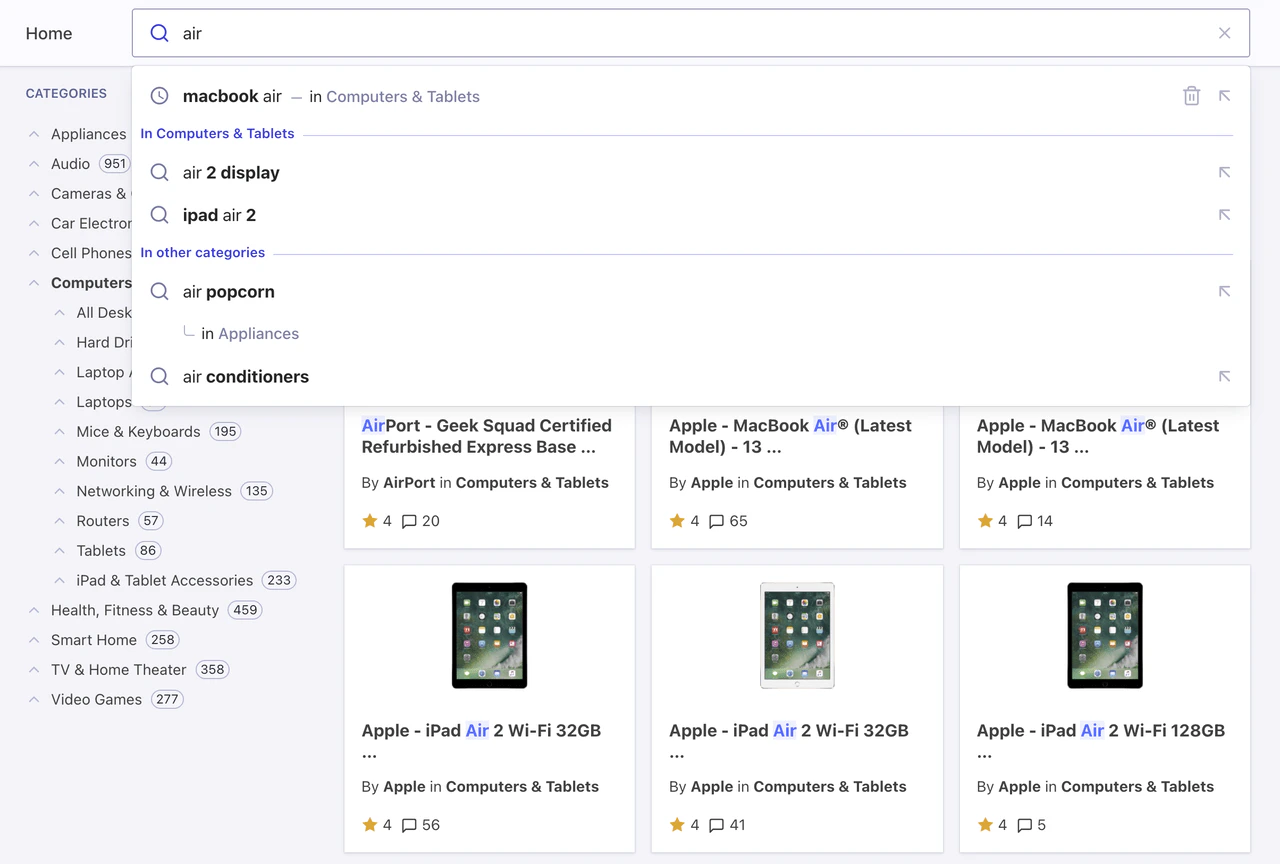
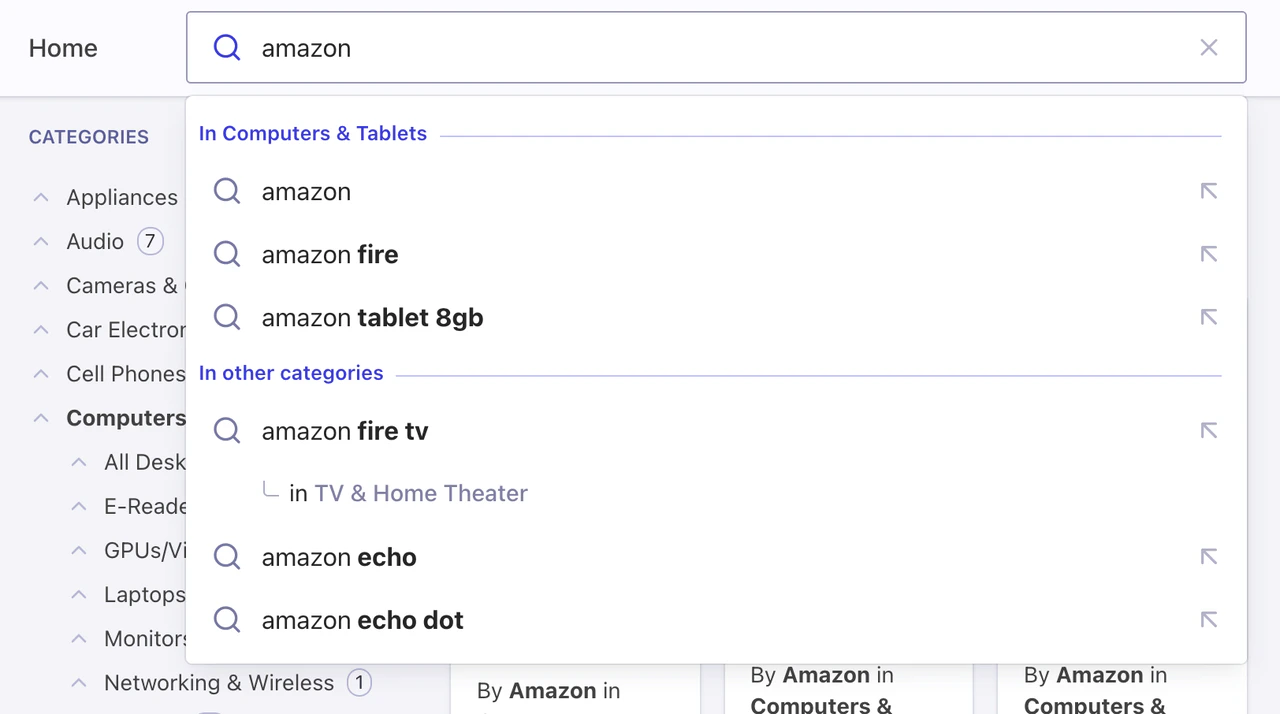
## Add contextual Query Suggestions
For an even richer Autocomplete experience, you can pick up the currently active InstantSearch category and provide suggestions for both this specific category and others. This pattern lets you reduce the scope of the search to the current category, like an actual department store, or broaden the suggestions to get out of the current category.
First, make sure to set your category attribute as a facet in your Query Suggestions index.
In this demo, the attribute to facet is `instant_search.facets.exact_matches.hierarchicalCategories.lvl0.value`.
```js JavaScript theme={"system"}
// ...
// Get the current category from InstantSearch.
function getInstantSearchCurrentCategory() {
const indexRenderState = search.renderState[INSTANT_SEARCH_INDEX_NAME];
const hierarchicalMenuUiState =
indexRenderState && indexRenderState.hierarchicalMenu;
const categories =
(hierarchicalMenuUiState &&
hierarchicalMenuUiState[INSTANT_SEARCH_HIERARCHICAL_ATTRIBUTE] &&
hierarchicalMenuUiState[INSTANT_SEARCH_HIERARCHICAL_ATTRIBUTE].items) ||
[];
const refinedCategory = categories.find((category) => category.isRefined);
return refinedCategory && refinedCategory.value;
}
// Query Suggestions plugin for the current category.
const querySuggestionsPluginInCategory = createQuerySuggestionsPlugin({
searchClient,
indexName: "instant_search_demo_query_suggestions",
getSearchParams() {
const currentCategory = getInstantSearchCurrentCategory();
return recentSearchesPlugin.data.getAlgoliaSearchParams({
hitsPerPage: 3,
facetFilters: [
`${INSTANT_SEARCH_INDEX_NAME}.facets.exact_matches.${INSTANT_SEARCH_HIERARCHICAL_ATTRIBUTE}.value:${currentCategory}`,
],
});
},
transformSource({ source }) {
const currentCategory = getInstantSearchCurrentCategory();
return {
...source,
sourceId: "querySuggestionsPluginInCategory",
getItemUrl({ item }) {
return getItemUrl({
query: item.query,
category: currentCategory,
});
},
onSelect({ setIsOpen, setQuery, event, item }) {
onSelect({
setQuery,
setIsOpen,
event,
query: item.query,
category: currentCategory,
});
},
getItems(params) {
if (!currentCategory) {
return [];
}
return source.getItems(params);
},
templates: {
...source.templates,
header({ items, html }) {
if (items.length === 0) {
return null;
}
return html`In ${currentCategory}
`;
},
item(params) {
const { children, html } = source.templates.item(params).props;
return createItemWrapperTemplate({
query: params.item.query,
category: currentCategory,
children,
html,
});
},
},
};
},
});
// Query Suggestions plugin for the other categories.
const querySuggestionsPlugin = createQuerySuggestionsPlugin({
// ...
getSearchParams() {
const currentCategory = getInstantSearchCurrentCategory();
if (!currentCategory) {
return recentSearchesPlugin.data.getAlgoliaSearchParams({
hitsPerPage: 6,
});
}
return recentSearchesPlugin.data.getAlgoliaSearchParams({
hitsPerPage: 3,
facetFilters: [
`${INSTANT_SEARCH_INDEX_NAME}.facets.exact_matches.${INSTANT_SEARCH_HIERARCHICAL_ATTRIBUTE}.value:-${currentCategory}`,
],
});
},
transformSource({ source }) {
const currentCategory = getInstantSearchCurrentCategory();
return {
...source,
// ...
templates: {
...source.templates,
header({ items, html }) {
if (!currentCategory || items.length === 0) {
return null;
}
return html`In other categories
`;
},
// ...
},
};
},
});
```
```jsx JSX theme={"system"}
/** @jsx h */
import { h, Fragment } from "preact";
// ...
// Get the current category from InstantSearch.
function getInstantSearchCurrentCategory() {
const indexRenderState = search.renderState[INSTANT_SEARCH_INDEX_NAME];
const hierarchicalMenuUiState =
indexRenderState && indexRenderState.hierarchicalMenu;
const categories =
(hierarchicalMenuUiState &&
hierarchicalMenuUiState[INSTANT_SEARCH_HIERARCHICAL_ATTRIBUTE] &&
hierarchicalMenuUiState[INSTANT_SEARCH_HIERARCHICAL_ATTRIBUTE].items) ||
[];
const refinedCategory = categories.find((category) => category.isRefined);
return refinedCategory && refinedCategory.value;
}
// Query Suggestions plugin for the current category.
const querySuggestionsPluginInCategory = createQuerySuggestionsPlugin({
searchClient,
indexName: "instant_search_demo_query_suggestions",
getSearchParams() {
const currentCategory = getInstantSearchCurrentCategory();
return recentSearchesPlugin.data.getAlgoliaSearchParams({
hitsPerPage: 3,
facetFilters: [
`${INSTANT_SEARCH_INDEX_NAME}.facets.exact_matches.${INSTANT_SEARCH_HIERARCHICAL_ATTRIBUTE}.value:${currentCategory}`,
],
});
},
transformSource({ source }) {
const currentCategory = getInstantSearchCurrentCategory();
return {
...source,
sourceId: "querySuggestionsPluginInCategory",
getItemUrl({ item }) {
return getItemUrl({
query: item.query,
category: currentCategory,
});
},
onSelect({ setIsOpen, setQuery, event, item }) {
onSelect({
setQuery,
setIsOpen,
event,
query: item.query,
category: currentCategory,
});
},
getItems(params) {
if (!currentCategory) {
return [];
}
return source.getItems(params);
},
templates: {
...source.templates,
header({ items }) {
if (items.length === 0) {
return null;
}
return (
In {currentCategory}
);
},
item(params) {
const { children } = source.templates.item(params).props;
return (
{children}
);
},
},
};
},
});
// Query Suggestions plugin for the other categories.
const querySuggestionsPlugin = createQuerySuggestionsPlugin({
// ...
getSearchParams() {
const currentCategory = getInstantSearchCurrentCategory();
if (!currentCategory) {
return recentSearchesPlugin.data.getAlgoliaSearchParams({
hitsPerPage: 6,
});
}
return recentSearchesPlugin.data.getAlgoliaSearchParams({
hitsPerPage: 3,
facetFilters: [
`${INSTANT_SEARCH_INDEX_NAME}.facets.exact_matches.${INSTANT_SEARCH_HIERARCHICAL_ATTRIBUTE}.value:-${currentCategory}`,
],
});
},
transformSource({ source }) {
const currentCategory = getInstantSearchCurrentCategory();
return {
...source,
// ...
templates: {
...source.templates,
header({ items }) {
if (!currentCategory || items.length === 0) {
return null;
}
return (
In other categories
);
},
// ...
},
};
},
});
```
## Next steps
**Autocomplete is now the main user interaction point driving InstantSearch to refine search results**.
From now on, you're leveraging the complete Autocomplete ecosystem to bring a state-of-the-art search experience for desktop and mobile.
You can now add Autocomplete everywhere on your site and redirect users to the search page whenever they submit a search, or after they select a suggestion. You can also use context from the current page to personalize the autocomplete experience. For example, you could display a preview of matching results in a panel for each suggestion, and let InstantSearch provide these results once on the search page.
Code examples:
* [Autocomplete with InstantSearch.js](https://codesandbox.io/s/github/algolia/autocomplete/tree/next/examples/instantsearch?file=/src/app.ts)
* [Autocomplete with React InstantSearch](https://codesandbox.io/s/github/algolia/autocomplete/tree/next/examples/react-instantsearch?file=/src/App.tsx)
* [Autocomplete with Vue InstantSearch](https://codesandbox.io/s/github/algolia/autocomplete/tree/next/examples/vue-instantsearch?file=/src/App.vue)
 First, make sure to set your category attribute as a facet in your Query Suggestions index.
In this demo, the attribute to facet is `instant_search.facets.exact_matches.hierarchicalCategories.lvl0.value`.
First, make sure to set your category attribute as a facet in your Query Suggestions index.
In this demo, the attribute to facet is `instant_search.facets.exact_matches.hierarchicalCategories.lvl0.value`.