> ## Documentation Index
> Fetch the complete documentation index at: https://algolia.com/llms.txt
> Use this file to discover all available pages before exploring further.
# Integrate Autocomplete with Vue InstantSearch
> Learn how to use Autocomplete with Vue InstantSearch.
Autocomplete is also available as an experimental widget in InstantSearch,
making it easier to integrate into your search experience.
For more information,
see the API reference for [InstantSearch.js](/doc/api-reference/widgets/autocomplete/js) or
[React InstantSearch](/doc/api-reference/widgets/autocomplete/react).
When you think of search experiences on sites like Amazon (ecommerce) or YouTube (media),
you may notice that both sites use an autocomplete experience.
It's the autocomplete, and not just a search input, that powers the search page.
If you have an existing Vue InstantSearch implementation,
**you can create a similar experience by adding Autocomplete to your Vue InstantSearch application**.
Adding Autocomplete to an existing Vue InstantSearch implementation lets you enhance the search experience and create a richer,
more contextual search.
You can use context from the current user and how they interacted with your site,
save their recent searches, provide suggested queries, and more.
This autocomplete can work as a rich search box in a search page,
and a portable all-in-one search experience anywhere else on your site.
This guide shows you how to integrate Autocomplete with Vue InstantSearch on your site.
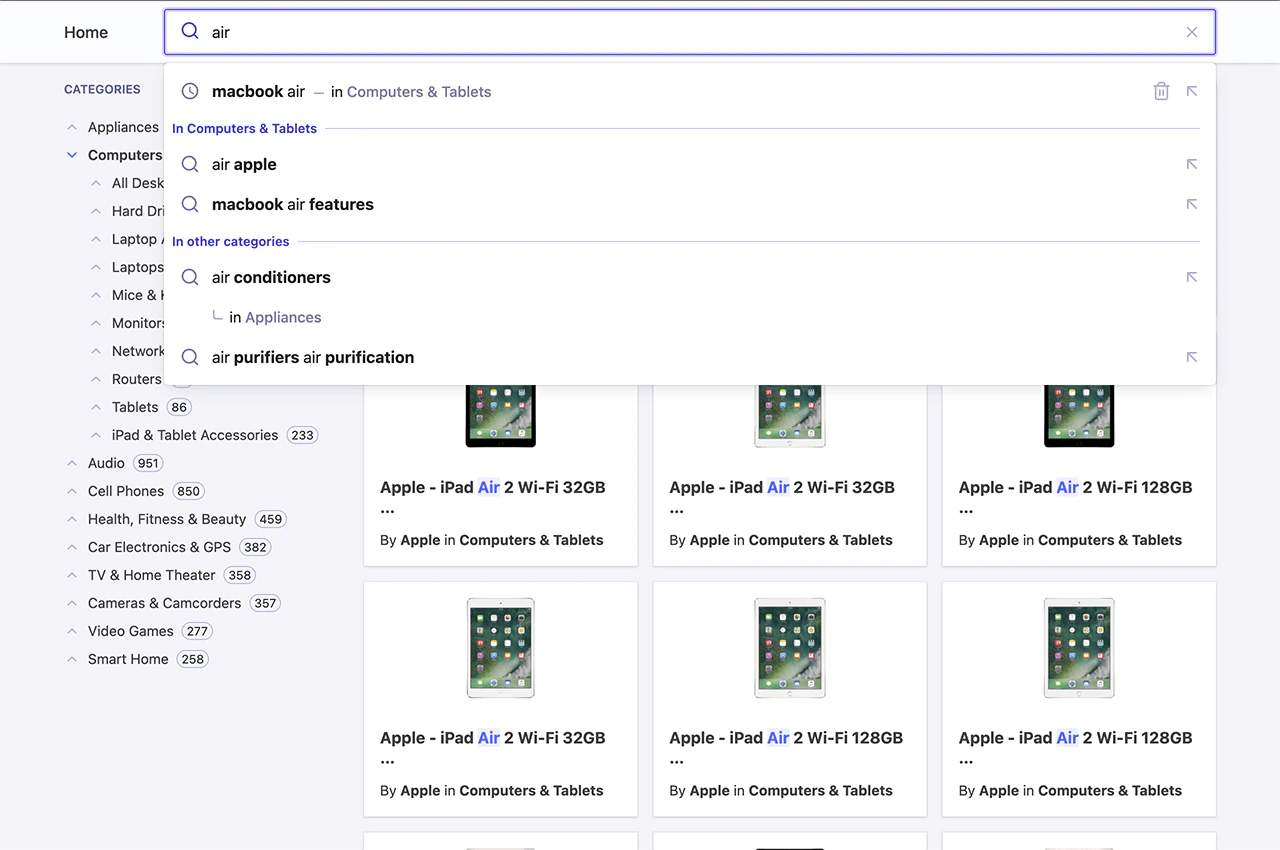 Run and edit the Autocomplete with Vue InstantSearch example in CodeSandbox.
Browse the source for the Autocomplete with Vue InstantSearch example on GitHub.
This guide starts from a brand new Vue InstantSearch application,
but you can adapt it to integrate Autocomplete in your existing implementation.
## Create a search page with Vue InstantSearch
First, use a starter template for the InstantSearch implementation.
The easiest way to achieve that is to use `create-instantsearch-app`,
a command-line utility that helps to quickly get your app started.
```sh Command line icon=square-terminal theme={"system"}
npx create-instantsearch-app@latest autocomplete-vue-instantsearch \
--template "Vue InstantSearch with Vue 3" \
--app-id "latency" \
--api-key "6be0576ff61c053d5f9a3225e2a90f76" \
--index-name instant_search \
--attributes-to-display name,description \
--attributes-for-faceting categories
```
The template uses a two-column layout with categories on the left and a search box,
hits, and a pagination widget on the right.
Next, set up InstantSearch to enable routing by using the default [`history`](/doc/api-reference/widgets/history-router/vue)
router, which you want to reuse in your Autocomplete integration.
This lets InstantSearch understand query parameters from the URL to derive its state.
```jsx Vue icon=code theme={"system"}
<-- ... -->
```
You should now have a working Vue InstantSearch application with routing.
## Use Autocomplete as a search box
Vue InstantSearch ships with a [``](/doc/api-reference/widgets/search-box/vue) component, but it doesn't offer autocomplete features like those seen on YouTube and Amazon. Instead, you can replace the `` with Algolia's Autocomplete.
With Vue, you can store all the logic of Autocomplete in a single file, and expose it as a component. Start by creating a file called `Autocomplete.vue`. As Autocomplete needs to interact with the InstantSearch state, you can add a mixin to transform it into a [custom Vue InstantSearch widget](/doc/guides/building-search-ui/widgets/create-your-own-widgets/vue).
```jsx Vue 3 theme={"system"}
```
```jsx Vue 2 theme={"system"}
```
You can now add this component into your app.
```jsx Vue icon=code theme={"system"}
```
Next, you can initialize Autocomplete in the `mounted()` hook of the component's lifecycle. Since it behaves as a custom InstantSearch widget, you have direct access to the underlying InstantSearch instance.
```jsx Autocomplete.vue (Vue 3) theme={"system"}
```
```jsx Autocomplete.vue (Vue 2) theme={"system"}
```
```js constants.js theme={"system"}
export const INSTANT_SEARCH_INDEX_NAME = "instant_search";
```
You can now remove the original `` component from your Vue InstantSearch implementation.
This replaces the InstantSearch search box with Autocomplete, and acts exactly like before.
But you can now add many more interesting features.
## Add recent searches
When you search on YouTube or Google and come back to the search box later on,
the autocomplete displays your recent searches.
This pattern lets users quickly access content by using the same path they took to find it in the first place.
Add recent searches to Autocomplete with the `@algolia/autocomplete-plugin-recent-searches` package.
It exposes a [`createLocalStorageRecentSearchesPlugin`](/doc/ui-libraries/autocomplete/api-reference/autocomplete-plugin-recent-searches/createLocalStorageRecentSearchesPlugin)
function to let you create a recent searches plugin.
```jsx Autocomplete.vue (Vue 3) theme={"system"}
```
```jsx Autocomplete.vue (Vue 2) theme={"system"}
```
Some of this code is abstracted in the following sections to simplify the examples.
Since the `recentSearchesPlugin` reads from [`localStorage`](https://developer.mozilla.org/en-US/docs/Web/API/Window/localStorage), you can't see any recent searches until you perform at least one query. To submit a search, make sure to press Enter on the query. Once you do, you'll see it appear as a recent search.
For more information, see [Recent searches](/doc/ui-libraries/autocomplete/guides/adding-recent-searches).
## Add Query Suggestions
**The most typical pattern you can see on every autocomplete is suggestions.**
They're predictions of queries that match what users are typing and are guaranteed to return results.
For example, when typing "how to" in Google,
the search engine suggests matching suggestions for users to complete their query.
It's beneficial on mobile devices, where typing is more demanding than a physical keyboard.
Autocomplete lets you add Query Suggestions with the `@algolia/autocomplete-plugin-query-suggestions` package.
It exposes a [`createQuerySuggestionsPlugin`](/doc/ui-libraries/autocomplete/api-reference/autocomplete-plugin-query-suggestions/createQuerySuggestionsPlugin)
function to let you create a Query Suggestions plugin.
This plugin requires a [Query Suggestions](/doc/guides/building-search-ui/ui-and-ux-patterns/query-suggestions/js) index.
```jsx App.vue theme={"system"}
```
```jsx Autocomplete.vue (Vue 3) theme={"system"}
```
```jsx Autocomplete.vue (Vue 2) theme={"system"}
```
```js constants.js theme={"system"}
export const INSTANT_SEARCH_INDEX_NAME = "instant_search";
export const INSTANT_SEARCH_QUERY_SUGGESTIONS =
"instant_search_demo_query_suggestions";
```
```js searchClient.js theme={"system"}
import { liteClient as algoliasearch } from "algoliasearch/lite";
export const searchClient = algoliasearch(
"latency",
"6be0576ff61c053d5f9a3225e2a90f76",
);
```
See also:
* [Suggested searches](/doc/ui-libraries/autocomplete/guides/adding-suggested-searches)
* [Autocomplete Query Suggestions plugin](/doc/ui-libraries/autocomplete/api-reference/autocomplete-plugin-query-suggestions)
## Debounce search results
Having two sets of results update as you type generates many UI flashes.
This is distracting for users because two distinct sections compete for their attention.
You can mitigate this problem by debouncing search results.
```jsx Vue icon=code theme={"system"}
```
## Support categories in Query Suggestions
**A key feature of Autocomplete is to pre-configure your InstantSearch page.**
The Query Suggestions plugin supports categories that you can use to refine the query and the category in a single interaction.
This pattern brings users to the right category without interacting with the [`ais-hierarchical-menu`](/doc/api-reference/widgets/hierarchical-menu/vue) widget but using Autocomplete.
You need to filter by category and support categories in the helpers you created at the beginning:
```jsx App.vue theme={"system"}
```
```jsx Autocomplete.vue (Vue 3) theme={"system"}
```
```jsx Autocomplete.vue (Vue 2) theme={"system"}
```
```js constants.js theme={"system"}
/* ... */
export const INSTANT_SEARCH_HIERARCHICAL_ATTRIBUTE =
"hierarchicalCategories.lvl0";
```
Update the plugins to forward the category to the helpers:
```jsx Autocomplete.vue (Vue 3) theme={"system"}
```
```jsx Autocomplete.vue (Vue 2) theme={"system"}
```
Implement the `onReset` function on your Autocomplete instance to also reset the InstantSearch category.
```jsx JSX icon=code theme={"system"}
autocomplete({
/* ... */
onReset() {
setInstantSearchUiState({ query: "", resetCategory: true });
},
});
```
## Add contextual Query Suggestions
For an even richer Autocomplete experience,
you can pick up the currently active InstantSearch category and provide suggestions for both this specific category and others. This pattern lets you reduce the search scope to the current category,
like an actual department store, or broaden the suggestions to get out of the current category.
Run and edit the Autocomplete with Vue InstantSearch example in CodeSandbox.
Browse the source for the Autocomplete with Vue InstantSearch example on GitHub.
This guide starts from a brand new Vue InstantSearch application,
but you can adapt it to integrate Autocomplete in your existing implementation.
## Create a search page with Vue InstantSearch
First, use a starter template for the InstantSearch implementation.
The easiest way to achieve that is to use `create-instantsearch-app`,
a command-line utility that helps to quickly get your app started.
```sh Command line icon=square-terminal theme={"system"}
npx create-instantsearch-app@latest autocomplete-vue-instantsearch \
--template "Vue InstantSearch with Vue 3" \
--app-id "latency" \
--api-key "6be0576ff61c053d5f9a3225e2a90f76" \
--index-name instant_search \
--attributes-to-display name,description \
--attributes-for-faceting categories
```
The template uses a two-column layout with categories on the left and a search box,
hits, and a pagination widget on the right.
Next, set up InstantSearch to enable routing by using the default [`history`](/doc/api-reference/widgets/history-router/vue)
router, which you want to reuse in your Autocomplete integration.
This lets InstantSearch understand query parameters from the URL to derive its state.
```jsx Vue icon=code theme={"system"}
<-- ... -->
```
You should now have a working Vue InstantSearch application with routing.
## Use Autocomplete as a search box
Vue InstantSearch ships with a [``](/doc/api-reference/widgets/search-box/vue) component, but it doesn't offer autocomplete features like those seen on YouTube and Amazon. Instead, you can replace the `` with Algolia's Autocomplete.
With Vue, you can store all the logic of Autocomplete in a single file, and expose it as a component. Start by creating a file called `Autocomplete.vue`. As Autocomplete needs to interact with the InstantSearch state, you can add a mixin to transform it into a [custom Vue InstantSearch widget](/doc/guides/building-search-ui/widgets/create-your-own-widgets/vue).
```jsx Vue 3 theme={"system"}
```
```jsx Vue 2 theme={"system"}
```
You can now add this component into your app.
```jsx Vue icon=code theme={"system"}
```
Next, you can initialize Autocomplete in the `mounted()` hook of the component's lifecycle. Since it behaves as a custom InstantSearch widget, you have direct access to the underlying InstantSearch instance.
```jsx Autocomplete.vue (Vue 3) theme={"system"}
```
```jsx Autocomplete.vue (Vue 2) theme={"system"}
```
```js constants.js theme={"system"}
export const INSTANT_SEARCH_INDEX_NAME = "instant_search";
```
You can now remove the original `` component from your Vue InstantSearch implementation.
This replaces the InstantSearch search box with Autocomplete, and acts exactly like before.
But you can now add many more interesting features.
## Add recent searches
When you search on YouTube or Google and come back to the search box later on,
the autocomplete displays your recent searches.
This pattern lets users quickly access content by using the same path they took to find it in the first place.
Add recent searches to Autocomplete with the `@algolia/autocomplete-plugin-recent-searches` package.
It exposes a [`createLocalStorageRecentSearchesPlugin`](/doc/ui-libraries/autocomplete/api-reference/autocomplete-plugin-recent-searches/createLocalStorageRecentSearchesPlugin)
function to let you create a recent searches plugin.
```jsx Autocomplete.vue (Vue 3) theme={"system"}
```
```jsx Autocomplete.vue (Vue 2) theme={"system"}
```
Some of this code is abstracted in the following sections to simplify the examples.
Since the `recentSearchesPlugin` reads from [`localStorage`](https://developer.mozilla.org/en-US/docs/Web/API/Window/localStorage), you can't see any recent searches until you perform at least one query. To submit a search, make sure to press Enter on the query. Once you do, you'll see it appear as a recent search.
For more information, see [Recent searches](/doc/ui-libraries/autocomplete/guides/adding-recent-searches).
## Add Query Suggestions
**The most typical pattern you can see on every autocomplete is suggestions.**
They're predictions of queries that match what users are typing and are guaranteed to return results.
For example, when typing "how to" in Google,
the search engine suggests matching suggestions for users to complete their query.
It's beneficial on mobile devices, where typing is more demanding than a physical keyboard.
Autocomplete lets you add Query Suggestions with the `@algolia/autocomplete-plugin-query-suggestions` package.
It exposes a [`createQuerySuggestionsPlugin`](/doc/ui-libraries/autocomplete/api-reference/autocomplete-plugin-query-suggestions/createQuerySuggestionsPlugin)
function to let you create a Query Suggestions plugin.
This plugin requires a [Query Suggestions](/doc/guides/building-search-ui/ui-and-ux-patterns/query-suggestions/js) index.
```jsx App.vue theme={"system"}
```
```jsx Autocomplete.vue (Vue 3) theme={"system"}
```
```jsx Autocomplete.vue (Vue 2) theme={"system"}
```
```js constants.js theme={"system"}
export const INSTANT_SEARCH_INDEX_NAME = "instant_search";
export const INSTANT_SEARCH_QUERY_SUGGESTIONS =
"instant_search_demo_query_suggestions";
```
```js searchClient.js theme={"system"}
import { liteClient as algoliasearch } from "algoliasearch/lite";
export const searchClient = algoliasearch(
"latency",
"6be0576ff61c053d5f9a3225e2a90f76",
);
```
See also:
* [Suggested searches](/doc/ui-libraries/autocomplete/guides/adding-suggested-searches)
* [Autocomplete Query Suggestions plugin](/doc/ui-libraries/autocomplete/api-reference/autocomplete-plugin-query-suggestions)
## Debounce search results
Having two sets of results update as you type generates many UI flashes.
This is distracting for users because two distinct sections compete for their attention.
You can mitigate this problem by debouncing search results.
```jsx Vue icon=code theme={"system"}
```
## Support categories in Query Suggestions
**A key feature of Autocomplete is to pre-configure your InstantSearch page.**
The Query Suggestions plugin supports categories that you can use to refine the query and the category in a single interaction.
This pattern brings users to the right category without interacting with the [`ais-hierarchical-menu`](/doc/api-reference/widgets/hierarchical-menu/vue) widget but using Autocomplete.
You need to filter by category and support categories in the helpers you created at the beginning:
```jsx App.vue theme={"system"}
```
```jsx Autocomplete.vue (Vue 3) theme={"system"}
```
```jsx Autocomplete.vue (Vue 2) theme={"system"}
```
```js constants.js theme={"system"}
/* ... */
export const INSTANT_SEARCH_HIERARCHICAL_ATTRIBUTE =
"hierarchicalCategories.lvl0";
```
Update the plugins to forward the category to the helpers:
```jsx Autocomplete.vue (Vue 3) theme={"system"}
```
```jsx Autocomplete.vue (Vue 2) theme={"system"}
```
Implement the `onReset` function on your Autocomplete instance to also reset the InstantSearch category.
```jsx JSX icon=code theme={"system"}
autocomplete({
/* ... */
onReset() {
setInstantSearchUiState({ query: "", resetCategory: true });
},
});
```
## Add contextual Query Suggestions
For an even richer Autocomplete experience,
you can pick up the currently active InstantSearch category and provide suggestions for both this specific category and others. This pattern lets you reduce the search scope to the current category,
like an actual department store, or broaden the suggestions to get out of the current category.
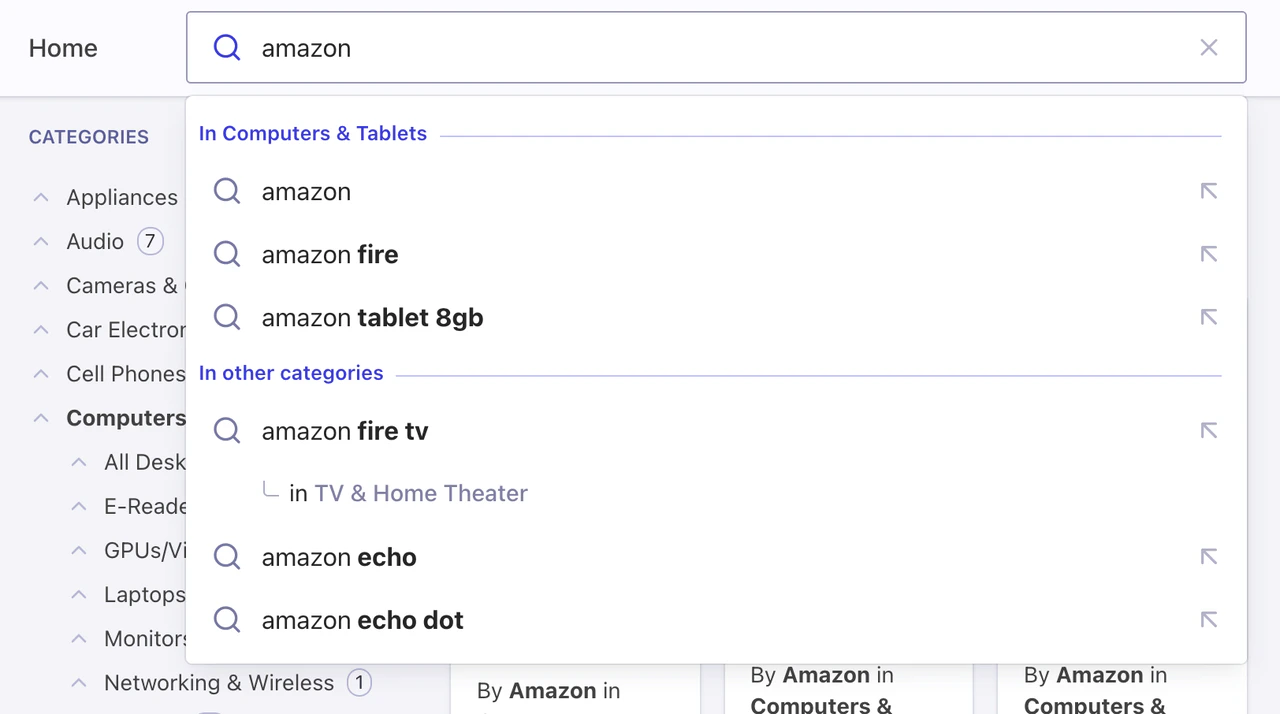 First, make sure to set your category attribute as a facet in your Query Suggestions index. In this demo, the attribute to facet is `instant_search.facets.exact_matches.hierarchicalCategories.lvl0.value`.
```jsx Autocomplete.vue (Vue 3) theme={"system"}
```
```jsx Autocomplete.vue (Vue 2) theme={"system"}
```
## Next steps
**Autocomplete is now the primary method for users to refine Vue InstantSearch results.**
From now on, you're leveraging the complete Autocomplete ecosystem to bring a state-of-the-art search experience for desktop and mobile.
You can now add Autocomplete everywhere on your site and redirect users to the search page whenever they submit a search or after they select a suggestion.
You can also use context from the current page to personalize the autocomplete experience.
For example, you could display a preview of matching results in a panel for each suggestion and let InstantSearch provide these results once on the search page.
Code examples:
* [Autocomplete with InstantSearch.js](https://codesandbox.io/s/github/algolia/autocomplete/tree/next/examples/instantsearch?file=/src/app.ts)
* [Autocomplete with React InstantSearch](https://codesandbox.io/s/github/algolia/autocomplete/tree/next/examples/react-instantsearch?file=/src/App.tsx)
* [Autocomplete with Vue InstantSearch](https://codesandbox.io/s/github/algolia/autocomplete/tree/next/examples/vue-instantsearch?file=/src/App.vue)
First, make sure to set your category attribute as a facet in your Query Suggestions index. In this demo, the attribute to facet is `instant_search.facets.exact_matches.hierarchicalCategories.lvl0.value`.
```jsx Autocomplete.vue (Vue 3) theme={"system"}
```
```jsx Autocomplete.vue (Vue 2) theme={"system"}
```
## Next steps
**Autocomplete is now the primary method for users to refine Vue InstantSearch results.**
From now on, you're leveraging the complete Autocomplete ecosystem to bring a state-of-the-art search experience for desktop and mobile.
You can now add Autocomplete everywhere on your site and redirect users to the search page whenever they submit a search or after they select a suggestion.
You can also use context from the current page to personalize the autocomplete experience.
For example, you could display a preview of matching results in a panel for each suggestion and let InstantSearch provide these results once on the search page.
Code examples:
* [Autocomplete with InstantSearch.js](https://codesandbox.io/s/github/algolia/autocomplete/tree/next/examples/instantsearch?file=/src/app.ts)
* [Autocomplete with React InstantSearch](https://codesandbox.io/s/github/algolia/autocomplete/tree/next/examples/react-instantsearch?file=/src/App.tsx)
* [Autocomplete with Vue InstantSearch](https://codesandbox.io/s/github/algolia/autocomplete/tree/next/examples/vue-instantsearch?file=/src/App.vue)