> ## Documentation Index
> Fetch the complete documentation index at: https://algolia.com/llms.txt
> Use this file to discover all available pages before exploring further.
# Advanced federated search experience for ecommerce
> Learn how to combine suggestions from multiple indices using a two-column layout.
export const Records = () =>
records
;
export const Facet = () =>
facet
;
export const Application = () =>
application
;
Autocomplete is also available as an experimental widget in InstantSearch,
making it easier to integrate into your search experience.
For more information,
see the API reference for [InstantSearch.js](/doc/api-reference/widgets/autocomplete/js) or
[React InstantSearch](/doc/api-reference/widgets/autocomplete/react).
A federated search offers recent searches, popular searches, search results,
and other content from multiple indices in a single interface.
The following example shows how to combine multiple indices
using Autocomplete with a [two-column layout](/doc/ui-libraries/autocomplete/guides/creating-a-multi-column-layout).
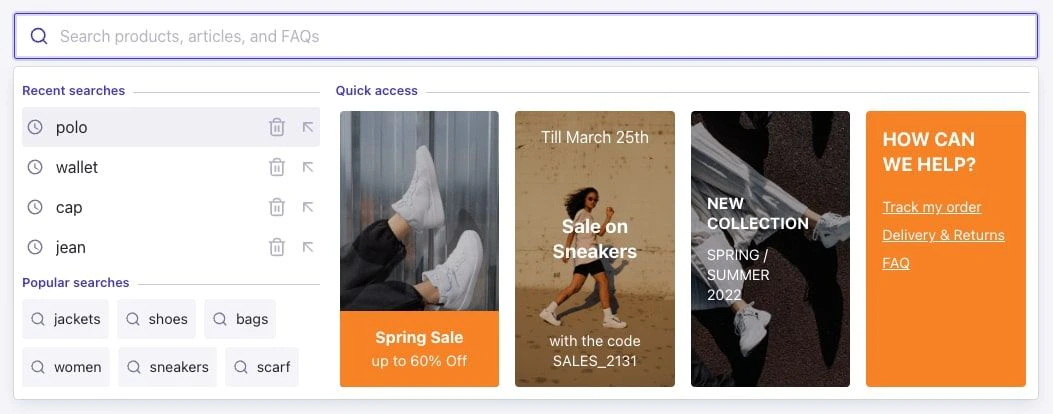
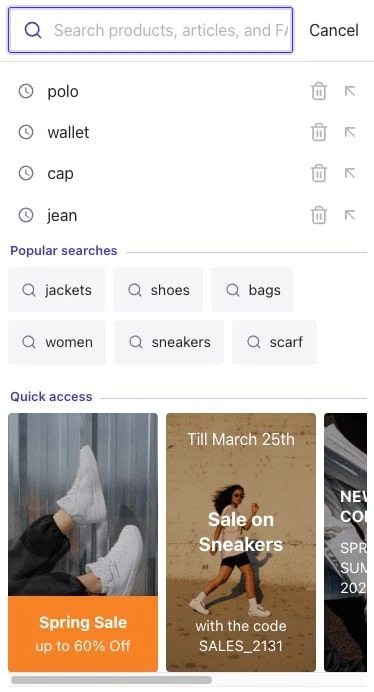 Run and edit the Advanced federated search experience for ecommerce example in CodeSandbox.
Browse the source for the Advanced federated search experience for ecommerce example on GitHub.
## Understand the user interface
This example's user interface consists of three search states, each one containing different plugins.
| Search state | Plugins |
| ------------------------------------------ | ---------------------------------------------------------------------------------------------------------------------------------------------------------------------------------------------------------------------------------------------------------------------------------------------------------------------------------- |
| **[Empty query](#empty-query-state)** | • [Recent searches](#recent-searches)
Run and edit the Advanced federated search experience for ecommerce example in CodeSandbox.
Browse the source for the Advanced federated search experience for ecommerce example on GitHub.
## Understand the user interface
This example's user interface consists of three search states, each one containing different plugins.
| Search state | Plugins |
| ------------------------------------------ | ---------------------------------------------------------------------------------------------------------------------------------------------------------------------------------------------------------------------------------------------------------------------------------------------------------------------------------- |
| **[Empty query](#empty-query-state)** | • [Recent searches](#recent-searches)
• [Popular searches](#popular-searches)
• [Quick access](#quick-access) |
| **[Results](#results-search-state)** | • [Product Query Suggestions](#product-query-suggestions)
• [Product category suggestions](#product-category-suggestions)
• [Product brand suggestions](#product-brand-suggestions)
• [FAQ suggestions](#faq-suggestions)
• [Products preview](#products-preview)
• [Articles preview](#articles-preview) |
| **[No results](#no-results-search-state)** | • [No results message](#no-results-message)
• [Popular category suggestions](#popular-category-suggestions) |
### Empty query state
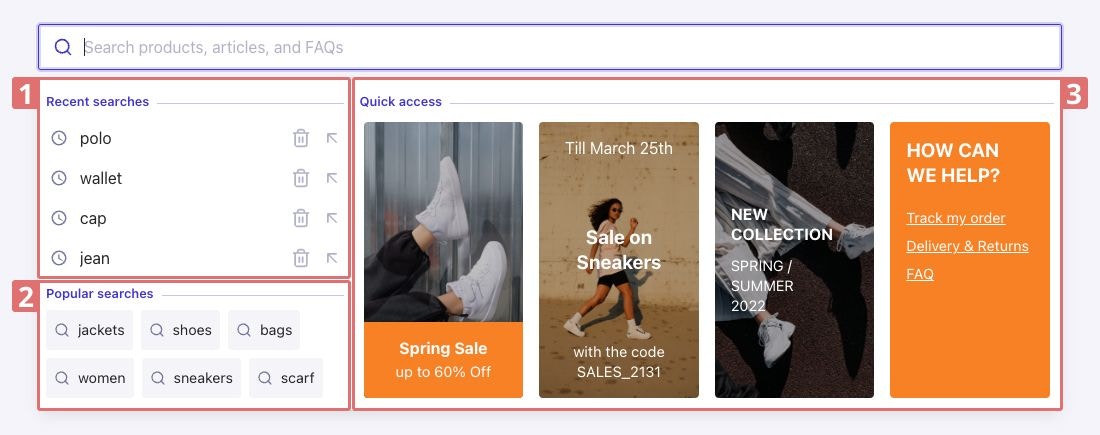
The empty query state describes what users see in the search box before typing a search query.
This example provides some recent and popular searches on the left (1 and 2) and quick-access items on the right (3).
 #### Recent searches
The [`autocomplete-plugin-recent-searches`](/doc/ui-libraries/autocomplete/api-reference/autocomplete-plugin-recent-searches)
plugin fetches and then saves recent searches on the user's local storage.
If there aren't any recent searches,
the recent searches section is hidden.
A maximum of 4 recent searches are displayed by default.
To customize the plugin options,
edit the [`recentSearchesPlugin`](https://github.com/algolia/autocomplete/blob/next/examples/two-column-layout/src/plugins/recentSearchesPlugin.tsx) file.
#### Popular searches
The [`autocomplete-plugin-query-suggestions`](/doc/ui-libraries/autocomplete/api-reference/autocomplete-plugin-query-suggestions)
plugin retrieves hits from the [Query Suggestions index](#product-query-suggestions-index).
The first 6 most popular query suggestions
are displayed.
By default, query suggestions are sorted by the `popularity` attribute in descending order (most popular first).
To customize the plugin options,
edit the [`popularPlugin`](https://github.com/algolia/autocomplete/blob/next/examples/two-column-layout/src/plugins/popularPlugin.tsx) file.
#### Quick access
Quick access is a custom plugin that retrieves the JSON data from the response coming from a [Rule](/doc/guides/managing-results/rules/rules-overview)
configured in the Algolia dashboard on the [products index](#products-index).
The rule is triggered by a rule context defined in the
[Autocomplete plugin](https://github.com/algolia/autocomplete/blob/next/examples/two-column-layout/src/plugins/quickAccessPlugin.tsx#L32).
The example uses four item templates: `sales-banner`, `sales-code`, `new-collection`, and `help`.
```json sales-banner theme={"system"}
{
"template": "sales-banner",
"title": "Spring Sale",
"subtitle": "up to 60% Off",
"image": "https://res.cloudinary.com/hilnmyskv/image/upload/v1645453369/sales_banner_y1hsr8.jpg",
"href": "#"
}
```
```json sales-code theme={"system"}
{
"template": "sales-code",
"title": "Sale on\nSneakers",
"subtitle": "with the code\nSALES_2131",
"image": "https://res.cloudinary.com/hilnmyskv/image/upload/v1645453422/sales_code_vuatep.jpg",
"href": "#",
"date": "Till March 25th"
}
```
```json new-collection theme={"system"}
{
"template": "new-collection",
"title": "New\ncollection",
"subtitle": "Spring / summer\n2022",
"image": "https://res.cloudinary.com/hilnmyskv/image/upload/v1645453466/new_collection_nloeb6.jpg",
"href": "#"
}
```
```json help theme={"system"}
{
"template": "help",
"title": "How can\nwe help?",
"href": "#",
"links": [
{
"text": "Track my order",
"href": "#"
},
{
"text": "Delivery & Returns",
"href": "#"
},
{
"text": "FAQ",
"href": "#"
}
]
}
```
Customize them or create a new template by using a new item's `template` value in the custom JSON data of the Rule and style it as you wish in the [CSS file](https://github.com/algolia/autocomplete/blob/next/examples/two-column-layout/style.css#L450-L461).
This is the rule's custom JSON data structure:
```jsonc JSON icon=braces theme={"system"}
{
"items": [/* Array of template items */]
}
```
To customize the plugin,
edit the [`quickAccessPlugin`](https://github.com/algolia/autocomplete/blob/next/examples/two-column-layout/src/plugins/quickAccessPlugin.tsx) file.
The complete rule configuration is in the [`products_configuration.json`](https://github.com/algolia/datasets/tree/master/ecommerce-federated/products_configuration.json) file.
### Results search state
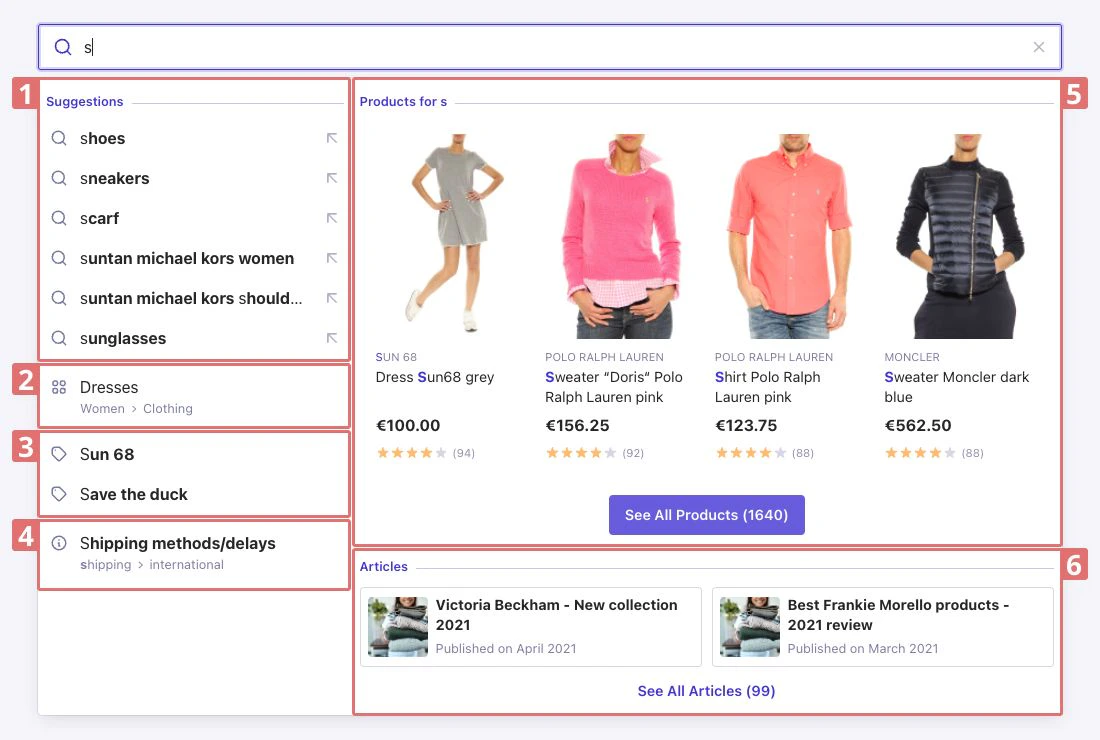
The results search state appears as soon as you start typing a query in the search box.
It provides **multiple suggestions** on the left and a preview of relevant **products and articles** on the right.
The suggestions are combined using the [Autocomplete Reshape API](/doc/ui-libraries/autocomplete/guides/reshaping-sources) following two rules:
* Suggestions are **deduplicated** between sources.
* A maximum of 1 category, 2 brands, and 1 FAQ are displayed.
The rest is filled up with query suggestions to reach a total of 10 suggestions on desktop and 6 suggestions on mobile.
This layout provides users with what they're looking for (however they may approach their search)
while maximizing the display on any device.
#### Recent searches
The [`autocomplete-plugin-recent-searches`](/doc/ui-libraries/autocomplete/api-reference/autocomplete-plugin-recent-searches)
plugin fetches and then saves recent searches on the user's local storage.
If there aren't any recent searches,
the recent searches section is hidden.
A maximum of 4 recent searches are displayed by default.
To customize the plugin options,
edit the [`recentSearchesPlugin`](https://github.com/algolia/autocomplete/blob/next/examples/two-column-layout/src/plugins/recentSearchesPlugin.tsx) file.
#### Popular searches
The [`autocomplete-plugin-query-suggestions`](/doc/ui-libraries/autocomplete/api-reference/autocomplete-plugin-query-suggestions)
plugin retrieves hits from the [Query Suggestions index](#product-query-suggestions-index).
The first 6 most popular query suggestions
are displayed.
By default, query suggestions are sorted by the `popularity` attribute in descending order (most popular first).
To customize the plugin options,
edit the [`popularPlugin`](https://github.com/algolia/autocomplete/blob/next/examples/two-column-layout/src/plugins/popularPlugin.tsx) file.
#### Quick access
Quick access is a custom plugin that retrieves the JSON data from the response coming from a [Rule](/doc/guides/managing-results/rules/rules-overview)
configured in the Algolia dashboard on the [products index](#products-index).
The rule is triggered by a rule context defined in the
[Autocomplete plugin](https://github.com/algolia/autocomplete/blob/next/examples/two-column-layout/src/plugins/quickAccessPlugin.tsx#L32).
The example uses four item templates: `sales-banner`, `sales-code`, `new-collection`, and `help`.
```json sales-banner theme={"system"}
{
"template": "sales-banner",
"title": "Spring Sale",
"subtitle": "up to 60% Off",
"image": "https://res.cloudinary.com/hilnmyskv/image/upload/v1645453369/sales_banner_y1hsr8.jpg",
"href": "#"
}
```
```json sales-code theme={"system"}
{
"template": "sales-code",
"title": "Sale on\nSneakers",
"subtitle": "with the code\nSALES_2131",
"image": "https://res.cloudinary.com/hilnmyskv/image/upload/v1645453422/sales_code_vuatep.jpg",
"href": "#",
"date": "Till March 25th"
}
```
```json new-collection theme={"system"}
{
"template": "new-collection",
"title": "New\ncollection",
"subtitle": "Spring / summer\n2022",
"image": "https://res.cloudinary.com/hilnmyskv/image/upload/v1645453466/new_collection_nloeb6.jpg",
"href": "#"
}
```
```json help theme={"system"}
{
"template": "help",
"title": "How can\nwe help?",
"href": "#",
"links": [
{
"text": "Track my order",
"href": "#"
},
{
"text": "Delivery & Returns",
"href": "#"
},
{
"text": "FAQ",
"href": "#"
}
]
}
```
Customize them or create a new template by using a new item's `template` value in the custom JSON data of the Rule and style it as you wish in the [CSS file](https://github.com/algolia/autocomplete/blob/next/examples/two-column-layout/style.css#L450-L461).
This is the rule's custom JSON data structure:
```jsonc JSON icon=braces theme={"system"}
{
"items": [/* Array of template items */]
}
```
To customize the plugin,
edit the [`quickAccessPlugin`](https://github.com/algolia/autocomplete/blob/next/examples/two-column-layout/src/plugins/quickAccessPlugin.tsx) file.
The complete rule configuration is in the [`products_configuration.json`](https://github.com/algolia/datasets/tree/master/ecommerce-federated/products_configuration.json) file.
### Results search state
The results search state appears as soon as you start typing a query in the search box.
It provides **multiple suggestions** on the left and a preview of relevant **products and articles** on the right.
The suggestions are combined using the [Autocomplete Reshape API](/doc/ui-libraries/autocomplete/guides/reshaping-sources) following two rules:
* Suggestions are **deduplicated** between sources.
* A maximum of 1 category, 2 brands, and 1 FAQ are displayed.
The rest is filled up with query suggestions to reach a total of 10 suggestions on desktop and 6 suggestions on mobile.
This layout provides users with what they're looking for (however they may approach their search)
while maximizing the display on any device.
 #### Key
1. [Product query suggestions](#product-query-suggestions)
2. [Product category suggestions](#product-category-suggestions)
3. [Product brand suggestions](#product-brand-suggestions)
4. [FAQ suggestions](#faq-suggestions)
5. [Products preview](#products-preview)
6. [Articles preview](#articles-preview)
#### Product Query Suggestions
The [`autocomplete-plugin-query-suggestions`](/doc/ui-libraries/autocomplete/api-reference/autocomplete-plugin-query-suggestions)
plugin retrieves hits matching the query from the [product Query Suggestions index](#product-query-suggestions-index).
A maximum of 10 product query suggestions are displayed by default.
To customize the plugin options,
edit the [`querySuggestionsPlugin`](https://github.com/algolia/autocomplete/blob/next/examples/two-column-layout/src/plugins/querySuggestionsPlugin.tsx) file.
##### Index records and configuration
* [`products_query_suggestions.json`](https://github.com/algolia/datasets/tree/master/ecommerce-federated/products_query_suggestions.json)
* [`products_query_suggestions_configuration.json`](https://github.com/algolia/datasets/tree/master/ecommerce-federated/products_query_suggestions_configuration.json)
#### Product category suggestions
**Product category suggestions** is a custom plugin that retrieves the category of the first matching product from the [products index](#products-index).
A maximum of 1 product category is displayed by default.
To customize the plugin, edit the [`categoriesPlugin`](https://github.com/algolia/autocomplete/blob/next/examples/two-column-layout/src/plugins/categoriesPlugin.tsx) file.
#### Product brand suggestions
**Product brand suggestions** is a custom plugin that retrieves the product brands values matching the query from the [products index](#products-index).
A maximum of two product brands are displayed by default.
To customize the plugin, edit the [`brandsPlugin`](https://github.com/algolia/autocomplete/blob/next/examples/two-column-layout/src/plugins/brandsPlugin.tsx) file.
#### FAQ suggestions
**FAQ suggestions** is a custom plugin that retrieves an FAQ matching the query from the [FAQ index](#faq-index).
A maximum of 1 FAQ is displayed by default.
To customize the plugin,
edit the [`faqPlugin`](https://github.com/algolia/autocomplete/blob/next/examples/two-column-layout/src/plugins/faqPlugin.tsx) file.
The are in the [`faq.json`](https://github.com/algolia/datasets/tree/master/ecommerce-federated/faq.json) file.
##### Sample FAQ record
```json JSON icon=braces theme={"system"}
{
"objectID": "5",
"title": "Shipping methods/delays",
"list_categories": ["shipping", "international"]
}
```
#### Products preview
Products preview is a custom plugin that retrieves products matching the query and displays a preview (including image, brand, name, price, and review rating/count) from the [products index](#products-index).
A **See All** button that lists the number of other matching products (if any) is also displayed.
A maximum of 4 product previews are displayed by default.
To customize the plugin,
edit the [`productsPlugin`](https://github.com/algolia/autocomplete/blob/next/examples/two-column-layout/src/plugins/productsPlugin.tsx) file.
##### Index records and configuration
* [`products.json`](https://github.com/algolia/datasets/tree/master/ecommerce-federated/products.json)
* [`products_configuration.json`](https://github.com/algolia/datasets/tree/master/ecommerce-federated/products_configuration.json)
##### Simplified sample record
```json JSON icon=braces theme={"system"}
{
"objectID": "M0E20000000DG2H",
"name": "Dress Sun68 grey",
"brand": "Sun 68",
"image_blurred": "LbR:7=t7_4M{IUof%MWBxuWBRPt7",
"image_urls": [
"https://res.cloudinary.com/hilnmyskv/image/upload/v1638371844/flagship_sunrise/M0E20000000DG2H_0.jpg",
"https://res.cloudinary.com/hilnmyskv/image/upload/v1638371845/flagship_sunrise/M0E20000000DG2H_1.jpg",
"https://res.cloudinary.com/hilnmyskv/image/upload/v1638371846/flagship_sunrise/M0E20000000DG2H_2.jpg"
],
"price": {
"currency": "EUR",
"discount_level": -100,
"discounted_value": 0,
"on_sales": false,
"value": 100
},
"reviews": {
"bayesian_avg": 3.957894736842105,
"count": 94,
"rating": 4
}
}
```
#### Articles preview
**Articles preview** is a custom plugin that retrieves articles matching the query from the [articles index](#articles-index).
A **See All** button that lists the number of other matching articles (if any) is also displayed.
A maximum of 2 article previews are displayed by default.
To customize the plugin, edit the [`articlesPlugin`](https://github.com/algolia/autocomplete/blob/next/examples/two-column-layout/src/plugins/articlesPlugin.tsx) file.
##### Index records
* [`articles.json`](https://github.com/algolia/datasets/tree/master/ecommerce-federated/articles.json).
##### Sample record
```json JSON icon=braces theme={"system"}
{
"objectID": "98",
"title": "Victoria Beckham - New collection 2021",
"image_url": "https://media.istockphoto.com/photos/stacked-and-ready-to-be-packed-picture-id1286024201?b=1&k=20&m=1286024201&s=170x170",
"date": "2021-03-31T22:00:00.000Z"
}
```
### No results search state
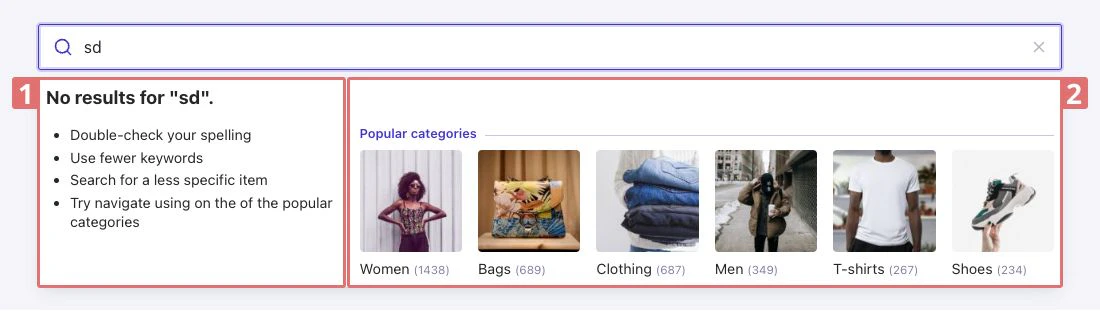
The no results search state is displayed when no results matching are found for the current query.
It provides some advice on the left and popular categories on the right.
#### Key
1. [Product query suggestions](#product-query-suggestions)
2. [Product category suggestions](#product-category-suggestions)
3. [Product brand suggestions](#product-brand-suggestions)
4. [FAQ suggestions](#faq-suggestions)
5. [Products preview](#products-preview)
6. [Articles preview](#articles-preview)
#### Product Query Suggestions
The [`autocomplete-plugin-query-suggestions`](/doc/ui-libraries/autocomplete/api-reference/autocomplete-plugin-query-suggestions)
plugin retrieves hits matching the query from the [product Query Suggestions index](#product-query-suggestions-index).
A maximum of 10 product query suggestions are displayed by default.
To customize the plugin options,
edit the [`querySuggestionsPlugin`](https://github.com/algolia/autocomplete/blob/next/examples/two-column-layout/src/plugins/querySuggestionsPlugin.tsx) file.
##### Index records and configuration
* [`products_query_suggestions.json`](https://github.com/algolia/datasets/tree/master/ecommerce-federated/products_query_suggestions.json)
* [`products_query_suggestions_configuration.json`](https://github.com/algolia/datasets/tree/master/ecommerce-federated/products_query_suggestions_configuration.json)
#### Product category suggestions
**Product category suggestions** is a custom plugin that retrieves the category of the first matching product from the [products index](#products-index).
A maximum of 1 product category is displayed by default.
To customize the plugin, edit the [`categoriesPlugin`](https://github.com/algolia/autocomplete/blob/next/examples/two-column-layout/src/plugins/categoriesPlugin.tsx) file.
#### Product brand suggestions
**Product brand suggestions** is a custom plugin that retrieves the product brands values matching the query from the [products index](#products-index).
A maximum of two product brands are displayed by default.
To customize the plugin, edit the [`brandsPlugin`](https://github.com/algolia/autocomplete/blob/next/examples/two-column-layout/src/plugins/brandsPlugin.tsx) file.
#### FAQ suggestions
**FAQ suggestions** is a custom plugin that retrieves an FAQ matching the query from the [FAQ index](#faq-index).
A maximum of 1 FAQ is displayed by default.
To customize the plugin,
edit the [`faqPlugin`](https://github.com/algolia/autocomplete/blob/next/examples/two-column-layout/src/plugins/faqPlugin.tsx) file.
The are in the [`faq.json`](https://github.com/algolia/datasets/tree/master/ecommerce-federated/faq.json) file.
##### Sample FAQ record
```json JSON icon=braces theme={"system"}
{
"objectID": "5",
"title": "Shipping methods/delays",
"list_categories": ["shipping", "international"]
}
```
#### Products preview
Products preview is a custom plugin that retrieves products matching the query and displays a preview (including image, brand, name, price, and review rating/count) from the [products index](#products-index).
A **See All** button that lists the number of other matching products (if any) is also displayed.
A maximum of 4 product previews are displayed by default.
To customize the plugin,
edit the [`productsPlugin`](https://github.com/algolia/autocomplete/blob/next/examples/two-column-layout/src/plugins/productsPlugin.tsx) file.
##### Index records and configuration
* [`products.json`](https://github.com/algolia/datasets/tree/master/ecommerce-federated/products.json)
* [`products_configuration.json`](https://github.com/algolia/datasets/tree/master/ecommerce-federated/products_configuration.json)
##### Simplified sample record
```json JSON icon=braces theme={"system"}
{
"objectID": "M0E20000000DG2H",
"name": "Dress Sun68 grey",
"brand": "Sun 68",
"image_blurred": "LbR:7=t7_4M{IUof%MWBxuWBRPt7",
"image_urls": [
"https://res.cloudinary.com/hilnmyskv/image/upload/v1638371844/flagship_sunrise/M0E20000000DG2H_0.jpg",
"https://res.cloudinary.com/hilnmyskv/image/upload/v1638371845/flagship_sunrise/M0E20000000DG2H_1.jpg",
"https://res.cloudinary.com/hilnmyskv/image/upload/v1638371846/flagship_sunrise/M0E20000000DG2H_2.jpg"
],
"price": {
"currency": "EUR",
"discount_level": -100,
"discounted_value": 0,
"on_sales": false,
"value": 100
},
"reviews": {
"bayesian_avg": 3.957894736842105,
"count": 94,
"rating": 4
}
}
```
#### Articles preview
**Articles preview** is a custom plugin that retrieves articles matching the query from the [articles index](#articles-index).
A **See All** button that lists the number of other matching articles (if any) is also displayed.
A maximum of 2 article previews are displayed by default.
To customize the plugin, edit the [`articlesPlugin`](https://github.com/algolia/autocomplete/blob/next/examples/two-column-layout/src/plugins/articlesPlugin.tsx) file.
##### Index records
* [`articles.json`](https://github.com/algolia/datasets/tree/master/ecommerce-federated/articles.json).
##### Sample record
```json JSON icon=braces theme={"system"}
{
"objectID": "98",
"title": "Victoria Beckham - New collection 2021",
"image_url": "https://media.istockphoto.com/photos/stacked-and-ready-to-be-packed-picture-id1286024201?b=1&k=20&m=1286024201&s=170x170",
"date": "2021-03-31T22:00:00.000Z"
}
```
### No results search state
The no results search state is displayed when no results matching are found for the current query.
It provides some advice on the left and popular categories on the right.
 #### No results message
To customize the no results message, edit the
[`render`](https://github.com/algolia/autocomplete/blob/next/examples/two-column-layout/src/app.tsx#L144-L151)
method in the `app.tsx` file.
#### Popular category suggestions
**Popular category suggestions** is a custom plugin that retrieves facet values for categories with the most number of products from the [products index](#products-index).
Image URLs are hard-coded for the first 6 categories.
To customize the plugin, edit the [`popularCategoriesPlugin`](https://github.com/algolia/autocomplete/blob/next/examples/two-column-layout/src/plugins/popularCategoriesPlugin.tsx) file.
## Technical requirements
### Dependencies
The example has multiple dependencies:
* [`autocomplete-js`](/doc/ui-libraries/autocomplete/api-reference/autocomplete-js) package with two plugins:
* [`autocomplete-plugin-query-suggestions`](/doc/ui-libraries/autocomplete/api-reference/autocomplete-plugin-query-suggestions) to add [Query Suggestions](/doc/ui-libraries/autocomplete/guides/adding-suggested-searches).
* [`autocomplete-plugin-recent-searches`](/doc/ui-libraries/autocomplete/api-reference/autocomplete-plugin-recent-searches) to display a list of the latest searches.
* [`autocomplete-theme-classic`](/doc/ui-libraries/autocomplete/api-reference/autocomplete-theme-classic) package as a neutral and clean theme starter.
* [Preact](https://preactjs.com/) to render the virtual DOM.
* [Ramda](https://ramdajs.com/) to pipe reshape functions.
* [Parcel](https://parceljs.org/) to bundle all the modules.
* [BlurHash](https://blurha.sh/) to have a placeholder for loading images.
* [TypeScript](https://www.typescriptlang.org/) for static type checking.
### Structure
The folder structure of the example is as follows:
* [`src/components`](https://github.com/algolia/autocomplete/tree/next/examples/two-column-layout/src/components): Preact components
* [`src/functions`](https://github.com/algolia/autocomplete/tree/next/examples/two-column-layout/src/functions): Autocomplete reshape functions
* [`src/plugins`](https://github.com/algolia/autocomplete/tree/next/examples/two-column-layout/src/plugins): Autocomplete custom plugins
* [`src/types`](https://github.com/algolia/autocomplete/tree/next/examples/two-column-layout/src/types): Custom types
* [`src/utils`](https://github.com/algolia/autocomplete/tree/next/examples/two-column-layout/src/utils): Miscellaneous utilities
### Combine different data sources
This example uses multiple Algolia indices hosted on Algolia's `latency` .
If you intend to use your own Algolia indices or change the existing ones, the **datasets and configurations** are provided as JSON files in the [**Algolia datasets repository**](https://github.com/algolia/datasets/tree/master/ecommerce-federated) and described below.
#### Products index
This index contains **fashion products**.
* [`products.json`](https://github.com/algolia/datasets/tree/master/ecommerce-federated/products.json)
* [`products_configuration.json`](https://github.com/algolia/datasets/tree/master/ecommerce-federated/products_configuration.json)
#### Product Query Suggestions index
This index contains **Query Suggestions for products**.
* [`products_query_suggestions.json`](https://github.com/algolia/datasets/tree/master/ecommerce-federated/products_query_suggestions.json)
* [`products_query_suggestions_configuration.json`](https://github.com/algolia/datasets/tree/master/ecommerce-federated/products_query_suggestions_configuration.json)
#### Articles index
This index contains **articles related to some product brands.**
* [`articles.json`](https://github.com/algolia/datasets/tree/master/ecommerce-federated/articles.json).
#### FAQ index
This index contains **frequently asked questions.**
* [`faq.json`](https://github.com/algolia/datasets/tree/master/ecommerce-federated/faq.json).
#### No results message
To customize the no results message, edit the
[`render`](https://github.com/algolia/autocomplete/blob/next/examples/two-column-layout/src/app.tsx#L144-L151)
method in the `app.tsx` file.
#### Popular category suggestions
**Popular category suggestions** is a custom plugin that retrieves facet values for categories with the most number of products from the [products index](#products-index).
Image URLs are hard-coded for the first 6 categories.
To customize the plugin, edit the [`popularCategoriesPlugin`](https://github.com/algolia/autocomplete/blob/next/examples/two-column-layout/src/plugins/popularCategoriesPlugin.tsx) file.
## Technical requirements
### Dependencies
The example has multiple dependencies:
* [`autocomplete-js`](/doc/ui-libraries/autocomplete/api-reference/autocomplete-js) package with two plugins:
* [`autocomplete-plugin-query-suggestions`](/doc/ui-libraries/autocomplete/api-reference/autocomplete-plugin-query-suggestions) to add [Query Suggestions](/doc/ui-libraries/autocomplete/guides/adding-suggested-searches).
* [`autocomplete-plugin-recent-searches`](/doc/ui-libraries/autocomplete/api-reference/autocomplete-plugin-recent-searches) to display a list of the latest searches.
* [`autocomplete-theme-classic`](/doc/ui-libraries/autocomplete/api-reference/autocomplete-theme-classic) package as a neutral and clean theme starter.
* [Preact](https://preactjs.com/) to render the virtual DOM.
* [Ramda](https://ramdajs.com/) to pipe reshape functions.
* [Parcel](https://parceljs.org/) to bundle all the modules.
* [BlurHash](https://blurha.sh/) to have a placeholder for loading images.
* [TypeScript](https://www.typescriptlang.org/) for static type checking.
### Structure
The folder structure of the example is as follows:
* [`src/components`](https://github.com/algolia/autocomplete/tree/next/examples/two-column-layout/src/components): Preact components
* [`src/functions`](https://github.com/algolia/autocomplete/tree/next/examples/two-column-layout/src/functions): Autocomplete reshape functions
* [`src/plugins`](https://github.com/algolia/autocomplete/tree/next/examples/two-column-layout/src/plugins): Autocomplete custom plugins
* [`src/types`](https://github.com/algolia/autocomplete/tree/next/examples/two-column-layout/src/types): Custom types
* [`src/utils`](https://github.com/algolia/autocomplete/tree/next/examples/two-column-layout/src/utils): Miscellaneous utilities
### Combine different data sources
This example uses multiple Algolia indices hosted on Algolia's `latency` .
If you intend to use your own Algolia indices or change the existing ones, the **datasets and configurations** are provided as JSON files in the [**Algolia datasets repository**](https://github.com/algolia/datasets/tree/master/ecommerce-federated) and described below.
#### Products index
This index contains **fashion products**.
* [`products.json`](https://github.com/algolia/datasets/tree/master/ecommerce-federated/products.json)
* [`products_configuration.json`](https://github.com/algolia/datasets/tree/master/ecommerce-federated/products_configuration.json)
#### Product Query Suggestions index
This index contains **Query Suggestions for products**.
* [`products_query_suggestions.json`](https://github.com/algolia/datasets/tree/master/ecommerce-federated/products_query_suggestions.json)
* [`products_query_suggestions_configuration.json`](https://github.com/algolia/datasets/tree/master/ecommerce-federated/products_query_suggestions_configuration.json)
#### Articles index
This index contains **articles related to some product brands.**
* [`articles.json`](https://github.com/algolia/datasets/tree/master/ecommerce-federated/articles.json).
#### FAQ index
This index contains **frequently asked questions.**
* [`faq.json`](https://github.com/algolia/datasets/tree/master/ecommerce-federated/faq.json).