> ## Documentation Index
> Fetch the complete documentation index at: https://algolia.com/llms.txt
> Use this file to discover all available pages before exploring further.
# Value Engineering
> Estimate the business impact of Algolia using your product and event data.
**Value Engineering** is a free service for [qualifying Algolia ecommerce users](/doc/value-engineering/data-and-privacy). It helps you estimate how Algolia could improve search and discovery on your site.
During Value Engineering, Algolia uses your product catalog and data from [Radar](/doc/value-engineering/radar), an Algolia connector that collects pseudonymized behavioral event data from your site. Algolia uses this data to analyze your current experience, estimate potential impact on revenue or conversions, and build a tailored demo with your data.
With Value Engineering you get:
* Return on investment estimates.
* Recommendations to improve search and discovery.
* A demo using your product catalog.
* Guidance based on pseudonymized user behavior.
## The process
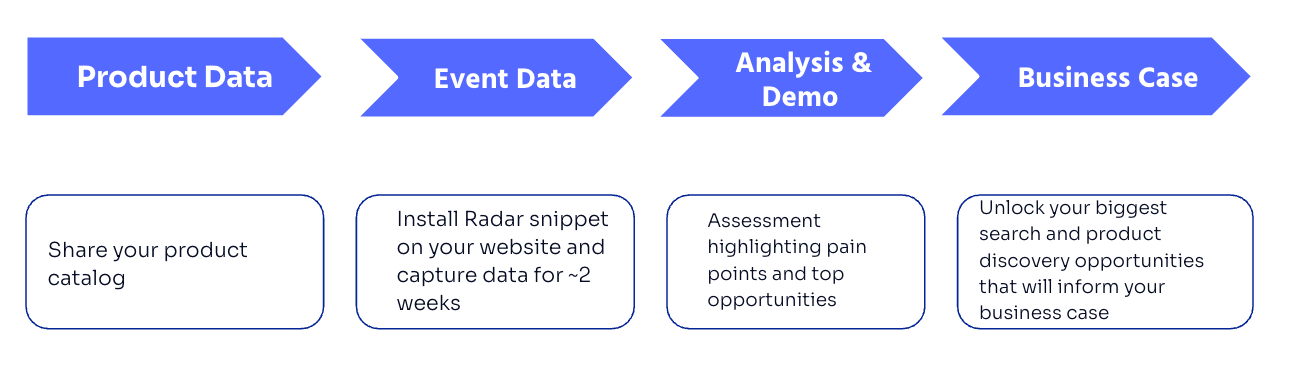 Algolia imports your product catalog into an index and uses it to build a demo that reflects your products and user experience.
After reviewing your website, Algolia will develop a custom Radar tracking script for your site. This script captures user behavior data. Algolia uses this data to review your search and discovery experience.
After Radar collects enough event data, Algolia analyzes it to identify opportunities to improve search and discovery. Algolia then uses the findings to build a tailored demo with your data.
Algolia presents the results of the Value Engineering analysis, including:
* What Radar collected.
* What Algolia found in the event data.
* Recommended changes to improve search and discovery.
* Estimated impact on revenue or conversions.
* A walkthrough of the tailored demo.
## Timeline
Algolia imports your product catalog into an index and uses it to build a demo that reflects your products and user experience.
After reviewing your website, Algolia will develop a custom Radar tracking script for your site. This script captures user behavior data. Algolia uses this data to review your search and discovery experience.
After Radar collects enough event data, Algolia analyzes it to identify opportunities to improve search and discovery. Algolia then uses the findings to build a tailored demo with your data.
Algolia presents the results of the Value Engineering analysis, including:
* What Radar collected.
* What Algolia found in the event data.
* Recommended changes to improve search and discovery.
* Estimated impact on revenue or conversions.
* A walkthrough of the tailored demo.
## Timeline
 The Value Engineering process takes three to four weeks:
* **Week one.** You deploy the [Radar](/doc/value-engineering/deploy) tag on your website.
* **Weeks two and three.** Algolia collects and monitors events from your site .
* **Week four.** Algolia analyzes the results and present you with a Value Engineering report. Depending on your goals, Algolia may also enable AI features for the demo.
## Before you begin
* Create an Algolia application in the [Algolia dashboard](https://dashboard.algolia.com/).
* An Algolia solutions engineer will contact you to arrange appropriate access to the application.
* Share your [product data](#product-data).
Add the Radar script to your live website when Algolia sends it to you.
Algolia handles the rest:
* Imports your product data into an Algolia index.
* Monitors the quality of the event data from Radar.
* Adjusts the Radar script to improve event quality.
* Uses the collected data to identify ranking and relevance improvements.
* Builds a tailored demo with Algolia features.
### Product data
Share your product catalog data with Algolia.
Prefer JSON format, but your Algolia solutions engineer can confirm the best way to share your catalog.
If you can't export your data, Algolia may be able to crawl your site.
Make sure each [record's `objectID`](/doc/guides/sending-and-managing-data/prepare-your-data/in-depth/what-is-in-a-record) matches the product ID used on your website. This lets Algolia connect catalog records with events collected by Radar.
The Value Engineering process takes three to four weeks:
* **Week one.** You deploy the [Radar](/doc/value-engineering/deploy) tag on your website.
* **Weeks two and three.** Algolia collects and monitors events from your site .
* **Week four.** Algolia analyzes the results and present you with a Value Engineering report. Depending on your goals, Algolia may also enable AI features for the demo.
## Before you begin
* Create an Algolia application in the [Algolia dashboard](https://dashboard.algolia.com/).
* An Algolia solutions engineer will contact you to arrange appropriate access to the application.
* Share your [product data](#product-data).
Add the Radar script to your live website when Algolia sends it to you.
Algolia handles the rest:
* Imports your product data into an Algolia index.
* Monitors the quality of the event data from Radar.
* Adjusts the Radar script to improve event quality.
* Uses the collected data to identify ranking and relevance improvements.
* Builds a tailored demo with Algolia features.
### Product data
Share your product catalog data with Algolia.
Prefer JSON format, but your Algolia solutions engineer can confirm the best way to share your catalog.
If you can't export your data, Algolia may be able to crawl your site.
Make sure each [record's `objectID`](/doc/guides/sending-and-managing-data/prepare-your-data/in-depth/what-is-in-a-record) matches the product ID used on your website. This lets Algolia connect catalog records with events collected by Radar.