

- Return on investment estimates.
- Recommendations to improve search and discovery.
- A demo using your product catalog.
- Guidance based on pseudonymized user behavior.
The process
1
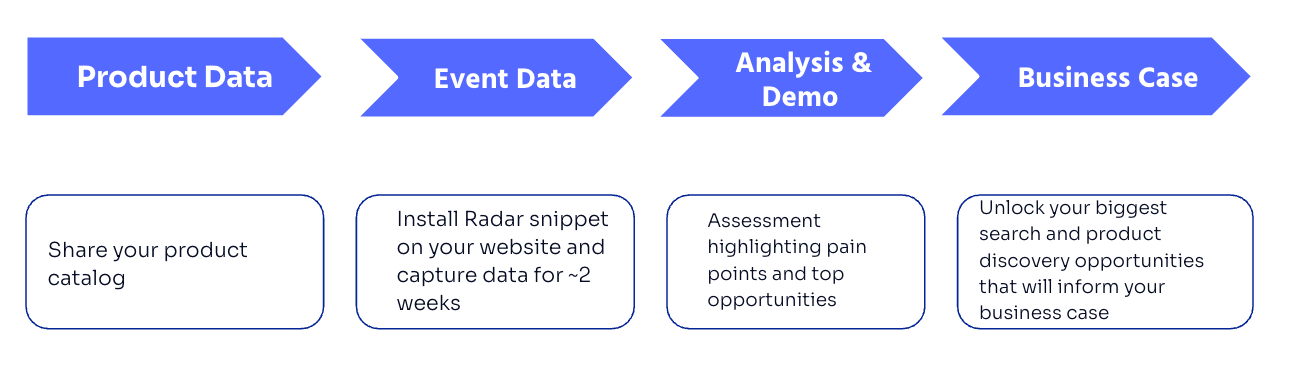
Product data collection
Algolia imports your product catalog into an index.
It uses this data to build a demo that reflects your products and user experience.
2
Event data collection
After reviewing your website, Algolia will develop a custom Radar tracking script for your site.
This script captures user behavior data.
Algolia uses this data to review your search and discovery experience.
3
Analysis and demo setup
After Radar collects enough event data, Algolia analyzes it to identify opportunities to improve search and discovery.
Algolia then uses the findings to build a tailored demo with your data.
4
Results presentation
Algolia presents the results of the Value Engineering analysis, including:
- What Radar collected.
- What Algolia found in the event data.
- Recommended changes to improve search and discovery.
- Estimated impact on revenue or conversions.
- A walkthrough of the tailored demo.
Timeline

- Week one. You deploy the Radar tag on your website.
- Weeks two and three. Algolia collects and monitors events from your site .
- Week four. Algolia analyzes the results and presents the Value Engineering report. Depending on your goals, Algolia may also enable AI features for the demo.
Before you begin
- Create an Algolia application in the Algolia dashboard.
- An Algolia solutions engineer will contact you to set up access to the application.
- Share your product data.
Add the Radar script to your live website when Algolia sends it to you.
- Imports your product data into an Algolia index.
- Monitors the quality of the event data from Radar.
- Adjusts the Radar script to improve event quality.
- Uses the collected data to identify ranking and relevance improvements.
- Builds a tailored demo with Algolia features.
Product data
Share your product catalog data with Algolia. Prefer JSON format, but your Algolia solutions engineer can confirm the best way to share your catalog. If you can’t export your data, Algolia may be able to crawl your site. Make sure each record’sobjectID matches the product ID used on your website.
This lets Algolia connect catalog records with events collected by Radar.