

This is a beta feature according to Algolia’s Terms of Service (“Beta Services”).
Before you begin
Make sure you have:- An Algolia index with records.
- Permission to update index settings (the
editSettingsACL).
Plan how to test and apply changes
Before applying recommendations, consider how the index is used:- If this is a production index, test changes on a test index or with A/B testing before applying them broadly.
- If the index is part of an active A/B test, wait until the test ends before changing a setting that the test is evaluating.
- If the index has replicas, decide whether each change should apply to the primary index, its replicas, or both.
Review and apply index setting recommendations
- Go to the Algolia dashboard and select your Algolia application.
- On the left sidebar, select Search.
- Select the index you want to review, then open the Configuration tab.
-
To review settings, select Optimize Search for any setting or, on the Configuration tab, select AI Assist, then enter
Optimize my search configuration. - Answer the questions about your industry, search use case, and goals. AI Assist uses your answers to tailor its recommendations.
-
Review the What’s working well and Needs optimization sections. For each proposed change, review the explanation.
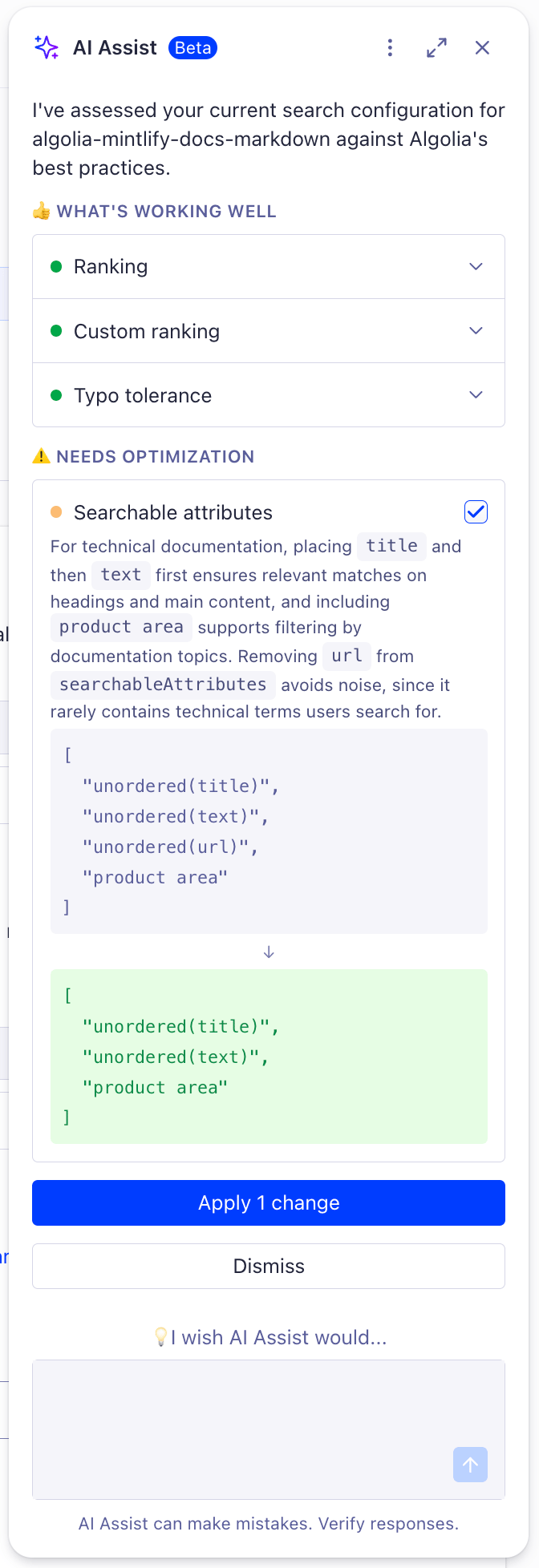
- Select the checkbox for each recommendation you want to use, then select Apply.
- Wait for AI Assist to confirm that the changes are applied.
If your Algolia plan includes Activity Logs, review the applied changes in the
logs.