

Dataset
The guide uses a dataset of the 3,000+ biggest airports in the world.JSON
[
 {
    "objectID": "3797",
    "name": "John F Kennedy Intl",
    "city": "New York",
    "country": "United States",
    "iata_code": "JFK",
    "_geoloc": {
      "lat": 40.639751,
      "lng": -73.778925
    },
    "links_count": 911
  }
]
_geoloc attribute.
Initialize the client
Configure index settings
Even if you just want to sort by distance to a location, your textual relevance should also be good so that users can refine the search with a query. To do that, you must configure the . The searchable attributes are:name, city, country, and iata_code.
var response = await client.SetSettingsAsync(
  "INDEX_NAME",
  new IndexSettings
  {
    SearchableAttributes = new List<string> { "name", "country", "city", "iata_code" },
    CustomRanking = new List<string> { "desc(links_count)" },
  }
);
final response = await client.setSettings(
  indexName: "INDEX_NAME",
  indexSettings: IndexSettings(
    searchableAttributes: [
      "name",
      "country",
      "city",
      "iata_code",
    ],
    customRanking: [
      "desc(links_count)",
    ],
  ),
);
response, err := client.SetSettings(client.NewApiSetSettingsRequest(
  "INDEX_NAME",
  search.NewEmptyIndexSettings().SetSearchableAttributes(
    []string{"name", "country", "city", "iata_code"}).SetCustomRanking(
    []string{"desc(links_count)"})))
if err != nil {
  // handle the eventual error
  panic(err)
}
UpdatedAtResponse response = client.setSettings(
  "INDEX_NAME",
  new IndexSettings()
    .setSearchableAttributes(Arrays.asList("name", "country", "city", "iata_code"))
    .setCustomRanking(Arrays.asList("desc(links_count)"))
);
const response = await client.setSettings({
  indexName: 'theIndexName',
  indexSettings: {
    searchableAttributes: ['name', 'country', 'city', 'iata_code'],
    customRanking: ['desc(links_count)'],
  },
});
var response =
  client.setSettings(
    indexName = "INDEX_NAME",
    indexSettings =
      IndexSettings(
        searchableAttributes = listOf("name", "country", "city", "iata_code"),
        customRanking = listOf("desc(links_count)"),
      ),
  )
$response = $client->setSettings(
    'INDEX_NAME',
    ['searchableAttributes' => [
        'name',

        'country',

        'city',

        'iata_code',
    ],
        'customRanking' => [
            'desc(links_count)',
        ],
    ],
);
response = client.set_settings(
    index_name="INDEX_NAME",
    index_settings={
        "searchableAttributes": [
            "name",
            "country",
            "city",
            "iata_code",
        ],
        "customRanking": [
            "desc(links_count)",
        ],
    },
)
response = client.set_settings(
  "INDEX_NAME",
  Algolia::Search::IndexSettings.new(
    searchable_attributes: ["name", "country", "city", "iata_code"],
    custom_ranking: ["desc(links_count)"]
  )
)
val response = Await.result(
  client.setSettings(
    indexName = "INDEX_NAME",
    indexSettings = IndexSettings(
      searchableAttributes = Some(Seq("name", "country", "city", "iata_code")),
      customRanking = Some(Seq("desc(links_count)"))
    )
  ),
  Duration(100, "sec")
)
let response = try await client.setSettings(
    indexName: "INDEX_NAME",
    indexSettings: IndexSettings(
        searchableAttributes: ["name", "country", "city", "iata_code"],
        customRanking: ["desc(links_count)"]
    )
)
Filtering inside a polygonal area
The USA can be considered as a polygon: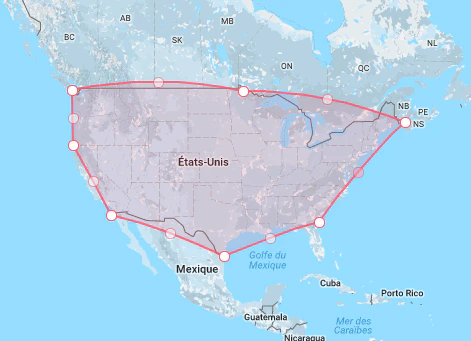
insidePolygon parameter:
- 42.01,-124.31,
- 48.835509470063045,-124.40453125000005
- 45.01082951668149,-65.95726562500005
- 31.247243545293433,-81.06578125000004
- 25.924152577235226,-97.68234374999997
- 32.300311895879545,-117.54828125
'') returns all matching airports.
var response = await client.SearchSingleIndexAsync<Hit>(
  "INDEX_NAME",
  new SearchParams(
    new SearchParamsObject
    {
      InsidePolygon = new List<List<Double>>
      {
        new List<Double>
        {
          42.01,
          -124.31,
          48.835509470063045,
          -124.40453125000005,
          45.01082951668149,
          -65.95726562500005,
          31.247243545293433,
          -81.06578125000004,
          25.924152577235226,
          -97.68234374999997,
          32.300311895879545,
          -117.54828125,
        },
      },
    }
  )
);
final response = await client.searchSingleIndex(
  indexName: "INDEX_NAME",
  searchParams: SearchParamsObject(
    insidePolygon: [
      [
        42.01,
        -124.31,
        48.835509470063045,
        -124.40453125000005,
        45.01082951668149,
        -65.95726562500005,
        31.247243545293433,
        -81.06578125000004,
        25.924152577235226,
        -97.68234374999997,
        32.300311895879545,
        -117.54828125,
      ],
    ],
  ),
);
response, err := client.SearchSingleIndex(client.NewApiSearchSingleIndexRequest(
  "INDEX_NAME").WithSearchParams(search.SearchParamsObjectAsSearchParams(
  search.NewEmptySearchParamsObject().SetInsidePolygon(
    [][]float64{
      {
        42.01,
        -124.31,
        48.835509470063045,
        -124.40453125000005,
        45.01082951668149,
        -65.95726562500005,
        31.247243545293433,
        -81.06578125000004,
        25.924152577235226,
        -97.68234374999997,
        32.300311895879545,
        -117.54828125,
      },
    }))))
if err != nil {
  // handle the eventual error
  panic(err)
}
SearchResponse response = client.searchSingleIndex(
  "INDEX_NAME",
  new SearchParamsObject().setInsidePolygon(
    Arrays.asList(
      Arrays.asList(
        42.01,
        -124.31,
        48.835509470063045,
        -124.40453125000005,
        45.01082951668149,
        -65.95726562500005,
        31.247243545293433,
        -81.06578125000004,
        25.924152577235226,
        -97.68234374999997,
        32.300311895879545,
        -117.54828125
      )
    )
  ),
  Hit.class
);
const response = await client.searchSingleIndex({
  indexName: 'indexName',
  searchParams: {
    insidePolygon: [
      [
        42.01, -124.31, 48.835509470063045, -124.40453125000005, 45.01082951668149, -65.95726562500005,
        31.247243545293433, -81.06578125000004, 25.924152577235226, -97.68234374999997, 32.300311895879545,
        -117.54828125,
      ],
    ],
  },
});
var response =
  client.searchSingleIndex(
    indexName = "INDEX_NAME",
    searchParams =
      SearchParamsObject(
        insidePolygon =
          listOf(
            listOf(
              42.01,
              -124.31,
              48.835509470063045,
              -124.40453125000005,
              45.01082951668149,
              -65.95726562500005,
              31.247243545293433,
              -81.06578125000004,
              25.924152577235226,
              -97.68234374999997,
              32.300311895879545,
              -117.54828125,
            )
          )
      ),
  )
$response = $client->searchSingleIndex(
    'INDEX_NAME',
    ['insidePolygon' => [
        [
            42.01,

            -124.31,

            48.835509470063045,

            -124.40453125000005,

            45.01082951668149,

            -65.95726562500005,

            31.247243545293433,

            -81.06578125000004,

            25.924152577235226,

            -97.68234374999997,

            32.300311895879545,

            -117.54828125,
        ],
    ],
    ],
);
response = client.search_single_index(
    index_name="INDEX_NAME",
    search_params={
        "insidePolygon": [
            [
                42.01,
                -124.31,
                48.835509470063045,
                -124.40453125000005,
                45.01082951668149,
                -65.95726562500005,
                31.247243545293433,
                -81.06578125000004,
                25.924152577235226,
                -97.68234374999997,
                32.300311895879545,
                -117.54828125,
            ],
        ],
    },
)
response = client.search_single_index(
  "INDEX_NAME",
  Algolia::Search::SearchParamsObject.new(
    inside_polygon: [
      [
        42.01,
        -124.31,
        48.835509470063045,
        -124.40453125000005,
        45.01082951668149,
        -65.95726562500005,
        31.247243545293433,
        -81.06578125000004,
        25.924152577235226,
        -97.68234374999997,
        32.300311895879545,
        -117.54828125
      ]
    ]
  )
)
val response = Await.result(
  client.searchSingleIndex(
    indexName = "INDEX_NAME",
    searchParams = Some(
      SearchParamsObject(
        insidePolygon = Some(
          Seq(
            Seq(42.01, -124.31, 48.835509470063045, -124.40453125000005, 45.01082951668149, -65.95726562500005,
              31.247243545293433, -81.06578125000004, 25.924152577235226, -97.68234374999997, 32.300311895879545,
              -117.54828125)
          )
        )
      )
    )
  ),
  Duration(100, "sec")
)
let response: SearchResponse<Hit> = try await client.searchSingleIndex(
    indexName: "INDEX_NAME",
    searchParams: SearchSearchParams.searchSearchParamsObject(SearchSearchParamsObject(insidePolygon: [[
        42.01,
        -124.31,
        48.835509470063045,
        -124.40453125000005,
        45.01082951668149,
        -65.95726562500005,
        31.247243545293433,
        -81.06578125000004,
        25.924152577235226,
        -97.68234374999997,
        32.300311895879545,
        -117.54828125,
    ]]))
)