

Key capabilities
Key capabilities
- Natural language queries (when Algolia NeuralSearch is enabled): users ask questions in plain language, agent performs the search
- Keyword search: agent performs traditional keyword-based searches
- Faceted filtering: agent applies filters with AND/OR logic based on user requests
- Multiple indices: agent can query up to 10 indices per request, chosen either in the configuration or per request. For more information, see Control which indices the agent can search
- Automatic enrichment: index metadata (facets, searchable attributes) is automatically discovered
- Analytics tracking: all agent-performed queries tagged with the
alg#agent-studioanalytics tag - Search API parameters: supports a curated subset of query-time Algolia Search parameters. For more information, see Search parameters
- Suggested refinements: agent can suggest follow-up search refinements based on facet values, using a deterministic (facet-count heuristic) or agentic (LLM-driven) strategy
- Configurable AI behavior: control what the AI can change at query time, such as bounds on results per page, which attributes to retrieve, or a fixed set of facets
- User-restricted access: works with secure API keys for record-level access control
- Simplest integration: no external APIs required, uses existing Algolia Search configuration
Configure the Search tool
- From the dashboard
- With the API
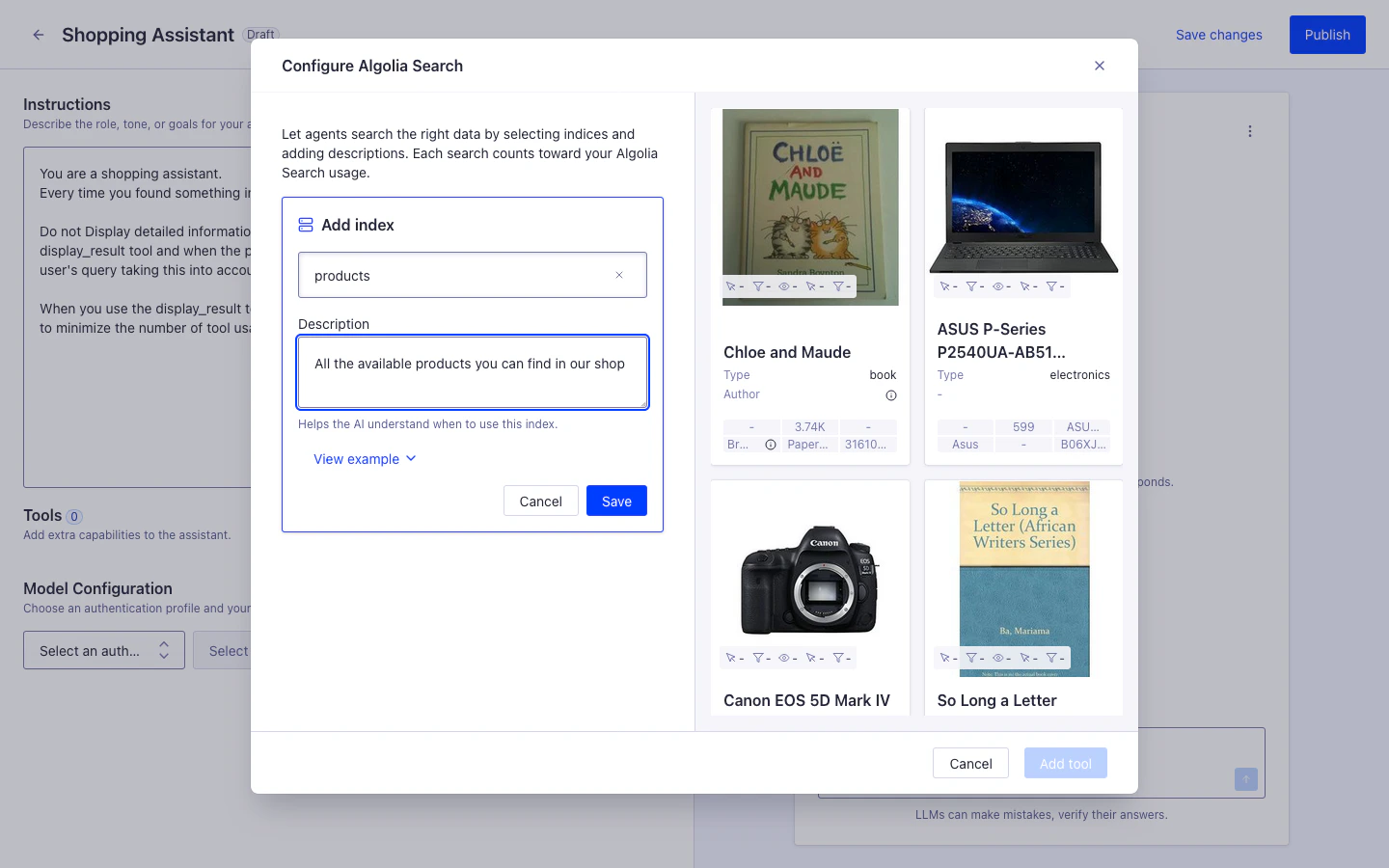
From the Agent Studio agent edit view in the Algolia dashboard:
- Click Add tool > Algolia Search
- Select your (for example,
products) - Add a description: “Product catalog with titles, descriptions, prices, and availability”
- Click Add tool
Use the Other tools option when you need to configure tools with settings not supported by the Algolia dashboard, or when a dedicated interface isn’t available.
Advanced usage
Search parameters
Set Algolia Search API parameters per index withsearchParameters.
The tool accepts only a subset of the query-time parameters.
The tool doesn’t expose attributesToHighlight, highlightPreTag, or highlightPostTag.
responseFields should be set in searchControls.
JSON
indices[] entry.
Agent Studio forwards searchParameters to the search tool so values outrank the agent’s own choices and the searchControls defaults below.
For anything the agent should be able to vary, use searchControls instead.
Control what the AI can change per index
searchControls sets, for each index, which search parameters the agent can change at query time, what value applies when it doesn’t, and the bounds it must stay within.
It accepts query, hitsPerPage, page, attributesToRetrieve, responseFields, distinct, facets, and custom.
Every field defaults to exposed: false, so the agent can’t change any of them until you allow it.
- From the dashboard
- With the API
Click AI Search Settings on an index entry in the Agent Studio agent edit view.
Query-time search parameter overrides
You can override specific search parameters per request by passingalgolia.searchParameters in the completions API request body.
Use this when some values vary by user or session, without changing the tool configuration.
The tool honors only the indices it’s already configured to search.
For how it resolves that set, see Control which indices the agent can search.
This is useful when you want to:
- Apply user-specific filters
- Return fewer attributes
- Restrict which attributes are searchable for a specific request
- Change
distinctdynamically - Pass personalization settings such as
userToken
JSON
For the request schema for
POST /agent-studio/1/agents/{agentId}/completions, see the Agent Studio API reference.
Whether an override reaches Algolia depends on what else sets the same parameter.
For the full resolution order, see Search parameter precedence.
Search parameter precedence
Several sources can set the same search parameter. From lowest to highest priority:- The search tool’s own defaults
- The
defaultvalue insearchControls - The value the agent chooses for this call, for any field you set to
exposed: true - Per-index
searchParameters, which Agent Studio forwards intocustom - Query-time
algolia.searchParametersfor this index, also forwarded intocustom searchControls.custom- The index name, which the tool reapplies last
custom field values override the agent’s choices, and they skip the bounds in constraint.
Control which indices the agent can search
The tool’smode decides whether a completions request can change the index list.
Static mode (default)
The configuredindices is the only set the tool can search.
A request that sends algolia.indices anyway gets a 422 with the code static_tool_rejects_per_request_indices.
Setting allowUnlistedIndices: true under static mode is a validation error.
Dynamic mode
Use dynamic mode when your application, rather than the agent configuration, decides which indices a request should search:- Multi-region catalogs: a shopper browsing the US site asks about availability in Germany, so that turn searches
products_euinstead ofproducts_us - Multi-tenant data: each customer owns a separate index, and the request names the index for the signed-in tenant
- More indices than one tool holds: a configuration takes at most 10 indices, so route across a larger set one request at a time
algolia.indices, a list of up to 10 index names, which replaces indices for that request only.
Omit algolia.indices and the configured indices apply as usual.
Send the list under algolia at the top level of the completions request body:
JSON
algolia.indices instead of sending [].
With allowUnlistedIndices left at false, the request’s list must be a subset of the configured indices.
A name you haven’t configured gets a 422 with the code index_not_listed_on_tool.
JSON
allowUnlistedIndices: true, the configured indices can also be empty, so every index arrives per request.
Such a tool doesn’t have any fallback: a request that omits algolia.indices leaves the agent with nothing to search.
On the search tool’s index configuration, two toggles control this:
Example filters for configuration
- Always exclude out-of-stock items
- Combine multiple filter conditions
- Limit retrieved attributes for faster responses
- Configure faceting behavior
JSON
Analytics tracking
All queries made by the Algolia Search tool are automatically tagged with:- Track agent-generated queries separately in your Algolia analytics
- Identify popular search patterns from conversational interactions
- Optimize your index based on agent usage
- Go to Algolia Analytics
- Filter by tag:
alg#agent-studio - Review top queries, click-through rates, and conversion metrics