As of December 31, 2023, Shopify no longer allows apps to modify theme code. To integrate Autocomplete and InstantSearch, use the Algolia AI Search & Discovery app’s App Embed and App Blocks. To get started, see Quickstart and Algolia configuration.
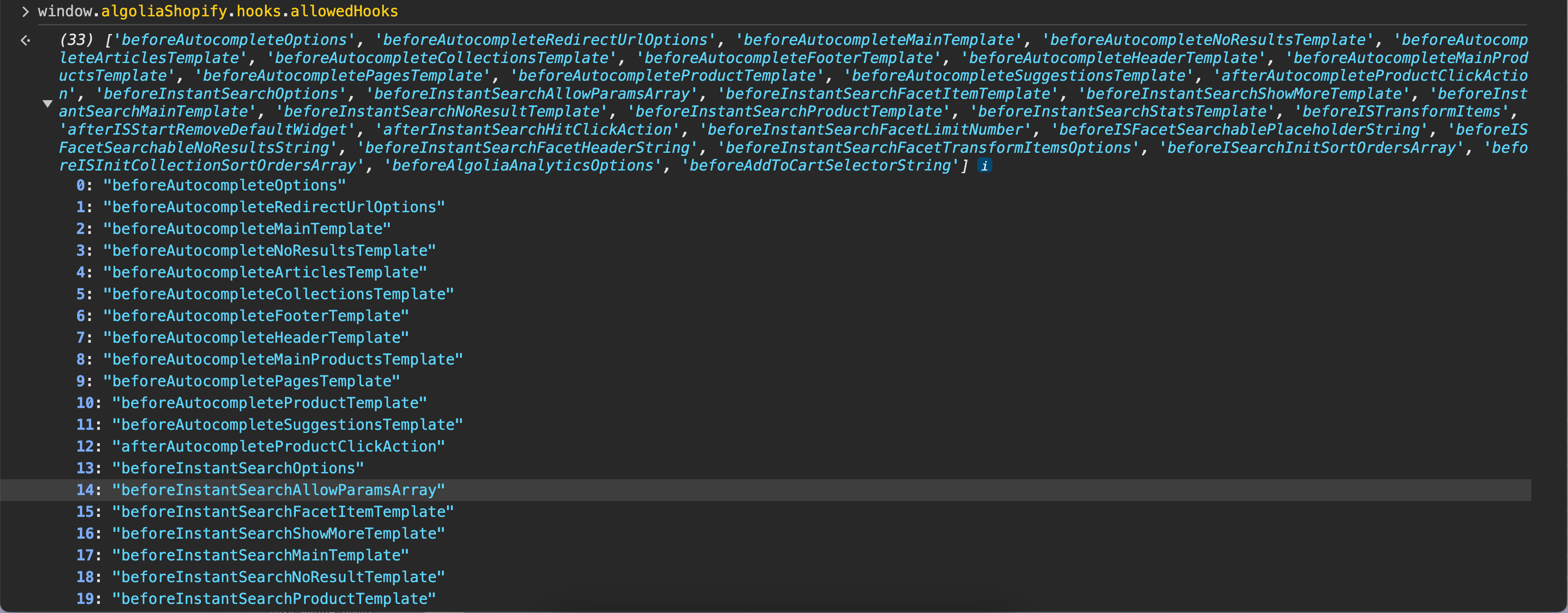
Hooks are functions that run at specific points of the Algolia app’s lifecycle. They let you register custom functions that change certain aspects of the Autocomplete and InstantSearch integrations. To listen to global events without passing or changing data, see Global events. To view the available hooks, go to your Shopify store and enter window.algoliaShopify.hooks.allowedHooks into the developer tools’ console of your browser. An example of allowed hooks

Deprecated hooks

The following custom hooks are deprecated. A console warning will display if used.

Add custom hooks

To add custom hooks, add a new JavaScript file and then include that file in your theme.
1

Add a new JavaScript file

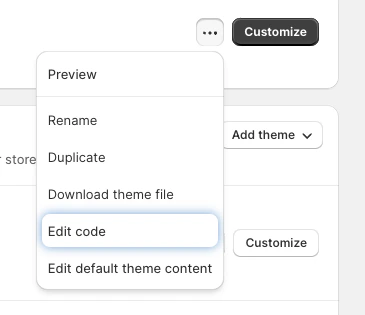
  1. Go to your theme list, select the theme you want to customize, and click the three dots next to the theme to reveal the menu. Edit the theme code
  2. Select Edit code.
  3. From the Assets section in the left-hand menu, click Add a new asset. Add a new asset file
  4. Select the Create a blank file tab and then select js from the drop-down menu. Add a new JavaScript asset file
  5. Enter a filename, for example, algolia_custom_hooks and click Done.
2

Include the JavaScript file in your theme

  1. In the Edit code tab, open the theme.liquid file.
  2. Scroll to the bottom of the theme.liquid file and add the following just before the </body> tag. Replace NEW_FILE with the filename of the JavaScript file with your custom hook:
    HTML
        <script src="{{ 'NEW_FILE.js' | asset_url }}" defer="defer"></script>
      </body>
    </html>
    
  3. Save the file.

Use custom hooks

To register a function to a hook, open the specific hooks JavaScript file, add an event listener to the algolia.hooks.initialize event, and call the algoliaShopify.hooks.registerHook function. For example:
JavaScript
document.addEventListener('algolia.hooks.initialize', function() {
  algoliaShopify.hooks.registerHook('beforeAutocompleteOptions', function (options) { /* */ });
});
The return values of the function you register with the hook must match the expected return type, indicated by the hook’s name.
Hook name ends withExpected return type
OptionsObject
TemplateTagged template literal
ArrayArray of strings or objects
StringString
NumberNumber
ActionFunction

Autocomplete hooks

Hooks in this section change the behavior of the Autocomplete menu.

beforeAutocompleteAsyncFunction

This hook waits for any asynchronous function, such as an external API request, to complete before continuing. It runs before any Autocomplete parameters are set. You can include multiple await statements within this hook to handle several asynchronous operations sequentially. Parameters: none.

Example

JavaScript
const sleep = (ms, hookName) => new Promise(resolve => {
  console.log("sleeping for ", ms, hookName);
  setTimeout(resolve, ms);
});

document.addEventListener('algolia.hooks.initialize', function() {
  algoliaShopify.hooks.registerHook('beforeAutocompleteAsyncFunction', async function() {
    console.log("----------- beforeAutocompleteAsyncFunction started ----------------")
    await sleep(1000, 'beforeAutocompleteAsyncFunction');
  });
});

beforeAutocompleteConfigurationOptions

Modifies the global Autocomplete configuration before any plugin executes a . This hook runs on every keystroke and lets you customize search parameters, apply a , modify analytics tags, or change other search query settings across all Autocomplete sources. Parameters:
  • config (object): configuration object containing:
    • searchClient: Algolia search client instance
    • queries (array): query objects, each containing:
      • indexName (string): Algolia name
      • query (string): current search query
      • params (object): search parameters (such as filters, hitsPerPage, analyticsTags)
  • context (object): context information containing:
    • pluginName (string): name of the plugin triggering the query (for example, ‘“products”’, ‘“collections”’, ‘“articles”’, ‘“pages”’)
    • sourceId (string): unique identifier for the Autocomplete source
Returns: modified config object.

Example: add analytics tags to product queries

JavaScript
document.addEventListener('algolia.hooks.initialize', function() {
  algoliaShopify.hooks.registerHook('beforeAutocompleteConfigurationOptions', function(config, context) {
    if (context.sourceId === 'products') {
      config.queries = config.queries.map(function(query) {
        return {
          ...query,
          params: {
            ...query.params,
            analyticsTags: ['autocomplete', 'products', 'v2']
          }
        };
      });
    }
    return config;
  });
});

Example: add dynamic filters based on query

JavaScript
document.addEventListener('algolia.hooks.initialize', function() {
  algoliaShopify.hooks.registerHook('beforeAutocompleteConfigurationOptions', function(config, context) {
    if (context.pluginName === 'products' && config.queries[0].query.includes('sale')) {
      config.queries = config.queries.map(function(query) {
        return {
          ...query,
          params: {
            ...query.params,
            filters: 'tags:sale'
          }
        };
      });
    }
    return config;
  });
});

beforeAutocompletePluginOptions

Customizes individual plugin options during plugin construction. This hook runs once per plugin at initialization time, making it ideal for setting static defaults like base filters, analytics tags, or custom transform functions. Parameters:
  • options (object): plugin options containing:
    • searchParameters (object): search parameters for this plugin
    • sourceId (string): unique identifier for the Autocomplete source
    • transformItems (function): optional function to transform items before rendering
    • analyticsTags (array): optional analytics tags
  • context (object): context information containing:
    • pluginName (string): name of the plugin being configured (for example, "products", "collections", "articles", "pages")
Returns: modified options object.

Example: set base filters per plugin

JavaScript
document.addEventListener('algolia.hooks.initialize', function() {
  algoliaShopify.hooks.registerHook('beforeAutocompletePluginOptions', function(options, context) {
    if (context.pluginName === 'products') {
      options.searchParameters.filters = 'inventory_quantity > 0';
    } else if (context.pluginName === 'collections') {
      options.searchParameters.filters = 'published:true';
    }
    return options;
  });
});

Example: customize hits per page per plugin

JavaScript
document.addEventListener('algolia.hooks.initialize', function() {
  algoliaShopify.hooks.registerHook('beforeAutocompletePluginOptions', function(options, context) {
    if (context.pluginName === 'products') {
      options.searchParameters.hitsPerPage = 12;
    } else if (context.pluginName === 'articles') {
      options.searchParameters.hitsPerPage = 5;
    }
    return options;
  });
});

beforeAutocompletePluginsArray

Manages the array of Autocomplete plugins before the Autocomplete instance is created. This hook runs once at initialization and lets you add custom plugins, remove unwanted plugins, or reorder the plugin array. Parameters: none.
  • Note: To work with the plugins, you must use the arguments object to extract them into an array.
Returns: array of plugins.

Example: remove specific plugins

JavaScript
document.addEventListener('algolia.hooks.initialize', function() {
  algoliaShopify.hooks.registerHook('beforeAutocompletePluginsArray', function() {
    // Extract plugins from arguments
    var plugins = Array.prototype.slice.call(arguments);

    // Remove articles and pages plugins
    return plugins.filter(function(plugin) {
      if (!plugin || !plugin.getSources) return true;

      var sources = plugin.getSources({ query: '' });
      if (!sources || !sources.length) return true;

      // Remove plugins that expose articles or pages
      return !sources.some(function(source) {
        return source.sourceId === 'articles' || source.sourceId === 'pages';
      });
    });
  });
});

beforeAutocompleteOptions

Sets parameters for the Autocomplete menu. Parameters:
  • options (object): Autocomplete options object
Returns: modified options object.

Example

JavaScript
document.addEventListener('algolia.hooks.initialize', function() {
  algoliaShopify.hooks.registerHook('beforeAutocompleteOptions', function(options) {
    // Change the placeholder text of the Autocomplete menu
    options.placeholder = "Search Our Products";
    return options;
  });
});

beforeAutocompleteFiltersString

Adds filter parameters to the Autocomplete menu. Parameters:
  • _defaultFilter (string): default filter string
Returns: filter string to apply.

Example

JavaScript
document.addEventListener('algolia.hooks.initialize', function() {
  algoliaShopify.hooks.registerHook('beforeAutocompleteFiltersString', function(_defaultFilter) {
    // Don't return the default filter and return a custom filter
    return 'price > 17';
  });
});

beforeAutocompleteRedirectUrlOptions

Changes the default parameters of the createRedirectUrlPlugin function. Parameters:
  • options (object): redirect URL plugin options
Returns: modified options object.

Example

JavaScript
document.addEventListener('algolia.hooks.initialize', function() {
  algoliaShopify.hooks.registerHook('beforeAutocompleteRedirectUrlOptions', function(options) {
    // Change the default template for rendering redirect items 
    return {
      templates: {
        item({ html, state }) {
          return html`<a className="myCustomClass">${state.query}</a>`;
        },
      },
    };
  });
});

beforeAutocompleteMainTemplate

Changes the HTML template that renders the Autocomplete panel. You can use this to render an Autocomplete multi-panel layout. Parameters:
  • _defaultTemplate: default template
  • templateOptions: template options including the html tagged template function
  • elements (object): object with the following properties:
    • querySuggestionsPlugin
    • collections
    • articles
    • pages
    • redirectUrlPlugin
    • products
  • displaySuggestions (boolean): whether to display suggestions

Example

JavaScript
document.addEventListener('algolia.hooks.initialize', function() {
  algoliaShopify.hooks.registerHook('beforeAutocompleteMainTemplate', function(_defaultTemplate, templateOptions, elements, displaySuggestions) {
    const { html } = templateOptions;
    // Don't return the default template and return a custom two-column layout instead
    return html`
      <div class="aa-PanelLayout aa-Panel--scrollable">
        <div class="aa-PanelSections">
          <div class="aa-PanelSection--left">
            ${displaySuggestions &&
              html`
                <div class="aa-SourceHeader">
                  <span class="aa-SourceHeaderTitle"
                    >${algoliaShopify.translations.suggestions}</span
                  >
                  <div class="aa-SourceHeaderLine" />
                </div>
                ${elements.querySuggestionsPlugin}
              `}
            ${elements.collections} ${elements.articles} ${elements.pages}
            ${elements.redirectUrlPlugin}
          </div>
          <div class="aa-PanelSection--right">
            ${elements.products}
          </div>
        </div>
      </div>
    `;
  });
});

beforeAutocompleteMainProductsTemplate

Renders the product section in the Autocomplete menu. Parameters:
  • _defaultTemplate: default template
  • templateOptions: template options including the html tagged template function
  • elements (object): object containing the products element

Example

JavaScript
document.addEventListener('algolia.hooks.initialize', function() {
  algoliaShopify.hooks.registerHook('beforeAutocompleteMainProductsTemplate', function(_defaultTemplate, templateOptions, elements) {
    const { html } = templateOptions;
    return html`
      <div class="aa-PanelLayout aa-Panel--scrollable">
        <div class="aa-PanelSection">
          ${elements.products}
        </div>
      </div>
    `;
  });
});

beforeAutocompleteNoResultsTemplate

Renders when there are no search results. Parameters:
  • _defaultTemplate: default template
  • templateOptions: template options including the html and state properties

Example

JavaScript
document.addEventListener('algolia.hooks.initialize', function() {
  algoliaShopify.hooks.registerHook('beforeAutocompleteNoResultsTemplate', function(_defaultTemplate, templateOptions) {
    const { html, state } = templateOptions;
    return html`
      <div class="aa-PanelLayout aa-Panel--scrollable">
        <p class="aa-NoResultsHeader">
          ${algoliaShopify.translation_helpers.no_result_for(state.query)}
        </p>
        <a class="aa-NoResultsLink" href="${window.Shopify.routes.root}search?q=">
          ${algoliaShopify.translations.allProducts}
        </a>
      </div>
    `;
  });
});

beforeAutocompleteHeaderTemplate

Renders a header section at the top of the Autocomplete results panel. Parameters:
  • _defaultTemplate: default template
  • templateOptions: template options including the html and state properties
  • resource (string): resource type

Example

JavaScript
document.addEventListener('algolia.hooks.initialize', function() {
  algoliaShopify.hooks.registerHook('beforeAutocompleteHeaderTemplate', function(_defaultTemplate, templateOptions, resource) {
    const { html, state } = templateOptions;
    return html`
      <div class="aa-SourceHeader">
        <span class="aa-SourceHeaderTitle">
          ${algoliaShopify.translation_helpers.render_title(
            resource,
            state.query
          )}
        </span>
        <div class="aa-SourceHeaderLine" />
      </div>
    `;
  });
});

beforeAutocompleteFooterTemplate

Renders a footer section at the bottom of the Autocomplete results panel. To render a footer, select the Show See All products option in the Autocomplete search options in your store’s admin. Parameters:
  • _defaultTemplate: default template
  • templateOptions: template options including the html and state properties

Example

JavaScript
document.addEventListener('algolia.hooks.initialize', function() {
  algoliaShopify.hooks.registerHook('beforeAutocompleteFooterTemplate', function(_defaultTemplate, templateOptions) {
    const { html, state } = templateOptions;
    return html`
      <div class="aa-footer">
        <a
          class="aa-SeeAllBtn"
          href="${window.Shopify.routes.root}search?q=${state.query}"
        >
          ${algoliaShopify.translations.allProducts}
          (${algoliaShopify.helpers.formatNumber(state.context.nbProducts)})
        </a>
      </div>
    `;
  });
});

beforeAutocompleteProductTemplate

Template for rendering each product hit in the Autocomplete results. If you are using this template, ensure you also call trackSearchAttribution(item) to properly handle events. Parameters:
  • _defaultTemplate: default template
  • templateOptions: template options including html, item, and components
  • distinct (boolean): whether distinct mode is enabled
  • itemLink (string): URL for the product
  • trackSearchAttribution (function): function to track search attribution

Example

JavaScript
document.addEventListener("algolia.hooks.initialize", function () {
  algoliaShopify.hooks.registerHook(
    "beforeAutocompleteProductTemplate",
    function (_defaultTemplate, templateOptions, distinct, itemLink, trackSearchAttribution) {
      // Modify default options, then return them
      const { html, item, components } = templateOptions;
      return html`
    <a
      href="${itemLink}"
      class="aa-ItemLink aa-ProductItem"
      onClick="${() => trackSearchAttribution(item)}"
    >
      <div class="aa-ItemContent">
        <div class="aa-ItemPicture aa-ItemPicture--loaded">
          <img
            src="${algoliaShopify.helpers.renderImage(item, 125).src}"
            srcset="${algoliaShopify.helpers.renderImage(item, 125).srcset}"
            sizes="${algoliaShopify.helpers.renderImage(item, 125).sizes}"
            alt="${item.title}"
          />
        </div>
        <div class="aa-ItemContentBody">
          <div class="aa-ItemContentBrand">
            ${
              item.product_type &&
              components.Highlight({ hit: item, attribute: "product_type" })
            }
           removing vendor
          </div>
          <div class="aa-ItemContentTitleWrapper">
            <div class="aa-ItemContentTitle">
              ${components.Highlight({ hit: item, attribute: "title" })}
              <span class="algolia-variant">
                ${algoliaShopify.helpers.variantTitleAddition(item, distinct)}
              </span>
            </div>
          </div>
          <div class="aa-ItemContentPrice">
            <div class="aa-ItemContentPriceCurrent">
              ${algoliaShopify.helpers.displayPrice(item, distinct)}
            </div>
          </div>
        </div>
      </div>
    </a>
  `;
    }
  );
});

beforeAutocompleteArticlesTemplate

Template for rendering each article hit in the Autocomplete results. Parameters:
  • _defaultTemplate: default template
  • templateOptions: template options including html, item, and components
  • itemLink (string): URL for the article

Example

JavaScript
document.addEventListener("algolia.hooks.initialize", function () {
  algoliaShopify.hooks.registerHook(
    "beforeAutocompleteArticlesTemplate",
    function (_defaultTemplate, templateOptions, itemLink) {
      const { item, html, components } = templateOptions;
      return html`
    <a href="${itemLink}" class="aa-ItemLink">
      <div class="aa-ItemWrapper">
        <div class="aa-ItemContent">
          <div class="aa-ItemIcon aa-ItemIcon--noBorder">
            <svg viewBox="0 0 24 24" fill="none" stroke="currentColor">
              <path
                stroke-linecap="round"
                stroke-linejoin="round"
                stroke-width="2"
                d="M7 7h.01M7 3h5c.512 0 1.024.195 1.414.586l7 7a2 2 0 010 2.828l-7 7a2 2 0 01-2.828 0l-7-7A1.994 1.994 0 013 12V7a4 4 0 014-4z"
              />
            </svg>
          </div>
          <div class="aa-ItemContentBody">
            <div class="aa-ItemContentTitle">
              ${components.Highlight({ hit: item, attribute: "title" })}
            </div>
          </div>
        </div>
      </div>
    </a>
  `;
    }
  );
});

beforeAutocompleteCollectionsTemplate

Template for rendering each collection hit in the Autocomplete results. Parameters:
  • _defaultTemplate: default template
  • templateOptions: template options including html, item, and components
  • itemLink (string): URL for the collection

Example

JavaScript
document.addEventListener('algolia.hooks.initialize', function() {
  algoliaShopify.hooks.registerHook('beforeAutocompleteCollectionsTemplate', function(_defaultTemplate, templateOptions, itemLink) {
    const { html, item, components } = templateOptions;
    return  html`
      <a href="${itemLink}" class="aa-ItemLink">
        <div class="aa-ItemWrapper">
          <div class="aa-ItemContent">
            <div class="aa-ItemIcon aa-ItemIcon--noBorder">
              <svg viewBox="0 0 24 24" fill="none" stroke="currentColor">
                <path
                  stroke-linecap="round"
                  stroke-linejoin="round"
                  stroke-width="2"
                  d="M4 6a2 2 0 012-2h2a2 2 0 012 2v2a2 2 0 01-2 2H6a2 2 0 01-2-2V6zM14 6a2 2 0 012-2h2a2 2 0 012 2v2a2 2 0 01-2 2h-2a2 2 0 01-2-2V6zM4 16a2 2 0 012-2h2a2 2 0 012 2v2a2 2 0 01-2 2H6a2 2 0 01-2-2v-2zM14 16a2 2 0 012-2h2a2 2 0 012 2v2a2 2 0 01-2 2h-2a2 2 0 01-2-2v-2z"
                />
              </svg>
            </div>
            <div class="aa-ItemContentBody">
              <div class="aa-ItemContentTitle">
                ${components.Highlight({ hit: item, attribute: 'title' })}
              </div>
            </div>
          </div>
        </div>
      </a>
    `;
  });
});

beforeAutocompletePagesTemplate

Template for rendering each pages hit in the Autocomplete results. Parameters:
  • _defaultTemplate: default template
  • templateOptions: template options including html, item, and components
  • itemLink (string): URL for the page

Example

JavaScript
document.addEventListener('algolia.hooks.initialize', function() {
  algoliaShopify.hooks.registerHook('beforeAutocompletePagesTemplate', function(_defaultTemplate, templateOptions, itemLink) {
    const { html, item, components } = templateOptions;
    return html`
      <a href="${itemLink}" class="aa-ItemLink aa-ProductItem">
        <div class="aa-ItemWrapper">
          <div class="aa-ItemContent">
            <div class="aa-ItemIcon aa-ItemIcon--noBorder">
              <svg viewBox="0 0 24 24" fill="none" stroke="currentColor">
                <path
                  stroke-linecap="round"
                  stroke-linejoin="round"
                  stroke-width="2"
                  d="M13 16h-1v-4h-1m1-4h.01M21 12a9 9 0 11-18 0 9 9 0 0118 0z"
                />
              </svg>
            </div>
            <div class="aa-ItemContentBody">
              <div class="aa-ItemContentTitle">
                ${components.Highlight({ hit: item, attribute: 'title' })}
              </div>
            </div>
          </div>
        </div>
      </a>
    `;
  });
});

beforeAutocompleteSuggestionsTemplate

Template for rendering each search suggestion in the Autocomplete menu. Parameters:
  • _defaultTemplate: default template
  • templateOptions: template options including html and state

Example

JavaScript
document.addEventListener('algolia.hooks.initialize', function() {
  algoliaShopify.hooks.registerHook('beforeAutocompleteSuggestionsTemplate', function(_defaultTemplate, templateOptions) {
    const { html, state } = templateOptions;
    return html`
      <a
        class="aa-ItemLink aa-ItemWrapper"
        href="${window.Shopify.routes.root}search?q=${item.query}"
      >
        <div class="aa-ItemContent">
          <div class="aa-ItemIcon aa-ItemIcon--noBorder">
            <svg viewBox="0 0 24 24" fill="currentColor">
              <path d="M16.041 15.856c-0.034 0.026-0.067 0.055-0.099 0.087s-0.060 0.064-0.087 0.099c-1.258 1.213-2.969 1.958-4.855 1.958-1.933 0-3.682-0.782-4.95-2.050s-2.050-3.017-2.050-4.95 0.782-3.682 2.050-4.95 3.017-2.050 4.95-2.050 3.682 0.782 4.95 2.050 2.050 3.017 2.050 4.95c0 1.886-0.745 3.597-1.959 4.856zM21.707 20.293l-3.675-3.675c1.231-1.54 1.968-3.493 1.968-5.618 0-2.485-1.008-4.736-2.636-6.364s-3.879-2.636-6.364-2.636-4.736 1.008-6.364 2.636-2.636 3.879-2.636 6.364 1.008 4.736 2.636 6.364 3.879 2.636 6.364 2.636c2.125 0 4.078-0.737 5.618-1.968l3.675 3.675c0.391 0.391 1.024 0.391 1.414 0s0.391-1.024 0-1.414z" />
            </svg>
          </div>
          <div class="aa-ItemContentBody">
            <div class="aa-ItemContentTitle">
              ${components.Highlight({ hit: item, attribute: 'query' })}
            </div>
          </div>
        </div>
        <div class="aa-ItemActions">
          <button
            class="aa-ItemActionButton"
            title={"Fill query with ${item.query}"}
          >
            <svg viewBox="0 0 24 24" fill="currentColor">
              <path d="M8 17v-7.586l8.293 8.293c0.391 0.391 1.024 0.391 1.414 0s0.391-1.024 0-1.414l-8.293-8.293h7.586c0.552 0 1-0.448 1-1s-0.448-1-1-1h-10c-0.552 0-1 0.448-1 1v10c0 0.552 0.448 1 1 1s1-0.448 1-1z" />
            </svg>
          </button>
        </div>
      </a>
    `;
  });
});

beforeAutocompleteProductTransformResponseHits

Modifies the hits before rendering them in the Autocomplete menu. For more information, see transformresponse. Parameters:
  • hits (array): search result hits
  • results (object): full results object from Algolia
Returns: modified array of hits.

Example

JavaScript
document.addEventListener('algolia.hooks.initialize', function() {
  algoliaShopify.hooks.registerHook('beforeAutocompleteProductTransformResponseHits', function(hits, results) {
    console.log(hits);
    return hits;
  });
});

afterAutocompleteProductClickAction

Deprecated since March 31, 2025. Use beforeAutocompleteProductTemplate instead.
This function adds a click event to the template. It should be run after a product is clicked. Parameters:
  • _ (any): first parameter (unused)
  • line_item (object): product line item that was clicked

Example

JavaScript
document.addEventListener('algolia.hooks.initialize', function() {
  algolia.shopify.hooks.registerHook('afterAutocompleteProductClickAction', function(_, line_item) {
    return;
  })
});

InstantSearch hooks

Hooks in this section change the behavior of the search results page.

beforeInstantSearchAsyncFunction

This hook waits for any asynchronous function, such as an external API request, to complete before continuing. It runs before any InstantSearch parameters are set. You can include multiple await statements within this hook to handle several asynchronous operations sequentially. Parameters: none.

Example

JavaScript
const sleep = (ms, hookName) => new Promise(resolve => {
  console.log("sleeping for ", ms, hookName);
  setTimeout(resolve, ms);
});

document.addEventListener('algolia.hooks.initialize', function() {
  algoliaShopify.hooks.registerHook('beforeInstantSearchAsyncFunction', async function() {
    console.log("----------- beforeInstantSearchAsyncFunction started ----------------")
    await sleep(1000, 'beforeInstantSearchAsyncFunction');
  });
});

beforeInstantSearchConfigurationOptions

Changes InstantSearch options. Parameters:
  • options (object): InstantSearch configuration options
Returns: modified options object.

Example

JavaScript
document.addEventListener('algolia.hooks.initialize', function() {
  algoliaShopify.hooks.registerHook('beforeInstantSearchConfigurationOptions', function(options) {
    // Modify default options, then return them
    options.numberLocale: 'fr';
    options.stalledSearchDelay: 500;
    return options;
  });
});

beforeInstantSearchOptions

Changes the following parameters: Parameters:
  • options (object): options object with the following properties:
    • colors
    • distinct
    • facets
    • hitsPerPage
    • selector
    • sortOrders
Returns: modified options object.

beforeInstantSearchAllowParamsArray

Preserves URL parameters when navigating through the search results. Parameters:
  • allowParamsArray (array): URL parameter names to preserve
Returns: modified array of parameter names.

Example

JavaScript
document.addEventListener('algolia.hooks.initialize', function() {
  algoliaShopify.hooks.registerHook('beforeInstantSearchAllowParamsArray', function(allowParamsArray) {
    // Modify default array, then return an array
    allowParamsArray.push('ref');
    return allowParamsArray;
  });
});

beforeInstantSearchFiltersString

Changes the filter parameter of the search results page. Parameters:
  • defaultFilter (string): default filter string (may be empty)
Returns: filter string to apply.

Example

JavaScript
// Modify default `defaultFilter` if it exists
document.addEventListener('algolia.hooks.initialize', function() {
  algoliaShopify.hooks.registerHook('beforeInstantSearchFiltersString', function(defaultFilter) {
    // Modify or replace the default string, then return a string
    if(defaultFilter) {
      return defaultFilter + ' AND price > 5'
    }
    else {
      return 'price > 5'
    }
  });
});

beforeInstantSearchMainTemplate

Template for the main template container. If you’re using the facet display feature, include a div with class="ais-facets-container" to display the facets. Parameters:
  • _defaultTemplate: default template
  • data (object): data object containing facets and configuration
  • html: tagged template function for rendering HTML

Example

JavaScript
document.addEventListener('algolia.hooks.initialize', function() {
  algoliaShopify.hooks.registerHook('beforeInstantSearchMainTemplate', function(_defaultTemplate, data, html) {
    return html`
      <div class="ais-page">
        <h1 class="ais-h2">${algoliaShopify.translations.searchTitle}</h1>
        <div class="ais-input">
          <div class="ais-search-box-container"></div>
          <div class="ais-input-button">
            <div class="ais-clear-input-icon"></div>
          </div>
        </div>
        <div class="ais-facets-button">
          ${algoliaShopify.translations.showFilters}
        </div>
        <div class="ais-facets">
          <div class="ais-clear-refinements-container"></div>
          <div class="ais-current-refined-values-container"></div>
          ${algoliaShopify.config.app_blocks_dynamic_widgets_beta_enabled
            ? html`
                <div class="ais-dynamic-widgets-container"></div>
              `
            : data.facets.map(
                facet =>
                  html`
                    <div
                      class="ais-facet-dropdown-wrapper ais-facet-${facet.type} ais-facet-${facet.escapedName}"
                    >
                      <label
                        for="${facet.escapedName}"
                        class="ais-range-slider--header ais-facet--header ais-header"
                        >${facet.title}</label
                      >
                      <input
                        class="ais-dropdown-checkbox"
                        type="checkbox"
                        id="${facet.escapedName}"
                        name="dropdown"
                      />
                      <div
                        class="ais-facet-${facet.escapedName}-container ais-facet-dropdown-container"
                      ></div>
                    </div>
                  `
              )}
        </div>
        <div class="ais-block">
          <div class="ais-search-header">
            <div class="ais-stats-container"></div>
            <div class="ais-change-display">
              <span class="ais-change-display-block ais-change-display-selected"
                ><i class="fa fa-th-large"></i
              ></span>
              <span class="ais-change-display-list"
                ><i class="fa fa-th-list"></i
              ></span>
            </div>
            <div class="ais-sort">
              ${data.multipleSortOrders
                ? html`
                    ${algoliaShopify.translations.sortBy}
                    <span class="ais-sort-orders-container"></span>
                  `
                : html`
                    ${algoliaShopify.translations.sortBy}
                    ${algoliaShopify.translations.relevance}
                  `}
            </div>
          </div>
          <div class="ais-hits-container ais-results-as-block"></div>
        </div>
        <div class="ais-pagination-container"></div>
      </div>
    `;
  });
});

beforeInstantSearchProductTemplate

Template for product hits in the search results. If you are using this template, ensure you also call algoliaShopify.helpers.handleItemClick(item) to properly handle events. Parameters:
  • _defaultTemplate: default template
  • hit (object): product hit object
  • html: tagged template function for rendering HTML
  • components (object): InstantSearch components (like Highlight)

Example

JavaScript
document.addEventListener('algolia.hooks.initialize', function() {
  algoliaShopify.hooks.registerHook('beforeInstantSearchProductTemplate', function(_defaultTemplate, hit, html, components) {
    return html`
      <div
        class="ais-hit ais-product"
        data-algolia-index="${hit.index}"
        data-algolia-position="${hit.productPosition}"
        data-algolia-queryid="${hit.queryID}"
        data-algolia-objectid="${hit.objectID}"
        data-handle="${hit.handle}"
        data-variant-id="${hit.objectID}"
        data-distinct="${hit._distinct}"
        data-product-id="${hit.id}"
        onClick="${() => algoliaShopify.helpers.handleItemClick(hit)}"
      >
        <img
          class="ais-hit--picture"
          src="${algoliaShopify.helpers.mediumImage(hit)}"
          alt="${hit.title} - ${hit.variant_title}"
        />

        <div class="ais-hit--details">
          <p class="ais-hit--title">
            <a
              data-algolia-index="${hit.index}"
              data-algolia-position="${hit.productPosition}"
              data-algolia-queryid="${hit.queryID}"
              data-algolia-objectid="${hit.objectID}"
              href="${algoliaShopify.helpers.instantsearchLink(hit)}"
              title="${algoliaShopify.helpers.fullTitle(
                hit.title,
                hit._distinct,
                hit.variant_title
              )}"
            >
              ${components.Highlight({ attribute: 'title', hit })}
              ${algoliaShopify.helpers.variantTitleAddition(hit, hit._distinct)}
            </a>
          </p>
          <p
            class="ais-hit--subtitle"
            title="${hit.product_type}${algoliaShopify.translation_helpers.by(
              hit.vendor
            )}"
          >
            ${components.Highlight({ attribute: 'product_type', hit })}
            ${hit.vendor &&
              html`
                <span> ${algoliaShopify.translations.by} </span>
              `}
            ${hit.vendor && components.Highlight({ attribute: 'vendor', hit })}
          </p>
          <p class="ais-hit--price">
            <b>${algoliaShopify.helpers.displayPrice(hit, hit._distinct)}</b>
            ${!hit._distinct &&
              html`
                <span class="ais-hit--price-striked"
                  ><span
                    >${algoliaShopify.helpers.displayStrikedPrice(
                      hit.price,
                      hit.compare_at_price
                    )}</span
                  ></span
                >
              `}
            ${!hit._distinct &&
              html`
                <span class="ais-hit--price-discount"
                  >${algoliaShopify.helpers.displayDiscount(
                    hit.price,
                    hit.compare_at_price,
                    hit.price_ratio
                  )}</span
                >
              `}
          </p>
          <!-- Extra info examples - Remove the display: none to show them -->
          <p class="ais-hit--info" style="display: none">
            ${hit.sku &&
              html`
                <span class="algolia-sku"
                  >${components.Highlight({ attribute: 'sku', hit })}</span
                >
              `}
            ${hit.barcode &&
              html`
                <span class="algolia-barcode"
                  >${components.Highlight({ attribute: 'barcode', hit })}</span
                >
              `}
            ${hit.weight &&
              html`
                <span class="algolia-weight">${hit.weight}</span>
              `}
            ${!hit.taxable &&
              html`
                <span class="algolia-taxable"
                  >${algoliaShopify.translations.taxFree}</span
                >
              `}
          </p>
          <!-- Tags example - Remove the display: none to show them -->
          <p class="ais-hit--tags" style="display: none">
            ${hit?._highlightResult.tags?.map(
              tag =>
                html`
                  <span class="ais-hit--tag">${tag.value}</span>
                `
            )}
          </p>
          ${!hit._distinct &&
            html`
              <form
                id="algolia-add-to-cart-${hit.objectID}"
                style="display: none;"
                action="/cart/add"
                method="post"
                enctype="multipart/form-data"
              >
                <input type="hidden" name="id" value="${hit.objectID}" />
              </form>
              <p class="ais-hit--cart">
                ${hit.can_order
                  ? html`
                      <button
                        class="ais-hit--cart-button"
                        data-form-id="algolia-add-to-cart-${hit.objectID}"
                      >
                        ${algoliaShopify.translations.addToCart}
                      </button>
                    `
                  : html`
                      <button
                        class="ais-hit--cart-button ais-hit--cart-button__disabled"
                      >
                        ${algoliaShopify.translations.outOfStock}
                      </button>
                    `}
              </p>
            `}
        </div>
      </div>
    `;
  });
});

beforeInstantSearchNoResultTemplate

Template for when there are no results. Parameters:
  • _defaultTemplate: default template
  • html: tagged template function for rendering HTML

Example

JavaScript
document.addEventListener('algolia.hooks.initialize', function() {
  algoliaShopify.hooks.registerHook('beforeInstantSearchNoResultTemplate', function(_defaultTemplate, html) {
    return html`
      <div class="ais-hit-empty">
        <div class="ais-hit-empty--title">
          ${algoliaShopify.translations.noResultFound}
        </div>
        <div class="ais-hit-empty--clears">
          ${algoliaShopify.translations.try} ${' '}
          <a class="ais-hit-empty--clear-filters ais-link">
            ${algoliaShopify.translations.clearFilters} ${' '}
          </a>
          ${algoliaShopify.translations.or} ${' '}
          <a class="ais-hit-empty--clear-input ais-link">
            ${algoliaShopify.translations.changeInput}
          </a>
        </div>
      </div>
    `;
  });
});

beforeInstantSearchFacetItemTemplate

Deprecated since March 31, 2025. Use beforeInstantSearchFacetParamsOptions instead. The refinementList widget can be added as a parameter within the template object.
Template for rendering facet items. Parameters:
  • _defaultTemplate: default template
  • item (object): facet item object
  • html: tagged template function for rendering HTML

Example

JavaScript
document.addEventListener('algolia.hooks.initialize', function() {
  algoliaShopify.hooks.registerHook('beforeInstantSearchFacetItemTemplate', function(_defaultTemplate, item, html) {
    return html`
      <label class="${item.cssClasses.label}">
        ${item.type === 'disjunctive' &&
          (item.isRefined
            ? html`
                <input
                  type="checkbox"
                  class="${item.cssClasses.checkbox}"
                  checked
                />
              `
            : html`
                <input type="checkbox" class="${item.cssClasses.checkbox}" />
              `)}
        ${item.label}
        <span class="${item.cssClasses.count}">
          ${algoliaShopify.helpers.formatNumber(item.count)}
        </span>
      </label>
    `;
  });
});

beforeInstantSearchShowMoreTemplate

Deprecated since March 31, 2025. Use beforeInstantSearchFacetParamsOptions instead. The refinementList widget can be added as a parameter within the template object.
Template for the showMoreText button Parameters:
  • _defaultTemplate: default template
  • data (object): data object containing isShowingMore property
  • html: tagged template function for rendering HTML

Example

JavaScript
document.addEventListener('algolia.hooks.initialize', function() {
  algoliaShopify.hooks.registerHook('beforeInstantSearchShowMoreTemplate', function(_defaultTemplate, data, html) {
    return html`
      <span
        >${data.isShowingMore
          ? algoliaShopify.translations.showLess
          : algoliaShopify.translations.showMore}</span
      >
    `;
  });
});

beforeInstantSearchStatsTemplate

Template for search stats Parameters:
  • _defaultTemplate: default template
  • data (object): data object containing search statistics (for example, nbHits, page, hitsPerPage)
  • html: tagged template function for rendering HTML

Example

JavaScript
document.addEventListener('algolia.hooks.initialize', function() {
  algoliaShopify.hooks.registerHook('beforeInstantSearchStatsTemplate', function(_defaultTemplate, data, html) {
    return html`
      ${data.hasOneResult &&
        html`
          <span class="ais-stats--nb-results">
            1 result found
          </span>
        `}
      ${data.hasManyResults &&
        html`
          ${data.page * data.hitsPerPage + 1} - ${' '}
          ${Math.min((data.page + 1) * data.hitsPerPage, data.nbHits)} ${' '}
          out of
          <span class="ais-stats--nb-results">
            ${' '} ${algoliaShopify.helpers.formatNumber(data.nbHits)} ${' '}
            results found
          </span>
        `}
      ${' '} in ${data.processingTimeMS / 1000}s
    `;
  });
});

beforeInstantSearchTransformItems

Replaces deprecated hook beforeISTransformItems
Change items before they’re rendered. Parameters:
  • transformedItems (array): search result items
  • items (array): original array of items
Returns: modified array of items.

Example

JavaScript
document.addEventListener('algolia.hooks.initialize', function() {
  algoliaShopify.hooks.registerHook('beforeInstantSearchTransformItems', function(transformedItems, items) {
    // Mark out-of-stock items
    return transformedItems.map(function(item) {
      if (item.inventory_quantity === 0) {
        item.can_order = false;
      }
      return item;
    });
  });
});

beforeISTransformItems

Deprecated since January 1, 2026. Use beforeInstantSearchTransformItems instead.
Change items before they’re rendered. Parameters:
  • transformedItems (array): transformed items
  • items (array): original array of items
Returns: modified array of items.

Example

JavaScript
document.addEventListener('algolia.hooks.initialize', function() {
  algoliaShopify.hooks.registerHook('beforeISTransformItems', function(transformedItems, items) {
    return transformedItems;
  });
});

beforeInstantSearchStartAddWidgets

Replaces deprecated hook beforeISStartAddWidgetArray
Add InstantSearch widgets to the search results page. Parameters: none. Returns: array of InstantSearch widget objects. You can add the following widgets:
  • rangeSlider
  • menu
  • refinementList
  • searchBox
  • stats
  • sortBy
  • clearRefinements
  • panel
  • hits
  • pagination
  • configure

Example

JavaScript
document.addEventListener('algolia.hooks.initialize', function() {
  algoliaShopify.hooks.registerHook('beforeInstantSearchStartAddWidgets', function() {
    // Please be aware not all widgets are available
    const { searchBox } = window.algoliaShopify.externals.widgets;

    const searchBoxWidget = searchBox({
      container: '#search-box'
    });

    return [searchBoxWidget];
  });
});

beforeISStartAddWidgetArray

Deprecated since January 1, 2026. Use beforeInstantSearchStartAddWidgets instead.
Add InstantSearch widgets to the search results page. Parameters: none. Returns: array of InstantSearch widget objects. You can add the following widgets:
  • rangeSlider
  • menu
  • refinementList
  • searchBox
  • stats
  • sortBy
  • clearRefinements
  • panel
  • hits
  • pagination
  • configure

Example

JavaScript
document.addEventListener('algolia.hooks.initialize', function() {
  algoliaShopify.hooks.registerHook('beforeISStartAddWidgetArray', function() {
    // Please be aware not all widgets are available
    const { searchBox } = window.algoliaShopify.externals.widgets;

    const searchBoxWidget = searchBox({
      container: '#search-box'
    });

    return [searchBoxWidget];
  });
});

afterInstantSearchStartRemoveDefaultWidgets

Replaces deprecated hook afterISStartRemoveDefaultWidget
Remove default widgets from the search results page. Parameters:
  • defaultWidgets (array): default InstantSearch widget objects
Returns: array of widgets to remove. You can remove these widgets (widget.$$widgetType):
  • ais.sortBy
  • ais.searchBox
  • ais.stats
  • ais.hits
  • ais.pagination

Example

JavaScript
document.addEventListener('algolia.hooks.initialize', function() {
  algoliaShopify.hooks.registerHook('afterInstantSearchStartRemoveDefaultWidgets', function(defaultWidgets) {
    // Find and return the default pagination widget to remove it
    const defaultPaginationWidget = defaultWidgets.find(
      widget => widget.$$widgetType === 'ais.pagination'
    );

    return [defaultPaginationWidget];
  });
});

afterISStartRemoveDefaultWidget

Deprecated since January 1, 2026. Use afterInstantSearchStartRemoveDefaultWidgets instead.
Remove default widgets from the search results page. Parameters:
  • defaultWidgets (array): default InstantSearch widget objects
Returns: array of widgets to remove. You can remove these widgets (widget.widgetType):
  • ais.sortBy
  • ais.searchBox
  • ais.stats
  • ais.hits
  • ais.pagination

Example

JavaScript
document.addEventListener('algolia.hooks.initialize', function() {
  algoliaShopify.hooks.registerHook('afterISStartRemoveDefaultWidget', function(defaultWidgets) {
    // Find and return the default pagination widget
    const defaultPaginationWidget = defaultWidgets.find(
      widget => widget.$$widgetType === 'ais.pagination'
    );

    return [defaultPaginationWidget];
  });
});

afterInstantSearchHitClickAction

Deprecated since March 31, 2025. Use beforeInstantSearchProductTemplate instead.
Runs a function after a search result is clicked. This function must return a function to override the default behavior. Parameters:
  • _ (any): first parameter (unused)
  • hit (object): product hit that was clicked
Returns: function to run on click.

Example

JavaScript
document.addEventListener('algolia.hooks.initialize', function() {
  algoliaShopify.hooks.registerHook('afterInstantSEarchHitClickAction', function(_, hit) {
    return function() {
      // Execute custom code here
      console.log('Product clicked', hit);
    }
  });
});

beforeInstantSearchFacetLimitNumber

Deprecated since March 31, 2025. Use beforeInstantSearchFacetParamsOptions instead. The refinementList widget can be added as a parameter.
Changes the limit (default: 10). Parameters:
  • limit (number): default limit value
Returns: new limit number.

Example

JavaScript
// Modify default `limit`
document.addEventListener('algolia.hooks.initialize', function() {
  algoliaShopify.hooks.registerHook('beforeInstantSearchFacetLimitNumber', function(limit) {
    // Modify default limit, then return a number
    return 12;
  });
});

beforeInstantSearchFacetSearchablePlaceholder

Replaces deprecated hook beforeISFacetSearchablePlaceholderString
This hook will be deprecated in a future release. Use beforeInstantSearchFacetParamsOptions instead.
Changes the searchablePlaceholder for facet search. Parameters:
  • placeholder (string): default placeholder text
Returns: modified placeholder string.

Example

JavaScript
document.addEventListener('algolia.hooks.initialize', function() {
  algoliaShopify.hooks.registerHook('beforeInstantSearchFacetSearchablePlaceholder', function(placeholder) {
    return 'Search filters...';
  });
});

beforeISFacetSearchablePlaceholderString

Deprecated since March 31, 2025. Use beforeInstantSearchFacetSearchablePlaceholder or beforeInstantSearchFacetParamsOptions instead. The searchablePlaceholder option can be added as a parameter within the template object.
Changes the searchablePlaceholder. Parameters:
  • placeholder (string): default placeholder text
Returns: modified placeholder string.

beforeISFacetSearchableNoResultsString

Deprecated since March 31, 2025. Use beforeInstantSearchFacetParamsOptions instead. The searchableNoResults option can be added as a parameter within the template object.
Changes the searchableNoResults. You can return a template literal or a string. Parameters:
  • noResultsText (string): default no results text
Returns: modified no results text (string or template literal).

beforeInstantSearchFacetHeaderString

Deprecated since March 31, 2025. Use beforeInstantSearchFacetPanelOptions instead. The header parameter can be added as a parameter in the template object. To avoid duplicate headers, use the beforeInstantSearchMainTemplate hook and remove the ais-facet-dropdown-wrapper container.
Changes the facet header string. Parameters:
  • headerString (string): default header string
Returns: modified header string.

beforeInstantSearchFacetTransformItemsOptions

Deprecated since March 31, 2025. Use beforeInstantSearchFacetParamsOptions instead. Use transformItems as a parameter to transform the data.
Transforms items before they’re rendered. Parameters:
  • options (object): transform items options
Returns: modified options object.

beforeInstantSearchFacetParamsOptions

Update widget parameters before they’re rendered. Parameters:
  • params:
    • Parameters depend on the widget type. Use the facet.type helper to determine the widget type.
  • facet (read only):

Example

JavaScript
document.addEventListener('algolia.hooks.initialize', function() {
  algoliaShopify.hooks.registerHook('beforeInstantSearchFacetParamsOptions', function(params, facet) {
    if (facet.title == "Tags") {
      return {
        ...params,
        limit: 5,
        templates: {
          searchableNoResults(data, { html }) {
            return html`<span>No results</span>`;
          },
        },
      }
    }

    if (facet.title == "Vendor") {
      return {
        ...params,
        transformItems(items) {
          return items.map(item => ({
            ...item,
            label: item.label.toUpperCase(),
          }));
        },
      }
    }

    if (facet.type == "slider") {
      return {
        ...params,
        pips: false,
        tooltips: true,
      }
    }

    return {
      ...params
    }
  });
});

beforeInstantSearchFacetPanelOptions

Update the panel parameters before they’re rendered. Parameters:
  • params
    • Panel parameters can be found in the panel documentation
  • facet
    • title
    • name

Example

JavaScript
document.addEventListener('algolia.hooks.initialize', function() {
  algoliaShopify.hooks.registerHook('beforeInstantSearchFacetPanelOptions', function(params, facet) {
    if (facet.name == "tags" || facet.title == "Tags") {
      return {
        ...params,
        templates: {
          // To avoid duplicate headers use the `beforeInstantSearchMainTemplate` hook and remove the  'ais-facet-dropdown-wrapper' container
          header(options, { html }) {
            if (options.results) {
              return html`<span class="ais-facet--header">Tags Header (${options.results.nbHits} results)</span>`;
            }
          },
        }
      }
    }

    if (facet.type == "disjunctive") {
      return {
        ...params,
        templates: {
          footer(options, { html }) {
            if (options.results) {
              return html`<span class="ais-facet--footer">Disjunctive footer (${options.results.nbHits} results)</span>`;
            }
          },
          searchableNoResults(data, { html }) {
            return html`<span>No results</span>`;
          },
        }
      }
    }

    return {
      ...params
    }
  });
});

beforeInstantSearchInitSearchSortOrders

Replaces deprecated hook beforeISearchInitSortOrdersArray
Transform sort order before they’re rendered. Parameters:
  • sortOrders (array): sort order objects, each containing:
    • name (string): display name for the sort order
    • value (string): index name for this sort order
Returns: modified array of sort order objects.

Example

JavaScript
document.addEventListener('algolia.hooks.initialize', function() {
  algoliaShopify.hooks.registerHook('beforeInstantSearchInitSearchSortOrders', function(sortOrders) {
    // Add a custom sort order
    sortOrders.push({
      name: 'Most Popular',
      value: 'shopify_products_popularity_desc'
    });
    return sortOrders;
  });
});

beforeISearchInitSortOrdersArray

Deprecated since January 1, 2026. Use beforeInstantSearchInitSearchSortOrders instead.
Transform sort order before they’re rendered. Parameters:
  • sortOrders (array): sort order objects
Returns: modified array of sort order objects.

beforeInstantSearchInitCollectionSortOrders

Replaces deprecated hook beforeISInitCollectionSortOrdersArray
Transform the sort order for collections. Parameters:
  • sortOrders (array): sort order objects for collections, each containing:
    • name (string): display name for the sort order
    • value (string): index name for this sort order
Returns: modified array of sort order objects.

Example

JavaScript
document.addEventListener('algolia.hooks.initialize', function() {
  algoliaShopify.hooks.registerHook('beforeInstantSearchInitCollectionSortOrders', function(sortOrders) {
    // Add a custom collection sort order
    sortOrders.push({
      name: 'Newest First',
      value: 'shopify_collections_created_at_desc'
    });
    return sortOrders;
  });
});

beforeISInitCollectionSortOrdersArray

Deprecated since January 1, 2026. Use beforeInstantSearchInitCollectionSortOrders instead.
Transform the sort order for collections. Parameters:
  • sortOrders (array): sort order objects for collections
Returns: modified array of sort order objects.

Recommend hooks

The following hooks can be used to change the behavior of recommendations from Algolia Recommend.

beforeRecommendHitTemplate

Can be used to modify the HTML template that renders the panel with recommendations. Parameters:
  • _defaultTemplate: default template
  • html: tagged template function for rendering HTML
  • item (object): recommendation item object

Example

JavaScript
document.addEventListener('algolia.hooks.initialize', function() {
  algoliaShopify.hooks.registerHook('beforeRecommendHitTemplate', function(_defaultTemplate, html, item) {
    return html`
      <div
      id="${item.objectID}"
      class="card-wrapper product-card-wrapper underline-links-hover"
    >
      <div
        class="card card--standard card--media"
        style="--ratio-percent: 100%;"
      >
        <div
          id="Card--${item.objectID}"
          class="card__inner gradient ratio"
          style="--ratio-percent: 100%"
        >
          <div class="card__content">
            <div class="card__information">
              <h3 class="card__heading">
                <a
                  id="StandardCardNoMediaLink--${item.objectID}"
                  class="full-unstyled-link"
                  aria-labelledby="StandardCardNoMediaLink--${item.objectID} NoMediaStandardBadge--${item.objectID}"
                >
                  ${item.title}
                </a>
              </h3>
            </div>
            <div class="card__badge bottom left"></div>
          </div>
        </div>
      </div>
    `;
  })
})

Insights hooks

The following hooks change aspects of the Insights integration for sending click and conversion events.

beforeAlgoliaAnalyticsOptions

Changes parameters of the Insights library. Parameters:
  • options (object): insights library options
Returns: modified options object.

Example

JavaScript
document.addEventListener('algolia.hooks.initialize', function() {
  algoliaShopify.hooks.registerHook('beforeAlgoliaAnalyticsOptions', function(options) {
    return {
      ...options
      userHasOptedOut: true
    };
  });
});

beforeAddToCartSelector

Replaces deprecated hook beforeAddToCartSelectorString
Changes the CSS selector for the add-to-cart button. Parameters:
  • selector (string): default CSS selector for add-to-cart button (default: '[name="add"]')
Returns: modified CSS selector string.

Example

JavaScript
document.addEventListener('algolia.hooks.initialize', function() {
  algoliaShopify.hooks.registerHook('beforeAddToCartSelector', function(selector) {
    // Return a custom CSS selector
    return '#add-to-cart';
  });
});

beforeAddToCartSelectorString

Deprecated since January 1, 2026. Use beforeAddToCartSelector instead.
Changes the CSS selector for the add-to-cart button. Parameters:
  • _selector (string): default CSS selector (default: '[name="add"]')
Returns: CSS selector string.

Example

JavaScript
// Modify default `options`
document.addEventListener('algolia.hooks.initialize', function() {
  algoliaShopify.hooks.registerHook('beforeAddToCartSelectorString', function(_selector) {
    // The default selector is '[name="add"]'
    // Return a CSS selector
    return '#add-to-cart';
  });
});
Last modified on January 28, 2026