A/B test Advanced Personalization
On this page
A/B testing, also known as split testing or bucket testing, compares two versions of a web page, app, or other product to decide which one performs better.
For the Advanced Personalization feature, A/B testing involves comparing two versions of search results. These search results are based on the effect of the personalization re-ranking level you set.
By conducting an A/B test, you can find the ideal level of personalization that suits your business and lets you maximize user engagement and satisfaction.
This feature isn’t available on every plan. Refer to your pricing plan to see if it’s included.
Prepare to A/B test Advanced Personalization
Before setting up an A/B test, make sure you have properly configured Advanced Personalization on the dashboard:
Alternatively, you can use the Advanced Personalization API to configure Advanced Personalization.
Launching an A/B test
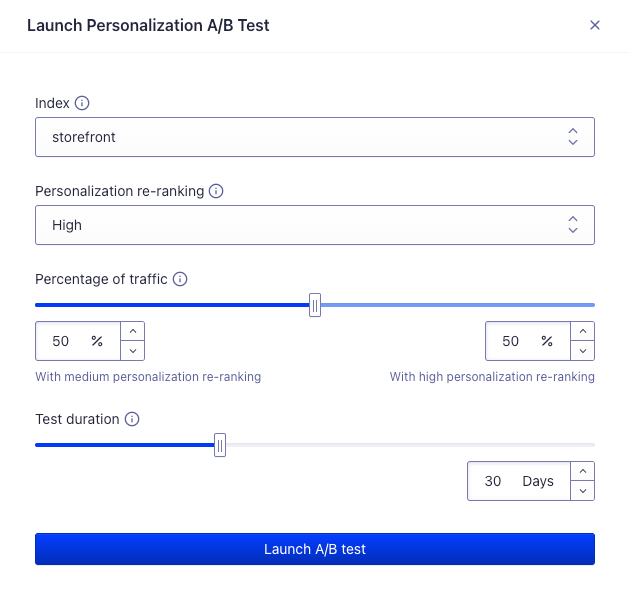
Dashboard interface for launching an A/B test
You can launch an A/B test directly from the Advanced Personalization dashboard. The process involves the following steps:
-
Select the index on which you want to A/B test personalization. This is the index for which search results will be compared. You only have access to indices that are configured to use Advanced Personalization.
-
Define the personalization re-ranking level for the A/B test. This is the level of personalization you want to A/B test against the personalization re-ranking from the configuration.
-
Set the percentage of traffic. This is the share of searches that will be boosted according to the personalization re-ranking level set.
-
Set the duration of the test. This is the maximum duration of time the A/B test will be live after you start it. For the best results, we recommend that you set a duration that is more likely to lead to high confidence in results.
-
Launch A/B test. This triggers the launch of the A/B test. Your users will now receive personalized search results based on your setup.
Viewing the results of an A/B test
You can view the results of all Advanced Personalization A/B tests in the A/B testing dashboard.
A/B test real-time personalization
Real-time personalization is a beta feature according to Algolia’s Terms of Service (“Beta Services”).
You can also use A/B testing to determine if real-time personalization is the right option for your application. After testing historical personalization, you can test the impact of real-time personalization to see if this approach leads to more engagement.
You can measure the impact of real-time personalization in two ways.
- If you aren’t yet using historical personalization, you can measure the combined impact of real-time personalization and historical personalization.
- If you are already using historical personalization, you need to stop using historical personalization for all users by setting personalization re-ranking to
none, then measure the combined impact of real-time personalization and no personalization.
Measure combined impact of real-time and historical personalization
- Ensure that you have setup real-time personalization in the Advanced Personalization dashboard.
- Repeat the steps in the launching an A/B test section.
The results of the A/B test will show you how real-time personalization combined with historical personalization affects user engagement compared to no personalization.
