

likes and retweets.
You can do this by using Algolia’s custom ranking feature
to specify what attributes to rank on.
You can configure these attributes with the customRanking parameter or through Algolia’s dashboard.
Example dataset
In this example, you’re developing an app based on Twitter feeds and want to rank tweets by the number of likes and retweets. Here’s what the dataset would look like:JSON
Configure custom ranking in the dashboard
- Go to the Algolia dashboard and select your Algolia .
- On the left sidebar, select Search.
- Select your Algolia index.
- On the Configuration tab, go to Ranking and Sorting.
-
Click Add custom ranking attribute and select the attributes
retweetsand thenlikes.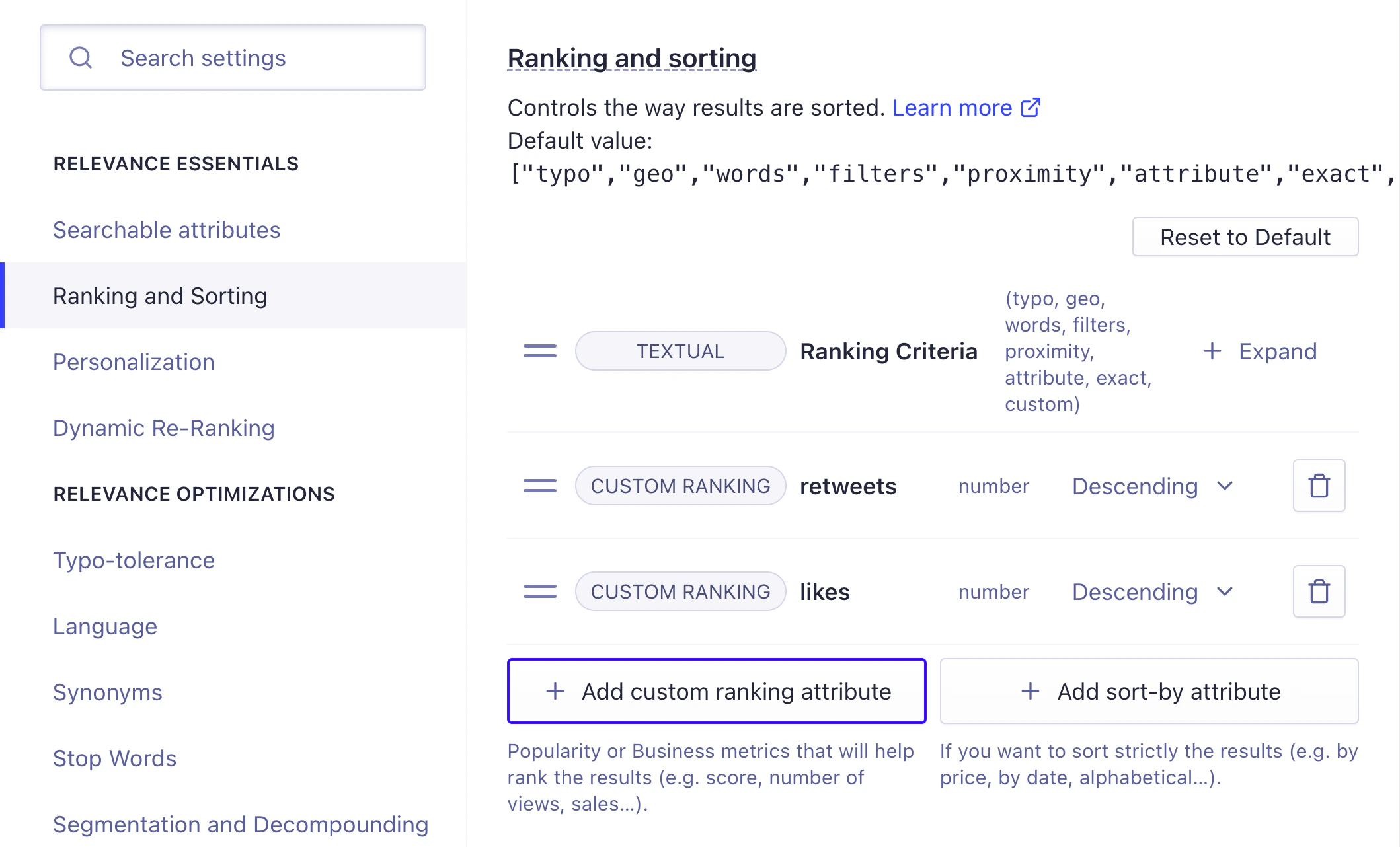
- Save your changes.
Configure custom ranking with the API
To rank on retweets and likes, setcustomRanking.
criteria to be in ascending or descending order.
Custom ranking criteria are applied in order (in this example, first retweets and then likes).
To run the code examples, install the latest API client.
Custom ranking on different attributes
Custom ranking applies at the index level. This means records that don’t have an attribute that’s in thecustomRanking list are pushed to the bottom.
For example, say you want to add Facebook posts to your dataset, and they have attributes likes and comments.
Because retweets are a custom ranking attribute, and Facebook posts don’t have a retweets attribute, they’re unlikely to win the tie-break against a tweet.
You could solve this by creating a computed attribute.
For example, you could compute a single popularity attribute instead of having likes and retweets on one side and likes and comments on the other.
Computed attributes
You might want to create a custom ranking attribute based on the calculated value of other attributes. In other words, a computed attribute. For example:- A Bayesian average of product ratings
- A simple, combined score of other attributes (such as
popularitybeing the sum oflikesandretweets). - A boolean value set to true or false based on whether another attribute is
null.
- Retrieve every record in the index, using the
browsemethod. - For each record, calculate the computed attribute value.
- Update each record’s computed attribute in the index with the calculated value, using the
partialUpdateObjectsmethod.
Metric types
The custom ranking field accepts any numerical or boolean value that represents the relative relevance of your records. The attribute type can be a raw value like the number of sales, views, or likes. The field can also be a computed value such as a popularity score that you calculated before adding the record to Algolia. What you set as yourcustomRanking depends on your use case and what data you have available.
Some retail metrics commonly used in customRanking include sales rank, stock levels, free shipping (boolean), on sale (boolean), and rating.
Publish date (as a timestamp), page views, and likes are often used in media applications.
Check that the numeric attributes used in
customRanking
aren’t formatted as strings.
This would cause the records to be ranked alphabetically.Boolean values
When using a boolean value attribute within the custom ranking, the ascending and descending setting uses the alphabetical value of the true or false text.- Descending: true before false
- Ascending: false before true